> For the complete documentation index, see [llms.txt](https://docs.maiagent.ai/llms.txt). Markdown versions of documentation pages are available by appending `.md` to page URLs; this page is available as [Markdown](https://docs.maiagent.ai/maiagent-user-guide/en/build/multi-language-support.md).
# Multi-Language Support
MaiAgent provides multi-tiered language support: **Web Chat supports 13 interface languages**, **the knowledge base supports content processing in all languages**, and **the admin dashboard offers Chinese and English interfaces**. This enables your AI assistant to engage in natural, fluent conversations with users worldwide, breaking language barriers and expanding your business reach.
## **🌍 Supported Languages**
MaiAgent Web Chat currently supports the following 13 languages:
#### **Chinese**
* **Traditional Chinese** (Traditional Chinese) - zh-TW
* **Simplified Chinese** (Simplified Chinese) - zh-CN
#### **International Common Languages**
* **English** (English) - en
#### **Southeast Asian Languages**
* **Thai** (Thai) - th
* **Malay** (Malay) - ms
* **Vietnamese** (Vietnamese) - vi
* **Indonesian** (Indonesian) - id
* **Filipino** (Filipino) - fil
* **Burmese** (Burmese) - my
* **Khmer** (Khmer) - km
* **Lao** (Lao) - lo
#### **East Asian Languages**
* **Japanese** (Japanese) - ja
* **Korean** (Korean) - ko
**Continuous Updates**: We continue to add more language support based on user demand. If you need support for a specific language, please contact our technical team.
***
## **⚙️ Language Configuration Methods**
#### **1. Configure via JavaScript**
{% hint style="info" %}
Refer to [Technical Manual — Web Chat](https://docs.maiagent.ai/tech/api-integration/web-chat-chu-shi-hua#e5-9b-9bweb-chat-e5-b5-8c-e5-85-a5-e8-88-87-e8-aa-9e-e8-a8-80-e8-a8-a-d-e5-ae-9a)
{% endhint %}
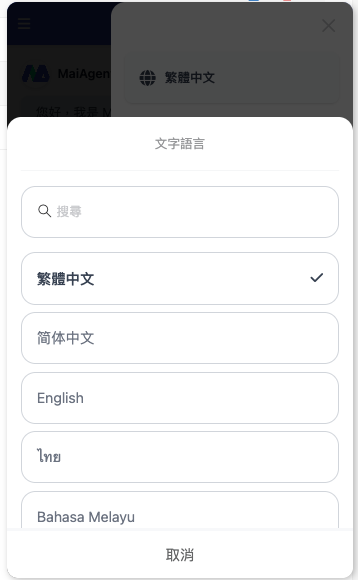
#### **2. Web Chat Settings**
**Configuration Steps:**
1. Click `⋮` in the top right corner of the window
2. Click Traditional Chinese
3. Select your preferred language
***
## **🎯 Multi-Language Feature Highlights**
#### **1. Intelligent Language Detection & Response**
* **Auto-Detection (Chinese & English)**: Supports automatic detection of Chinese and English; the system responds in the corresponding language.
* **Multi-Language Configuration**: Supports multiple language systems; you can switch and select the display language in settings. Once selected, conversations respond in the chosen language.
* **High Accuracy**: Based on advanced NLP technology, language detection accuracy reaches 98%.
#### **2. Natural Language Understanding**
* **Semantic Understanding**: Not just translation, but genuine understanding of semantics across different languages
* **Cultural Adaptation**: Considers expression habits across different cultural backgrounds
* **Slang Recognition**: Understands common slang and colloquial expressions
#### **3. Localized Responses**
* **Word Choice**: Uses wording and expressions that match local conventions
* **Format Adjustment**: Adjusts date, number, and currency formats based on different languages
***
## **📚** Knowledge Base & Interface Language Guide
#### **I. Interface Language Support Levels**
**MaiAgent Admin Dashboard**
* Supports 3 interface languages: Traditional Chinese, Simplified Chinese, English
* Applicable for system management and configuration operations
**Web Chat Interface**
* Supports all 13 languages for interface display
* Includes voice recognition and voice response features
* Covers: Chinese (Traditional & Simplified), English, Thai, Japanese, Korean, Malay, Vietnamese, Indonesian, Filipino, Burmese, Khmer, Lao
#### **II. Knowledge Base Content Processing Capabilities**
**Full-Language Document Support**
* The knowledge base can parse and process document content in any language
* No document language restrictions — supports all global language formats
* Intelligent retrieval can accurately search across multi-language knowledge bases
**Upload Steps:**
1\. Go to **Knowledge Base Management**
2\. Select **Add Document**
3\. Upload documents in any language (no language restrictions)
4\. The system automatically detects the document language and builds multi-language indexes
#### **III. Cross-Language Q\&A Capabilities**
#### Core Features
* **Multi-Language Queries**: Support free-form questions in 13 languages
* **Full-Language Retrieval**: Search for relevant content across the complete multi-language knowledge base
* **Intelligent Translation**: Automatically translate retrieval results into the user's preferred language
* **Accurate Responses**: Ensure completeness and accuracy of answers
#### Workflow
1. **Receive Query** - User asks a question in any supported language (Thai, Japanese, Korean, etc.)
2. **Intelligent Retrieval** - System searches across languages for the most relevant content
3. **Content Integration** - LLM analyzes and integrates multi-language data
4. **Language Conversion** - Translates into the user's selected display language
5. **Output Answer** - Provides a complete response
***
## **🚀 Use Cases**
#### **1. Southeast Asian Market Expansion**
* **Regional Coverage**: Supports 8 major Southeast Asian languages, covering over 600 million people
* **Localized Service**: Understands cultural differences and business customs across countries
* **Cross-Border E-Commerce**: Provides native-language shopping experiences for customers in different countries
#### **2. International Customer Service Center**
* **Global Support**: Covers customer service needs across major Asian markets
* **24/7 Service**: Multi-language customer support across time zones
* **Cultural Sensitivity**: Understands communication styles and politeness norms across different cultures
#### **3. Multinational Enterprise Internal**
* **Employee Support**: Provides internal Q\&A services for multinational staff
* **Knowledge Sharing**: Breaks language barriers to promote knowledge flow
* **Training Assistance**: Multi-language training content and Q\&A
#### **4. Travel & Tourism Industry**
* **Tourist Services**: Provides real-time assistance for tourists from different countries
* **Attraction Information**: Multi-language attraction information and guided tour services
* **Booking Services**: Supports multi-language reservation and inquiry services
---
# Agent Instructions
This documentation is published with GitBook. GitBook is the documentation platform designed so that both humans and AI agents can read, navigate, and reason over technical content effectively. Learn more at gitbook.com.
## Querying This Documentation
If you need additional information that is not directly available in this page, you can query the documentation dynamically by asking a question.
Perform an HTTP GET request on the current page URL with the `ask` query parameter, and the optional `goal` query parameter:
```
GET https://docs.maiagent.ai/maiagent-user-guide/en/build/multi-language-support.md?ask=&goal=
```
`ask` is the immediate question: it should be specific, self-contained, and written in natural language.
`goal` is optional and describes the broader end goal you are ultimately trying to accomplish on behalf of the user. GitBook uses it to tailor the answer towards what is most useful for that goal.
The response will contain a direct answer to the question and relevant excerpts and sources from the documentation.
Use this mechanism when the answer is not explicitly present in the current page, you need clarification or additional context, or you want to retrieve related documentation sections.
%20(1).png?alt=media)
%20(1)%20(1)%20(1).png?alt=media)
%20(1).png?alt=media)