> For the complete documentation index, see [llms.txt](https://docs.maiagent.ai/llms.txt). Markdown versions of documentation pages are available by appending `.md` to page URLs; this page is available as [Markdown](https://docs.maiagent.ai/tech/authorization-integration/zhi-shi-guan-li-quan-xian-query-metadata-cha-xun-yuan-zi-liao-zong-lan/json-interfaces.md).

# 開始建構—使用 JSON 格式

## Query Metadata 控制項目說明 <a href="#querymetadata-kong-zhi-xiang-mu-shuo-ming" id="querymetadata-kong-zhi-xiang-mu-shuo-ming"></a>

<table><thead><tr><th width="108.66668701171875">項目類別</th><th width="140.66668701171875">Key名稱</th><th>說明</th><th>使用方法</th></tr></thead><tbody><tr><td>知識庫</td><td><code>knowledge_base</code></td><td>AI 助理產生對話時參考使用的知識庫</td><td>包裹在 knowledge_bases 命名的 <code>Array→[...]</code> 中，傳入知識庫 id 開放多個知識庫</td></tr><tr><td>知識庫檔案文件</td><td><code>Chatbot_file</code></td><td>knowledge_base 指定之知識庫中可參考的檔案文件</td><td>在 knowledge_base 中傳入的 <code>物件→{...}</code> 中定義</td></tr><tr><td>問答資料集</td><td><code>FAQ</code></td><td>knowledge_base 指定之知識庫中可參考的常見問答集</td><td>同上</td></tr><tr><td>知識庫檔案文件標籤</td><td><code>label</code></td><td>檔案文件中的標籤，若無指定 Chatbot_file 仍可指定 label，限制只能參考符合該標籤的文件，用於支援更細緻的文件權限劃分</td><td>使用 label_relations 命名的物件傳入，以 <code>"OR"/"AND"</code> 定義可適用的文件標籤條件，傳入conditions 命名的 <code>Array→[...]</code> 中定義</td></tr></tbody></table>

### 結構格式範例與說明

```json
{
  "query_metadata": {
    "knowledge_bases": [
      {
        "knowledge_base_id": "123e4567-e89b-12d3-a456-426614174000",
        "chatbot_file_ids": ["9f7a9f7b-2b2b-4c4c-9d9d-8e8e8e8e8e8e"],
        "faq_ids": ["a1b2c3d4-e5f6-7890-abcd-1234567890ab"],
        "has_user_selected_all": false
      },
      {
        "knowledge_base_id": "223e4567-e89b-12d3-a456-426614174001",
        "has_user_selected_all": true
      }
    ],
    "label_relations": {
      "operator": "OR",
      "conditions": [
        { "label_id": "11111111-2222-3333-4444-555555555555" },
        {
          "operator": "AND",
          "conditions": [
            { "label_id": "66666666-7777-8888-9999-000000000000" },
            { "label_id": "aaaaaaa1-bbbb-cccc-dddd-eeeeeeeeeeee" }
          ]
        }
      ]
    }
  }
}
```

範例說明：

* `knowledge_bases` 可傳入多個物件，一次設定多個知識庫下的可參考文件、FAQ。
* 第一個知識庫 `has_user_selected_all: false`＝僅開放明確列出的文件與 FAQ；第二個 `has_user_selected_all: true`＝開放該知識庫全部內容。
* `label_relations.operator` 以 `"OR"`（符合任一標籤）或 `"AND"`（須同時符合全部標籤）組合條件，並支援巢狀定義複雜條件。
* 上述範例為可直接複製使用的合法 JSON（JSON 不支援 `//` 註解）。

## 空集合與未設定的語意（重要） <a href="#empty-vs-unset" id="empty-vs-unset"></a>

「空集合」與「未設定」意義不同，設定錯誤會造成權限全開或全關：

| 設定                                                             | 效果                                                                  |
| -------------------------------------------------------------- | ------------------------------------------------------------------- |
| 未提供或 `null`                                                    | 未設定 → 繼續往下一層查找；三層皆未設定＝不限制，可查詢 AI 助理掛載的全部知識庫                         |
| `{}`（空物件）                                                      | **視同不限制（全選）**，且因「已有設定」會終止往下層查找——要設「無權限」請務必用 `"knowledge_bases": []` |
| `"knowledge_bases": []`（空陣列）                                   | 全部知識庫皆不可查——**「無權限」請使用此設定**                                          |
| `"label_relations": {"operator": "OR", "conditions": []}`（空條件） | 不做標籤過濾＝所選知識庫內容全部可查，**並非**無權限                                        |
| 有值                                                             | 依條件過濾：知識庫 → 檔案／FAQ → 標籤逐層縮小範圍                                       |

{% hint style="warning" %}
`label_relations` 必須與 `knowledge_bases` 一併提供：單獨提供 `label_relations`（未帶 `knowledge_bases`）時，知識庫檢索不會套用標籤過濾（等同不限制）。
{% endhint %}

### 欄位名稱必須完全正確 <a href="#exact-field-names" id="exact-field-names"></a>

* `conditions` 內的每個條件只接受兩種形態：`{"label_id": "..."}`，或巢狀群組 `{"operator": ..., "conditions": [...]}`。寫成 `label`、`labelid` 等其他鍵名時，API 會回傳 400 並指出錯誤欄位名稱。
* `knowledge_bases` 內的物件只接受 `knowledge_base_id`、`chatbot_file_ids`、`knowledge_base_file_ids`、`faq_ids`、`has_user_selected_all` 五個欄位；出現其他欄位時同樣回傳 400。
* `query_metadata` 頂層可附加您自己的識別欄位（例如 `_user_id`），這些欄位會被忽略、不影響查詢範圍。

{% hint style="info" %}
格式錯誤都會在 API 邊界被 400 擋下（fail-closed），不會靜默生效出比預期更寬的權限。設定完仍建議實測一次，確認範圍符合預期。
{% endhint %}

### 層級優先序 <a href="#metadata-hierarchy" id="metadata-hierarchy"></a>

query\_metadata 可設定於 Message / Conversation / Contact 三個層級，由上而下取第一個「有設定」的層級：**Message > Conversation > Contact**，上層設定會蓋過下層。

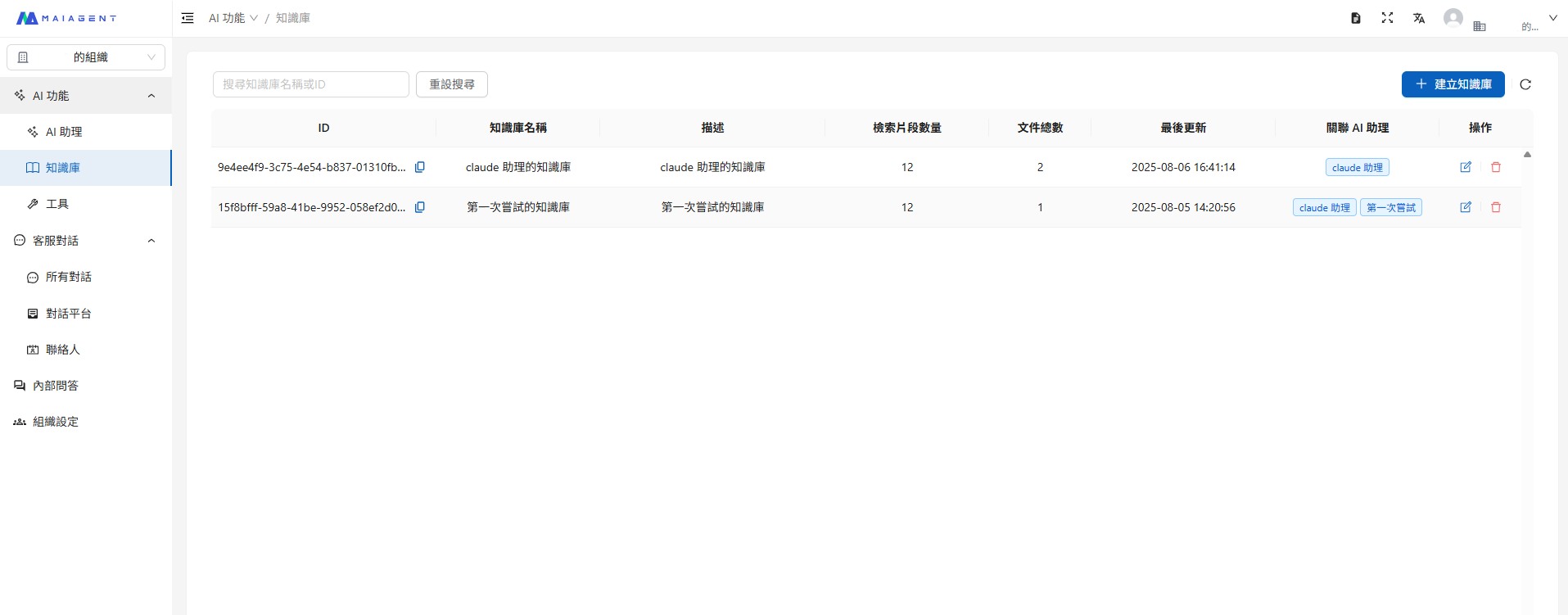
## 如何獲取各層級 ID？ <a href="#ru-he-huo-qu-ge-ceng-ji-id" id="ru-he-huo-qu-ge-ceng-ji-id"></a>

您可以進入左側選單的各層級內容中查看 ID 欄位 (以知識庫為例，可點選複製圖示直接複製所有 ID 內容)

<figure><img src="/files/NdOdltab3WUqfXoJfUqi" alt=""><figcaption><p>取得各層級 ID 位置</p></figcaption></figure>

## 關鍵邏輯說明 <a href="#guan-jian-luo-ji-shuo-ming" id="guan-jian-luo-ji-shuo-ming"></a>

### 1. label\_relations 邏輯 <a href="#id-1labelrelations-luo-ji" id="id-1labelrelations-luo-ji"></a>

* `OR` 運算：符合任一標籤即可存取
* `AND` 運算：必須符合所有標籤才能存取
* 嵌套邏輯：支援多層、巢狀的權限組合

### 2. knowledge\_bases 設定 <a href="#id-2knowledgebases-she-ding" id="id-2knowledgebases-she-ding"></a>

* `has_user_selected_all = true`：可存取該知識庫的所有內容（排除清單中列出的項目）
* `has_user_selected_all = false`：僅能存取指定的文件跟 FAQ
* 建議使用 JSON boolean（`true` / `false`）；字串 `"True"` / `"False"` 亦可被系統接受（相容既有整合）

## 聯絡人(Contact)設定 <a href="#lian-luo-ren-contact-she-ding" id="lian-luo-ren-contact-she-ding"></a>

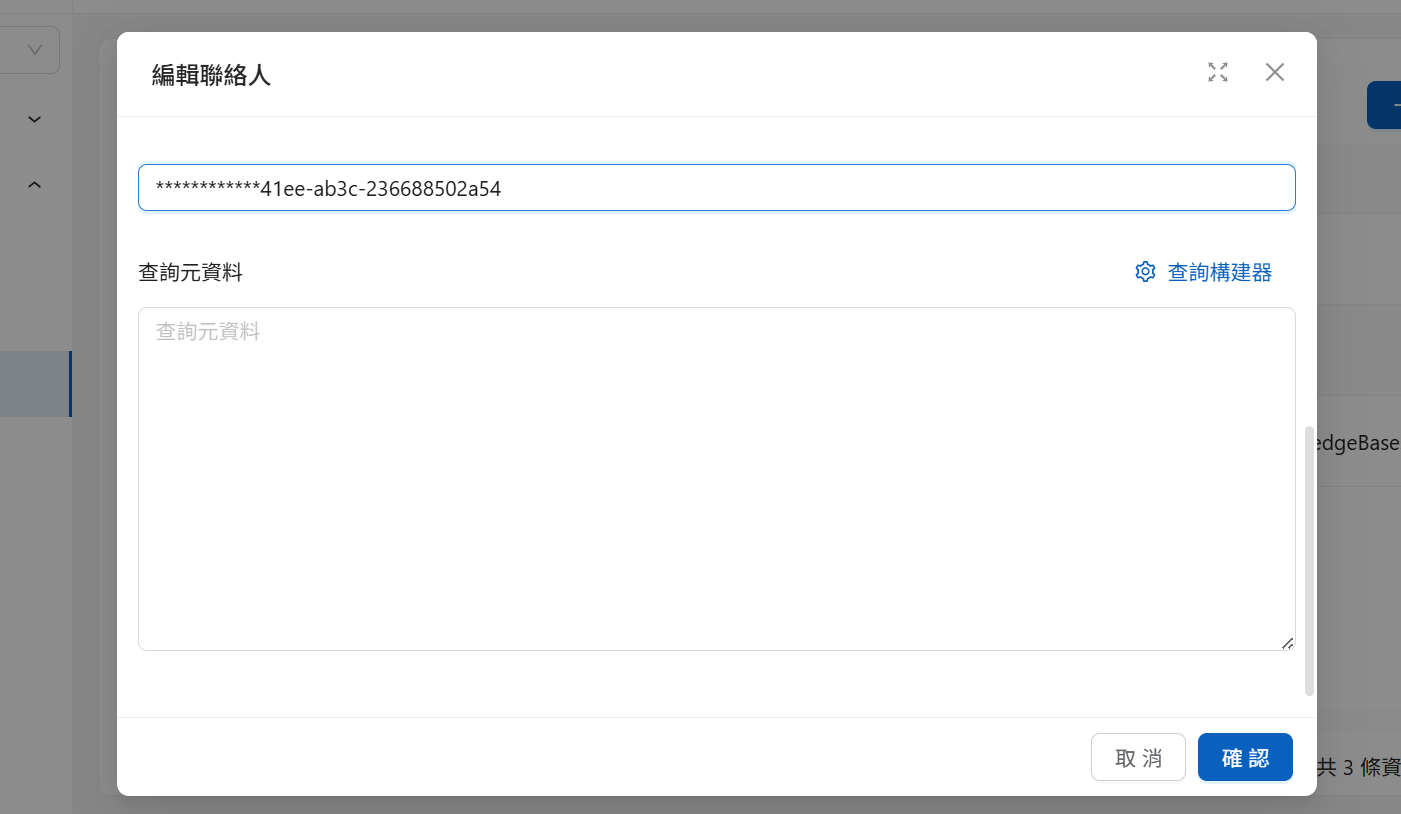
您可以在編輯聯絡人的地方直接寫入 JSON 格式的 query\_metadata 設定：

<figure><img src="/files/JyZsiffgDQC67auiuwBc" alt=""><figcaption><p>聯絡人 JSON 編輯介面</p></figcaption></figure>

系統會自動驗證格式並套用權限設定。

## Web Chat 初始化設定 <a href="#webchat-chu-shi-hua-she-ding" id="webchat-chu-shi-hua-she-ding"></a>

{% hint style="info" %}
Web Chat 嵌入介紹請參考 [Web Chat 嵌入與 SDK](/tech/api-integration/web-chat-sdk.md)
{% endhint %}

若想要在聯絡人前限制對話內容(如：提供 Web Chat 服務給未註冊聯絡人帳號的客戶時)，可以在嵌入時提供 Query Metadata，系統將預設啟動訊息(Message)層級的知識庫文件過濾機制

### 程式碼範例 <a href="#cheng-shi-ma-fan-li" id="cheng-shi-ma-fan-li"></a>

```javascript
<script>
  window.maiagentChatbotConfig = {
    // 設定 Web Chat 基礎參數
    webChatId: '從 Admin 嵌入視窗中獲得的 Web Chat ID',
    baseUrl: 'https://chat.maiagent.ai/web-chats',
    primaryColor: '#3854d8',
    
    // 設定 Web Chat 知識庫文件搜索範圍
    queryMetadata: {
      labelRelations: { // 標籤
        operator: 'OR',
        conditions: [
          { labelId: '186a3012-44ac-4cd2-a132-a76bfda5bcae' },
          {
            operator: 'AND',
            conditions: [
              { labelId: '0267c405-cc26-4497-b17f-180aedf8b0eb' }, 
              { labelId: '60f81de6-a4b6-4d86-9781-5430783ef0b6' }
            ]
          }
        ]
      },
      knowledgeBases: [
        {
          knowledgeBaseId: '123e4567-e89b-12d3-a456-426614174000',
          chatbotFileIds: [
            '9f7a9f7b-2b2b-4c4c-9d9d-8e8e8e8e8e8e' // 檔案文件
          ],
          faqIds: [
            'a1b2c3d4-e5f6-7890-abcd-1234567890ab' // FAQ
          ],
          hasUserSelectedAll: false // 僅選取上列明確指定的檔案與 FAQ
        }
      ]
    },
    
    // 設定 Contact
    contactId: '60f81de6-a4b6-4d86-9781-5430783ef0b6'
  };
</script>
<script
  src="https://chat.maiagent.ai/js/embed.min.js"
  defer>
</script>
```

### hasUserSelectedAll 參數說明

此參數為單一知識庫下的排除 / 使用少數項目之設定，在您開放的文件基礎下才會再套用標籤的過濾條件。

<table><thead><tr><th width="82">參數值</th><th>行為</th><th>適用場景</th></tr></thead><tbody><tr><td><code>true</code></td><td>系統選擇該知識庫中的所有內容，排除 <code>chatbotFileIds</code> 和 <code>faqIds</code> 中列出的項目</td><td>100 個文件中使用 98 個文件，2 個文件在參數中列出表示不使用</td></tr><tr><td><code>false</code></td><td>系統選擇 <code>chatbotFileIds</code> 和 <code>faqIds</code> 中明確列出的項目</td><td>100 個文件中只使用 2 個文件</td></tr></tbody></table>

### 程式碼範例

```js
// hasUserSelectedAll: true，列出想排除的文件 ID
{
  "knowledgeBaseId": "123e4567-e89b-12d3-a456-426614174000",
  "chatbotFileIds": ["不想使用的文件ID1", "不想使用的文件ID2"],
  "faqIds": ["不想使用的FAQ_ID1"],
  "hasUserSelectedAll": true
}

// hasUserSelectedAll: false，列出想使用的文件 ID
{
  "knowledgeBaseId": "123e4567-e89b-12d3-a456-426614174000",
  "chatbotFileIds": ["想使用的文件ID1", "想使用的文件ID2"],
  "faqIds": ["想使用的FAQ_ID1"],
  "hasUserSelectedAll": false
}
```

### queryMetadata 與 contactId 的優先順序

* **當不設定 queryMetadata 和 contactId 時**：系統會搜索全部知識庫範圍，不做任何排除
* **可以單獨設定 queryMetadata 或 contactId**
* **當兩者都設定時**：系統只會使用聯絡人(以 contactId 辨識)中 Query Metadata 的設定

## 對話 API（completions）逐次帶入 <a href="#completions-api" id="completions-api"></a>

除了聯絡人與 Web Chat 嵌入設定，您也可以在每次呼叫對話 API 時逐次帶入 Query Metadata，讓同一個 AI 助理針對不同請求套用不同的知識範圍。適合由後端依當下使用者身分即時組裝條件的整合情境，例如：

* **金融／證券業**：依會員等級決定可參考的方案文件，一般會員與 VIP 客戶問同一個問題會得到不同範圍的回覆
* **科技／電子製造業**：依客戶所屬產品線，限定只參考該產品線的規格書與技術文件
* **教育機構**：依在校生、校友、一般訪客身分，開放不同層級的招生與校務資訊
* **醫療／健康產業**：依科別限定衛教資料範圍，避免跨科別內容互相干擾

端點：`POST https://api.maiagent.ai/api/v1/chatbots/{chatbotId}/completions/`

{% hint style="warning" %}
`queryMetadata` 要放在 **`message` 物件內**，不是請求本體的最外層。放錯位置不會報錯，但條件不會生效，結果會等同於未設定任何篩選。
{% endhint %}

### 完整範例 <a href="#completions-full-example" id="completions-full-example"></a>

{% code title="completions + queryMetadata" overflow="wrap" %}

```bash
curl --location 'https://api.maiagent.ai/api/v1/chatbots/550e8400-e29b-41d4-a716-446655440000/completions/' \
--header 'Content-Type: application/json' \
--header 'Authorization: Api-Key 您的 API 金鑰' \
--data '{
    "conversation": null,
    "message": {
        "content": "我的會員等級可以享有哪些優惠方案？",
        "queryMetadata": {
            "knowledgeBases": [
                {
                    "knowledgeBaseId": "123e4567-e89b-12d3-a456-426614174000"
                }
            ],
            "labelRelations": {
                "operator": "AND",
                "conditions": [
                    { "labelId": "186a3012-44ac-4cd2-a132-a76bfda5bcae" }
                ]
            }
        }
    },
    "isStreaming": false
}'
```

{% endcode %}

上例的語意是：只在 `123e4567…` 這個知識庫中，參考同時符合 `186a3012…` 標籤（例如「一般會員」）的文件與 FAQ。換成 VIP 客戶時，後端只需改傳對應的標籤 ID，不必另外複製一個 AI 助理。

巢狀條件的寫法與 Web Chat 相同，可直接沿用上一節的 `labelRelations` 結構：

```json
"labelRelations": {
    "operator": "OR",
    "conditions": [
        { "labelId": "186a3012-44ac-4cd2-a132-a76bfda5bcae" },
        {
            "operator": "AND",
            "conditions": [
                { "labelId": "0267c405-cc26-4497-b17f-180aedf8b0eb" },
                { "labelId": "60f81de6-a4b6-4d86-9781-5430783ef0b6" }
            ]
        }
    ]
}
```

### 三種設定位置的差異 <a href="#three-entry-points" id="three-entry-points"></a>

<table><thead><tr><th width="150">設定位置</th><th>生效範圍</th><th>適用情境</th></tr></thead><tbody><tr><td>聯絡人（Contact）</td><td>該聯絡人的所有對話</td><td>依身分長期綁定權限</td></tr><tr><td>Web Chat 嵌入</td><td>該嵌入頁面產生的對話</td><td>對未註冊聯絡人的訪客限制範圍</td></tr><tr><td>對話 API（<code>message.queryMetadata</code>）</td><td>僅該次請求</td><td>後端逐次組裝條件、同一助理服務多種權限</td></tr></tbody></table>

### 欄位命名：camelCase 與 snake\_case 皆可 <a href="#field-naming" id="field-naming"></a>

API 會自動轉換命名風格，因此下列兩種寫法等價：

* camelCase：`queryMetadata`、`knowledgeBases`、`knowledgeBaseId`、`labelRelations`、`labelId`、`hasUserSelectedAll`
* snake\_case：`query_metadata`、`knowledge_bases`、`knowledge_base_id`、`label_relations`、`label_id`、`has_user_selected_all`

建議整份請求統一使用同一種風格，避免維護時混淆。

### hasUserSelectedAll 省略時的預設值 <a href="#default-has-user-selected-all" id="default-has-user-selected-all"></a>

`hasUserSelectedAll` 未傳入時，預設為 `true`，也就是**該知識庫的全部內容**，再套用標籤條件過濾。

因此當您只想「用標籤限制整個知識庫」時，`knowledgeBases` 只需要給 `knowledgeBaseId`：

```json
"knowledgeBases": [
    { "knowledgeBaseId": "123e4567-e89b-12d3-a456-426614174000" }
]
```

### 標籤過濾的作用範圍 <a href="#label-filter-scope" id="label-filter-scope"></a>

* 標籤條件**同時**套用於知識庫的檔案文件與 FAQ。
* 使用者在該次對話中**直接上傳的附件不受標籤條件限制**，仍可被參考；標籤只約束知識庫內的內容。
* 標籤為**各知識庫獨立建立**，`label_id` 必須使用該知識庫自己的標籤 ID，不可沿用其他知識庫的標籤。
* 標籤需**實際掛在檔案／FAQ 上**才會生效：僅在「標籤管理」建立標籤選項、未掛到內容上，過濾不會有任何效果。
* 在問句中直接指定檔名索取特定檔案時，同樣受標籤條件約束：若該檔案不符合條件，AI 助理會回覆在知識庫中找不到該檔案。


---

# Agent Instructions
This documentation is published with GitBook. GitBook is the documentation platform designed so that both humans and AI agents can read, navigate, and reason over technical content effectively. Learn more at gitbook.com.

## Querying This Documentation
If you need additional information that is not directly available in this page, you can query the documentation dynamically by asking a question.

Perform an HTTP GET request on the current page URL with the `ask` query parameter, and the optional `goal` query parameter:

```
GET https://docs.maiagent.ai/tech/authorization-integration/zhi-shi-guan-li-quan-xian-query-metadata-cha-xun-yuan-zi-liao-zong-lan/json-interfaces.md?ask=<question>&goal=<endgoal>
```

`ask` is the immediate question: it should be specific, self-contained, and written in natural language.
`goal` is optional and describes the broader end goal you are ultimately trying to accomplish on behalf of the user. GitBook uses it to tailor the answer towards what is most useful for that goal.

The response will contain a direct answer to the question and relevant excerpts and sources from the documentation.

Use this mechanism when the answer is not explicitly present in the current page, you need clarification or additional context, or you want to retrieve related documentation sections.