> For the complete documentation index, see [llms.txt](https://docs.maiagent.ai/llms.txt). Markdown versions of documentation pages are available by appending `.md` to page URLs; this page is available as [Markdown](https://docs.maiagent.ai/maiagent-user-guide/en/org/organization.md).

# Organization Management

What an organization is, whether a company should create one or multiple organizations, how to create and switch organizations, and what owners are responsible for.

## What Is an Organization? <a href="#what-is-organization" id="what-is-organization"></a>

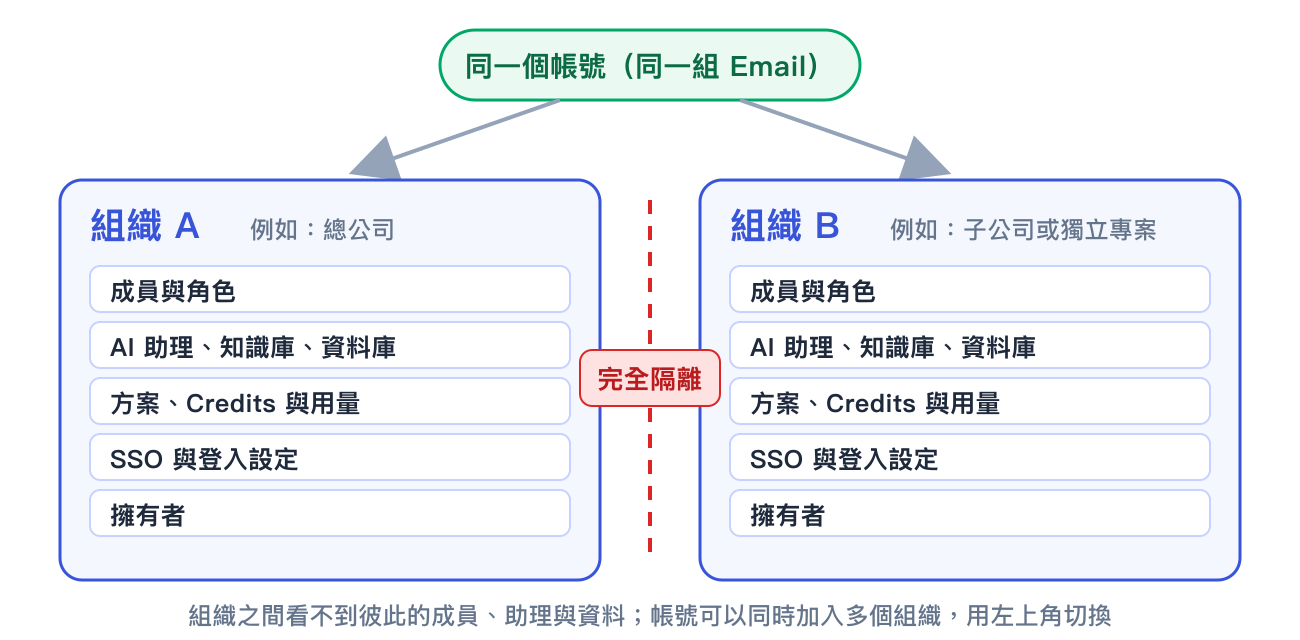
An **organization** is the top-level management unit in MaiAgent, like an independently operated "digital office." Members, roles, AI assistants, knowledge bases, plans, and Credits all belong to a specific organization. Organizations are completely isolated from one another.

<figure><img src="https://1360999650-files.gitbook.io/~/files/v0/b/gitbook-x-prod.appspot.com/o/spaces%2F6v6TNkkOQVfRYfcNirHL%2Fuploads%2Fgit-blob-82a0780b18c6f04ac503ce0e6cb9f1a6e8aee1a2%2Forg-isolation.png?alt=media" alt="One account can join multiple organizations, which are completely isolated from one another"><figcaption><p>One account can join multiple organizations. Each organization has its own members, resources, plan, and owners, and cannot see another organization's data.</p></figcaption></figure>

For more information about what an organization contains and how roles and members work, see [Organizations and Member Management](/maiagent-user-guide/en/org/overview.md).

***

## One Organization or Multiple Organizations? <a href="#one-or-many" id="one-or-many"></a>

For most companies, **one organization is enough**. Use roles to separate departments, assign different permissions, and control who can access assistants. You do not need to create a new organization for these purposes.

<table><thead><tr><th width="180">Scenario</th><th>Recommendation</th></tr></thead><tbody><tr><td>Departments need different permissions</td><td>Use one organization and create one role for each department.</td></tr><tr><td>Employees do not want others to see the assistants they create</td><td>Use one organization and create one role for each person. See the <a href="/maiagent-user-guide/en/org/roles/role-design-guide.md">Role Permission Planning Guide</a>.</td></tr><tr><td>Test and production environments must be separate</td><td>One organization is enough. Use "publish to different roles" on the platform to distinguish testing from production instead of duplicating an entire organization.</td></tr><tr><td>Subsidiaries need separate billing and their own owners</td><td>Use separate organizations. Plans, Credits, and usage statistics are managed at the organization level.</td></tr><tr><td>The two sides sign in with different company accounts (SSO)</td><td>Use separate organizations. SSO settings are tied to an organization.</td></tr><tr><td>Data must be completely isolated to comply with laws or contracts</td><td>Use separate organizations. Nothing is shared between organizations.</td></tr></tbody></table>

{% hint style="warning" %}
**The cost of using multiple organizations**

AI assistants, knowledge bases, and roles cannot be shared across organizations and must be created separately in each one. Members must also be added and maintained separately. Before creating a second organization, confirm that roles cannot meet your needs.
{% endhint %}

***

## Create an Organization <a href="#create-organization" id="create-organization"></a>

Any account can create a new organization. The creator automatically becomes the organization's **owner**.

### 1. Open the Organization Switcher <a href="#open-switcher" id="open-switcher"></a>

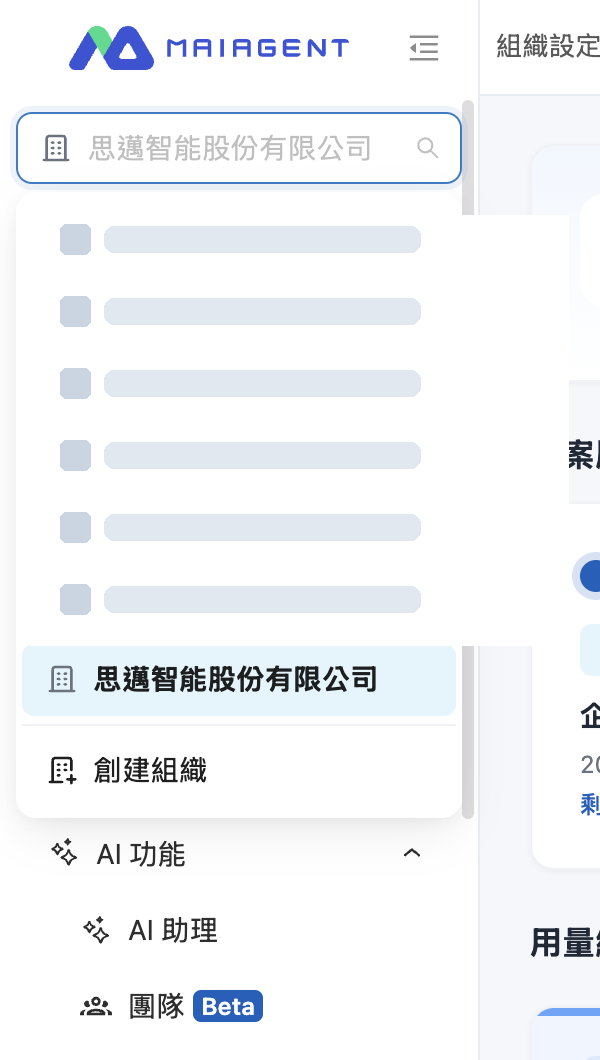
Click the organization name at the top of the left menu to expand the organization list, then click <mark style="color:blue;">Create Organization</mark> at the bottom.

<figure><img src="https://1360999650-files.gitbook.io/~/files/v0/b/gitbook-x-prod.appspot.com/o/spaces%2F6v6TNkkOQVfRYfcNirHL%2Fuploads%2Fgit-blob-be24796b02d2cd727fefeb257b7c8579055adfc1%2Forg-switcher.png?alt=media" alt="Organization switcher at the top of the left menu, with Create Organization at the bottom" width="420"><figcaption><p>The organization switcher is at the top of the left menu, and "Create Organization" is at the bottom of the list.</p></figcaption></figure>

### 2. Enter the Organization Information <a href="#fill-in-form" id="fill-in-form"></a>

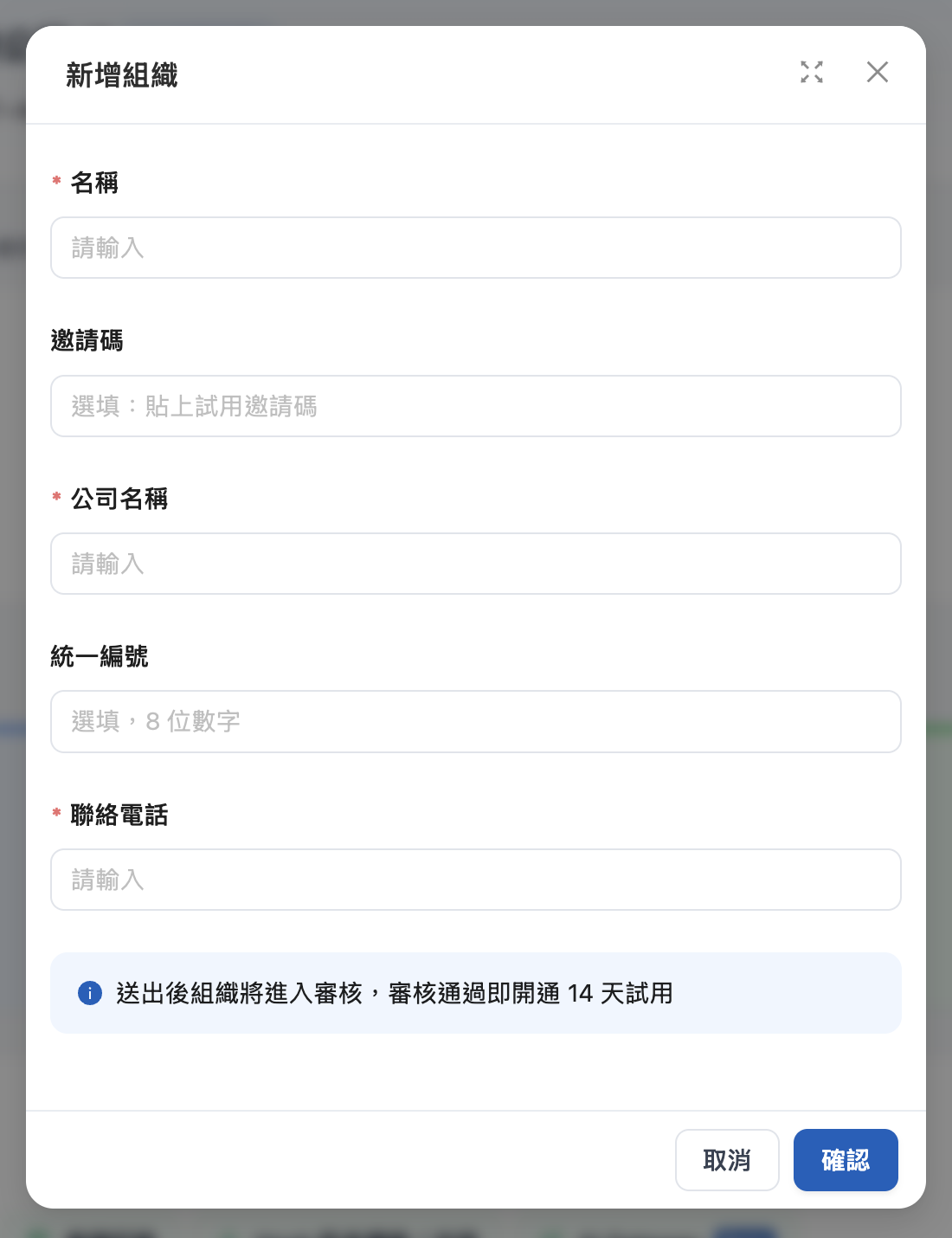
<figure><img src="https://1360999650-files.gitbook.io/~/files/v0/b/gitbook-x-prod.appspot.com/o/spaces%2F6v6TNkkOQVfRYfcNirHL%2Fuploads%2Fgit-blob-3e632d283a84a672737b732f46fc2fa0780f5aec%2Forg-create-dialog.png?alt=media" alt="Add Organization dialog" width="480"><figcaption><p>The "Add Organization" dialog</p></figcaption></figure>

<table><thead><tr><th width="140">Field</th><th width="90">Required</th><th>Description</th></tr></thead><tbody><tr><td>Name</td><td>Yes</td><td>The organization's display name on the platform. You can change it later in <a href="/maiagent-user-guide/en/org/organization-overview.md">Organization Overview</a>.</td></tr><tr><td>Invitation code</td><td>No</td><td>A <strong>trial invitation code</strong> provided by MaiAgent. Paste it to automatically populate the company information and begin using the organization immediately after creation without waiting for approval.</td></tr><tr><td>Company name</td><td>Yes</td><td>The company's full legal name, used for the approval application.</td></tr><tr><td>Tax ID number</td><td>No</td><td>8 digits</td></tr><tr><td>Contact phone number</td><td>Yes</td><td>Used to contact you if there are questions during the approval process.</td></tr></tbody></table>

{% hint style="info" %}
**In simple terms:**

If you have an invitation code, paste it and the other fields will be populated automatically. If you do not have one, enter your company information and submit it for approval. Once approved, a 14-day trial will be activated. The "invitation code" on the registration page is a platform referral code, which is different from the trial invitation code used here.
{% endhint %}

### 3. Submit and Wait for Approval <a href="#submit-and-approval" id="submit-and-approval"></a>

Click <mark style="color:blue;">Confirm</mark> to submit. Applications without an invitation code will be reviewed. Once approved, the organization will receive a 14-day trial. To continue using it during or after the trial period, see [Credits Billing](/maiagent-user-guide/en/org/credits.md) or contact the sales team.

{% hint style="warning" %}
When an organization does not have an active plan, Organization Overview displays its data retention deadline. Data is permanently deleted when the deadline is reached, so upgrade the plan before it expires.
{% endhint %}

***

## Switch Organizations <a href="#switch-organization" id="switch-organization"></a>

After the same account joins multiple organizations, click the organization name at the top of the left menu, then select the organization you want from the list. If you have many organizations, enter a name in the search box at the top. Your current organization appears below your account name in the upper-right corner.

{% hint style="info" %}
After you switch organizations, the assistants, knowledge bases, and conversations shown will change to those belonging to the selected organization. If you cannot find an assistant, first confirm that the correct organization is selected in the upper-left corner.
{% endhint %}

***

## Owner Responsibilities <a href="#owner-responsibilities" id="owner-responsibilities"></a>

Organization owners bypass all permission checks and have the highest level of access in an organization. An organization can have multiple owners. We recommend assigning at least two so that the organization remains manageable if the primary contact leaves. Owners are responsible for the following:

<table><thead><tr><th width="200">Task</th><th>Where to Perform It</th></tr></thead><tbody><tr><td>View the plan expiration date and monthly usage, and change the organization name</td><td><a href="/maiagent-user-guide/en/org/organization-overview.md">Organization Overview</a></td></tr><tr><td>Design roles and decide who can create assistants and who can only use them</td><td><a href="/maiagent-user-guide/en/org/roles.md">Roles and Permissions</a></td></tr><tr><td>Add members, assign roles, and remove members</td><td><a href="/maiagent-user-guide/en/org/member.md">Member Management</a></td></tr><tr><td>Sign in with company accounts and synchronize the member list</td><td><a href="/maiagent-user-guide/en/org/sso.md">Third-Party Login (SSO)</a> and <a href="/maiagent-user-guide/en/org/identity-sync.md">Identity Synchronization (LDAP)</a></td></tr><tr><td>Manage Credits and member quotas</td><td><a href="/maiagent-user-guide/en/org/credits.md">Credits Billing</a></td></tr><tr><td>Delete the entire organization when it is no longer needed</td><td><a href="/maiagent-user-guide/en/org/organization-management.md">Delete Organization</a>. This action cannot be undone.</td></tr></tbody></table>


---

# Agent Instructions
This documentation is published with GitBook. GitBook is the documentation platform designed so that both humans and AI agents can read, navigate, and reason over technical content effectively. Learn more at gitbook.com.

## Querying This Documentation
If you need additional information that is not directly available in this page, you can query the documentation dynamically by asking a question.

Perform an HTTP GET request on the current page URL with the `ask` query parameter, and the optional `goal` query parameter:

```
GET https://docs.maiagent.ai/maiagent-user-guide/en/org/organization.md?ask=<question>&goal=<endgoal>
```

`ask` is the immediate question: it should be specific, self-contained, and written in natural language.
`goal` is optional and describes the broader end goal you are ultimately trying to accomplish on behalf of the user. GitBook uses it to tailor the answer towards what is most useful for that goal.

The response will contain a direct answer to the question and relevant excerpts and sources from the documentation.

Use this mechanism when the answer is not explicitly present in the current page, you need clarification or additional context, or you want to retrieve related documentation sections.