> For the complete documentation index, see [llms.txt](https://docs.maiagent.ai/llms.txt). Markdown versions of documentation pages are available by appending `.md` to page URLs; this page is available as [Markdown](https://docs.maiagent.ai/work/meeting-records.md).
# AI 會議記錄
會議記錄是 MaiAgent 平台的語音轉錄與 AI 摘要功能,提供**即時**和**離線**兩種模式。即時模式可在開會時低延遲轉錄與翻譯;離線模式可上傳錄音檔,進行高精準轉錄與語者辨識。兩種模式都支援 AI 自動摘要、問答、下載匯出和知識庫整合。
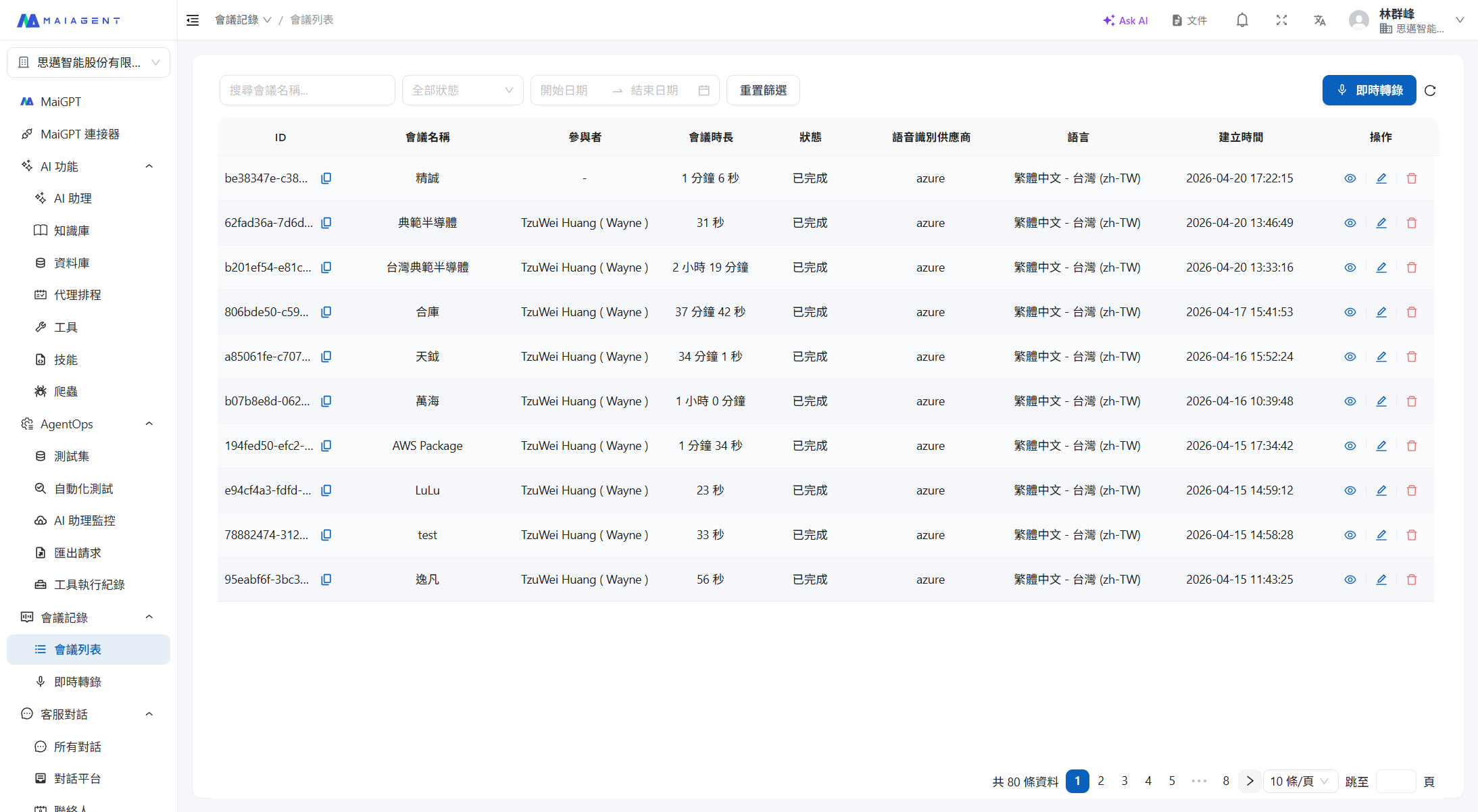
會議記錄列表
## 兩種模式
| | 即時會議記錄 | 離線會議記錄 |
| -------- | ---------------------------------------------------------------------- | ----------------------------- |
| **輸入方式** | 麥克風即時錄音 | 上傳音檔(mp3, mp4, m4a, aac, wav) |
| **轉錄特色** | 低延遲即時轉錄 | 多語言高精準轉錄 |
| **翻譯** | 低延遲即時翻譯(最多 3 種語言) | 轉錄後翻譯 |
| **語者辨識** | 依 STT 引擎支援 | 高精準語者辨識與管理 |
| **時間軸** | 即時標記 | 高精準時間軸辨識 |
| **字幕播放** | — | 動態字幕播放,同步音檔 |
| **備援音檔** | 瀏覽器本機同步備援錄音,斷網不漏音(見 [會議記錄備援音檔](/work/meeting-records/backup-audio.md)) | — |
## 共同功能
| 功能 | 說明 |
| --------------------- | ------------------------------------------ |
| **多國語言轉錄** | 支援多種語言的語音辨識 |
| **多國語言翻譯** | 將轉錄內容翻譯為多種目標語言 |
| **自動摘要** | 用自訂的 AI 助理自動產生會議重點摘要 |
| **AI 問答、串接 Agent 開單** | 對逐字稿提問;若所選 AI 助理配置了開單工具,可請它把會議待辦直接建立成任務或工單 |
| **下載匯出** | 錄音 MP3、純文字稿、SRT 字幕檔下載 |
| **知識庫整合** | 將逐字稿上傳至知識庫,供 Agent 查閱 |
## 使用流程
**即時模式:**
```
建立會議 → 設定 STT 引擎與翻譯 → 開始錄音 → 低延遲即時轉錄
↓
會議結束 → 檢視逐字稿
↓
AI 摘要 / AI 問答 / 下載匯出
```
**離線模式:**
```
上傳音檔(mp3/mp4/m4a/aac/wav) → 系統轉錄與語者辨識 → 檢視逐字稿
↓
動態字幕播放 / AI 摘要 / AI 問答 / 下載匯出
```
## 會議記錄的狀態
| 狀態 | 說明 |
| -------------------- | ----------------- |
| **待開始** (Pending) | 已建立或已上傳,尚未開始處理 |
| **錄音中** (Recording) | 即時模式下正在進行轉錄 |
| **處理中** (Processing) | 錄音結束或音檔上傳後,系統正在處理 |
| **已完成** (Completed) | 處理完成,可檢視逐字稿、產生摘要 |
| **失敗** (Failed) | 處理過程發生錯誤 |
## 部署方式
會議記錄功能支持多種部署方式:
* **SaaS**:直接使用 MaiAgent 雲端服務
* **私有雲**:部署在客戶的雲端環境
* **地端部署**:安裝在客戶的本地伺服器
## 權限說明
會議記錄功能需要組織啟用後才能使用,並區分三種權限:
* **檢視權限**:可瀏覽會議列表、檢視逐字稿、下載檔案
* **轉錄權限**:可建立會議、啟動錄音、上傳音檔、編輯和刪除會議記錄
* **管理權限**:決定看得到組織內所有會議,還是只看自己有參與的會議
會議列表預設**只顯示自己建立或被加入的會議**。誰看得到哪些會議、如何把會議分享給同事,詳見 [會議存取權限](/work/meeting-records/access-control.md)。
---
# Agent Instructions
This documentation is published with GitBook. GitBook is the documentation platform designed so that both humans and AI agents can read, navigate, and reason over technical content effectively. Learn more at gitbook.com.
## Querying This Documentation
If you need additional information that is not directly available in this page, you can query the documentation dynamically by asking a question.
Perform an HTTP GET request on the current page URL with the `ask` query parameter, and the optional `goal` query parameter:
```
GET https://docs.maiagent.ai/work/meeting-records.md?ask=&goal=
```
`ask` is the immediate question: it should be specific, self-contained, and written in natural language.
`goal` is optional and describes the broader end goal you are ultimately trying to accomplish on behalf of the user. GitBook uses it to tailor the answer towards what is most useful for that goal.
The response will contain a direct answer to the question and relevant excerpts and sources from the documentation.
Use this mechanism when the answer is not explicitly present in the current page, you need clarification or additional context, or you want to retrieve related documentation sections.