> For the complete documentation index, see [llms.txt](https://docs.maiagent.ai/llms.txt). Markdown versions of documentation pages are available by appending `.md` to page URLs; this page is available as [Markdown](https://docs.maiagent.ai/work/maigpt/video.md).
# AI 影片生成
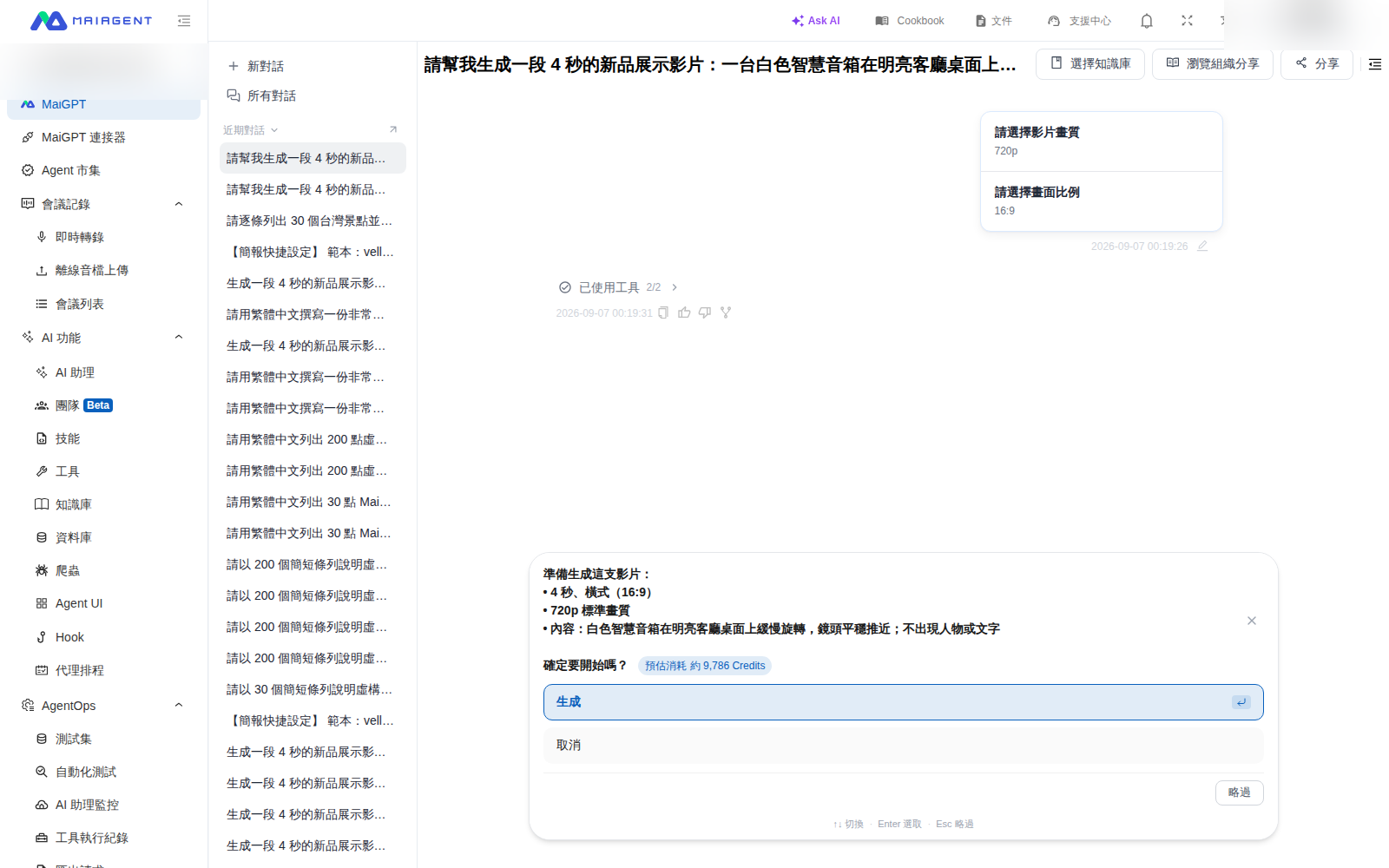
在 MaiGPT 描述影片內容、選擇畫質與比例,確認預估 Credits 後開始生成
MaiGPT 可以依文字描述生成影片。對話會引導你選擇影片畫質與畫面比例,並在送出前顯示設定摘要與預估 Credits;你不需要記住影片模型的技術名稱。
{% hint style="info" %}
影片生成會消耗 Credits。送出前請先查看確認畫面中的預估用量,再決定是否生成。
{% endhint %}
## 使用情境
行銷人員想製作一段新品社群短片。他在 MaiGPT 描述虛構智慧音箱的外觀、場景與鏡頭動作,依活動需求選擇影片畫質與橫式比例,再從確認卡核對片長、設定與預估 Credits,確認後才開始生成。
## 用文字生成影片
{% stepper %}
{% step %}
### 1. 描述影片內容
在 MaiGPT 新對話中,說明主體、場景、動作與鏡頭效果。例如:
> 生成一段 4 秒的新品展示影片:一台白色智慧音箱在明亮客廳桌面上緩慢旋轉,鏡頭平穩推近,畫面不要出現人物或文字。
> {% endstep %}
{% step %}
### 2. 選擇生成設定
依對話中的選項選擇影片畫質,再選擇畫面比例。實際可選項目請以當次畫面為準。
選好畫質與比例後,確認卡會列出片長、畫面比例、畫質、內容與預估 Credits
{% endstep %}
{% step %}
### 3. 確認並生成
檢查確認卡中的內容描述、片長、畫面比例、畫質與預估 Credits。設定正確時,點選生成;若不繼續,點選取消。
{% endstep %}
{% step %}
### 4. 預覽結果
送出後在同一段對話等待生成結果。
{% endstep %}
{% endstepper %}
## 下一步
* [AI 生圖](/work/maigpt/image.md)
* [用量與額度](/work/maigpt/faq/usage.md)
* [回到 MaiGPT 總覽](/work/maigpt.md)
---
# Agent Instructions
This documentation is published with GitBook. GitBook is the documentation platform designed so that both humans and AI agents can read, navigate, and reason over technical content effectively. Learn more at gitbook.com.
## Querying This Documentation
If you need additional information that is not directly available in this page, you can query the documentation by asking a question.
Perform an HTTP GET request on the following URL with the `ask` and `goal` query parameters:
```
GET https://docs.maiagent.ai/work/maigpt/video.md?ask=&goal=
```
`ask` is the immediate question: it should be specific, self-contained, and written in natural language.
`goal` is what the user is ultimately trying to achieve, the reason they need the answer. Sharing it helps GitBook give you a better, more relevant answer. A goal is most helpful when it describes the outcome the user wants rather than restating the question. For example, with `ask=how do I create an API token`, a goal like `automate deployments from our CI pipeline` lets GitBook tailor the answer to that use case.
The response will contain a direct answer to the question and relevant excerpts and sources from the documentation.
Use this mechanism when the answer is not explicitly present in the current page, you need clarification or additional context, or you want to retrieve related documentation sections.