> For the complete documentation index, see [llms.txt](https://docs.maiagent.ai/llms.txt). Markdown versions of documentation pages are available by appending `.md` to page URLs; this page is available as [Markdown](https://docs.maiagent.ai/tech/ja/authorization-integration/role-vs-contact.md).

# ロール（Role）と連絡先（Contact）の違い

社内メンバーはロール（Role）でプラットフォーム権限を管理し、外部ユーザーは連絡先（Contact）で ID を識別します。それぞれの定義、違い、選択方法を説明します

MaiAgent には2種類の「人」が存在します。\*\*メンバー（Member）**は、MaiAgent プラットフォームにログインして管理画面を操作するアカウントで、その権限は**ロール（Role）\*\*によって決まります。\*\*連絡先（Contact）\*\*は、AI アシスタントと対話するエンドユーザーであり、MaiAgent アカウントは必要ありません。連携時によくある混同は、この2つを取り違えることです。このページでは両者の違いを明確に説明します。

## 定義 <a href="#definitions" id="definitions"></a>

### 連絡先（Contact） <a href="#contact-definition" id="contact-definition"></a>

「AI アシスタントと対話するエンドユーザー」を表します。Web サイトの訪問者、会員システムのユーザー、LINE の友だちはすべて連絡先です。連絡先は MaiAgent にログインしません。会話時にシステムによって自動作成されるか、お客様のシステムから API 経由で作成され、自社アカウントに対応付けられます。会話履歴、パーソナライズ属性、ナレッジ検索範囲、ツールの認証情報は、すべて連絡先に関連付けられます。

{% hint style="info" %}
連絡先のデータモデルと連携方法については、[連絡先（Contact）の概要と連携](/tech/ja/authorization-integration/contacts.md)を参照してください。
{% endhint %}

<figure><img src="https://605688223-files.gitbook.io/~/files/v0/b/gitbook-x-prod.appspot.com/o/spaces%2FVYMUz6J7vDZ0QTvb1rbN%2Fuploads%2Fgit-blob-014415472288f559f650849304a7b45e5d2cb89d%2F%E6%88%AA%E5%9C%96%202025-07-07%20%E4%B8%8B%E5%8D%886.29.05%20(1).png?alt=media" alt=""><figcaption><p>氏名が設定されていない連絡先は、デフォルトで匿名と表示されます</p></figcaption></figure>

### ロール（Role） <a href="#role-definition" id="role-definition"></a>

ロールは**メンバーの権限テンプレート**です。MaiAgent の管理画面にログインしたメンバーが操作できる機能と、アクセスできるリソース（AI アシスタント、ナレッジベース、受信トレイなど）を定義します。企業は「カスタマーサービス担当者」「管理部門担当者」「インターン」などのロールを事前に定義し、メンバーが組織に参加するときに適用できます。これにより、メンバーごとに設定する必要がなくなります。

<figure><img src="https://605688223-files.gitbook.io/~/files/v0/b/gitbook-x-prod.appspot.com/o/spaces%2FVYMUz6J7vDZ0QTvb1rbN%2Fuploads%2Fgit-blob-3ee9233a19709cbeb9d408d978d2b331b2f8e898%2F%E6%88%AA%E5%9C%96%202025-07-07%20%E4%B8%8B%E5%8D%886.36.55.png?alt=media" alt=""><figcaption><p>メンバーの基本情報にあるロール設定</p></figcaption></figure>

## 違いの比較 <a href="#comparison" id="comparison"></a>

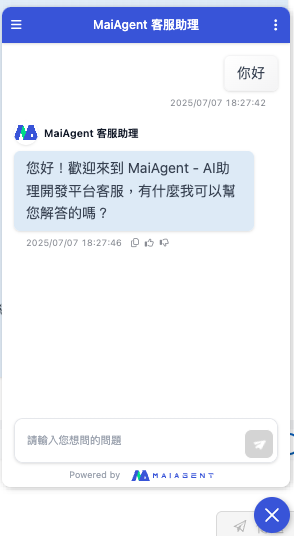
<figure><img src="https://605688223-files.gitbook.io/~/files/v0/b/gitbook-x-prod.appspot.com/o/spaces%2FVYMUz6J7vDZ0QTvb1rbN%2Fuploads%2Fgit-blob-bb81392bc29a9771001ca21c0572cd2a94c123fc%2F%E6%88%AA%E5%9C%96%202025-07-07%20%E4%B8%8B%E5%8D%886.32.19.png?alt=media" alt=""><figcaption><p>AI アシスタントの埋め込み画面</p></figcaption></figure>

|          比較項目         |                       連絡先（Contact）                      |           ロール（Role）          |
| :-------------------: | :-----------------------------------------------------: | :--------------------------: |
|       🎯 **対象**       |                  外部のエンドユーザー（訪問者、会員、顧客）                  |        社内メンバー（従業員、管理者）       |
| 👤 **MaiAgent アカウント** |                           ❌ 不要                          |   ✅ 必要（メンバーがプラットフォームにログイン）   |
|      📋 **作成方法**      |              会話時に自動作成、API で作成、または管理画面で手動作成              |    管理画面でロールを事前に定義し、メンバーに適用   |
|     🎯 **制御する内容**     | ユーザーの会話履歴、パーソナライズ属性、ナレッジ検索範囲（`query_metadata`）、ツールの認証情報 | 管理画面でのメンバーの操作権限とリソースへのアクセス範囲 |
|      ⚙️ **管理画面**      |                   API 連携または管理画面の「連絡先」                   |        管理画面の「ロール権限管理」        |

## ナレッジ範囲を制御する役割分担 <a href="#knowledge-scope" id="knowledge-scope"></a>

どちらも「検索できるナレッジ」に影響しますが、その仕組みは異なります。

* **連絡先**：連絡先に [Query Metadata](/tech/ja/authorization-integration/zhi-shi-guan-li-quan-xian-query-metadata-cha-xun-yuan-zi-liao-zong-lan.md) を設定し、ユーザーとの会話時に AI が検索できるナレッジベース／ドキュメント／タグの範囲を制限します
* **ロール**：メンバーがプラットフォーム上で**閲覧・管理できる**リソースを制御します（ユーザーマニュアルの[ロール権限管理](https://docs.maiagent.ai/org/role-permission)を参照してください）。社内での質疑応答では、メンバーがメッセージごとに参照するナレッジ範囲を選択できます

## 選択方法 <a href="#how-to-choose" id="how-to-choose"></a>

* **社外向けサービス**（公式 Web サイトのカスタマーサービス、会員センター、自社製品への埋め込み）：ユーザーに MaiAgent アカウントは不要であり、付与すべきでもありません → **連絡先**を使用し、ID に応じて query\_metadata またはカスタム属性を関連付けて区別します
* **社内利用**（従業員向け社内 Q\&A、チームによる AI アシスタントの運用）：メンバーがプラットフォームにログインします → **ロール**を使用して権限を一括付与します
* 両者は併存できます。同じ企業には通常、「管理画面を管理するメンバー」と「AI と対話する連絡先」の両方が存在します。それぞれ独立した仕組みを使用し、重複することはありません

<figure><img src="https://605688223-files.gitbook.io/~/files/v0/b/gitbook-x-prod.appspot.com/o/spaces%2FVYMUz6J7vDZ0QTvb1rbN%2Fuploads%2Fgit-blob-53645aaed37bd279cd5330b940b591e287bba444%2Fimage%20(34).png?alt=media" alt=""><figcaption><p>Contact と Role の権限設定に関する推奨事項</p></figcaption></figure>


---

# Agent Instructions
This documentation is published with GitBook. GitBook is the documentation platform designed so that both humans and AI agents can read, navigate, and reason over technical content effectively. Learn more at gitbook.com.

## Querying This Documentation
If you need additional information that is not directly available in this page, you can query the documentation dynamically by asking a question.

Perform an HTTP GET request on the current page URL with the `ask` query parameter, and the optional `goal` query parameter:

```
GET https://docs.maiagent.ai/tech/ja/authorization-integration/role-vs-contact.md?ask=<question>&goal=<endgoal>
```

`ask` is the immediate question: it should be specific, self-contained, and written in natural language.
`goal` is optional and describes the broader end goal you are ultimately trying to accomplish on behalf of the user. GitBook uses it to tailor the answer towards what is most useful for that goal.

The response will contain a direct answer to the question and relevant excerpts and sources from the documentation.

Use this mechanism when the answer is not explicitly present in the current page, you need clarification or additional context, or you want to retrieve related documentation sections.