> For the complete documentation index, see [llms.txt](https://docs.maiagent.ai/llms.txt). Markdown versions of documentation pages are available by appending `.md` to page URLs; this page is available as [Markdown](https://docs.maiagent.ai/tech/ja/api-integration/n8n.md).
# n8n 連携
n8n と MaiAgent の連携:n8n のワークフロー自動化ツールで複数の Agent を呼び出し、連携させます。ワークフロー例、複数ターンの対話の応用、トラブルシューティング、完全な JSON を掲載しています。
このドキュメントでは、n8n のワークフロー自動化ツールを使用して、MaiAgent の複数の Agent を連携させる方法を詳しく説明します。n8n を使うと、複数の Agent を連携させるワークフローを簡単に作成できます。
## 前提条件
1. n8n アカウントに登録済みであること
2. 有効な MaiAgent API キーがあること
3. Agent の構築が完了し、Agent ID を取得済みであること
4. API とワークフローの基本を理解していること
## 基本概念
MaiAgent API は、Agent と対話する機能を提供します。n8n を使用してこれらの処理を自動化し、複数の Agent を連携させます。
## ワークフローの例
### 例1:Agent を順番に連携させる簡単なワークフローを作成する
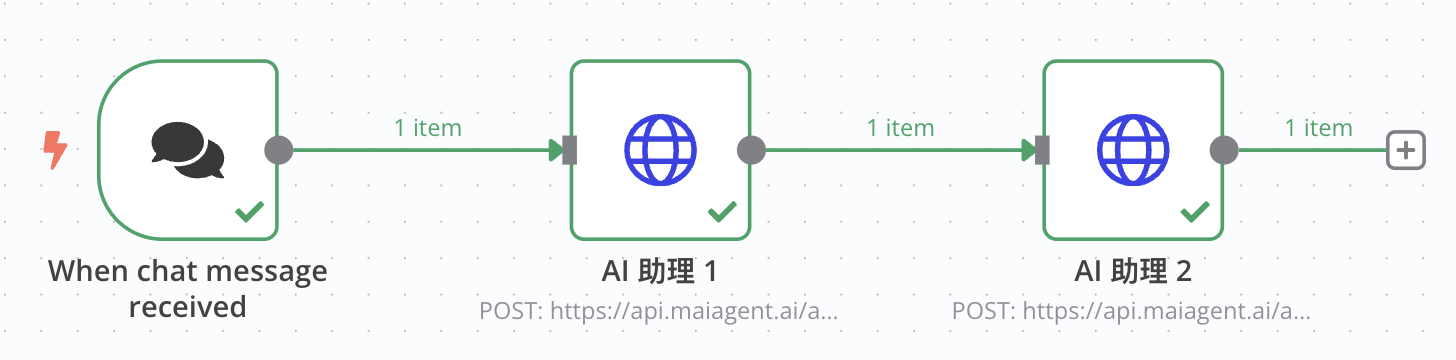
このワークフローはユーザーのチャットメッセージを受け取り、2つの異なる Agent で順番に処理することで、一連の処理フローを構成します。
### ステップ1:チャットトリガーノードを設定する
1. n8n ワークフローに「When chat message received」ノードを追加します
2. これがワークフローの開始点となり、ユーザーがメッセージを送信すると実行されます
### ステップ2:1つ目の HTTP リクエストノードを設定する
1. 「HTTP Request」ノードを追加し、「When chat message received」ノードに接続します
2. 次の項目を設定します:
* メソッド:POST
* URL:`https://api.maiagent.ai/api/v1/chatbots/{id}/completions/`
* id:Agent ID
* 認証:Headers
* Headers:`Authorization` ヘッダーを追加し、値を `Api-Key YOUR_API_KEY` に設定します(実際の API キーに置き換えてください)
* リクエストボディの種類:JSON
* リクエストボディ:
```json
{
"conversation": "",
"message": {
"content": "{{ $json.chatInput }}",
"attachments": []
},
"is_streaming": false
}
```
### ステップ3:2つ目の HTTP リクエストノードを設定する
1. 別の「HTTP Request」ノードを追加し、1つ目の HTTP Request ノードに接続します
2. 次の項目を設定します:
* メソッド:POST
* URL:`https://api.maiagent.ai/api/v1/chatbots/{id}/completions/`
* id:Agent ID
* 認証:Headers
* Headers:`Authorization` ヘッダーを追加し、値を `Api-Key YOUR_API_KEY` に設定します
* リクエストボディの種類:JSON
* リクエストボディ:
```json
{
"conversation": "",
"message": {
"content": {{ JSON.stringify($json.content) }},
"attachments": []
},
"is_streaming": false
}
```
この設定により、1つ目の Agent の応答を2つ目の Agent に入力として渡し、順番に処理できます。
## Agent 連携の活用例
### 活用例1:複数の専門家の意見を集約する
異なる専門分野の Agent がそれぞれの視点を提示し、それらを集約して包括的な応答を作成します:
1. 法律 Agent が法的な問題を分析します
2. 技術 Agent が技術的な実現可能性を分析します
3. ビジネス Agent が事業への影響を分析します
4. 最後に集約用 Agent が総合的な提案を提示します
### 活用例2:翻訳の改善フロー
1. 最初の Agent が翻訳します
2. 2つ目の Agent が翻訳品質を確認します
3. 最後の Agent が文章を推敲し、表現を改善します
### 活用例3:コンテンツ生成とレビューのワークフロー
1. クリエイティブ Agent がコンテンツを生成します
2. レビュー Agent が正確性と適切性を確認します
3. 編集 Agent が文章を推敲し、書式を整えます
## 応用:複数ターンの対話ワークフローを作成する
### 例2:対話 ID を使用して複数ターンの対話を継続する
### ステップ1:対話の初期化ノードを作成する
1. 最初の対話を行う HTTP Request ノードを追加します
2. 前述と同様に設定しますが、対話 ID を保存します:
```jsx
// 後で使用できるように対話 ID を保存します
const conversationId = $json.conversationId;
$workflow.vars.conversationId = conversationId;
return {
json: {
...$json,
savedConversationId: conversationId
}
};
```
### ステップ2:後続の対話ノードを設定する
1. 新しい HTTP Request ノードを追加し、保存済みの対話 ID を使用するように設定します:
```json
{
"conversation": "{{$workflow.vars.conversationId}}",
"message": {
"content": "先ほどの質問の続きとして、さらに詳しく説明してください"
},
"is_streaming": false
}
```
## トラブルシューティング
よくある問題と解決方法です:
1. **API 認証エラー**:「Api-Key」プレフィックスを含め、API キーの形式が正しいことを確認します
2. **リクエストのタイムアウト**:複雑なクエリでは、HTTP リクエストノードのタイムアウト時間を長くします
3. **ストリーミングモードの処理**:`is_streaming: true` を使用すると、応答がストリーミングモードに切り替わります
## まとめ
n8n を使用すると、MaiAgent の複数の Agent を簡単に統合・自動化し、強力な AI ワークフローを作成できます。異なる専門分野の Agent が協力して複雑なタスクを実行できます。単純な対話から複数の Agent を順番に連携させる複雑な処理まで、n8n は柔軟で強力な自動化機能を提供します。
## 付録:完全なワークフロー JSON
以下は例1の完全なワークフロー JSON 設定です。n8n に直接インポートできます:
```json
{
"name": "My workflow",
"nodes": [
{
"parameters": {
"method": "POST",
"url": "https://api.maiagent.ai/api/v1/chatbots/{id}/completions/",
"sendHeaders": true,
"headerParameters": {
"parameters": [
{
"name": "Authorization",
"value": "Api-Key YOUR_API_KEY"
}
]
},
"sendBody": true,
"specifyBody": "json",
"jsonBody": "={\n \"conversation\": \"\",\n \"message\": {\n \"content\": \"{{ $json.chatInput }}\",\n \"attachments\": []\n },\n \"is_streaming\": false\n} ",
"options": {}
},
"type": "n8n-nodes-base.httpRequest",
"typeVersion": 4.2,
"position": [
-240,
-180
],
"id": "dfc1157d-7569-4caf-8b1d-256aa74515ac",
"name": "HTTP Request"
},
{
"parameters": {
"options": {}
},
"type": "@n8n/n8n-nodes-langchain.chatTrigger",
"typeVersion": 1.1,
"position": [
-500,
-180
],
"id": "82748324-6021-4660-98ef-481bdfc73569",
"name": "When chat message received",
"webhookId": "5f833c90-a7f9-4c66-8fff-cecc3568cd2a"
},
{
"parameters": {
"method": "POST",
"url": "https://api.maiagent.ai/api/v1/chatbots/{id}/completions/",
"sendHeaders": true,
"headerParameters": {
"parameters": [
{
"name": "Authorization",
"value": "Api-Key YOUR_API_KEY"
}
]
},
"sendBody": true,
"specifyBody": "json",
"jsonBody": "={\n \"conversation\": \"\",\n \"message\": {\n \"content\": {{ JSON.stringify($json.content) }},\n \"attachments\": []\n },\n \"is_streaming\": false\n} ",
"options": {}
},
"type": "n8n-nodes-base.httpRequest",
"typeVersion": 4.2,
"position": [
20,
-180
],
"id": "f0a80b1f-1bed-491b-bc5e-cddb87ccd2d5",
"name": "HTTP Request1"
}
],
"pinData": {},
"connections": {
"When chat message received": {
"main": [
[
{
"node": "HTTP Request",
"type": "main",
"index": 0
}
]
]
},
"HTTP Request": {
"main": [
[
{
"node": "HTTP Request1",
"type": "main",
"index": 0
}
]
]
},
"HTTP Request1": {
"main": [
[]
]
}
},
"active": false,
"settings": {
"executionOrder": "v1"
},
"versionId": "c914db70-985a-48d0-a1ca-47c2a0d4f244",
"meta": {
"instanceId": "2eb51fcaa84ba34149e7fc138f6cac3b20a0038764b284579d6ceaea90b669f8"
},
"id": "pvMcKA5hHmwAKuZT",
"tags": []
}
```
## インポート結果
 ***
ご不明な点がある場合は、[MaiAgent の公式 API ドキュメント](https://docs.maiagent.ai/api)または [n8n の公式ドキュメント](https://docs.n8n.io/)を参照してください。
---
# Agent Instructions
This documentation is published with GitBook. GitBook is the documentation platform designed so that both humans and AI agents can read, navigate, and reason over technical content effectively. Learn more at gitbook.com.
## Querying This Documentation
If you need additional information that is not directly available in this page, you can query the documentation by asking a question.
Perform an HTTP GET request on the following URL with the `ask` and `goal` query parameters:
```
GET https://docs.maiagent.ai/tech/ja/api-integration/n8n.md?ask=&goal=
```
`ask` is the immediate question: it should be specific, self-contained, and written in natural language.
`goal` is what the user is ultimately trying to achieve, the reason they need the answer. Sharing it helps GitBook give you a better, more relevant answer. A goal is most helpful when it describes the outcome the user wants rather than restating the question. For example, with `ask=how do I create an API token`, a goal like `automate deployments from our CI pipeline` lets GitBook tailor the answer to that use case.
The response will contain a direct answer to the question and relevant excerpts and sources from the documentation.
Use this mechanism when the answer is not explicitly present in the current page, you need clarification or additional context, or you want to retrieve related documentation sections.
***
ご不明な点がある場合は、[MaiAgent の公式 API ドキュメント](https://docs.maiagent.ai/api)または [n8n の公式ドキュメント](https://docs.n8n.io/)を参照してください。
---
# Agent Instructions
This documentation is published with GitBook. GitBook is the documentation platform designed so that both humans and AI agents can read, navigate, and reason over technical content effectively. Learn more at gitbook.com.
## Querying This Documentation
If you need additional information that is not directly available in this page, you can query the documentation by asking a question.
Perform an HTTP GET request on the following URL with the `ask` and `goal` query parameters:
```
GET https://docs.maiagent.ai/tech/ja/api-integration/n8n.md?ask=&goal=
```
`ask` is the immediate question: it should be specific, self-contained, and written in natural language.
`goal` is what the user is ultimately trying to achieve, the reason they need the answer. Sharing it helps GitBook give you a better, more relevant answer. A goal is most helpful when it describes the outcome the user wants rather than restating the question. For example, with `ask=how do I create an API token`, a goal like `automate deployments from our CI pipeline` lets GitBook tailor the answer to that use case.
The response will contain a direct answer to the question and relevant excerpts and sources from the documentation.
Use this mechanism when the answer is not explicitly present in the current page, you need clarification or additional context, or you want to retrieve related documentation sections.