> For the complete documentation index, see [llms.txt](https://docs.maiagent.ai/llms.txt). Markdown versions of documentation pages are available by appending `.md` to page URLs; this page is available as [Markdown](https://docs.maiagent.ai/tech/en/platform-development/architecture.md).

# Deployment Architecture

MaiAgent deployment architecture—the differences between all-in-one and distributed deployments, service components and data flow, and the deployment package's three deployment types of single-host Do

MaiAgent is a scalable generative AI platform that supports a wide range of applications. To accommodate different business needs and resource configurations, the platform provides two main deployment modes: **all-in-one deployment** and **distributed deployment**.

This chapter explains the differences between these architectures, their use cases, and their respective advantages and disadvantages, and provides practical deployment references. When installing the deployment package in a private cloud or on premises, all-in-one corresponds to “single-host Docker,” while distributed corresponds to “distributed Docker” or “Kubernetes.” See [Three Deployment Types in the Deployment Package](#deployment-types-in-practice) at the end of this page.

## All-in-One Deployment

### Architecture Overview

In all-in-one deployment mode, all core MaiAgent components (such as the main service, task scheduling service, data storage, database, and frontend services) are installed and run on the same server. This mode features **centralized management** and simple deployment, making it suitable for quick launches and test environments.

The MaiAgent platform can run without a GPU and can be deployed and operated smoothly in a standard CPU environment. On a machine with GPU resources, the platform and models can also be deployed in the same environment to take full advantage of hardware acceleration. The following diagrams illustrate two common architectures.

### Architecture Diagrams

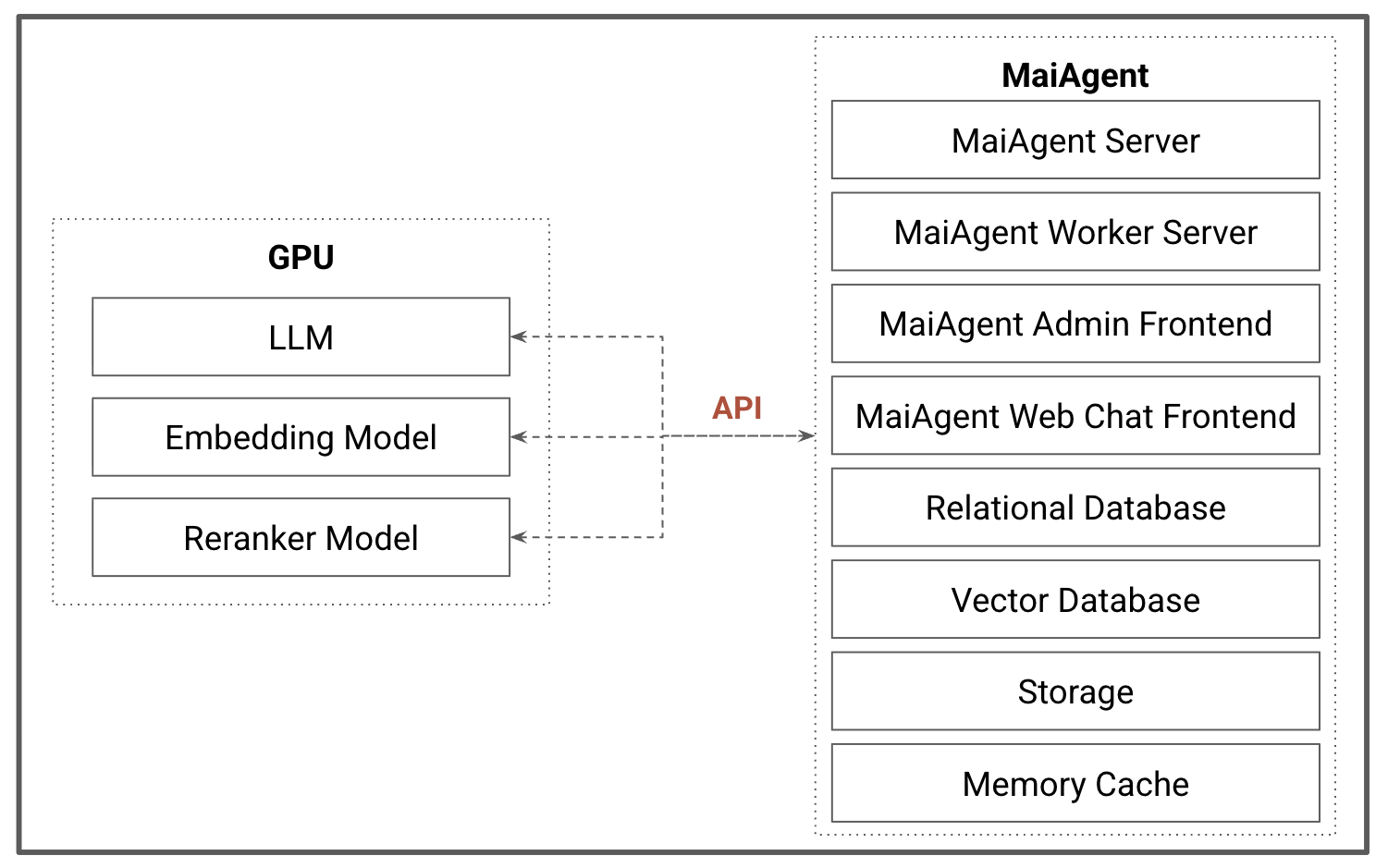
1. Deployment on a server with a GPU:

The MaiAgent platform and model services are installed on the same machine. The platform coordinates requests and controls traffic through internal APIs, while the models use the GPU for efficient inference. Placing the platform and model services together eliminates the need to purchase an additional general-purpose server solely for the platform, reducing overall hardware costs.

<figure><img src="https://3415477754-files.gitbook.io/~/files/v0/b/gitbook-x-prod.appspot.com/o/spaces%2FNBTi475lqozGpB7xObpE%2Fuploads%2Fgit-blob-c44f0012dfa26a57f94b3502599ef95e0449b82b%2F%E6%88%AA%E5%9C%96%202025-09-07%20%E4%B8%8A%E5%8D%8810.45.02.png?alt=media" alt=""><figcaption></figcaption></figure>

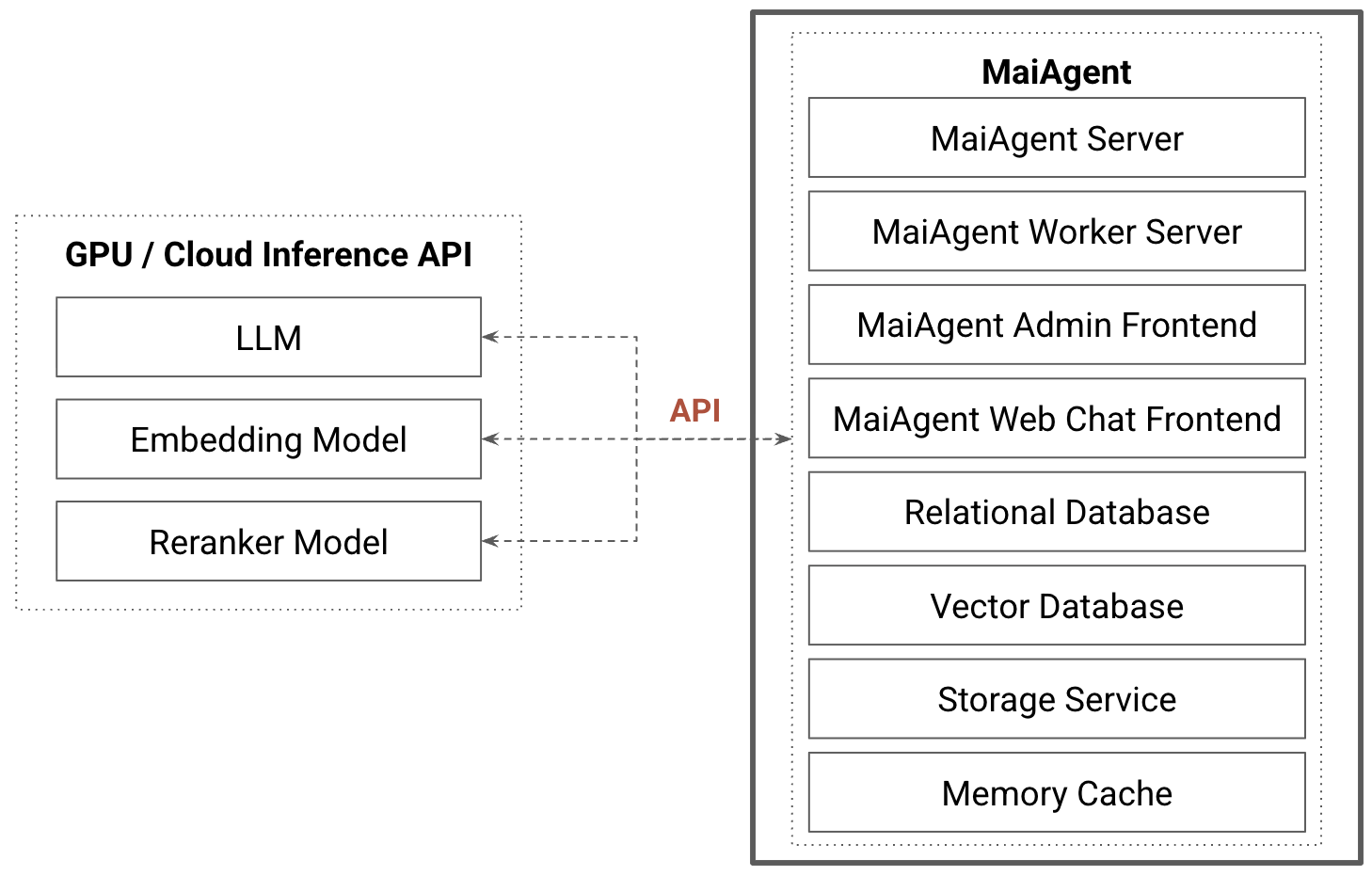
2. Deployment on a server without a GPU:

When MaiAgent is deployed on a server without a GPU, it still requires model services, so it must connect to a GPU server or a cloud API inference service through APIs. Separating the platform from model services allows them to scale independently, with computing capacity increased or decreased as needed, making the architecture more flexible and maintainable.

<figure><img src="https://3415477754-files.gitbook.io/~/files/v0/b/gitbook-x-prod.appspot.com/o/spaces%2FNBTi475lqozGpB7xObpE%2Fuploads%2Fgit-blob-ae088ec75c4ed0ad2b74d027af6f5afdae86dff2%2F%E6%88%AA%E5%9C%96%202025-09-07%20%E4%B8%8A%E5%8D%8811.35.32.png?alt=media" alt=""><figcaption></figcaption></figure>

## Distributed Deployment

### Architecture Overview

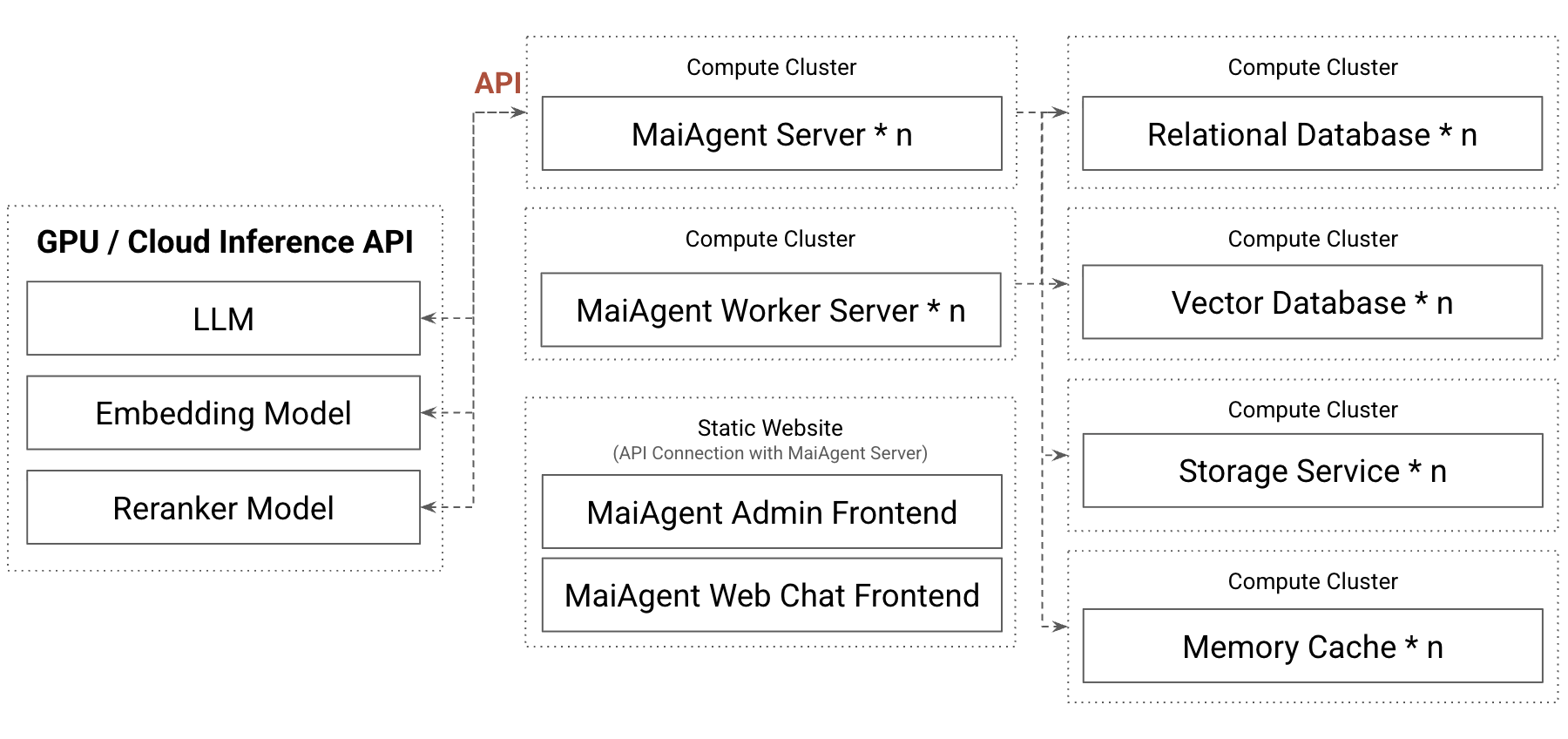
In distributed deployment mode, MaiAgent's core modules are separated into independent services and distributed across multiple servers. Each module can scale horizontally as needed to provide high availability and large-scale processing capacity.

* **Cloud Platform (Cloud PaaS) Environment**\
  In public or private cloud environments, you can directly use platform-as-a-service (PaaS) capabilities such as Kubernetes (including the customer's existing clusters), AWS ECS, GCP Cloud Run, or Azure Container Apps. These services provide container orchestration, load balancing, auto-scaling, and monitoring, allowing distributed modules to be deployed quickly and resources to be adjusted dynamically while reducing infrastructure maintenance work.
* **On-Premises (On-Premise VM) Environment**\
  Even in an on-premises VM environment, you can set up a container platform or application service framework on virtual machines or bare-metal servers to achieve distributed management and scaling similar to the cloud. Although you must plan cluster resources, monitoring, and redundancy yourself, high availability and flexible scaling are still achievable.

### Architecture Diagram

<figure><img src="https://3415477754-files.gitbook.io/~/files/v0/b/gitbook-x-prod.appspot.com/o/spaces%2FNBTi475lqozGpB7xObpE%2Fuploads%2Fgit-blob-b75d99c8b7d76847ec9ff2bd2c967640c156f6b3%2F%E6%88%AA%E5%9C%96%202025-09-07%20%E4%B8%8A%E5%8D%8811.28.15.png?alt=media" alt=""><figcaption></figcaption></figure>

## Deployment Mode Comparison

<table><thead><tr><th width="133.58203125">Feature</th><th>All-in-One Deployment</th><th>Distributed Deployment</th></tr></thead><tbody><tr><td><strong>Architecture</strong></td><td>All components on a single server/container</td><td>Components separated into independent services across multiple nodes</td></tr><tr><td><strong>Infrastructure Cost</strong></td><td>Low; a single server is sufficient</td><td>High; multiple servers or cloud resources required</td></tr><tr><td><strong>Deployment Cost</strong></td><td>Low</td><td>High; complex deployment requiring a DevOps team</td></tr><tr><td><strong>Maintenance Cost</strong></td><td>Low; centralized management</td><td>High; maintenance and monitoring across servers and services</td></tr><tr><td><strong>Scalability</strong></td><td>No; limited by a single machine's resources</td><td>Yes; bottleneck modules can be scaled independently</td></tr><tr><td><strong>High Availability</strong></td><td>No; a single point of failure interrupts the entire system</td><td>Yes; failure of a single service does not affect the entire system</td></tr><tr><td><strong>Use Cases</strong></td><td>PoC, development and testing, small-scale applications</td><td>Production, large-scale applications, multiple departments</td></tr></tbody></table>

## Service Components and Data Flow <a href="#components-and-data-flow" id="components-and-data-flow"></a>

The architecture diagrams above show only the main service categories. When installing the deployment package, the actual components and their connections are as follows (using Docker deployment as an example):

```mermaid
flowchart LR
    User["User Browser"] --> Proxy["Nginx Reverse Proxy"]
    Proxy --> Admin["Admin Frontend"]
    Proxy --> WebChat["Chat Page Frontend"]
    Proxy --> API["MaiAgent Server (Django API)"]
    Proxy --> Storage[("Object Storage Garage or MinIO")]
    API --> Broker["Message Queue RabbitMQ"]
    Beat["Scheduler Celery Beat"] --> Broker
    Broker --> Worker["Worker (Regular, Low Priority)"]
    API --> PgBouncer["Connection Pool PgBouncer"]
    Worker --> PgBouncer
    PgBouncer --> PG[("PostgreSQL")]
    API --> Redis[("Redis Cache")]
    API --> ES[("Elasticsearch")]
    Worker --> ES
    API --> Storage
    Worker --> Storage
    API --> Models["Model Services LLM, Embedding, Reranker"]
    Worker --> Models
```

* **Message Queue (RabbitMQ)**: MaiAgent Server and the scheduler place background tasks in the queue for Workers to retrieve and process. Regular Workers handle tasks such as streaming message output, while low-priority Workers handle time-consuming tasks such as document vectorization.
* **Scheduler (Celery Beat)**: Triggers periodic tasks. Exactly one instance runs.
* **Connection Pool (PgBouncer)**: MaiAgent Server and Workers connect to PostgreSQL through it.
* **Reverse Proxy**: The external HTTPS entry point. When uploading or downloading files, browsers access object storage directly through the reverse proxy (port 9000 when connecting by IP address and port). Kubernetes deployments use Traefik or Cilium Gateway instead, and services connect using internal cluster addresses.
* **Model Services**: These can be vLLM on the host, the customer's existing OpenAI-compatible services, or cloud models. See [Integrating On-Premises Model Services](/tech/en/platform-development/onprem-model-services.md).
* **Where Data Is Stored**: Relational data (organizations, Agents, conversations, and settings) is stored in PostgreSQL; vectors and passages for knowledge bases and memory features are stored in Elasticsearch (knowledge bases can instead use a [bring-your-own vector database](/tech/en/platform-development/bring-your-own-vector-db.md)); uploaded files are stored in object storage; Redis is used only for API caching and temporary storage. MaiAgent Server and Workers call model services directly using each provider's SDK. There is no separate model gateway service in the architecture; enterprises that want centralized management of model calls can use the platform's [AI Gateway](/tech/en/ai-gateway/ai-gateway-openai-compatible.md) feature.

See [Overview](/tech/en/platform-development/gai-lan.md) for how each component maps to AWS, GCP, and the deployment package.

## High Availability and Traffic Paths in Distributed Deployments <a href="#ha-and-traffic-paths" id="ha-and-traffic-paths"></a>

The deployment package's three deployment types provide different levels of high availability:

|                      | Single-Host Docker                                                                                                                              | Distributed Docker                                                                                | Kubernetes                                                                                                                                                                                                                               |
| -------------------- | ----------------------------------------------------------------------------------------------------------------------------------------------- | ------------------------------------------------------------------------------------------------- | ---------------------------------------------------------------------------------------------------------------------------------------------------------------------------------------------------------------------------------------- |
| Entry Point          | Nginx reverse proxy (on the host)                                                                                                               | Nginx (on the deployment host)                                                                    | Traefik or Cilium Gateway; a load balancer is placed in front for multi-node deployments                                                                                                                                                 |
| Application Replicas | Multiple API containers can be added (Nginx automatically balances traffic across them); 2 regular Workers and 1 low-priority Worker by default | Same as the left, but each service category runs on its own host                                  | 2 API replicas, 2 regular Workers, and 1 low-priority Worker by default; exactly 1 scheduler                                                                                                                                             |
| Data Layer           | Single instance                                                                                                                                 | Single instance, centralized on the data host                                                     | One instance each of PostgreSQL, Redis, Elasticsearch, and object storage; data is stored on Longhorn replicated storage (3 copies by default for multiple nodes). If a node fails, the cluster reschedules data services to other nodes |
| Control Plane        | —                                                                                                                                               | —                                                                                                 | With 3 control nodes, a VIP provides high availability (kube-vip, keepalived, or the customer's existing external load balancer)                                                                                                         |
| Single Node Failure  | The entire system stops                                                                                                                         | Services on that host stop (for example, a data host failure makes the entire system unavailable) | Application replicas are automatically replaced; brief interruption while the data layer is rescheduled                                                                                                                                  |

The **external entry point for Kubernetes** depends on the network environment in the deployment configuration. Choose one of four options:

| Network Environment                | Traffic Path                                                                                | What the Customer Must Prepare                                                          |
| ---------------------------------- | ------------------------------------------------------------------------------------------- | --------------------------------------------------------------------------------------- |
| Cloud Load Balancer                | DNS → cloud ALB/NLB (or the customer's own Nginx reverse proxy) → node → ingress controller | Load balancer and its health checks, DNS                                                |
| Cloudflare Proxy                   | DNS → Cloudflare → node ports 80/443 → ingress controller                                   | Cloudflare configuration, DNS                                                           |
| On-Premises Load Balancing         | DNS → service IP advertised by Cilium through L2 or BGP → ingress controller                | An IP range reserved for the platform (to avoid conflicts with existing addresses), DNS |
| Direct Connection to a Single Host | DNS → node ports 80/443 → ingress controller                                                | DNS                                                                                     |

**Planning Considerations**

* The platform API provides both streaming responses (SSE) and WebSocket connections. Load balancers and reverse proxies must allow long-lived connections and WebSocket upgrades. Avoid short idle timeouts, which can interrupt streaming responses midway.
* Kubernetes supports only “one domain per service.” Configure domains in the customer's DNS (internal DNS in offline environments). For certificates, see [Operations Essentials: Domains and TLS Certificates](/tech/en/platform-development/onprem-operations.md#tls-and-domain).
* The customer's network team determines the required VIPs, service IP ranges, DNS names, firewall rules, and subnets, and records them in the Deployment Configuration Confirmation Form. For ports, see [System Requirements: Ports](/tech/en/platform-development/system-requirements.md#ports).
* Active-active deployments across data centers or availability zones, database replication, and automatic failover are outside the deployment package's scope. Contact MaiAgent for an assessment if you have these requirements.
* The platform does not provide high availability for model services. If vLLM on the host stops, conversations using that model fail until the service recovers.

## Three Deployment Types in the Deployment Package <a href="#deployment-types-in-practice" id="deployment-types-in-practice"></a>

When installing the deployment package in a private cloud or on premises, the two deployment modes above are implemented as follows:

| Deployment Mode | Deployment Type in the Package | Implementation Summary                                                                                                                                                                                                         |
| --------------- | ------------------------------ | ------------------------------------------------------------------------------------------------------------------------------------------------------------------------------------------------------------------------------ |
| All-in-One      | Single-Host Docker             | All services are installed on the same host; suitable for production environments with fewer than 400 users                                                                                                                    |
| Distributed     | Distributed Docker             | A deployment host installs services on multiple hosts through SSH; the tested topology uses three hosts for applications, data, and background jobs                                                                            |
| Distributed     | Kubernetes                     | The installer creates a cluster (kubeadm, Cilium, Longhorn), or Helm installs services on the customer's existing cluster; requires a dedicated deployment package generated by MaiAgent based on the deployment configuration |

See [Deployment Types and Feature Comparison](/tech/en/platform-development/onprem-deployment-types.md) for guidance on choosing a type, its limitations, and feature differences. See [System Requirements](/tech/en/platform-development/system-requirements.md) for host specifications.


---

# Agent Instructions
This documentation is published with GitBook. GitBook is the documentation platform designed so that both humans and AI agents can read, navigate, and reason over technical content effectively. Learn more at gitbook.com.

## Querying This Documentation
If you need additional information that is not directly available in this page, you can query the documentation by asking a question.

Perform an HTTP GET request on the following URL with the `ask` and `goal` query parameters:

```
GET https://docs.maiagent.ai/tech/en/platform-development/architecture.md?ask=<question>&goal=<user_goal>
```

`ask` is the immediate question: it should be specific, self-contained, and written in natural language.
`goal` is what the user is ultimately trying to achieve, the reason they need the answer. Sharing it helps GitBook give you a better, more relevant answer. A goal is most helpful when it describes the outcome the user wants rather than restating the question. For example, with `ask=how do I create an API token`, a goal like `automate deployments from our CI pipeline` lets GitBook tailor the answer to that use case.

The response will contain a direct answer to the question and relevant excerpts and sources from the documentation.

Use this mechanism when the answer is not explicitly present in the current page, you need clarification or additional context, or you want to retrieve related documentation sections.