> For the complete documentation index, see [llms.txt](https://docs.maiagent.ai/llms.txt). Markdown versions of documentation pages are available by appending `.md` to page URLs; this page is available as [Markdown](https://docs.maiagent.ai/tech/en/mcp/mcp-model-context-protocol.md).
# MCP (Model Context Protocol)
What is MCP (Model Context Protocol): an open protocol for connecting AI applications to external tools and data sources. Covers how it works, its core value, and connecting to an MCP Server with MCP
{% hint style="info" %}
**How to Read the MCP Pages**: Start with the concepts on this page → For management console steps to attach an MCP tool to an Agent, see [Create an MCP Tool](https://docs.maiagent.ai/build/tools/mcp-setup) in the user manual → To turn your own system into an MCP Server, see [Self-Hosted MCP Server Integration Specifications](/tech/en/mcp/self-hosted-mcp-server.md); for hosted services such as Composio and Zapier, see [Remote MCP Services Overview](/tech/en/mcp/remote-mcp.md) → To let AI tools such as Claude and Cursor operate MaiAgent in the other direction, see [MaiAgent MCP](/tech/en/mcp/maiagent-mcp.md).
{% endhint %}
## What Is MCP?
MCP stands for Model Context Protocol and is an open protocol for connecting AI applications to external tools and data sources. Applications that support MCP can use the same rules to connect to tools provided by MCP servers, regardless of which large language model they use, such as Anthropic Claude, OpenAI GPT, or Google Gemini.
### What Can MCP Help With?
With MCP, an LLM can retrieve external data and operate external systems in addition to answering questions:
#### **Connect to External Data Sources in Real Time**
* Access databases
* Read file systems
* Integrate cloud services
#### **Actively Invoke Tools**
* Execute code
* Operate applications
***
## How MCP Works
The diagram below shows how MCP works, with the following layers:
| Layer | Description |
| ----------------------------- | ---------------------------------------------------------------------------------------------------------------------------------------------------------------------------------------------------------------------------------------------------------------------------------------------------------------------------------------------------------------------- |
| **User Interface (Frontend)** | Users issue instructions through a UI or SDK |
| **AI Model Layer** | The LLM determines which tools to call and which parameters to use based on tool definitions; the application's MCP Client converts these into MCP requests and sends them |
| **Protocol Layer (MCP)** |
Exchanges messages using JSON-RPC 2.0, describes tool parameters with JSON Schema, and defines transports such as stdio and Streamable HTTP JSON-RPC 2.0 is a communication protocol that defines the structure of "requests and responses" in JSON, allowing LLMs to communicate with different programs using the same language.
|
| **MCP Servers** |
Receive model requests and interact with actual tools or data systems In addition to hosting your own MCP Servers, you can use Remote MCP services to connect LLMs with other services.
|
| **External Systems** | Real-world resources such as databases, APIs, Git, and file systems |
### MCP Workflow Diagram
With this flow, an application only needs to implement an MCP Client once to connect to tools provided by various MCP servers.
### MCP Use Cases
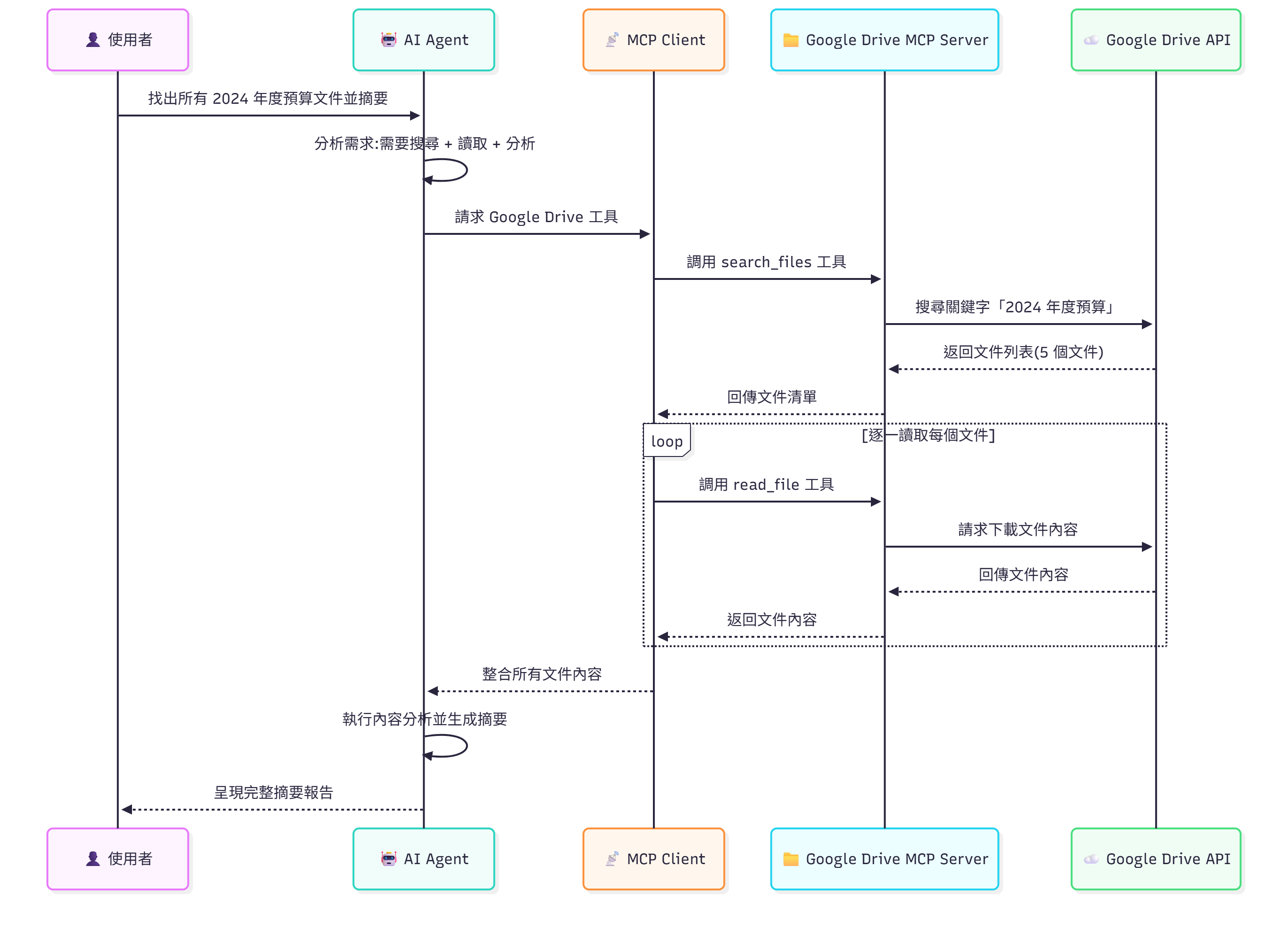
#### Use Case 1: Organize Google Drive Files Through MCP—Document Search and Summarization
Describe the task to the LLM in natural language:
> Find all documents in Google Drive related to the "2024 Annual Budget" and compile a summary report
The LLM determines which MCP tools to call based on the request, such as `search_files`. The tool names and results below are illustrative.
**MCP Workflow:**
**Actions the AI Performs:**
1. 🔍 Search for documents containing the keyword "2024 Annual Budget"
2. 📄 Read the contents of the 5 documents found
3. 🧠 Analyze the key points of each document
4. 📊 Generate a consolidated summary report
5. 💡 Provide budget analysis recommendations
**Results for the User:**
```
Found 5 relevant documents:
1. 【2024年度預算提案.docx】
- Total budget: NT$ 50,000,000
- Main items: Personnel costs 60%, operating costs 25%, R&D 15%
2. 【Q1預算執行報告.xlsx】
- Execution rate: 92%
- Over-budget item: Marketing expenses +8%
3. 【預算修正案_v2.pdf】
- Recommended adjustment: Increase the R&D budget by 10%
... (Summaries of other documents)
```
***
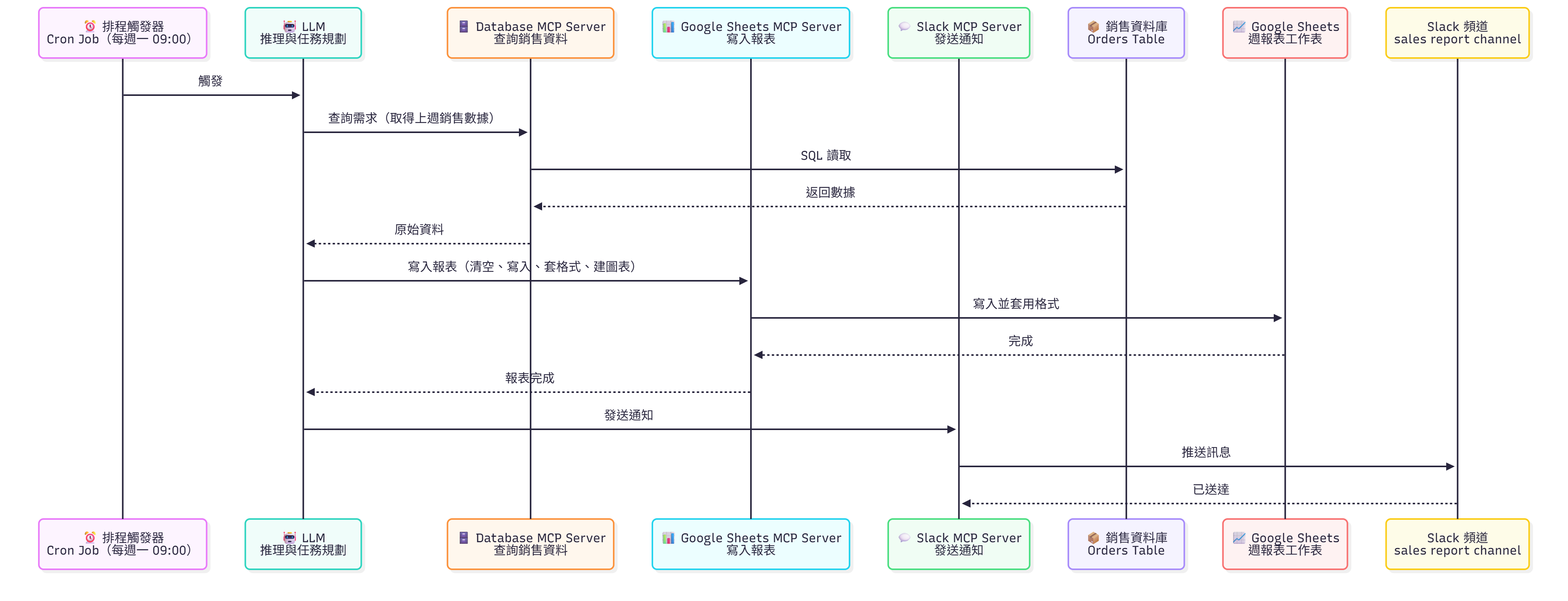
#### Use Case 2: Connect Google Sheet and Slack Through MCP—Schedule Weekly Reports and Send Them to a Group
An LLM can connect tools from multiple external services through MCP, as shown in the diagram below:
Use a scheduling service to trigger the LLM to perform the same query task every week:
The LLM determines which MCP tools to call based on the request, such as `search_sheet` and `query_sheet` (illustrative). In MaiAgent, use [Agent Scheduling](https://docs.maiagent.ai/build/agent/schedule) to trigger an Agent to perform these tasks regularly.
Weekly Agent workflow:
1. 🔍 Search for the "Sales Data" spreadsheet
2. 📄 Read the values in the spreadsheet
3. 📊 Generate a consolidated summary report based on the requirements, such as average revenue and growth compared with the same period
4. 💡 Automatically send the consolidated results to a Slack channel
***
## Core Value of MCP
#### 🧠 **LLMs Provide Intelligence**
* Natural language understanding
* Reasoning and decision-making
* Knowledge integration
* Creative generation
* Anomaly detection
* Predictive analysis
#### 📡 **MCP Provides Capabilities**
* Connect to various tools
* Perform actual operations
* Integrate across systems
* Standardize communication
The LLM understands requirements and decides the next step, while MCP connects tools in a standard way. Together, they enable the LLM to look up data and perform operations during a conversation. The MCP protocol specifies connection and authorization flows; what connected tools can actually do depends on the MCP server implementation and the permissions of the account authorized to use it.
***
## Using MCP in MaiAgent
MaiAgent is an **MCP Client**: Create an MCP tool in the management console, enter the server URL, and attach it to an Agent so the Agent can call the tools provided by the server. To let AI tools such as Claude and Cursor operate MaiAgent in the other direction, see [MaiAgent MCP](/tech/en/mcp/maiagent-mcp.md).
### Supported Transports
MaiAgent connects only to remote MCP servers and determines the transport from the URL: it uses SSE when the path ends in `/sse`, contains `/sse/`, or the query string includes `transport=sse`; all other URLs use Streamable HTTP.
| Transport | Description | Supported by MaiAgent |
| --------------------------------------- | -------------------------------------------------------------------------------------------------------------------------------------------------------------------- | --------------------- |
| **Streamable HTTP** | Standard transport in the MCP specification: each message is sent to a single endpoint via HTTP POST, and responses can be JSON or a stream | ✅ |
| **SSE (HTTP with SSE)** | Transport from the 2024-11-05 specification that streams server messages using Server-Sent Events | ✅ |
| **stdio** | Standard transport in the MCP specification: the client starts a server process locally (for example, with `npx`) and communicates through standard input and output | ❌ |
| **Custom Transports Such as WebSocket** | Not among the standard transports in the MCP specification | ❌ |
stdio is unsupported because the platform does not run local commands such as `npx` or `node` on its servers. For an MCP server that provides only a stdio version, use the provider's remote version or deploy it yourself as an HTTP service. For transport, URL, and authentication requirements for self-hosted MCP Servers, see [Self-Hosted MCP Server Integration Specifications](/tech/en/mcp/self-hosted-mcp-server.md).
### Quick Integration Through the Graphical Interface
MaiAgent provides a graphical interface for connecting to remote MCP servers without writing code: when adding an MCP tool in the management console, enter the server URL and authentication method (put a static key in the headers, or select an OAuth connector), then select the tools the Agent may use from the list returned by the server.
{% hint style="info" %}
For instructions on creating an MCP tool, see: [User Manual—Create an MCP Tool](https://docs.maiagent.ai/build/tools/mcp-setup)
{% endhint %}
### Platform Behavior
* **Tool Scope**: Only tools enabled in the MCP tool's "Allowed Tools (JSON Array)" are passed to the model; new tools added by the server are not enabled automatically.
* **Timeouts and Retries**: The MCP session read timeout is 30 seconds. For temporary errors such as disconnected connections, automatic retries apply only to tools that are safe to resend.
* **Records**: Each call is recorded in the tool execution logs, available under AgentOps → Tool Execution Logs.
* **Connection Validation**: MCP tools configured with a URL connect to the server and retrieve its tool list when saved. If the connection fails, "MCP tool validation failed" appears and the incomplete configuration is not saved; tools using OAuth connectors retrieve the list after authorization is complete. For instructions, see [Create an MCP Tool](https://docs.maiagent.ai/build/tools/mcp-setup#mcp-server-url) in the user manual.
### Troubleshooting `unhandled errors in a TaskGroup`
When the error message in a tool execution log contains `unhandled errors in a TaskGroup (1 sub-exception)`, it is not a separate error type: the MCP client runs its session in an asynchronous task group, and transport-layer errors such as disconnections, read timeouts, and server-initiated connection closures are wrapped in this outer message. The actual cause appears in the sub-exception after the parentheses. Troubleshoot in this order:
1. Go to AgentOps → Tool Execution Logs, open the record, and check the full `errorMessage` and `status` (`timeout` means no response was received within 30 seconds).
2. The platform automatically retries transport-layer errors. If retries still fail, first confirm that the server URL is reachable from the public internet, the transport (SSE/Streamable HTTP) matches the server, and the headers or OAuth authorization are still valid.
3. If the sub-exception is an application error returned by the server (for example, a tool reports invalid parameters), the platform does not retry; reproduce the issue by calling your MCP server directly with the same parameters.
4. If retrieving the tool list again on the tool settings page succeeds, the connection and authentication are working. The issue is usually a timeout or server-side error during execution of that tool.
For considerations when using hosted services such as Composio and Zapier, see [Remote MCP Services Overview](/tech/en/mcp/remote-mcp.md).
---
# Agent Instructions
This documentation is published with GitBook. GitBook is the documentation platform designed so that both humans and AI agents can read, navigate, and reason over technical content effectively. Learn more at gitbook.com.
## Querying This Documentation
If you need additional information that is not directly available in this page, you can query the documentation by asking a question.
Perform an HTTP GET request on the following URL with the `ask` and `goal` query parameters:
```
GET https://docs.maiagent.ai/tech/en/mcp/mcp-model-context-protocol.md?ask=&goal=
```
`ask` is the immediate question: it should be specific, self-contained, and written in natural language.
`goal` is what the user is ultimately trying to achieve, the reason they need the answer. Sharing it helps GitBook give you a better, more relevant answer. A goal is most helpful when it describes the outcome the user wants rather than restating the question. For example, with `ask=how do I create an API token`, a goal like `automate deployments from our CI pipeline` lets GitBook tailor the answer to that use case.
The response will contain a direct answer to the question and relevant excerpts and sources from the documentation.
Use this mechanism when the answer is not explicitly present in the current page, you need clarification or additional context, or you want to retrieve related documentation sections.
%20(1).png?alt=media)