> For the complete documentation index, see [llms.txt](https://docs.maiagent.ai/llms.txt). Markdown versions of documentation pages are available by appending `.md` to page URLs; this page is available as [Markdown](https://docs.maiagent.ai/tech/en/authorization-integration/role-vs-contact.md).

# Differences Between Roles and Contacts

Internal members use roles to manage platform permissions, while external users use contacts for identity—their definitions, differences, and how to choose between them

MaiAgent has two types of “people”: **members**, who have accounts that sign in to the MaiAgent platform and operate the admin console, with permissions determined by **roles**; and **contacts**, who are end users interacting with AI assistants and do not need MaiAgent accounts. Confusing the two is a common integration mistake, so this page clearly explains their differences.

## Definitions <a href="#definitions" id="definitions"></a>

### Contact <a href="#contact-definition" id="contact-definition"></a>

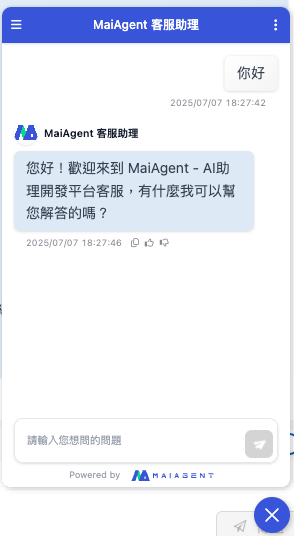
A contact represents an end user who interacts with an AI assistant, such as a website visitor, a user in a membership system, or a LINE friend. Contacts do not sign in to MaiAgent. The system creates them automatically during a conversation, or your system creates them through the API and maps them to your own accounts. Conversation history, personalized attributes, knowledge query scope, and tool credentials are all associated with contacts.

{% hint style="info" %}
For the contact data model and integration methods, see [Contacts: Introduction and Integration](/tech/en/authorization-integration/contacts.md).
{% endhint %}

<figure><img src="https://3415477754-files.gitbook.io/~/files/v0/b/gitbook-x-prod.appspot.com/o/spaces%2FNBTi475lqozGpB7xObpE%2Fuploads%2Fgit-blob-014415472288f559f650849304a7b45e5d2cb89d%2F%E6%88%AA%E5%9C%96%202025-07-07%20%E4%B8%8B%E5%8D%886.29.05%20(1).png?alt=media" alt=""><figcaption><p>A contact without a configured name is displayed as anonymous by default</p></figcaption></figure>

### Role <a href="#role-definition" id="role-definition"></a>

A role is a **permission template for members**. It defines which features members can use and which resources they can access after signing in to the MaiAgent admin console, such as AI assistants, knowledge bases, and inboxes. An organization can define roles such as “customer service representative,” “administrative staff,” and “intern” in advance and apply them when members join, without configuring each person individually.

<figure><img src="https://3415477754-files.gitbook.io/~/files/v0/b/gitbook-x-prod.appspot.com/o/spaces%2FNBTi475lqozGpB7xObpE%2Fuploads%2Fgit-blob-3ee9233a19709cbeb9d408d978d2b331b2f8e898%2F%E6%88%AA%E5%9C%96%202025-07-07%20%E4%B8%8B%E5%8D%886.36.55.png?alt=media" alt=""><figcaption><p>Role settings in a member's profile</p></figcaption></figure>

## Comparison <a href="#comparison" id="comparison"></a>

<figure><img src="https://3415477754-files.gitbook.io/~/files/v0/b/gitbook-x-prod.appspot.com/o/spaces%2FNBTi475lqozGpB7xObpE%2Fuploads%2Fgit-blob-bb81392bc29a9771001ca21c0572cd2a94c123fc%2F%E6%88%AA%E5%9C%96%202025-07-07%20%E4%B8%8B%E5%8D%886.32.19.png?alt=media" alt=""><figcaption><p>AI assistant embed screen</p></figcaption></figure>

|          Comparison         |                                                          Contact                                                         |                                   Role                                   |
| :-------------------------: | :----------------------------------------------------------------------------------------------------------------------: | :----------------------------------------------------------------------: |
|   🎯 **Who it applies to**  |                                     External end users (visitors, members, customers)                                    |               Internal members (employees, administrators)               |
|   👤 **MaiAgent account**   |                                                      ❌ Not required                                                      |             ✅ Required (the member signs in to the platform)             |
|   📋 **How it is created**  |              Created automatically during a conversation, through the API, or manually in the admin console              | A role is defined in advance in the admin console and applied to members |
|   🎯 **What it controls**   | The user's conversation history, personalized attributes, knowledge query scope (`query_metadata`), and tool credentials |      A member's admin-console permissions and resource access scope      |
| ⚙️ **Management interface** |                                    API integration or “Contacts” in the admin console                                    |             “Role Permission Management” in the admin console            |

## How knowledge scope is controlled <a href="#knowledge-scope" id="knowledge-scope"></a>

Both can affect which knowledge is available, but they use different mechanisms:

* **Contact**: Configure [Query Metadata](/tech/en/authorization-integration/zhi-shi-guan-li-quan-xian-query-metadata-cha-xun-yuan-zi-liao-zong-lan.md) on the contact to restrict which knowledge bases, documents, and tags the AI can retrieve during that user's conversations
* **Role**: Controls which resources members can **view and manage** on the platform (see [Role Permission Management](https://docs.maiagent.ai/org/role-permission) in the user manual). In internal Q\&A, members can select the knowledge scope to reference for each message

## How to choose <a href="#how-to-choose" id="how-to-choose"></a>

* **External services** (website customer support, member centers, or embedded products): Users do not need and should not have MaiAgent accounts → use **contacts**, associating query\_metadata or custom attributes with each identity as needed
* **Internal use** (internal employee Q\&A or team operations for AI assistants): Members sign in to the platform → use **roles** to grant permissions consistently
* Both can coexist: The same organization typically has both members who manage the admin console and contacts who interact with the AI. Each uses its own mechanism, with no overlap

<figure><img src="https://3415477754-files.gitbook.io/~/files/v0/b/gitbook-x-prod.appspot.com/o/spaces%2FNBTi475lqozGpB7xObpE%2Fuploads%2Fgit-blob-53645aaed37bd279cd5330b940b591e287bba444%2Fimage%20(34).png?alt=media" alt=""><figcaption><p>Recommendations for Contact and Role authorization</p></figcaption></figure>


---

# Agent Instructions
This documentation is published with GitBook. GitBook is the documentation platform designed so that both humans and AI agents can read, navigate, and reason over technical content effectively. Learn more at gitbook.com.

## Querying This Documentation
If you need additional information that is not directly available in this page, you can query the documentation dynamically by asking a question.

Perform an HTTP GET request on the current page URL with the `ask` query parameter, and the optional `goal` query parameter:

```
GET https://docs.maiagent.ai/tech/en/authorization-integration/role-vs-contact.md?ask=<question>&goal=<endgoal>
```

`ask` is the immediate question: it should be specific, self-contained, and written in natural language.
`goal` is optional and describes the broader end goal you are ultimately trying to accomplish on behalf of the user. GitBook uses it to tailor the answer towards what is most useful for that goal.

The response will contain a direct answer to the question and relevant excerpts and sources from the documentation.

Use this mechanism when the answer is not explicitly present in the current page, you need clarification or additional context, or you want to retrieve related documentation sections.