> For the complete documentation index, see [llms.txt](https://docs.maiagent.ai/llms.txt). Markdown versions of documentation pages are available by appending `.md` to page URLs; this page is available as [Markdown](https://docs.maiagent.ai/tech/en/api-integration/n8n.md).
# n8n Integration
Integrate n8n with MaiAgent to call multiple Agents using workflow automation. Includes workflow examples, advanced multi-turn conversations, troubleshooting, and complete JSON.
This document provides detailed instructions for connecting multiple MaiAgent Agents using the n8n workflow automation tool. With n8n, you can easily build workflows that chain multiple Agents together.
## Prerequisites
1. A registered n8n account
2. A valid MaiAgent API key
3. An Agent that has been set up, and its Agent ID
4. A basic understanding of APIs and workflows
## Basic Concepts
The MaiAgent API lets you converse with Agents. We will use n8n to automate these interactions and chain multiple Agents together.
## Workflow Examples
### Example 1: Create a Simple Workflow That Chains Agents
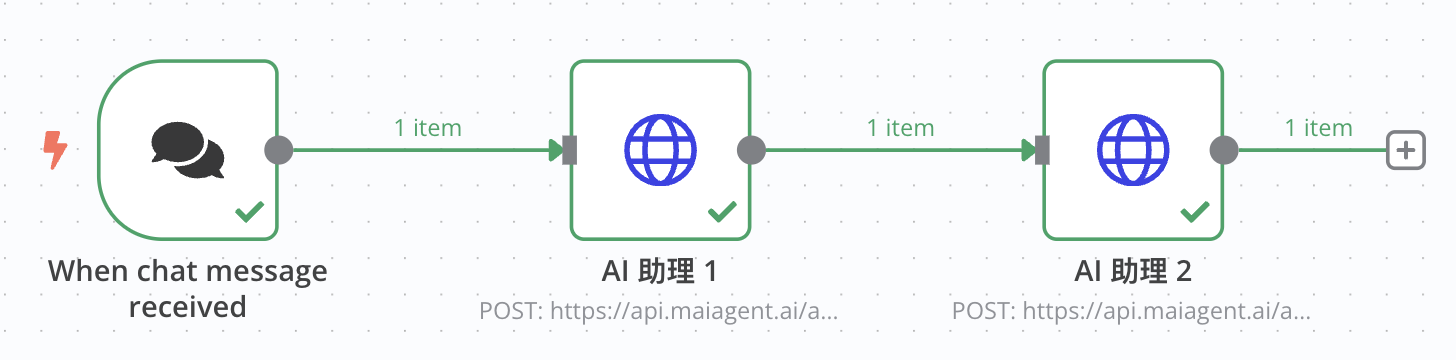
This workflow receives a user’s chat message and processes it through two different Agents in sequence, creating a processing chain.
### Step 1: Set Up the Chat Trigger Node
1. Add a “When chat message received” node to the n8n workflow
2. This is the starting point of the workflow and is triggered when a user sends a message
### Step 2: Set Up the First HTTP Request Node
1. Add an “HTTP Request” node and connect it to the “When chat message received” node
2. Configure the following settings:
* Method: POST
* URL:`https://api.maiagent.ai/api/v1/chatbots/{id}/completions/`
* id: Agent ID
* Authentication: Headers
* Headers: Add an `Authorization` header with the value `Api-Key YOUR_API_KEY` (replace it with your actual API key)
* Request body type: JSON
* Request body:
```json
{
"conversation": "",
"message": {
"content": "{{ $json.chatInput }}",
"attachments": []
},
"is_streaming": false
}
```
### Step 3: Set Up the Second HTTP Request Node
1. Add another “HTTP Request” node and connect it to the first HTTP Request node
2. Configure the following settings:
* Method: POST
* URL:`https://api.maiagent.ai/api/v1/chatbots/{id}/completions/`
* id: Agent ID
* Authentication: Headers
* Headers: Add an `Authorization` header with the value `Api-Key YOUR_API_KEY`
* Request body type: JSON
* Request body:
```json
{
"conversation": "",
"message": {
"content": {{ JSON.stringify($json.content) }},
"attachments": []
},
"is_streaming": false
}
```
This configuration passes the first Agent’s response as input to the second Agent, creating a processing chain.
## Use Cases for Chaining Agents
### Scenario 1: Aggregate Multiple Expert Opinions
Have Agents with different specialties provide their perspectives, then combine them into a comprehensive response:
1. Have a legal Agent analyze legal issues
2. Have a technical Agent analyze technical feasibility
3. Have a business Agent analyze business impact
4. Finally, have an aggregation Agent provide combined recommendations
### Scenario 2: Translation Improvement Process
1. An initial Agent translates the content
2. A second Agent checks translation quality
3. A final Agent polishes and improves the wording
### Scenario 3: Content Generation and Review Workflow
1. A creative Agent generates content
2. A review Agent checks accuracy and appropriateness
3. An editing Agent polishes the content and improves formatting
## Advanced Usage: Create a Multi-turn Conversation Workflow
### Example 2: Use a Conversation ID to Maintain a Multi-turn Conversation
### Step 1: Create a Conversation Initialization Node
1. Add an HTTP Request node to start the conversation
2. Use settings similar to those above, but save the conversation ID:
```jsx
// Save the conversation ID for later use
const conversationId = $json.conversationId;
$workflow.vars.conversationId = conversationId;
return {
json: {
...$json,
savedConversationId: conversationId
}
};
```
### Step 2: Set Up a Follow-up Conversation Node
1. Add a new HTTP Request node and configure it to use the saved conversation ID:
```json
{
"conversation": "{{$workflow.vars.conversationId}}",
"message": {
"content": "Continuing the previous question, please provide more details"
},
"is_streaming": false
}
```
## Troubleshooting
Common issues and solutions:
1. **API Authentication Errors**:Make sure the API key format is correct, including the “Api-Key” prefix
2. **Request Timeouts**:For complex queries, increase the timeout of the HTTP Request node
3. **Handling Streaming Mode**:Use `is_streaming: true` to switch responses to streaming mode
## Conclusion
With n8n, you can easily integrate and automate multiple MaiAgent Agents to create powerful AI workflows in which Agents with different specialties collaborate on complex tasks. From simple conversations to complex processing chains involving multiple Agents, n8n provides flexible and powerful automation capabilities.
## Appendix: Complete Workflow JSON
Below is the complete workflow JSON configuration for Example 1, which you can import directly into n8n:
```json
{
"name": "My workflow",
"nodes": [
{
"parameters": {
"method": "POST",
"url": "https://api.maiagent.ai/api/v1/chatbots/{id}/completions/",
"sendHeaders": true,
"headerParameters": {
"parameters": [
{
"name": "Authorization",
"value": "Api-Key YOUR_API_KEY"
}
]
},
"sendBody": true,
"specifyBody": "json",
"jsonBody": "={\n \"conversation\": \"\",\n \"message\": {\n \"content\": \"{{ $json.chatInput }}\",\n \"attachments\": []\n },\n \"is_streaming\": false\n} ",
"options": {}
},
"type": "n8n-nodes-base.httpRequest",
"typeVersion": 4.2,
"position": [
-240,
-180
],
"id": "dfc1157d-7569-4caf-8b1d-256aa74515ac",
"name": "HTTP Request"
},
{
"parameters": {
"options": {}
},
"type": "@n8n/n8n-nodes-langchain.chatTrigger",
"typeVersion": 1.1,
"position": [
-500,
-180
],
"id": "82748324-6021-4660-98ef-481bdfc73569",
"name": "When chat message received",
"webhookId": "5f833c90-a7f9-4c66-8fff-cecc3568cd2a"
},
{
"parameters": {
"method": "POST",
"url": "https://api.maiagent.ai/api/v1/chatbots/{id}/completions/",
"sendHeaders": true,
"headerParameters": {
"parameters": [
{
"name": "Authorization",
"value": "Api-Key YOUR_API_KEY"
}
]
},
"sendBody": true,
"specifyBody": "json",
"jsonBody": "={\n \"conversation\": \"\",\n \"message\": {\n \"content\": {{ JSON.stringify($json.content) }},\n \"attachments\": []\n },\n \"is_streaming\": false\n} ",
"options": {}
},
"type": "n8n-nodes-base.httpRequest",
"typeVersion": 4.2,
"position": [
20,
-180
],
"id": "f0a80b1f-1bed-491b-bc5e-cddb87ccd2d5",
"name": "HTTP Request1"
}
],
"pinData": {},
"connections": {
"When chat message received": {
"main": [
[
{
"node": "HTTP Request",
"type": "main",
"index": 0
}
]
]
},
"HTTP Request": {
"main": [
[
{
"node": "HTTP Request1",
"type": "main",
"index": 0
}
]
]
},
"HTTP Request1": {
"main": [
[]
]
}
},
"active": false,
"settings": {
"executionOrder": "v1"
},
"versionId": "c914db70-985a-48d0-a1ca-47c2a0d4f244",
"meta": {
"instanceId": "2eb51fcaa84ba34149e7fc138f6cac3b20a0038764b284579d6ceaea90b669f8"
},
"id": "pvMcKA5hHmwAKuZT",
"tags": []
}
```
## Import Result
***
If you have any questions, refer to the [official MaiAgent API documentation](https://docs.maiagent.ai/api) or the [official n8n documentation](https://docs.n8n.io/).
---
# Agent Instructions
This documentation is published with GitBook. GitBook is the documentation platform designed so that both humans and AI agents can read, navigate, and reason over technical content effectively. Learn more at gitbook.com.
## Querying This Documentation
If you need additional information that is not directly available in this page, you can query the documentation by asking a question.
Perform an HTTP GET request on the following URL with the `ask` and `goal` query parameters:
```
GET https://docs.maiagent.ai/tech/en/api-integration/n8n.md?ask=&goal=
```
`ask` is the immediate question: it should be specific, self-contained, and written in natural language.
`goal` is what the user is ultimately trying to achieve, the reason they need the answer. Sharing it helps GitBook give you a better, more relevant answer. A goal is most helpful when it describes the outcome the user wants rather than restating the question. For example, with `ask=how do I create an API token`, a goal like `automate deployments from our CI pipeline` lets GitBook tailor the answer to that use case.
The response will contain a direct answer to the question and relevant excerpts and sources from the documentation.
Use this mechanism when the answer is not explicitly present in the current page, you need clarification or additional context, or you want to retrieve related documentation sections.