> For the complete documentation index, see [llms.txt](https://docs.maiagent.ai/llms.txt). Markdown versions of documentation pages are available by appending `.md` to page URLs; this page is available as [Markdown](https://docs.maiagent.ai/tech/en/ai-agents/evaluation.md).

# Response Evaluation and Monitoring Results

Last updated: 2025-11-14

## Overview

MaiAgent uses the Deepeval framework for response evaluation. It has now been upgraded to **Deepeval 3.7.0**, providing more powerful evaluation capabilities and more flexible configuration options.

## Release Notes

### What's New in Deepeval 3.7.0

The MaiAgent platform has been upgraded to Deepeval 3.7.0, introducing the following major improvements:

#### 1. Configurable Evaluation LLM

The new version lets you customize the large language model (LLM) used for evaluation:

* **Flexible selection**: Evaluation is no longer limited to a specific LLM
* **Cost optimization**: Choose a more economical model for evaluation to reduce operating costs
* **Performance tuning**: Select a model with the appropriate balance of speed and accuracy for your evaluation needs

**Configuration example:**

```python
# Specify the LLM used in the evaluation settings
evaluation_config = {
    "evaluation_model": "gpt-4",  # Or another supported model
    "temperature": 0.0,
    "max_tokens": 1000
}
```

#### 2. Flexible Handling of Empty Ground Truth

The new version improves the handling of empty or missing correct answers (Ground Truth):

* **Automatic adaptation**: When a test case does not provide a correct answer, the system automatically adjusts the evaluation strategy
* **Partial evaluation**: Other evaluation dimensions can still be assessed even without complete Ground Truth
* **Helpful notifications**: Clearly indicates which evaluation metrics cannot be calculated due to missing Ground Truth

**Applicable scenarios:**

* Exploratory testing before standard answers have been defined
* Open-ended question-answering scenarios with no single correct answer
* Quickly validating an AI assistant's basic response capabilities

#### 3. Parallel Processing Improves Evaluation Performance

Deepeval 3.7.0 introduces parallel processing, significantly increasing evaluation speed:

* **Batch evaluation**: Multiple test cases can be evaluated simultaneously
* **Performance improvement**: Evaluations are 2–3 times faster than in the previous version
* **Resource optimization**: Makes more efficient use of computing resources

**Performance comparison:**

| Number of test cases | Previous version | New version | Performance improvement |
| -------------------- | ---------------- | ----------- | ----------------------- |
| 10                   | 45 seconds       | 18 seconds  | 2.5x                    |
| 50                   | 3.5 minutes      | 1.5 minutes | 2.3x                    |
| 100                  | 7 minutes        | 3 minutes   | 2.3x                    |

### Upgrade Recommendations

If you are using the evaluation features from an earlier version, consider the following upgrade strategy:

1. **Review existing evaluation settings**: Verify the evaluation parameters currently in use
2. **Test the new configuration options**: Try the new LLM configuration feature
3. **Optimize test cases**: Use flexible Ground Truth handling to expand test coverage
4. **Monitor performance improvements**: Observe the speed increase provided by parallel processing

## View Response Evaluation Results

Response evaluation is available in the **AgentOps** module and can be viewed in two ways:

### Real-Time Monitoring

AgentOps → AI Assistant Monitoring

Calculates a score for each conversation in real time to monitor the response quality of production AI assistants.

### Automated Testing

AgentOps → Automated Testing

Runs evaluations against test sets in batches and generates comprehensive reports and improvement recommendations. This is suitable for quality validation before a release.

## Evaluation Metrics

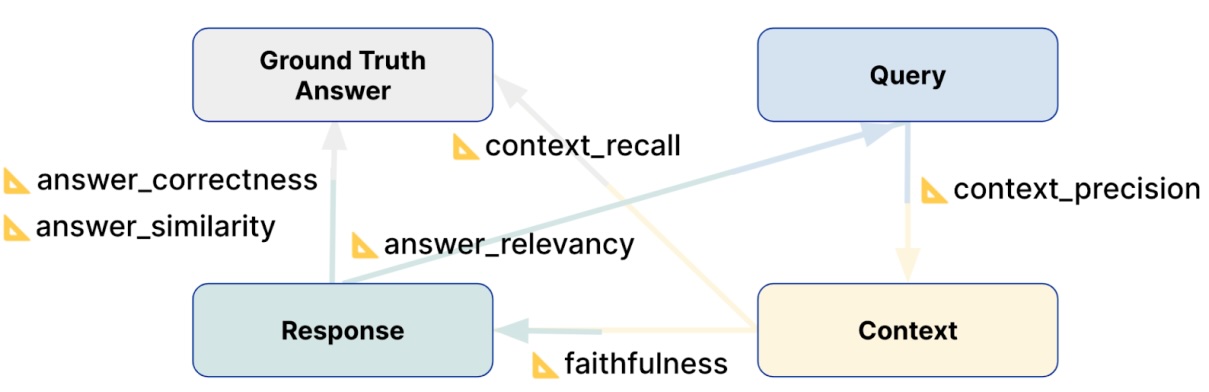
The MaiAgent platform provides response evaluation features that record and automatically score each question-and-answer interaction. The scores include:

<table><thead><tr><th>Metric</th><th>Description</th><th>Influencing factors</th><th>Question</th><th>Response</th><th width="118">Retrieval context</th><th>Correct answer</th></tr></thead><tbody><tr><td>Faithfulness</td><td>Whether the LLM answers faithfully instead of fabricating an answer</td><td>LLM, RAG, knowledge base</td><td></td><td>✅</td><td>✅</td><td></td></tr><tr><td>Answer Relevancy</td><td>Whether the LLM addresses the key points and whether the answer is incomplete or contains redundant text</td><td>LLM, RAG, knowledge base</td><td>✅</td><td>✅</td><td></td><td></td></tr><tr><td>Context Precision</td><td>Whether the content retrieved by RAG is relevant to the question</td><td>RAG, knowledge base</td><td>✅</td><td></td><td>✅</td><td></td></tr><tr><td>Contextual Relevancy</td><td>The overall relevance between the retrieved content and the question</td><td>RAG, knowledge base</td><td>✅</td><td></td><td>✅</td><td></td></tr><tr><td>Context Recall</td><td>Whether RAG retrieved all the information contained in the correct answer</td><td>RAG, knowledge base</td><td></td><td></td><td>✅</td><td>✅</td></tr><tr><td>Answer Correctness</td><td>The correctness of the response compared with the correct answer</td><td>LLM, RAG, knowledge base</td><td></td><td>✅</td><td></td><td>✅</td></tr><tr><td>Answer Similarity</td><td>The semantic similarity between the response and the correct answer</td><td>LLM, RAG, knowledge base</td><td></td><td>✅</td><td></td><td>✅</td></tr><tr><td>Bias</td><td>Detects whether the answer contains gender, racial, religious, or other biases</td><td>LLM</td><td></td><td>✅</td><td></td><td></td></tr><tr><td>Toxicity</td><td>Detects whether the answer contains harmful or offensive content</td><td>LLM</td><td></td><td>✅</td><td></td><td></td></tr><tr><td>Hallucination</td><td>Detects whether the answer contains fabricated information that conflicts with the context</td><td>LLM, RAG</td><td></td><td>✅</td><td>✅</td><td></td></tr></tbody></table>

<figure><img src="https://3415477754-files.gitbook.io/~/files/v0/b/gitbook-x-prod.appspot.com/o/spaces%2FNBTi475lqozGpB7xObpE%2Fuploads%2Fgit-blob-5afff8be7e607c93ab1d4aa997e76120ea0b84db%2FRAG_Evaluation_Metrics_8f5973cd74%E5%89%AF%E6%9C%AC.jpg?alt=media" alt=""><figcaption><p>Relationship between response evaluation metrics</p></figcaption></figure>

### Difference Between Faithfulness and Hallucination

These two metrics are often confused, but they evaluate responses from different perspectives:

* **Faithfulness**: Measures the “proportion” of content in a response that is based on the retrieval context. It is a **positive metric** (higher is better)
* **Hallucination**: Detects whether the response “contains” content that contradicts the context or cannot be verified. It is a **negative metric** (lower is better)

| Aspect              | Faithfulness                                                 | Hallucination                                     |
| ------------------- | ------------------------------------------------------------ | ------------------------------------------------- |
| Direction           | Positive (higher is better)                                  | Negative (lower is better)                        |
| Evaluation question | How much of the answer is based on the source?               | Does the answer contain fabricated content?       |
| Calculation         | Number of verifiable statements ÷ total number of statements | Detects whether fabricated information is present |

**Example**

> **Retrieval context**: “Taipei 101 is 508 meters tall and was completed in 2004.”
>
> **Answer**: “Taipei 101 is 508 meters tall, was completed in 2004, and was once the world's tallest building.”

* **Low Faithfulness score**: Only 2/3 of the content is supported by the context
* **High Hallucination score**: “Was once the world's tallest building” is not mentioned in the context and is therefore treated as hallucinated content

In short, Faithfulness focuses on the “degree of adherence to the source,” while Hallucination focuses on “whether anything was fabricated.” The two are related but distinct: low Faithfulness does not necessarily indicate hallucination, but hallucination always lowers Faithfulness.

## Feature Support Matrix

| Metric               | Real-time monitoring | Automated testing |
| -------------------- | :------------------: | :---------------: |
| Faithfulness         |           ✅          |         ✅         |
| Answer Relevancy     |           ✅          |         ✅         |
| Context Precision    |           ✅          |         ✅         |
| Contextual Relevancy |                      |         ✅         |
| Context Recall       |          ⚠️          |         ✅         |
| Answer Correctness   |          ⚠️          |                   |
| Answer Similarity    |          ⚠️          |                   |
| Bias                 |                      |         ✅         |
| Toxicity             |                      |         ✅         |
| Hallucination        |                      |         ✅         |

> ⚠️ Coming soon

## What Scores Mean

* Below 0.5: Generally considered to need improvement
* 0.6–0.7: Acceptable range
* 0.8 or higher: Considered good performance
* 0.9 or higher: Considered excellent performance

## Identifying and Resolving the Causes of Low Scores

* LLM capability issues that prevent it from answering questions based on the reference materials
  * Solution: Switch to a more capable LLM or use the configurable evaluation LLM feature in the new version
* RAG retrieval capability and whether information relevant to the question was found
  * Solution: Contact MaiAgent support
* Whether the knowledge base provides sufficient information
  * Solution: Add accurate information and frequently asked questions to the knowledge base

## Best Practices

### Use Flexible Ground Truth

Even without standard answers, you can still:

1. Run a basic evaluation first using metrics that do not require Ground Truth
2. Observe the AI assistant's response patterns
3. Gradually establish evaluation criteria based on actual performance
4. Add Ground Truth to run a complete evaluation

### Make Effective Use of Parallel Processing

For the best evaluation performance:

* Evaluate multiple test cases at once (10 or more recommended)
* Avoid overly frequent small-batch evaluations
* Consider running large-scale evaluations during off-peak hours

## Technical Resources

* [Official Deepeval documentation](https://docs.confident-ai.com/)
* [Deepeval 3.7.0 release notes](https://github.com/confident-ai/deepeval/releases/tag/v3.7.0)


---

# Agent Instructions
This documentation is published with GitBook. GitBook is the documentation platform designed so that both humans and AI agents can read, navigate, and reason over technical content effectively. Learn more at gitbook.com.

## Querying This Documentation
If you need additional information that is not directly available in this page, you can query the documentation dynamically by asking a question.

Perform an HTTP GET request on the current page URL with the `ask` query parameter, and the optional `goal` query parameter:

```
GET https://docs.maiagent.ai/tech/en/ai-agents/evaluation.md?ask=<question>&goal=<endgoal>
```

`ask` is the immediate question: it should be specific, self-contained, and written in natural language.
`goal` is optional and describes the broader end goal you are ultimately trying to accomplish on behalf of the user. GitBook uses it to tailor the answer towards what is most useful for that goal.

The response will contain a direct answer to the question and relevant excerpts and sources from the documentation.

Use this mechanism when the answer is not explicitly present in the current page, you need clarification or additional context, or you want to retrieve related documentation sections.
