> For the complete documentation index, see [llms.txt](https://docs.maiagent.ai/llms.txt). Markdown versions of documentation pages are available by appending `.md` to page URLs; this page is available as [Markdown](https://docs.maiagent.ai/tech/en/advanced-genai-tech/skill.md).
# Skill Modules
Skill module technical guide: packaging task instructions, tools, and resource files into capabilities that an Agent expands on demand, including the SKILL.md specification, trigger conditions, skill
## What Is a Skill?
A Skill packages a set of task instructions, additional tools, and resource files into a capability that an Agent can expand on demand. For concepts, use cases, and administration steps, see [Skills](https://docs.maiagent.ai/build/skills) in the user guide. This page explains how skills work, the `SKILL.md` specification, and the API.
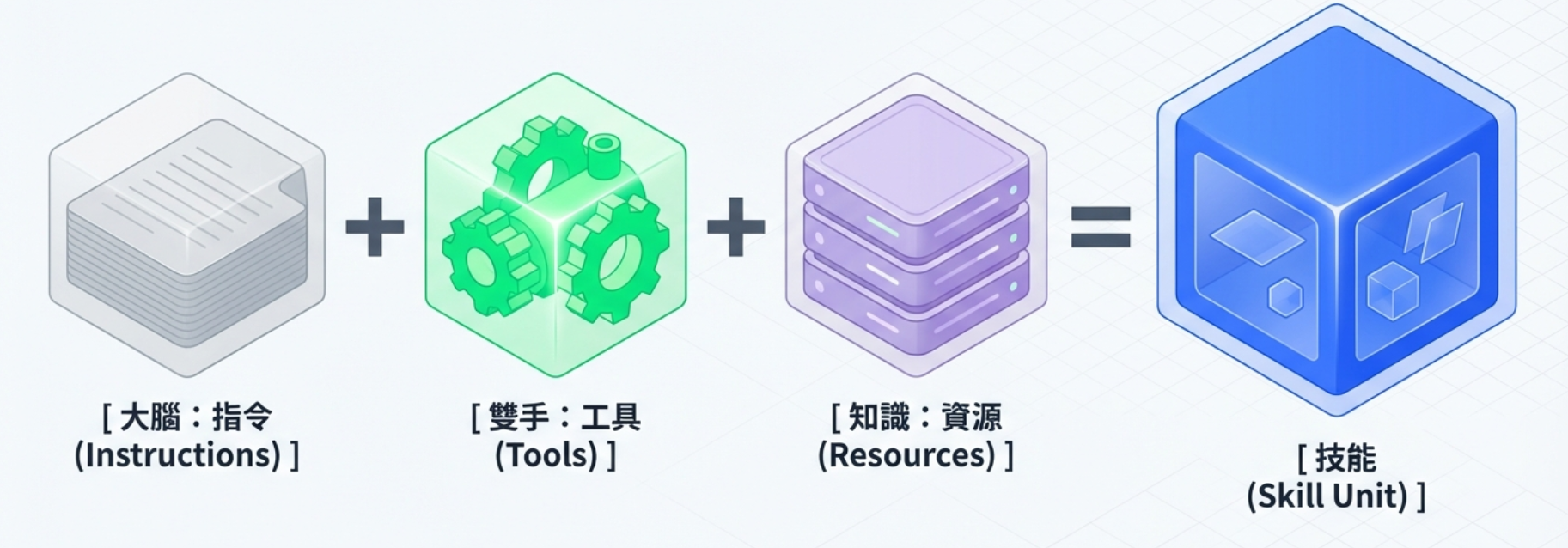
Skill = Instructions + Tools + Resources
***
## How Skills Work
### Workflow
```
User asks a question
│
▼
Agent receives the message (with a list of available skills: names + when to use them)
│
▼
LLM analyzes the intent and checks when each skill should be used
│
├─ Skill matches → Call skill_expand_tool
│ │
│ ▼
│ Retrieve the full skill instructions
│ + Names of additional tools (already attached with the skill)
│ + Resource file locations (when Code Interpreter is enabled)
│ │
│ ▼
│ LLM follows the instructions step by step and calls additional tools
│ │
│ ▼
│ LLM generates a response in the specified format
│
└─ No match → Respond as a regular conversation
```
### 1. Skill List
After skills are bound to an Agent, the model initially sees only each skill's name and when to use it: the `when_to_use` field in `SKILL.md`, or `description` if that field is not set. The full instructions are not loaded into the context in advance.
### 2. Skill Expansion
When the model determines that a skill should handle a question, it calls `skill_expand_tool`:
* **Input**: The skill name (`skill_name`, case-insensitive)
* **Output**: JSON containing the full skill instructions (`instructions`), when to use the skill, additional tool names (`attached_tools`), and the resource file list and directory (`resource_files`, `resource_directory`)
```json
{
"name": "skill_expand_tool",
"arguments": {
"skill_name": "Leave Days Calculation"
}
}
```
### 3. Additional Tools and Resource Files
* **Additional tools**: API tools and MCP tools bound to the skill are attached along with the skill at the start of a conversation. Once the model expands the skill, it can call these tools directly without loading them separately.
* **Resource files**: When Code Interpreter is enabled for the Agent, expanding a skill loads its resource files into the sandbox directory `/workspace/skills//`, where the model can read them programmatically. Without Code Interpreter, the model receives only the instructions.
***
## SKILL.md Specification
The core skill definition file, `SKILL.md`, uses YAML Frontmatter followed by Markdown content:
```markdown
---
name: Skill name
description: Skill description (determines when the AI triggers this skill)
---
# Skill Title
## Trigger Conditions
Trigger when the user asks about XXX.
## Execution Steps
### Step 1: Confirm Information
Guide the user to provide the required information...
### Step 2: Search for Information
Use retrieve_text_nodes to search the knowledge base...
### Step 3: Generate a Response
Respond in the following format:
- ① Applicable regulations
- ② Calculation results
- ③ Reference examples
```
### Frontmatter Fields
| Field | Required | Description |
| ------------- | -------- | ---------------------------------------------------------------------------------------------------------------- |
| `name` | Yes | Skill name; must be unique within the organization |
| `description` | Yes | Skill description; when `when_to_use` is not set, the LLM uses this field to determine when to trigger the skill |
| `when_to_use` | No | When to use the skill; the LLM prioritizes this field when determining whether to trigger the skill |
### Recommendations for Writing Instructions
1. **Define clear trigger conditions**: Specify when the skill applies and when it does not in its description and instructions.
2. **Structure the steps**: Use numbered steps (Step 1, Step 2...) so the LLM can follow them in order.
3. **Provide tool usage guidance**: Clearly specify the tools to use and the search strategy in each step.
4. **Define the response format**: Use templates or tables to keep responses consistent.
5. **Add error prevention checks**: Include a checklist at the end of the instructions for the LLM to verify its work.
***
## Skill Package
### File Structure
An uploaded `.skill` or `.zip` file should have the following structure:
```
my-skill.skill (ZIP format)
├── SKILL.md # Required: skill definition
├── reference.pdf # Optional: reference material
├── template.xlsx # Optional: template file
└── examples/ # Optional: examples directory
└── case1.json
```
### Security Validation
The system performs the following security checks when parsing a skill package:
* **Compression ratio check**: A maximum ratio of 100:1 to prevent ZIP bomb attacks
* **Path traversal protection**: Blocks path injection such as `../`
* **File size limit**: Based on the organization's upload limit (100 MB by default)
* **SKILL.md validation**: The file must exist and contain valid `name` and `description` fields
***
## API Endpoints
### Skill CRUD
| Method | Endpoint | Description |
| -------- | ---------------------- | ---------------------------------------------------------------- |
| `GET` | `/api/v1/skills/` | List skills in the organization (supports pagination and search) |
| `POST` | `/api/v1/skills/` | Create a skill manually |
| `GET` | `/api/v1/skills/{id}/` | Retrieve skill details |
| `PATCH` | `/api/v1/skills/{id}/` | Update a skill |
| `DELETE` | `/api/v1/skills/{id}/` | Delete a skill (including S3 cleanup) |
### Skill Package Operations
| Method | Endpoint | Description |
| ------ | ---------------------------------------- | ------------------------------------------------- |
| `POST` | `/api/v1/skills/upload/` | Upload a `.skill` / `.zip` file to create a skill |
| `POST` | `/api/v1/skills/{id}/reupload/` | Reupload to replace a skill package |
| `GET` | `/api/v1/skills/{id}/export/` | Export a skill as a `.skill` file |
| `GET` | `/api/v1/skills/{id}/package-structure/` | View the skill package file structure |
### Resource Management (Nested Routes)
| Method | Endpoint | Description |
| -------- | ----------------------------------------------- | ------------------------- |
| `GET` | `/api/v1/skills/{id}/resources/` | List skill resource files |
| `POST` | `/api/v1/skills/{id}/resources/` | Upload a resource file |
| `DELETE` | `/api/v1/skills/{id}/resources/{rid}/` | Delete a resource file |
| `GET` | `/api/v1/skills/{id}/resources/{rid}/download/` | Download a resource file |
### Manual Creation Request Fields
`POST /api/v1/skills/` creates a skill using JSON (`Authorization: Api-Key `, `Content-Type: application/json`). Field names accept both camelCase and snake\_case; responses always use camelCase:
| Field | Required | Description |
| ----------------- | ------------------- | ------------------------------------------------------------------------------------------------------------------------------------------------------------------ |
| `name` | Yes | Skill name; must be unique within the organization and contain only characters valid for folder names |
| `description` | Yes | Skill description; when `whenToUse` is not set, the model uses it to determine when to trigger the skill |
| `whenToUse` | No | When to use the skill; the model prioritizes this field when determining whether to trigger the skill |
| `instructions` | Yes | Contents of `SKILL.md` (Markdown) |
| `attachedToolIds` | No | Array of IDs for tools to attach; only enabled tools are accepted. This field is not returned in responses; tool summaries are returned in `attachedTools` instead |
| `groups` | Depends on identity | `[{"id": ""}]`; the organization owner may omit this field. Other members must specify at least one role they belong to, or the API returns `400` |
| `files` | No | Resource files included with the skill; each item is `{"path": "scripts/run.py", "content": "…", "contentEncoding": "text" or "base64"}` |
A successful request returns `201` with the skill object (including `id`, `createdAt`, and `resources`). Duplicate names, invalid tool IDs, or invalid roles return `400`, with field errors or `{"detail": "…"}`. Use `PATCH /api/v1/skills/{id}/` to update a skill with the same fields (except `files`). Changing any of `name`, `description`, `whenToUse`, or `instructions` regenerates `SKILL.md`.
### Skill Creation Examples
**Manual creation:**
```json
POST /api/v1/skills/
{
"name": "Return Processing",
"description": "Handle customer returns and exchanges: look up orders, confirm return eligibility, and create return requests.",
"whenToUse": "Trigger when a customer mentions a return, exchange, or refund",
"instructions": "# Return Processing\n\n## Step 1: Confirm Information\n...",
"attachedToolIds": [
"uuid-of-order-query-tool",
"uuid-of-return-api-tool"
]
}
```
**Skill package upload:**
```bash
curl -X POST /api/v1/skills/upload/ \
-F "file=@my-skill.skill" \
-F "attached_tool_ids=[\"uuid-1\",\"uuid-2\"]"
```
***
## Binding Skills to Agents
Skills and Agents have a many-to-many relationship through the `ChatbotSkill` intermediary model:
* An Agent can have multiple skills bound to it.
* A skill can be used by multiple Agents.
* Binding and unbinding operations are recorded in the `ChatbotSkillEvent` history table.
```
Agent A ──┬── Skill: Return Processing
├── Skill: Product Inquiries
└── Skill: Email Sending
Agent B ──┬── Skill: Product Inquiries ← Shared
└── Skill: Meeting Lookup
```
***
## Design Features and Limitations
### Managing Instructions and Tools Separately
A skill stores instructions, when to use it, and resource files; additional tools are references to existing tools in the organization. Changing skill instructions does not change tool settings. Changing a tool itself (its URL, headers, and so on) affects all skills that attach it and all Agents bound to those skills.
### On-Demand Expansion
The full skill instructions enter the context only when the model calls `skill_expand_tool`. Before expansion, a skill takes up only the space for its name and when to use it; see [Skill List](#skill-list). Whether a skill is used therefore depends on whether the model can infer its applicability from the usage conditions. Vague conditions may prevent a skill from being expanded. Include common phrases and situations where the skill does not apply.
### Export and Cross-Organization Import
* An exported `.skill` file contains `SKILL.md` and all resource files. For manually created skills, the generated `SKILL.md` also includes when to use the skill and the names of additional tools.
* When uploaded to another organization, the system rebinds tools by name to tools in that organization. Tools without a match (including MCP tools without a tool name) are listed in the upload results and must be bound manually.
* Tools themselves and their credentials are not exported with the skill package.
### Reupload
Skills created by upload can be reuploaded. The new package replaces the skill's name, description, instructions, and all resource files; old resource files are deleted. The platform does not retain previous skill packages. Keep a copy of the previous `.skill` file yourself if you need to restore it. Manually created skills cannot be reuploaded.
### Permissions
Access to the skills page is controlled by “Skill Permissions” (`chatbot_skill_access`). Skills created by an organization can be assigned to roles, with separate read, edit, and delete permissions for each role–skill pair. Roles also have an “Allow Skill Creation” toggle. For configuration steps, see [Control Skill Visibility and Permissions by Role](https://docs.maiagent.ai/build/skills/skills-management#skill-role-visibility) in the user guide.
***
## See the User Guide for Instructions
* [Skills](https://docs.maiagent.ai/build/skills): Concepts and use cases
* [Skill Management](https://docs.maiagent.ai/build/skills/skills-management): Creation, upload, attaching tools, export, and binding to Agents
---
# Agent Instructions
This documentation is published with GitBook. GitBook is the documentation platform designed so that both humans and AI agents can read, navigate, and reason over technical content effectively. Learn more at gitbook.com.
## Querying This Documentation
If you need additional information that is not directly available in this page, you can query the documentation by asking a question.
Perform an HTTP GET request on the following URL with the `ask` and `goal` query parameters:
```
GET https://docs.maiagent.ai/tech/en/advanced-genai-tech/skill.md?ask=&goal=
```
`ask` is the immediate question: it should be specific, self-contained, and written in natural language.
`goal` is what the user is ultimately trying to achieve, the reason they need the answer. Sharing it helps GitBook give you a better, more relevant answer. A goal is most helpful when it describes the outcome the user wants rather than restating the question. For example, with `ask=how do I create an API token`, a goal like `automate deployments from our CI pipeline` lets GitBook tailor the answer to that use case.
The response will contain a direct answer to the question and relevant excerpts and sources from the documentation.
Use this mechanism when the answer is not explicitly present in the current page, you need clarification or additional context, or you want to retrieve related documentation sections.