> For the complete documentation index, see [llms.txt](https://docs.maiagent.ai/llms.txt). Markdown versions of documentation pages are available by appending `.md` to page URLs; this page is available as [Markdown](https://docs.maiagent.ai/tech/en/advanced-genai-tech/function-calling.md).
# Function Calling
The concept of Function Calling (tool calling), how MaiAgent Agents receive tool definitions, how the platform executes tools and returns results to the model, and limits on iterations, timeouts, and
## What Is Function Calling?
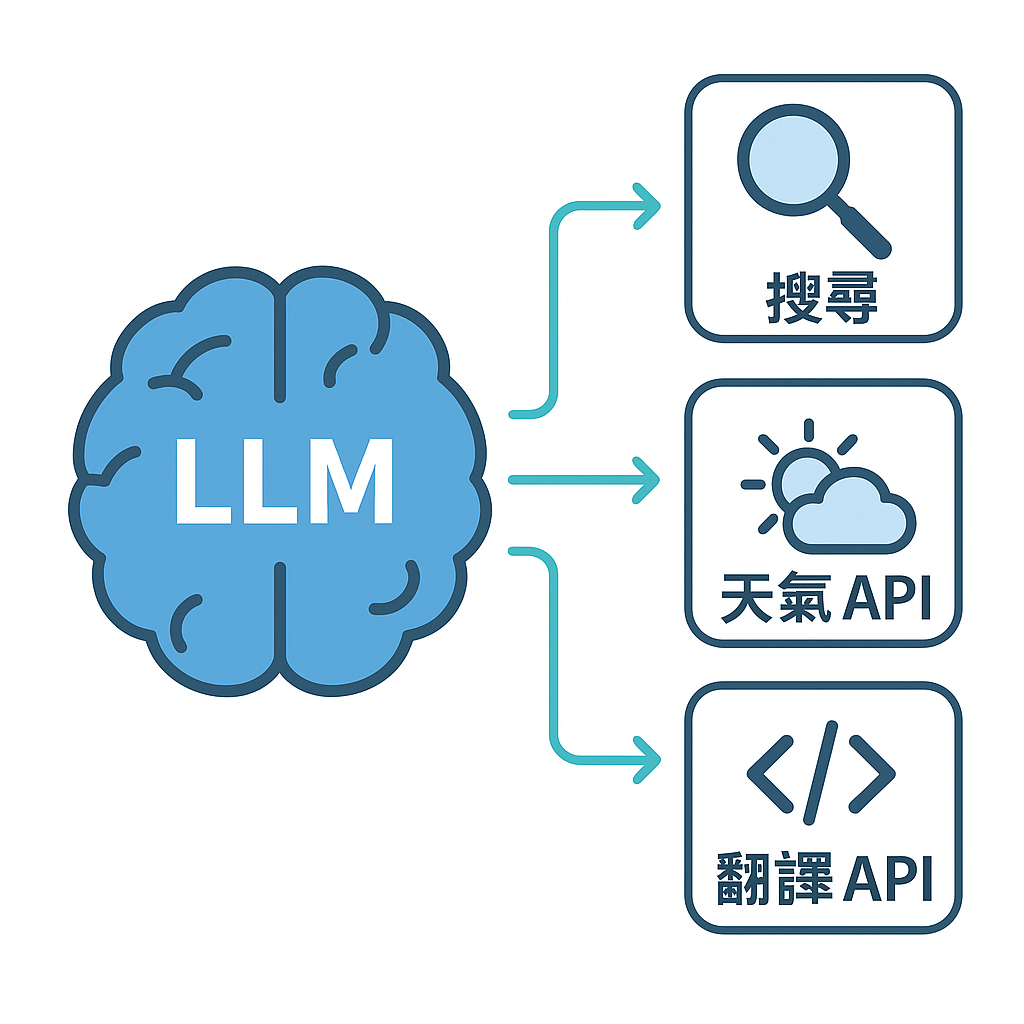
Function Calling (also known as tool calling) means that a large language model (LLM), while processing a request, determines that it needs an external program or API (collectively referred to below as “tools”) and outputs the tool name and arguments in a structured format, usually JSON.
The LLM does not execute tools itself. It only decides which tool to call and which arguments to pass. The calling application executes the tool and returns the result to the LLM, which then answers based on the result or decides to call another tool.
The LLM selects a tool to call based on the user's needs (illustration)
## How Function Calling Works
Function Calling generally follows a loop:
1. **Provide tool definitions**: The calling application sends each tool's name, purpose, and parameter structure (JSON Schema) to the LLM along with the conversation.
2. **The model decides to call a tool**: When the LLM determines that a tool is needed, it outputs the tool name and JSON arguments instead of answering directly.
3. **Execute the tool**: The calling application executes the corresponding program using the name and arguments, such as querying a database or calling a third-party API.
4. **Return the result**: The calling application adds the result to the conversation and sends it back to the LLM.
5. **Answer or continue**: The LLM produces an answer based on the result, or determines that more information is needed and calls another tool.
Whether the model calls a tool and which arguments it supplies largely depend on how clearly the tool's purpose and parameters are described.
### Common Uses
| Use | Example |
| ------------------------------------------------ | ----------------------------------------------------------------------------------------------- |
| Retrieve real-time or internal data | Check order status, inventory, exchange rates, or records in internal company systems |
| Perform actions | Create tickets, make reservations, or send notifications |
| Multi-step tasks | Look up customer information, query contracts based on the results, and then compile a response |
| Convert natural language into structured queries | Text to SQL; see [Text to SQL](/tech/en/advanced-genai-tech/text-to-sql.md) |
***
## How It Works in MaiAgent
### Prerequisites
* The Agent's response mode must be Agent mode. Other response modes, such as RAG Q\&A, do not call tools.
* The admin console only offers Agent mode for models that support tool calling; the organization plan may also restrict the available response modes.
### Which Tools Can the Model Call?
| Source | Description | Specification |
| ----------------------- | ------------------------------------------------------------------------------------------------------------------- | ----------------------------------------------------------------------------------------------------------------------------------------------------- |
| API tools | Each tool corresponds to an HTTP endpoint and method; the platform sends the request on its behalf | [API Tool Engineering Guide](/tech/en/api-integration/api-tool-engineering-guide.md) |
| MCP tools | Each tool corresponds to an MCP server; all “allowed tools” on that server become callable by the model | [Self-Hosted MCP Server Integration Specification](/tech/en/mcp/self-hosted-mcp-server.md), [Remote MCP Service Overview](/tech/en/mcp/remote-mcp.md) |
| Built-in platform tools | Examples include knowledge base retrieval, Code Interpreter, and Browser Tool, enabled through the Agent's settings | See the user manual |
| Skills | Once a skill is bound, the model uses `skill_expand_tool` to expand its instructions and additional tools | [Skill Module](/tech/en/advanced-genai-tech/skill.md) |
An Agent can only call tools bound to it. When creating a tool in the admin console, the available types are API tools and MCP tools.
### How Tool Definitions Reach the Model
* **Name**: Tool names are normalized to alphanumeric characters and underscores, with a maximum of 64 characters. See [API Tool Engineering Guide: Tool Definition Mapping](/tech/en/api-integration/api-tool-engineering-guide.md#tool-definition) for the rules.
* **Purpose**: For API tools, the prompt is used if provided; otherwise, the description is used. For MCP tools, the `description` returned by the server's `tools/list` is used.
* **Parameter structure**: API tools use Parameter Structure (JSON Schema); MCP tools use the `inputSchema` returned by the server.
* **Tool search**: When Enable Tool Search is enabled for the Agent (enabled by default), the full definitions of most tools are not sent to the model initially. The model first sees the available tool names in the description of `tool_searching_tool`, then searches by name to load a definition when it needs to call a tool. When many tools are bound, this reduces the tool definitions sent to the model on each request.
### Execution and Results
```mermaid
sequenceDiagram
participant U as User
participant A as Agent (LLM)
participant P as MaiAgent Platform
participant T as Tool (API / MCP Server / Built-in Feature)
U->>A: Ask a question
A->>P: Tool call (name + JSON arguments)
P->>P: Validate arguments against the parameter structure and check Credits
P->>T: Execute tool
T-->>P: Result
P->>P: Truncate long results and write tool execution record
P-->>A: Tool result
A-->>U: Answer (or call another tool)
```
* **Argument validation**: Arguments supplied by the model are checked against the parameter structure. If arguments are invalid or an error occurs during execution, the error is returned to the model as the tool result. The model can correct the arguments and retry or explain the error to the user without interrupting the entire response.
* **Multiple tools**: When the model requests multiple tools in the same step, the platform executes them concurrently.
* **Result length**: If a tool result exceeds a certain proportion of the model's context window (the platform default is 0.8), the beginning and end are retained and the middle is omitted. The Agent can also enable Tool Result Truncation to truncate oversized results by a character limit (8000 by default).
* **Repeated calls**: Within the same response, if the same tool is called again with exactly the same arguments and returns the same result, the platform does not return that result again. Instead, it returns a message telling the model that retrying will not yield different data.
* **Execution records**: Every call creates a tool execution record containing input arguments, output or errors, status, and duration.
* **Credits**: API tools, MCP tools, and some built-in tools deduct Credits on each call. If the balance is insufficient, the call is not sent, and the model receives an explanation of the insufficient balance.
### Execution Limits
| Setting | Range and Default | When Reached |
| ------------------------------------------------------------ | -------------------------------------------------------------------------- | --------------------------------------------------------------------- |
| Maximum Iterations | 1–100, default 20. Counts rounds of tool calls; tool searches are excluded | The Agent stops calling tools and produces a summary response |
| Execution Timeout (Seconds) | 30–1200, default 600 | The workflow terminates and displays a timeout message (customizable) |
Whichever limit is reached first takes effect. Increase the timeout along with the iteration limit; otherwise, execution may time out first.
***
## Limitations and Considerations
* **The model may skip tools or call the wrong tool**: The platform does not guarantee that the model will call the right tool at the right time. If the model does not call a tool, no tool execution record is created. In this case, adjust the tool and parameter descriptions rather than the tool itself.
* **Tool descriptions determine quality**: Include a description and format example for every parameter. Clearly describe the tool's purpose, when to use it, and what it returns.
* **Write operations must tolerate repeated requests**: API tools automatically retry after timeouts and some errors, and the model may also repeat calls. Implement idempotency in the tool for write operations such as placing orders or creating tickets. See [API Tool Engineering Guide: Timeouts, Retries, and TLS](/tech/en/api-integration/api-tool-engineering-guide.md#timeout-retry-tls) for details.
* **Do not put keys in the parameter structure**: The model can see the parameter structure and argument values. Put keys in the tool's headers or query parameters, or use contact credentials.
* **Tool-calling capabilities generally vary by model**: Switching models while using the same tools may change when tools are called and the quality of the arguments. Test again after switching models.
***
## See the User Manual for Instructions
* [Tools Overview](https://docs.maiagent.ai/build/tools/tool_description)
* [Create an API Tool](https://docs.maiagent.ai/build/tools/setup_api_tool)
* [Create an MCP Tool](https://docs.maiagent.ai/build/tools/mcp-setup)
* [Configure Tools for an Agent](https://docs.maiagent.ai/build/tools/configure_tools)
* [Response Length and Agent Execution Limits](https://docs.maiagent.ai/build/agent/custom-max-tokens)
* [Tool Execution Records](https://docs.maiagent.ai/build/agent-ops/tool-execution-records)
---
# Agent Instructions
This documentation is published with GitBook. GitBook is the documentation platform designed so that both humans and AI agents can read, navigate, and reason over technical content effectively. Learn more at gitbook.com.
## Querying This Documentation
If you need additional information that is not directly available in this page, you can query the documentation by asking a question.
Perform an HTTP GET request on the following URL with the `ask` and `goal` query parameters:
```
GET https://docs.maiagent.ai/tech/en/advanced-genai-tech/function-calling.md?ask=&goal=
```
`ask` is the immediate question: it should be specific, self-contained, and written in natural language.
`goal` is what the user is ultimately trying to achieve, the reason they need the answer. Sharing it helps GitBook give you a better, more relevant answer. A goal is most helpful when it describes the outcome the user wants rather than restating the question. For example, with `ask=how do I create an API token`, a goal like `automate deployments from our CI pipeline` lets GitBook tailor the answer to that use case.
The response will contain a direct answer to the question and relevant excerpts and sources from the documentation.
Use this mechanism when the answer is not explicitly present in the current page, you need clarification or additional context, or you want to retrieve related documentation sections.