> For the complete documentation index, see [llms.txt](https://docs.maiagent.ai/llms.txt). Markdown versions of documentation pages are available by appending `.md` to page URLs; this page is available as [Markdown](https://docs.maiagent.ai/tech/authorization-integration/zhi-shi-guan-li-quan-xian-query-metadata-cha-xun-yuan-zi-liao-zong-lan/graphical-interface.md).

# 開始建構—使用「查詢構建器」

用後台的「查詢構建器」以勾選方式設定 Query Metadata，涵蓋聯絡人層級與內部問答的逐訊息設定

查詢構建器是 Query Metadata 的圖形化設定方式：用勾選代替 JSON，適合後台手動管理。兩個入口對應[總覽頁](/tech/authorization-integration/zhi-shi-guan-li-quan-xian-query-metadata-cha-xun-yuan-zi-liao-zong-lan.md#levels)的兩個層級：

* **聯絡人編輯** → 設定該使用者所有對話的知識範圍（聯絡人層級）
* **內部問答** → 每則訊息發送前選擇知識範圍（訊息層級）

{% hint style="info" %}
需要巢狀標籤條件、或由 API／嵌入程式碼設定時，請改用 [JSON 格式](/tech/authorization-integration/zhi-shi-guan-li-quan-xian-query-metadata-cha-xun-yuan-zi-liao-zong-lan/json-interfaces.md)。兩種方式產生的設定等價。
{% endhint %}

## 聯絡人（Contact）層級設定 <a href="#contact-level" id="contact-level"></a>

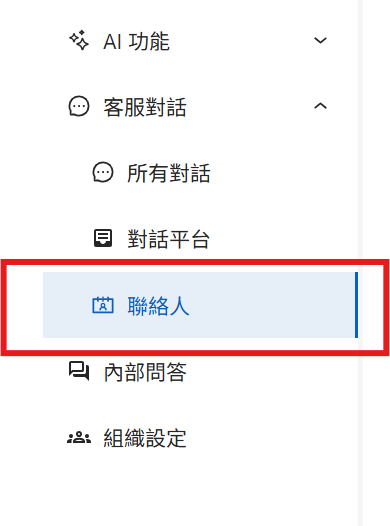
### 步驟 1：進入後台的聯絡人區域 <a href="#step-1-contacts" id="step-1-contacts"></a>

<figure><img src="https://527168072-files.gitbook.io/~/files/v0/b/gitbook-x-prod.appspot.com/o/spaces%2F38pkhhqHl1oA6yyE9R2n%2Fuploads%2Fgit-blob-e1193c589be2e94dd3b408588d7ea9a426bb3d2a%2F%E8%9E%A2%E5%B9%95%E6%93%B7%E5%8F%96%E7%95%AB%E9%9D%A2%202025-08-07%20165727.png?alt=media" alt=""><figcaption><p>聯絡人區域入口</p></figcaption></figure>

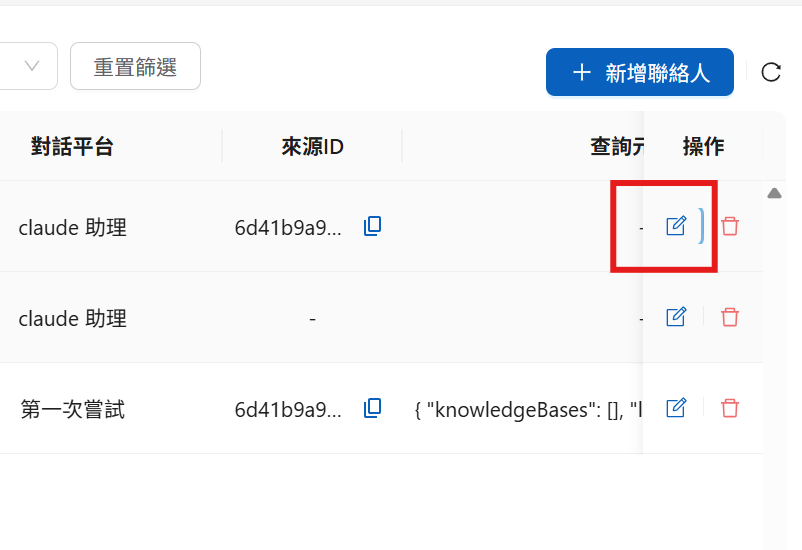
### 步驟 2：編輯聯絡人、開啟查詢構建器 <a href="#step-2-edit" id="step-2-edit"></a>

找到要設定的聯絡人，點擊<mark style="color:blue;">編輯</mark>：

<figure><img src="https://527168072-files.gitbook.io/~/files/v0/b/gitbook-x-prod.appspot.com/o/spaces%2F38pkhhqHl1oA6yyE9R2n%2Fuploads%2Fgit-blob-3e040c93c8149b98cec909c9f006f59876673de0%2F%E8%9E%A2%E5%B9%95%E6%93%B7%E5%8F%96%E7%95%AB%E9%9D%A2%202025-08-07%20165859.png?alt=media" alt=""><figcaption><p>聯絡人編輯入口</p></figcaption></figure>

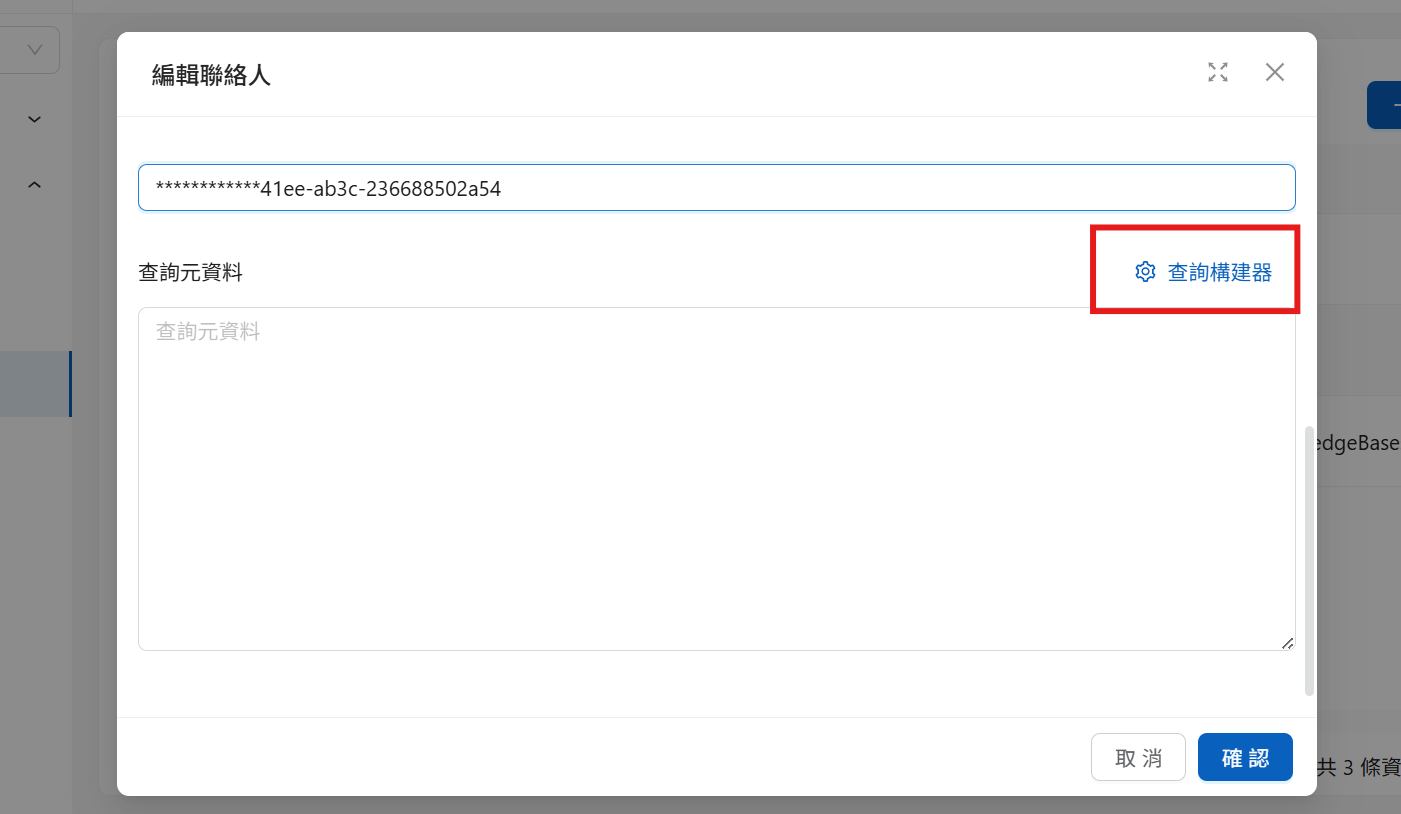
在編輯畫面點擊<mark style="color:blue;">查詢構建器</mark>進入圖形化介面：

<figure><img src="https://527168072-files.gitbook.io/~/files/v0/b/gitbook-x-prod.appspot.com/o/spaces%2F38pkhhqHl1oA6yyE9R2n%2Fuploads%2Fgit-blob-ce1f2353f60000f676e26df8cd028b2729a238e1%2Fquery%20metadata%20maker.png?alt=media" alt=""><figcaption><p>查詢構建器入口</p></figcaption></figure>

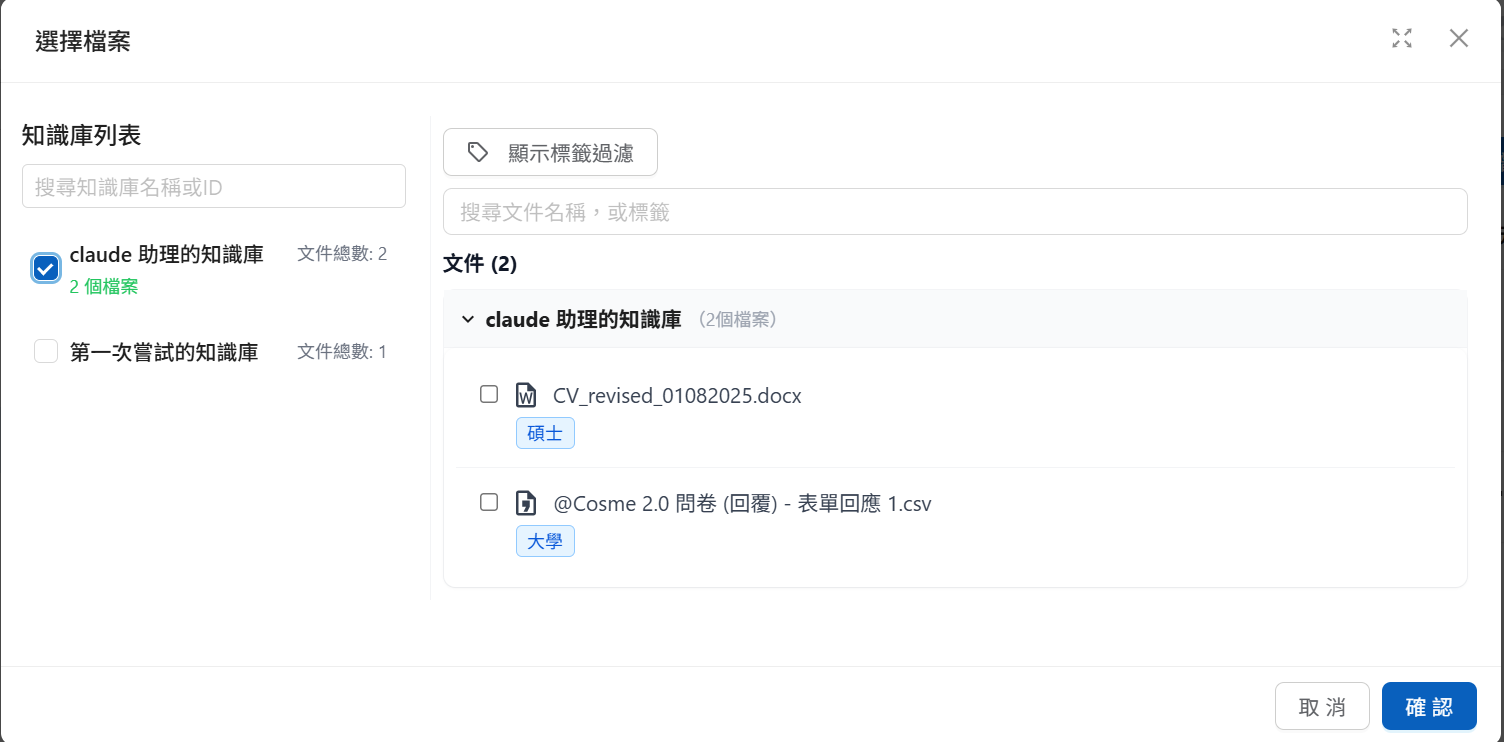
### 步驟 3：勾選要開放的範圍 <a href="#step-3-select" id="step-3-select"></a>

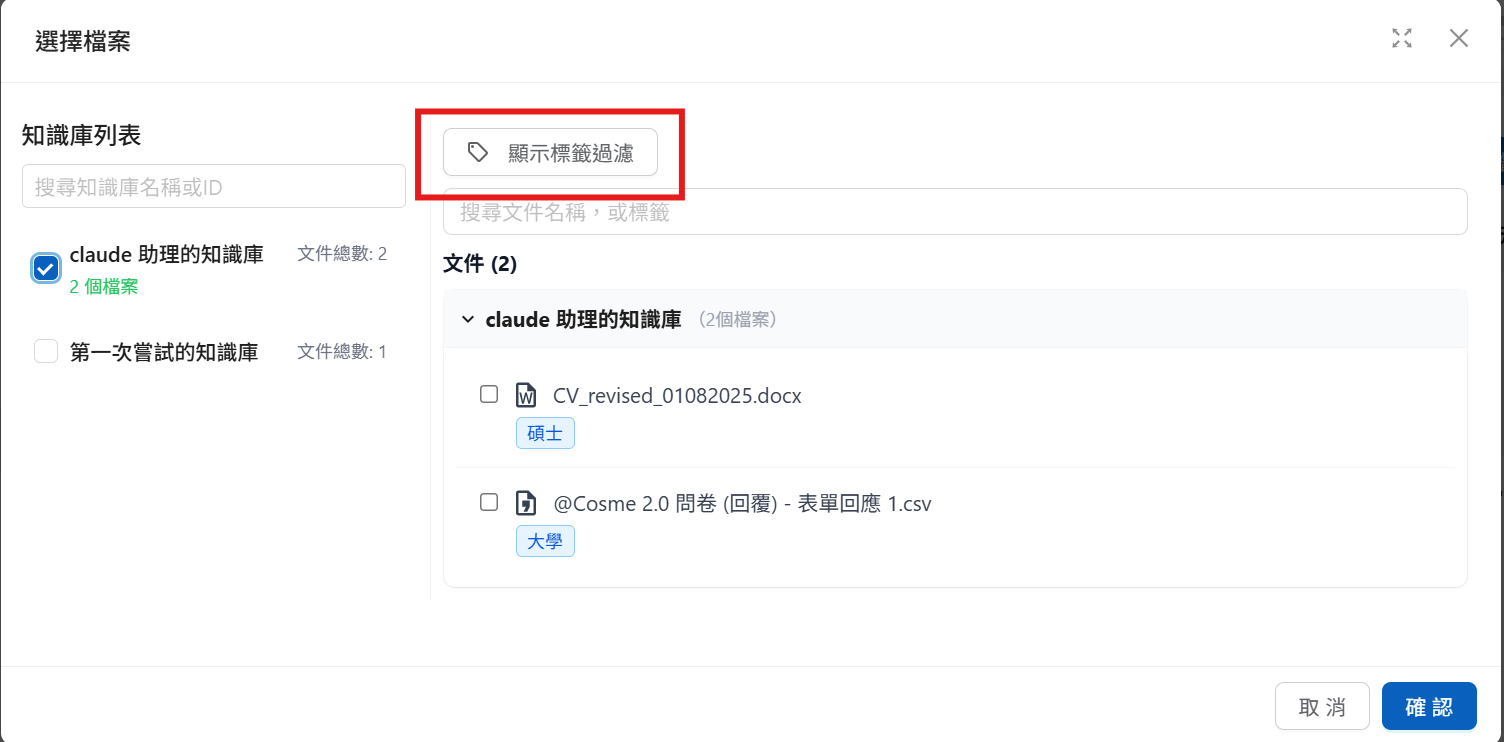
勾選要開放的知識庫；展開知識庫可只勾選其中部分文件：

<figure><img src="https://527168072-files.gitbook.io/~/files/v0/b/gitbook-x-prod.appspot.com/o/spaces%2F38pkhhqHl1oA6yyE9R2n%2Fuploads%2Fgit-blob-3cb875fe8a74fe9532e04d2d816b04dab3c3f3b3%2F%E8%9E%A2%E5%B9%95%E6%93%B7%E5%8F%96%E7%95%AB%E9%9D%A2%202025-08-07%20170306.png?alt=media" alt=""><figcaption><p>選擇知識庫與文件</p></figcaption></figure>

要依標籤過濾時，點擊<mark style="color:blue;">顯示標籤過濾</mark>展開標籤條件設定：

<figure><img src="https://527168072-files.gitbook.io/~/files/v0/b/gitbook-x-prod.appspot.com/o/spaces%2F38pkhhqHl1oA6yyE9R2n%2Fuploads%2Fgit-blob-4858e1ff92d8efc4cd28216d2ff05c207215aaca%2F%E8%9E%A2%E5%B9%95%E6%93%B7%E5%8F%96%E7%95%AB%E9%9D%A2%202025-08-07%20170306-1.png?alt=media" alt=""><figcaption><p>標籤過濾設定</p></figcaption></figure>

標籤條件以 `OR`（符合任一標籤）或 `AND`（須同時符合全部標籤）組合，在已勾選的知識庫範圍內再過濾文件——與 [JSON 格式的 `label_relations`](/tech/authorization-integration/zhi-shi-guan-li-quan-xian-query-metadata-cha-xun-yuan-zi-liao-zong-lan/json-interfaces.md#id-1labelrelations-luo-ji) 語意相同。

## 內部問答：逐訊息設定 <a href="#message-level" id="message-level"></a>

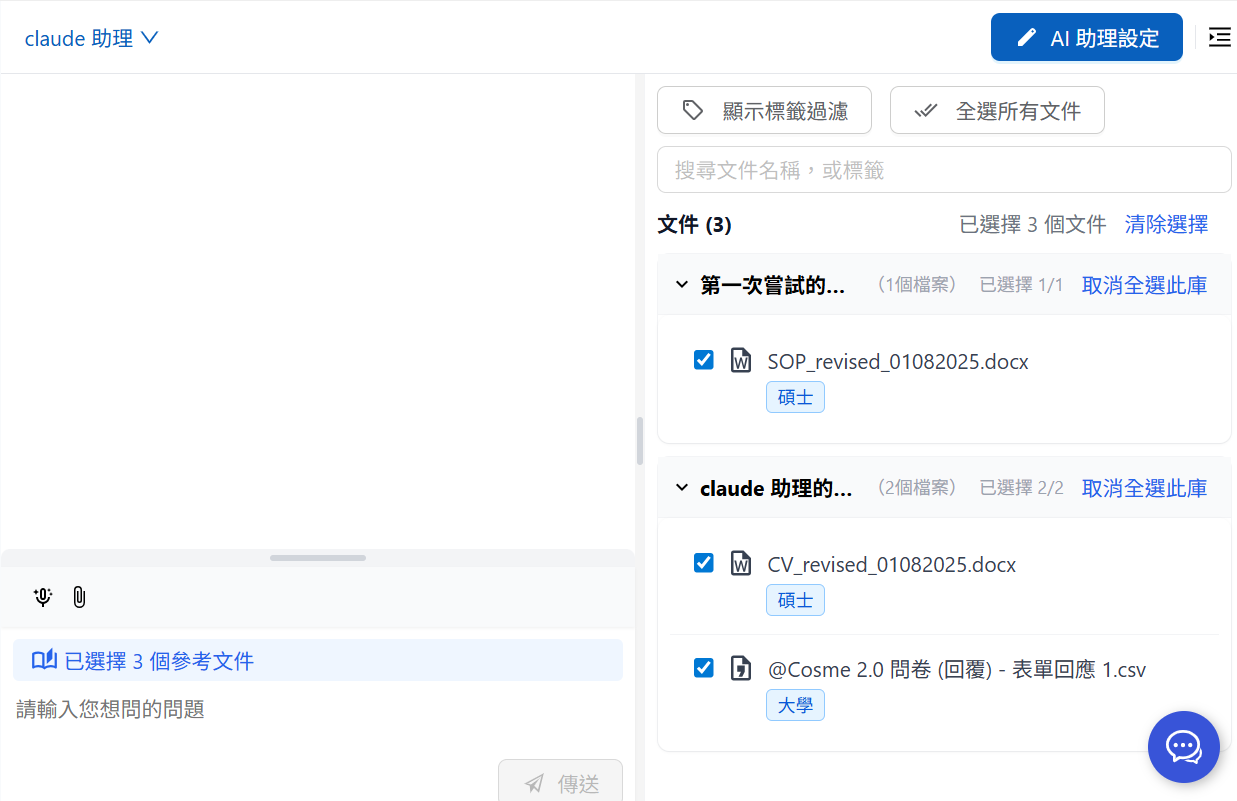
成員使用內部問答時，可在介面右側選單選擇該則訊息要參考的知識範圍（即訊息層級的 Query Metadata）：

<figure><img src="https://527168072-files.gitbook.io/~/files/v0/b/gitbook-x-prod.appspot.com/o/spaces%2F38pkhhqHl1oA6yyE9R2n%2Fuploads%2Fgit-blob-c197581d7292296d9555671138c8d7ed62ce5a70%2F%E8%9E%A2%E5%B9%95%E6%93%B7%E5%8F%96%E7%95%AB%E9%9D%A2%202025-08-08%20095028.png?alt=media" alt=""><figcaption><p>內部問答：選擇可用知識權限</p></figcaption></figure>

同樣可用<mark style="color:blue;">顯示標籤過濾</mark>設定標籤條件。

{% hint style="info" %}
每次發送訊息前都可以調整，只影響**該輪回答**能引用的內容——訊息層級的設定優先於聯絡人層級（見[解析順序](/tech/authorization-integration/zhi-shi-guan-li-quan-xian-query-metadata-cha-xun-yuan-zi-liao-zong-lan.md#resolution-order)）。
{% endhint %}

### 效果示範 <a href="#demo" id="demo"></a>

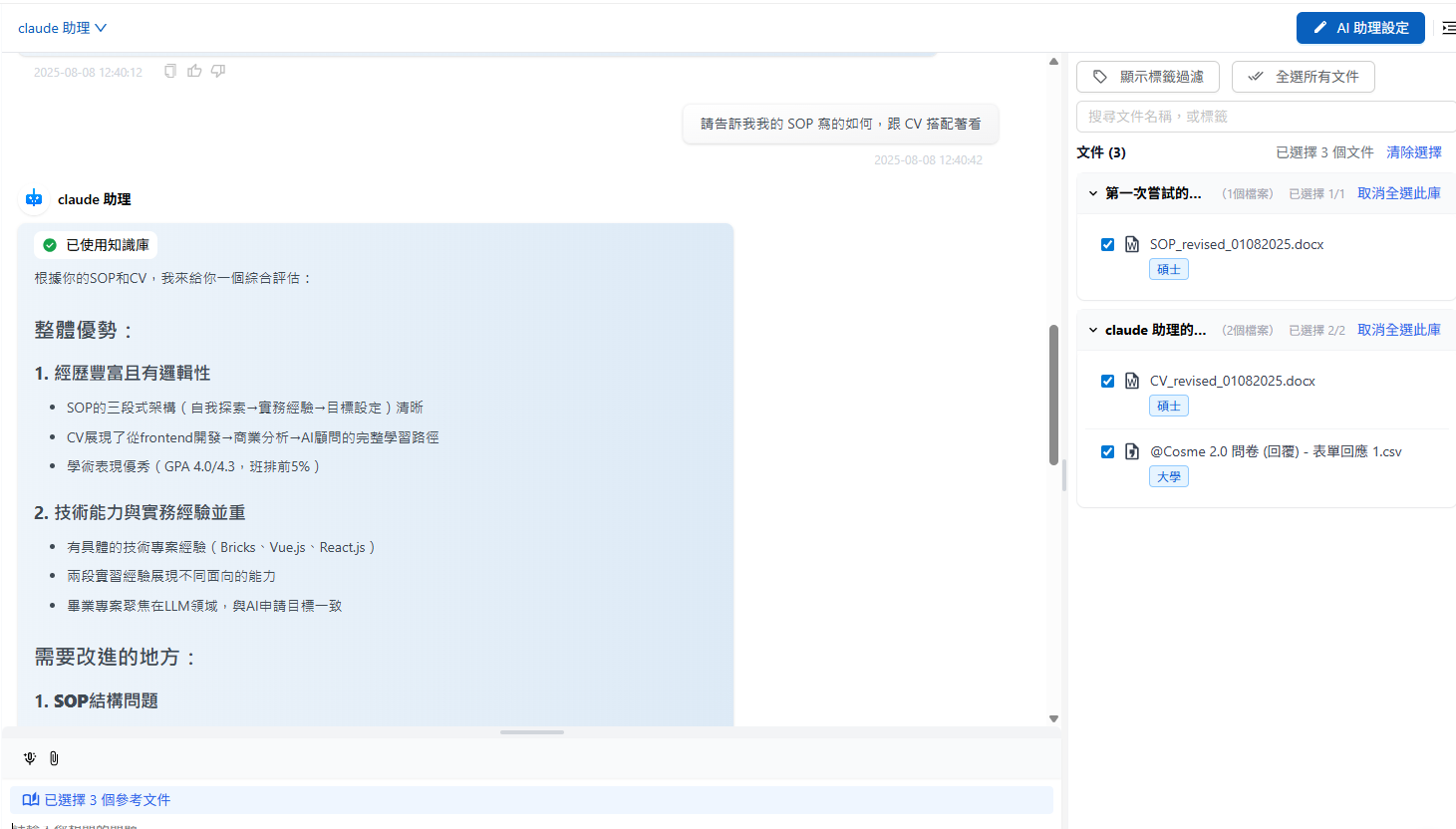
勾選 CV、SOP、問卷調查三個檔案時，AI 可引用三者：

<figure><img src="https://527168072-files.gitbook.io/~/files/v0/b/gitbook-x-prod.appspot.com/o/spaces%2F38pkhhqHl1oA6yyE9R2n%2Fuploads%2Fgit-blob-1fd810ec8e5c4b185673a93858d73a36bca5d085%2F%E8%9E%A2%E5%B9%95%E6%93%B7%E5%8F%96%E7%95%AB%E9%9D%A2%202025-08-08%20124143.png?alt=media" alt=""><figcaption><p>可用文件清單</p></figcaption></figure>

<figure><img src="https://527168072-files.gitbook.io/~/files/v0/b/gitbook-x-prod.appspot.com/o/spaces%2F38pkhhqHl1oA6yyE9R2n%2Fuploads%2Fgit-blob-e6b0091dcec82fe35f8d8f6f859ed8fd886249a0%2F%E8%9E%A2%E5%B9%95%E6%93%B7%E5%8F%96%E7%95%AB%E9%9D%A2%202025-08-08%20124344.png?alt=media" alt=""><figcaption><p>已選取文件狀態</p></figcaption></figure>

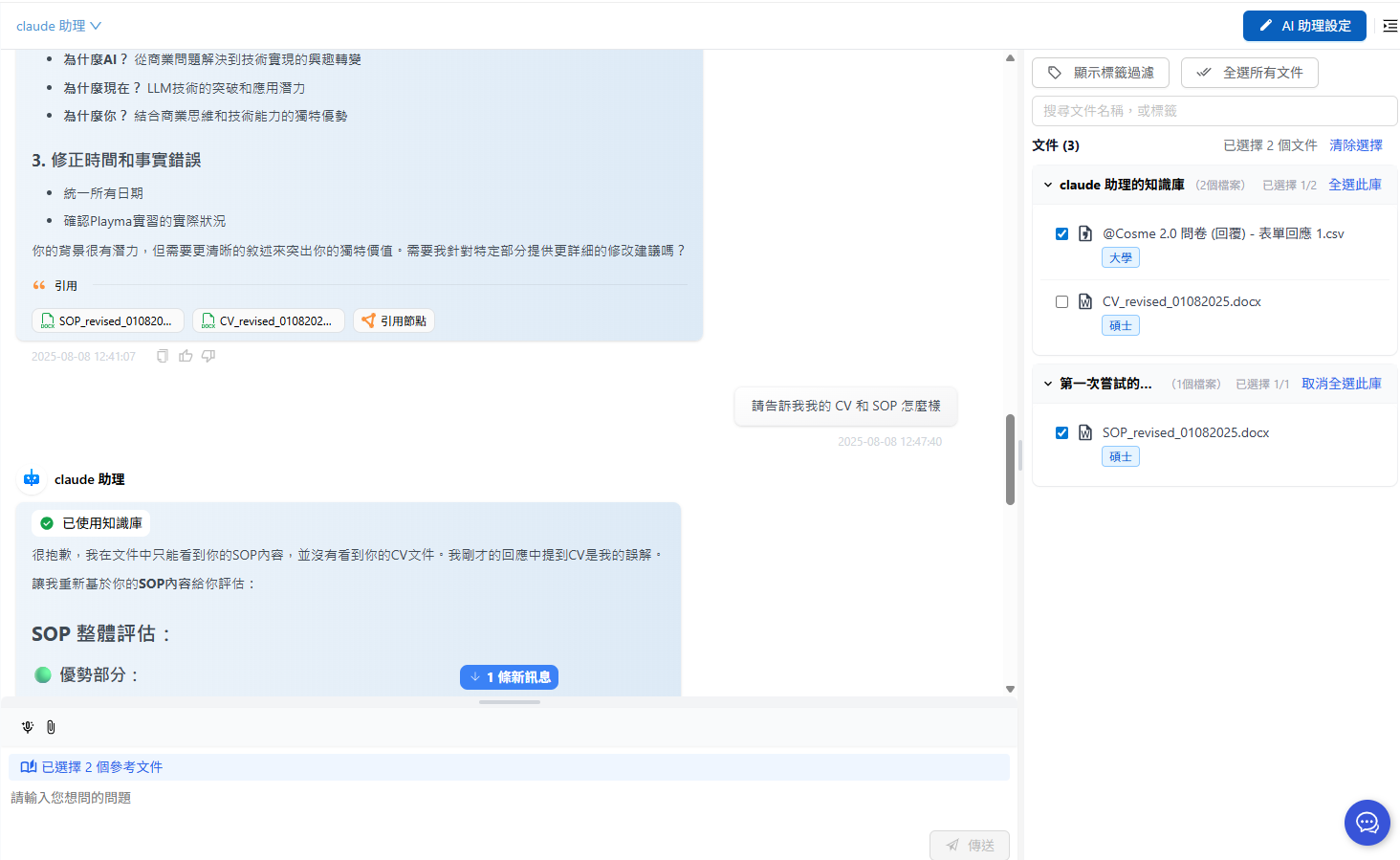
下一則訊息取消 CV 的勾選後再發送：

<figure><img src="https://527168072-files.gitbook.io/~/files/v0/b/gitbook-x-prod.appspot.com/o/spaces%2F38pkhhqHl1oA6yyE9R2n%2Fuploads%2Fgit-blob-9805fef0555d8b09f66eebd0114738a62852f580%2F%E8%9E%A2%E5%B9%95%E6%93%B7%E5%8F%96%E7%95%AB%E9%9D%A2%202025-08-08%20124830.png?alt=media" alt=""><figcaption><p>取消勾選文件示例</p></figcaption></figure>

AI 便無法使用 CV 檔案，引用列表也不再顯示 CV：

<figure><img src="https://527168072-files.gitbook.io/~/files/v0/b/gitbook-x-prod.appspot.com/o/spaces%2F38pkhhqHl1oA6yyE9R2n%2Fuploads%2Fgit-blob-18ee67d0a77a1ce864386d755225372b9f15fd63%2F%E8%9E%A2%E5%B9%95%E6%93%B7%E5%8F%96%E7%95%AB%E9%9D%A2%202025-08-08%20124958.png?alt=media" alt=""><figcaption><p>引用庫變化：移除 CV 後</p></figcaption></figure>


---

# Agent Instructions
This documentation is published with GitBook. GitBook is the documentation platform designed so that both humans and AI agents can read, navigate, and reason over technical content effectively. Learn more at gitbook.com.

## Querying This Documentation
If you need additional information that is not directly available in this page, you can query the documentation dynamically by asking a question.

Perform an HTTP GET request on the current page URL with the `ask` query parameter, and the optional `goal` query parameter:

```
GET https://docs.maiagent.ai/tech/authorization-integration/zhi-shi-guan-li-quan-xian-query-metadata-cha-xun-yuan-zi-liao-zong-lan/graphical-interface.md?ask=<question>&goal=<endgoal>
```

`ask` is the immediate question: it should be specific, self-contained, and written in natural language.
`goal` is optional and describes the broader end goal you are ultimately trying to accomplish on behalf of the user. GitBook uses it to tailor the answer towards what is most useful for that goal.

The response will contain a direct answer to the question and relevant excerpts and sources from the documentation.

Use this mechanism when the answer is not explicitly present in the current page, you need clarification or additional context, or you want to retrieve related documentation sections.