> For the complete documentation index, see [llms.txt](https://docs.maiagent.ai/llms.txt). Markdown versions of documentation pages are available by appending `.md` to page URLs; this page is available as [Markdown](https://docs.maiagent.ai/tech/api-integration/n8n.md).
# n8n 串接
n8n 串接 MaiAgent:用 n8n 工作流自動化工具呼叫多個 Agent(多 Agent 串接),含工作流範例、多輪對話進階應用、故障排除與完整 JSON。
本文件提供了如何使用 n8n 工作流自動化工具來串接 MaiAgent 的多個 Agent 的詳細說明。透過 n8n,您可以輕鬆建立工作流,達到多 Agent 串接的效果。
## 前置條件
1. 已註冊 n8n 帳戶
2. 有效的 MaiAgent API 金鑰
3. 建置完成 Agent,並取得 Agent ID
4. 基本的 API 和工作流程理解
## 基本概念
MaiAgent API 提供了與 Agent 進行對話的功能。我們將使用 n8n 來自動化這些流程,並串接多個 Agent。
## 工作流程範例
### 範例1:建立簡單的 Agent 串聯工作流
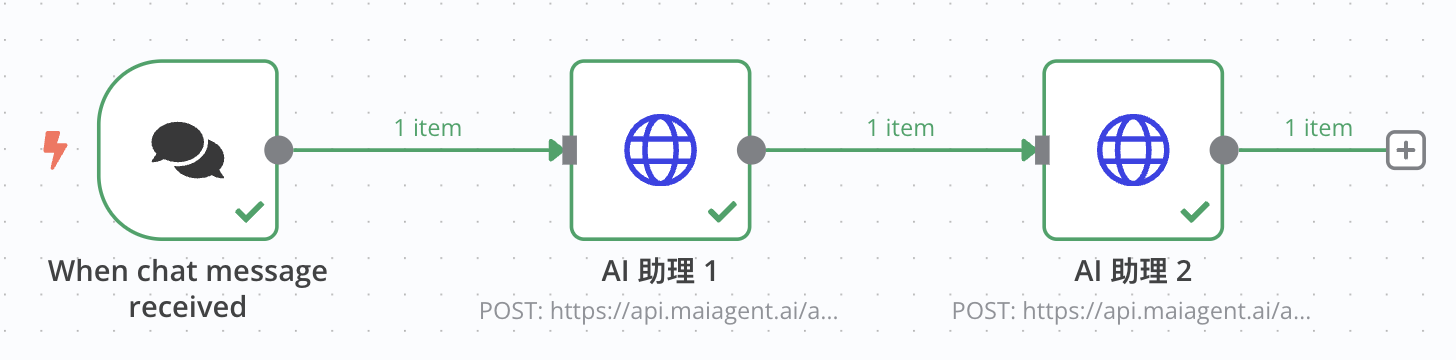
這個工作流將接收使用者的聊天訊息,然後依序透過兩個不同的 Agent 處理,形成一個串聯處理的流程。
### 步驟1:設置聊天觸發器節點
1. 在 n8n 工作流中新增一個「When chat message received」節點
2. 這將作為工作流的起點,當使用者發送訊息時觸發
### 步驟2:設置第一個 HTTP 請求節點
1. 新增一個「HTTP Request」節點,連接到「When chat message received」節點
2. 設定以下設置:
* 方法:POST
* URL:`https://api.maiagent.ai/api/v1/chatbots/{id}/completions/`
* id:Agent ID
* 認證:Headers
* Headers:新增 `Authorization` 頭,值為 `Api-Key YOUR_API_KEY`(請替換為您的實際 API 金鑰)
* 請求內容類型:JSON
* 請求內容:
```json
{
"conversation": "",
"message": {
"content": "{{ $json.chatInput }}",
"attachments": []
},
"is_streaming": false
}
```
### 步驟3:設置第二個 HTTP 請求節點
1. 新增另一個「HTTP Request」節點,連接到第一個 HTTP Request 節點
2. 設定以下設置:
* 方法:POST
* URL:`https://api.maiagent.ai/api/v1/chatbots/{id}/completions/`
* id:Agent ID
* 認證:Headers
* Headers:新增 `Authorization` 頭,值為 `Api-Key YOUR_API_KEY`
* 請求內容類型:JSON
* 請求內容:
```json
{
"conversation": "",
"message": {
"content": {{ JSON.stringify($json.content) }},
"attachments": []
},
"is_streaming": false
}
```
這個設置將第一個 Agent 的回應作為輸入傳遞給第二個 Agent,實現串聯處理。
## 串接應用場景
### 場景1:多專家意見聚合
透過不同專長 Agent 提供各自觀點,然後聚合成全面回應:
1. 讓法律 Agent 分析法律問題
2. 讓技術 Agent 分析技術可行性
3. 讓商業 Agent 分析商業影響
4. 最後聚合 Agent 提供綜合建議
### 場景2:翻譯改進流程
1. 初始 Agent 進行翻譯
2. 二次 Agent 檢查翻譯品質
3. 最終 Agent 潤飾並優化表達
### 場景3:內容生成與審查工作流
1. 創意 Agent 生成內容
2. 審查 Agent 檢查準確性和適當性
3. 編輯 Agent 進行潤飾和格式優化
## 進階應用:建立多輪對話工作流
### 範例2:使用對話 ID 維持多輪對話
### 步驟1:建立對話初始化節點
1. 新增一個 HTTP Request 節點進行初始對話
2. 設定與之前類似,但儲存對話 ID:
```jsx
// 儲存對話 ID 供後續使用
const conversationId = $json.conversationId;
$workflow.vars.conversationId = conversationId;
return {
json: {
...$json,
savedConversationId: conversationId
}
};
```
### 步驟2:設置後續對話節點
1. 新增新的 HTTP Request 節點,設定為使用已保存的對話 ID:
```json
{
"conversation": "{{$workflow.vars.conversationId}}",
"message": {
"content": "繼續上一個問題,請提供更多細節"
},
"is_streaming": false
}
```
## 故障排除
常見問題及解決方案:
1. **API 認證錯誤**:確保 API 金鑰格式正確,包括「Api-Key」前綴
2. **請求逾時**:對於複雜查詢,增加 HTTP 請求節點的逾時時間
3. **串流模式處理**:使用 `is_streaming: true` ,回覆模式會更改為串流模式
## 結論
透過 n8n,您可以輕鬆整合和自動化 MaiAgent 的多個 Agent,創建強大的 AI 工作流程,讓不同專長的 Agent 協作完成複雜任務。從簡單的對話到複雜的多 Agent 串聯處理,n8n 提供了靈活且強大的自動化能力。
## 附錄:完整工作流 JSON
以下是範例1的完整工作流 JSON 設定,您可以直接匯入到 n8n 中:
```json
{
"name": "My workflow",
"nodes": [
{
"parameters": {
"method": "POST",
"url": "https://api.maiagent.ai/api/v1/chatbots/{id}/completions/",
"sendHeaders": true,
"headerParameters": {
"parameters": [
{
"name": "Authorization",
"value": "Api-Key YOUR_API_KEY"
}
]
},
"sendBody": true,
"specifyBody": "json",
"jsonBody": "={\n \"conversation\": \"\",\n \"message\": {\n \"content\": \"{{ $json.chatInput }}\",\n \"attachments\": []\n },\n \"is_streaming\": false\n} ",
"options": {}
},
"type": "n8n-nodes-base.httpRequest",
"typeVersion": 4.2,
"position": [
-240,
-180
],
"id": "dfc1157d-7569-4caf-8b1d-256aa74515ac",
"name": "HTTP Request"
},
{
"parameters": {
"options": {}
},
"type": "@n8n/n8n-nodes-langchain.chatTrigger",
"typeVersion": 1.1,
"position": [
-500,
-180
],
"id": "82748324-6021-4660-98ef-481bdfc73569",
"name": "When chat message received",
"webhookId": "5f833c90-a7f9-4c66-8fff-cecc3568cd2a"
},
{
"parameters": {
"method": "POST",
"url": "https://api.maiagent.ai/api/v1/chatbots/{id}/completions/",
"sendHeaders": true,
"headerParameters": {
"parameters": [
{
"name": "Authorization",
"value": "Api-Key YOUR_API_KEY"
}
]
},
"sendBody": true,
"specifyBody": "json",
"jsonBody": "={\n \"conversation\": \"\",\n \"message\": {\n \"content\": {{ JSON.stringify($json.content) }},\n \"attachments\": []\n },\n \"is_streaming\": false\n} ",
"options": {}
},
"type": "n8n-nodes-base.httpRequest",
"typeVersion": 4.2,
"position": [
20,
-180
],
"id": "f0a80b1f-1bed-491b-bc5e-cddb87ccd2d5",
"name": "HTTP Request1"
}
],
"pinData": {},
"connections": {
"When chat message received": {
"main": [
[
{
"node": "HTTP Request",
"type": "main",
"index": 0
}
]
]
},
"HTTP Request": {
"main": [
[
{
"node": "HTTP Request1",
"type": "main",
"index": 0
}
]
]
},
"HTTP Request1": {
"main": [
[]
]
}
},
"active": false,
"settings": {
"executionOrder": "v1"
},
"versionId": "c914db70-985a-48d0-a1ca-47c2a0d4f244",
"meta": {
"instanceId": "2eb51fcaa84ba34149e7fc138f6cac3b20a0038764b284579d6ceaea90b669f8"
},
"id": "pvMcKA5hHmwAKuZT",
"tags": []
}
```
## 匯入結果
 ***
若有任何問題,請參考 [MaiAgent 的官方 API 文件](https://docs.maiagent.ai/api)或 [n8n 的官方文件](https://docs.n8n.io/)。
---
# Agent Instructions
This documentation is published with GitBook. GitBook is the documentation platform designed so that both humans and AI agents can read, navigate, and reason over technical content effectively. Learn more at gitbook.com.
## Querying This Documentation
If you need additional information that is not directly available in this page, you can query the documentation by asking a question.
Perform an HTTP GET request on the following URL with the `ask` and `goal` query parameters:
```
GET https://docs.maiagent.ai/tech/api-integration/n8n.md?ask=&goal=
```
`ask` is the immediate question: it should be specific, self-contained, and written in natural language.
`goal` is what the user is ultimately trying to achieve, the reason they need the answer. Sharing it helps GitBook give you a better, more relevant answer. A goal is most helpful when it describes the outcome the user wants rather than restating the question. For example, with `ask=how do I create an API token`, a goal like `automate deployments from our CI pipeline` lets GitBook tailor the answer to that use case.
The response will contain a direct answer to the question and relevant excerpts and sources from the documentation.
Use this mechanism when the answer is not explicitly present in the current page, you need clarification or additional context, or you want to retrieve related documentation sections.
***
若有任何問題,請參考 [MaiAgent 的官方 API 文件](https://docs.maiagent.ai/api)或 [n8n 的官方文件](https://docs.n8n.io/)。
---
# Agent Instructions
This documentation is published with GitBook. GitBook is the documentation platform designed so that both humans and AI agents can read, navigate, and reason over technical content effectively. Learn more at gitbook.com.
## Querying This Documentation
If you need additional information that is not directly available in this page, you can query the documentation by asking a question.
Perform an HTTP GET request on the following URL with the `ask` and `goal` query parameters:
```
GET https://docs.maiagent.ai/tech/api-integration/n8n.md?ask=&goal=
```
`ask` is the immediate question: it should be specific, self-contained, and written in natural language.
`goal` is what the user is ultimately trying to achieve, the reason they need the answer. Sharing it helps GitBook give you a better, more relevant answer. A goal is most helpful when it describes the outcome the user wants rather than restating the question. For example, with `ask=how do I create an API token`, a goal like `automate deployments from our CI pipeline` lets GitBook tailor the answer to that use case.
The response will contain a direct answer to the question and relevant excerpts and sources from the documentation.
Use this mechanism when the answer is not explicitly present in the current page, you need clarification or additional context, or you want to retrieve related documentation sections.