> For the complete documentation index, see [llms.txt](https://docs.maiagent.ai/llms.txt). Markdown versions of documentation pages are available by appending `.md` to page URLs; this page is available as [Markdown](https://docs.maiagent.ai/teams/traces.md).

# 團隊執行記錄

團隊在助理之間自動移交與委派，過程對使用者是無感的。〈**執行記錄**〉讓你回頭檢視每一次對話實際「走過哪些助理、各花了多少資源」，用來確認團隊有如預期分工，也方便排查與優化。

## <mark style="color:blue;">一、查看執行記錄</mark> <a href="#view-traces" id="view-traces"></a>

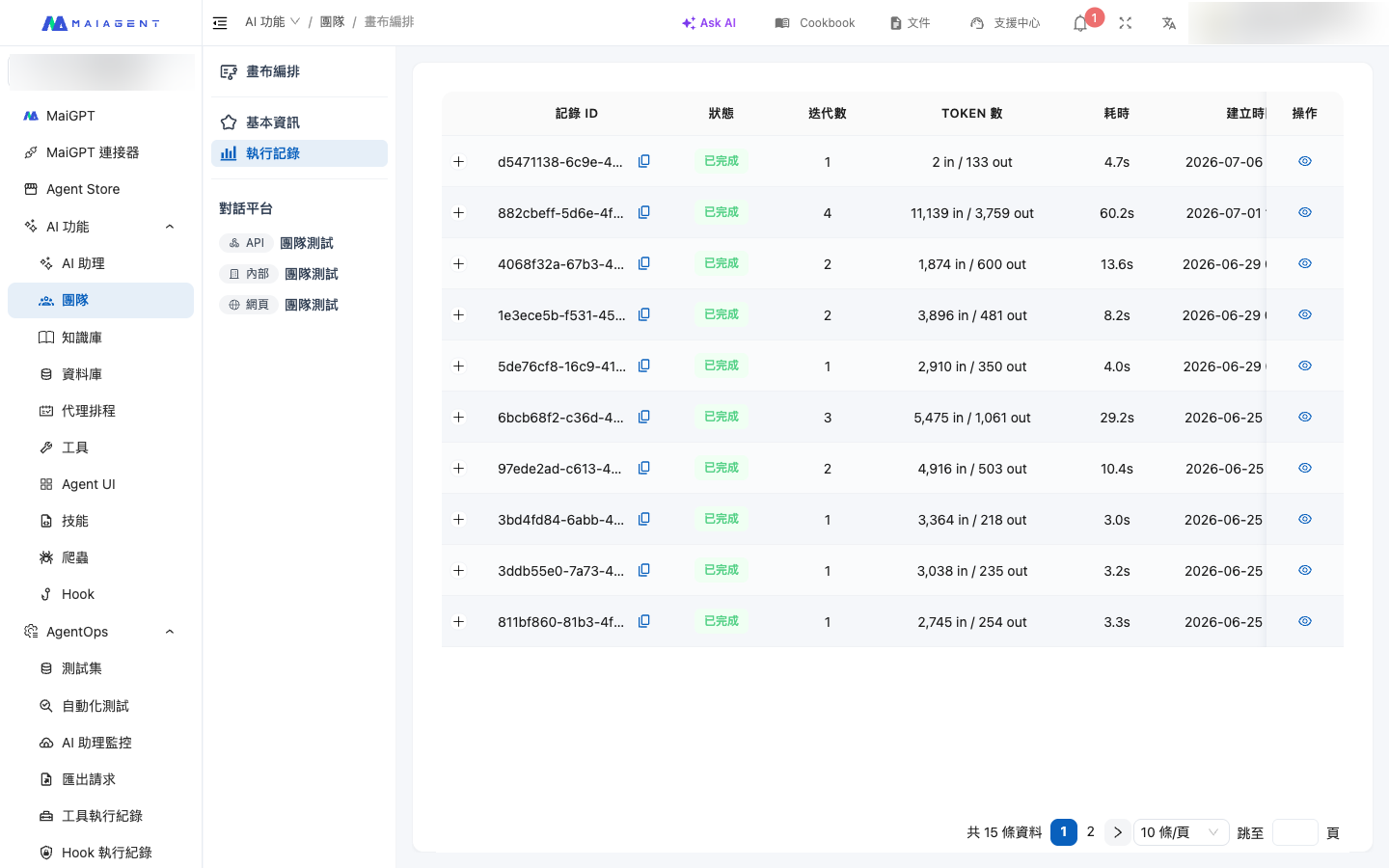
在團隊頁切換到〈**執行記錄**〉檢視，會列出這個團隊的每一次執行。每筆記錄包含：

| 欄位          | 說明                   |
| ----------- | -------------------- |
| **記錄 ID**   | 這次執行的唯一識別碼。          |
| **狀態**      | 〈執行中〉〈已完成〉〈失敗〉或〈逾時〉。 |
| **迭代數**     | 這次執行中，助理之間總共來回了幾次。   |
| **Token 數** | 這次執行的總 Token 用量。     |
| **耗時**      | 從收到訊息到完成回覆的總時間。      |

<figure><img src="/files/gQXLNcjh4lMARoOxjtDq" alt="團隊執行記錄列表"><figcaption><p>執行記錄：每一次團隊執行的狀態、迭代數、Token 數與耗時</p></figcaption></figure>

## <mark style="color:blue;">二、展開步驟詳情</mark> <a href="#step-detail" id="step-detail"></a>

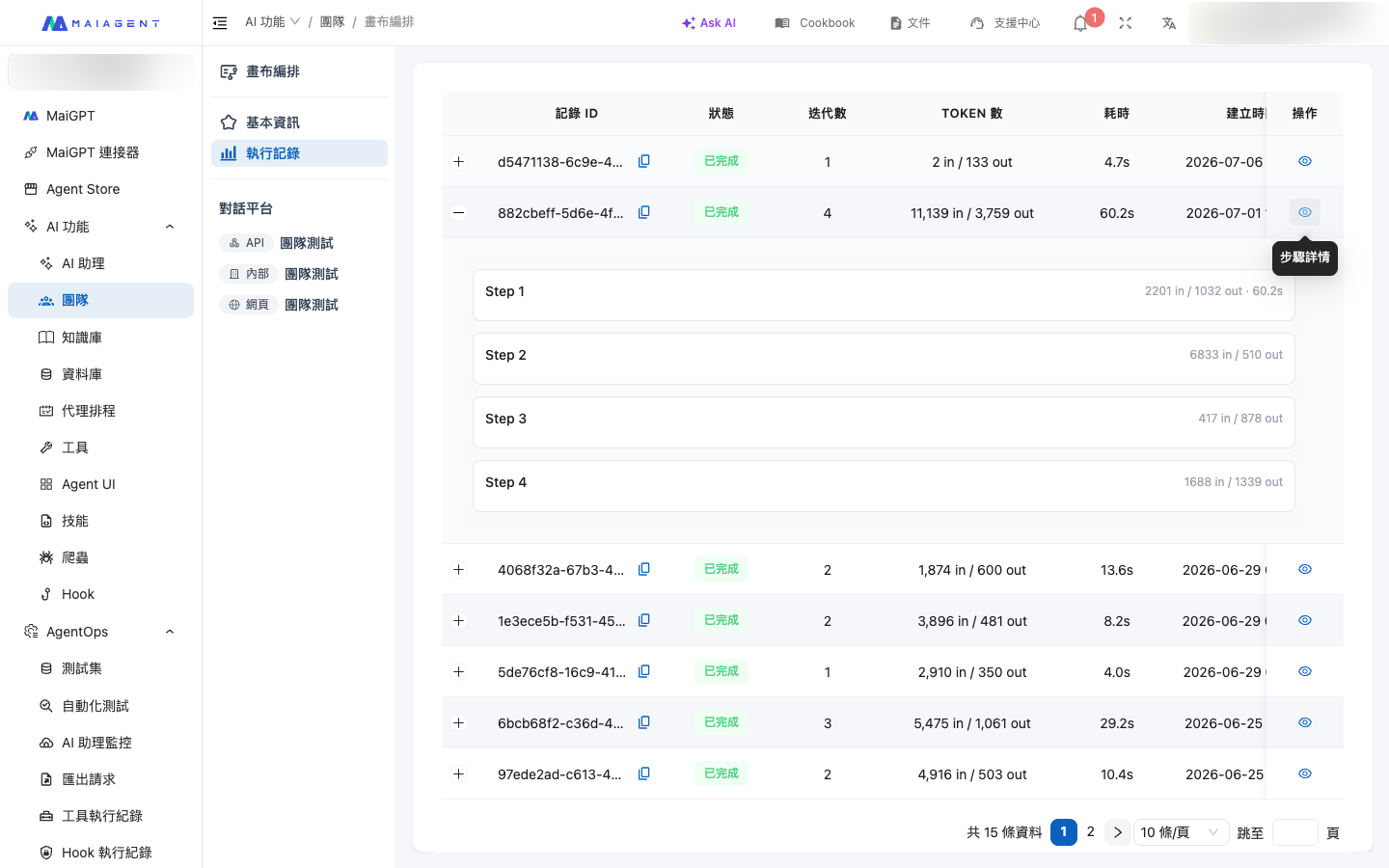
展開單筆記錄可看到〈**步驟詳情**〉——這次執行**依序經過哪些助理節點**，以及每一步的細節：

| 項目       | 說明                                                        |
| -------- | --------------------------------------------------------- |
| **步驟序號** | 這一步是整個流程中的第幾步、由哪個助理執行。                                    |
| **輸入**   | 這個助理這一步收到的內容摘要。                                           |
| **輸出**   | 這個助理這一步產生的內容摘要。                                           |
| **成本分攤** | 這一步的 Token 用量（輸入 Token、輸出 Token、嵌入 Token），讓你看清成本花在哪個助理身上。 |

<figure><img src="/files/wudnIbKUGFAspTIlUZHQ" alt="執行記錄步驟詳情"><figcaption><p>步驟詳情：逐步看到經過哪些助理、各自的輸入輸出摘要與 Token 成本分攤</p></figcaption></figure>

{% hint style="info" %}
**看不到記錄？** 執行記錄只在團隊實際被對話觸發後才會產生。若列表顯示〈暫無執行記錄〉，先透過對話平台與團隊聊幾句，再回來查看。
{% endhint %}

## <mark style="color:blue;">三、怎麼用這些記錄優化團隊</mark> <a href="#optimize" id="optimize"></a>

* **路由不如預期**：若發現問題被交給了錯誤的助理，回到 [畫布編排](/teams/setup.md#compose-canvas) 調整連線的〈觸發條件描述〉，把「什麼時候走這條連線」寫得更明確。
* **迭代數或耗時偏高**：可能是助理之間來回移交太多次。檢查是否有多餘的連線，或調整團隊的〈最大迭代數〉與各節點設定。
* **成本集中在某個助理**：從〈成本分攤〉找出 Token 花最多的助理，考慮為它換用較輕量的模型，或縮小它的知識庫與工具範圍。


---

# Agent Instructions
This documentation is published with GitBook. GitBook is the documentation platform designed so that both humans and AI agents can read, navigate, and reason over technical content effectively. Learn more at gitbook.com.

## Querying This Documentation
If you need additional information that is not directly available in this page, you can query the documentation dynamically by asking a question.

Perform an HTTP GET request on the current page URL with the `ask` query parameter, and the optional `goal` query parameter:

```
GET https://docs.maiagent.ai/teams/traces.md?ask=<question>&goal=<endgoal>
```

`ask` is the immediate question: it should be specific, self-contained, and written in natural language.
`goal` is optional and describes the broader end goal you are ultimately trying to accomplish on behalf of the user. GitBook uses it to tailor the answer towards what is most useful for that goal.

The response will contain a direct answer to the question and relevant excerpts and sources from the documentation.

Use this mechanism when the answer is not explicitly present in the current page, you need clarification or additional context, or you want to retrieve related documentation sections.