> For the complete documentation index, see [llms.txt](https://docs.maiagent.ai/llms.txt). Markdown versions of documentation pages are available by appending `.md` to page URLs; this page is available as [Markdown](https://docs.maiagent.ai/org/usage.md).
# 使用分析
提供後台監測數據內容,了解使用者的資訊。
## 如何查看
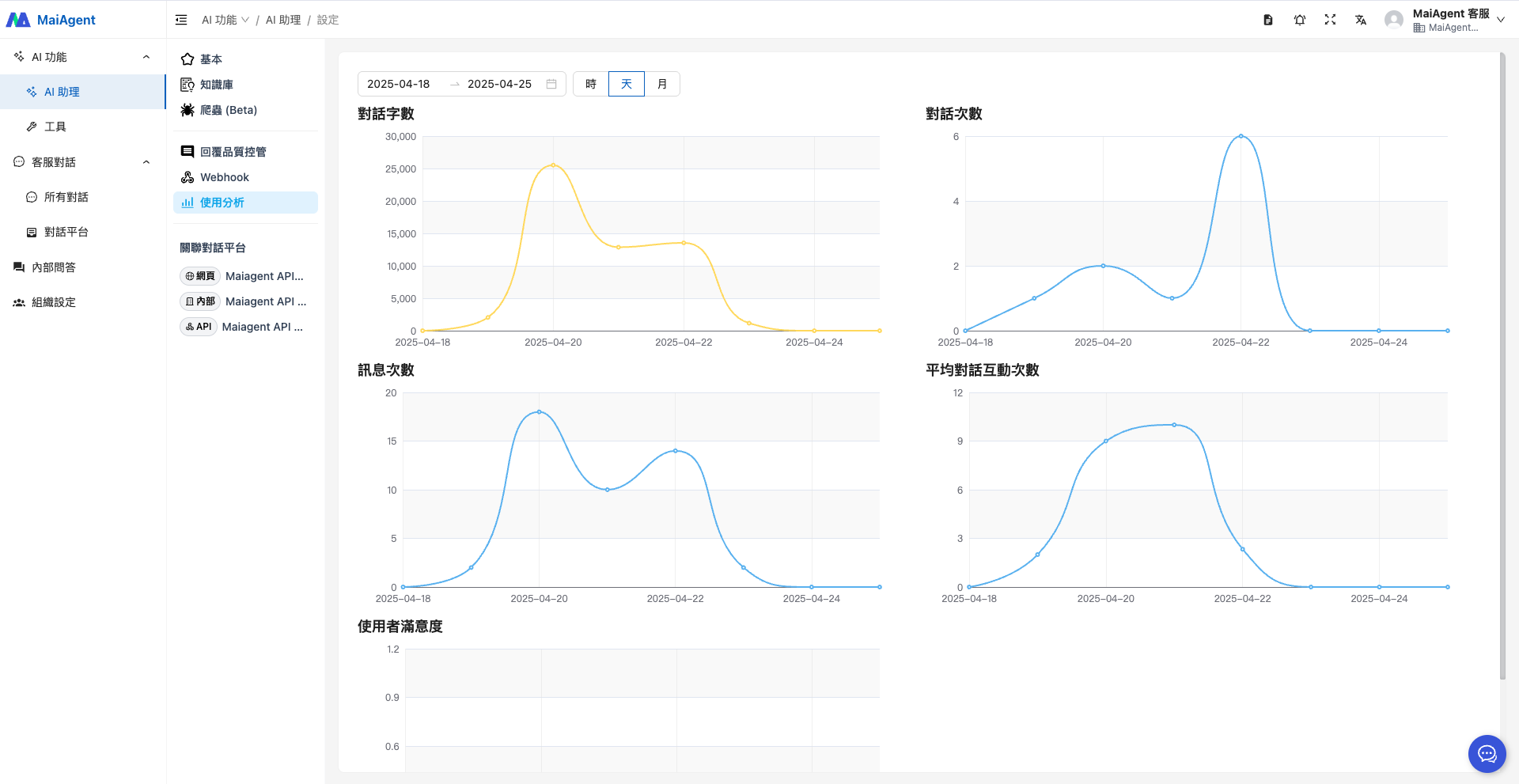
進入左側功能欄 「AI 助理」中的 「使用分析」,即可看到 AI 助理處理對話的儀表板。
* 對話字數
* 對話次數
* 訊息次數
* 平均對話互動次數
* 使用者滿意度
* 時間篩選(依日期、月、天、時)
透過這些指標,您可以從多角度了解 AI 助理的使用情形。
## 統計數據詳細說明
### 1. 對話字數 (Words Count)
**計算方式:**
* **文字字數**:計算訊息內容的字元數量
* **圖片成本**:每張圖片依照設定的圖片字數成本來計算
* **總字數** = 訊息內容字數 + (圖片數量 × 圖片字數成本)
**統計範圍:** 包含使用者輸入訊息和 AI 助理回覆訊息,支援日、月時間粒度統計
***
### 2. 對話次數 (Conversations Count)
**計算方式:**
* 每當建立一個新的對話時,計數器 +1
* 當對話中的第一則訊息建立時,會觸發對話統計更新
**更新時機:** 用戶開始新對話時(第一則訊息)
{% hint style="info" %}
「對話次數」與 AgentOps「AI 助理監控」儀表板的「對話數」定義不同:這裡是每個對話計 1 次;儀表板的「對話數」是 AI 助理回覆的次數,同一個對話回覆幾輪就計幾次。詳見 [自動評估與 AI 助理監控](/agent-ops/evaluations.md#conversation-count-definition)。
{% endhint %}
**統計範圍:** 支援小時、日、月時間粒度統計
***
### 3. 訊息次數 (Messages Count)
**計算方式:**
* 每當建立一則新訊息時,計數器 +1
* 包含使用者輸入訊息和 AI 助理回覆訊息
**更新時機:** 每則訊息建立時都會觸發統計更新
**統計範圍:** 支援小時、日、月時間粒度統計
***
### 4. 平均對話互動次數 (Average Messages per Conversation)
**計算公式:**
```
平均對話互動次數 = 訊息次數 ÷ 對話次數(若對話次數為0則顯示0)
```
**含義說明:**
* 表示每個對話平均包含多少則訊息
* 反映使用者與 AI 助理的互動深度
* 數值越高表示對話越深入、互動越頻繁
**統計範圍:** 支援小時、日、月時間粒度統計
***
### 5. 使用者滿意度 (User Satisfaction Rate)
**計算公式:**
```
使用者滿意度 = 按讚數 ÷ 總回饋數(若總回饋數為0則顯示0)
總回饋數 = 按讚數 + 按倒讚數
```
**含義說明:**
* 表示獲得正面回饋的比例(按讚率)
* 數值範圍:0% \~ 100%
* 數值越高表示使用者對 AI 助理回覆越滿意
**回饋機制:**
* 使用者可對 AI 助理的回覆給予「讚」或「倒讚」
* 支援即時更新統計數據
**更新時機:** 使用者給予回饋時(建立、更新、刪除)
**統計範圍:** 支援小時、日、月時間粒度統計
***
## 統計數據更新機制
**即時更新:** 當相關事件發生時(新訊息、新對話、回饋變更),會立即觸發統計更新
**時間粒度支援:**
* **小時級**:適合即時監控
* **日級**:適合日報分析
* **月級**:適合月報和趨勢分析
## 應用場景:使用成效評估
觀察「使用者滿意度」與互動次數的變化趨勢,可評估 AI 助理回應品質是否符合預期,作為優化依據。
---
# Agent Instructions
This documentation is published with GitBook. GitBook is the documentation platform designed so that both humans and AI agents can read, navigate, and reason over technical content effectively. Learn more at gitbook.com.
## Querying This Documentation
If you need additional information that is not directly available in this page, you can query the documentation dynamically by asking a question.
Perform an HTTP GET request on the current page URL with the `ask` query parameter, and the optional `goal` query parameter:
```
GET https://docs.maiagent.ai/org/usage.md?ask=&goal=
```
`ask` is the immediate question: it should be specific, self-contained, and written in natural language.
`goal` is optional and describes the broader end goal you are ultimately trying to accomplish on behalf of the user. GitBook uses it to tailor the answer towards what is most useful for that goal.
The response will contain a direct answer to the question and relevant excerpts and sources from the documentation.
Use this mechanism when the answer is not explicitly present in the current page, you need clarification or additional context, or you want to retrieve related documentation sections.