> For the complete documentation index, see [llms.txt](https://docs.maiagent.ai/llms.txt). Markdown versions of documentation pages are available by appending `.md` to page URLs; this page is available as [Markdown](https://docs.maiagent.ai/org/overview/organization.md).

# 組織管理

組織是什麼、一家公司該開一個還是多個組織、怎麼建立與切換組織，以及擁有者要負責的事。

## 什麼是組織？ <a href="#what-is-organization" id="what-is-organization"></a>

**組織**（Organization）是 MaiAgent 最上層的管理單位，像一間獨立運作的「數位辦公室」。成員、角色、Agent、知識庫、方案與 Credits 都屬於某一個組織，組織之間完全隔離。

<figure><img src="https://1593648278-files.gitbook.io/~/files/v0/b/gitbook-x-prod.appspot.com/o/spaces%2Fmzb5NG9GDzFP2YDKeYVl%2Fuploads%2Fgit-blob-82a0780b18c6f04ac503ce0e6cb9f1a6e8aee1a2%2Forg-isolation.png?alt=media" alt="同一個帳號可以加入多個組織，組織之間完全隔離"><figcaption><p>同一個帳號可以加入多個組織；每個組織有自己的成員、資源、方案與擁有者，彼此看不到對方的資料</p></figcaption></figure>

一個組織裡有什麼，以及角色與成員怎麼運作，見 [組織與成員管理](/org/overview.md)。

***

## 一個組織，還是多個組織？ <a href="#one-or-many" id="one-or-many"></a>

大多數公司**一個組織就夠**。部門要分開、權限要不同、Agent 要分享給誰，這些都用角色處理，不需要開新組織。

<table><thead><tr><th width="180">情境</th><th>建議</th></tr></thead><tbody><tr><td>部門之間權限不同</td><td>同一個組織，各部門一個角色</td></tr><tr><td>同仁自建的 Agent 不想被別人看到</td><td>同一個組織，一人一個角色，見 <a href="/org/roles/role-design-guide.md">角色權限規劃指南</a></td></tr><tr><td>測試環境與正式環境要分開</td><td>同一個組織即可。平台用「上架到不同角色」區分測試與正式，不用複製一套組織</td></tr><tr><td>子公司要各自管帳、各自有擁有者</td><td>分開的組織。方案、Credits、用量統計都是以組織為單位</td></tr><tr><td>兩邊用不同的公司帳號（SSO）登入</td><td>分開的組織。SSO 設定綁在組織上</td></tr><tr><td>資料依法規或合約必須完全隔離</td><td>分開的組織。組織之間沒有任何共用</td></tr></tbody></table>

{% hint style="warning" %}
**分成多個組織的代價**

Agent、知識庫、角色都不能跨組織共用，要在每個組織各建一份；成員也要各自加入、各自維護。開第二個組織之前，先確認角色真的做不到。
{% endhint %}

***

## 建立組織 <a href="#create-organization" id="create-organization"></a>

任何帳號都可以建立新組織，建立者自動成為該組織的**擁有者**。

### 1. 打開組織切換選單 <a href="#open-switcher" id="open-switcher"></a>

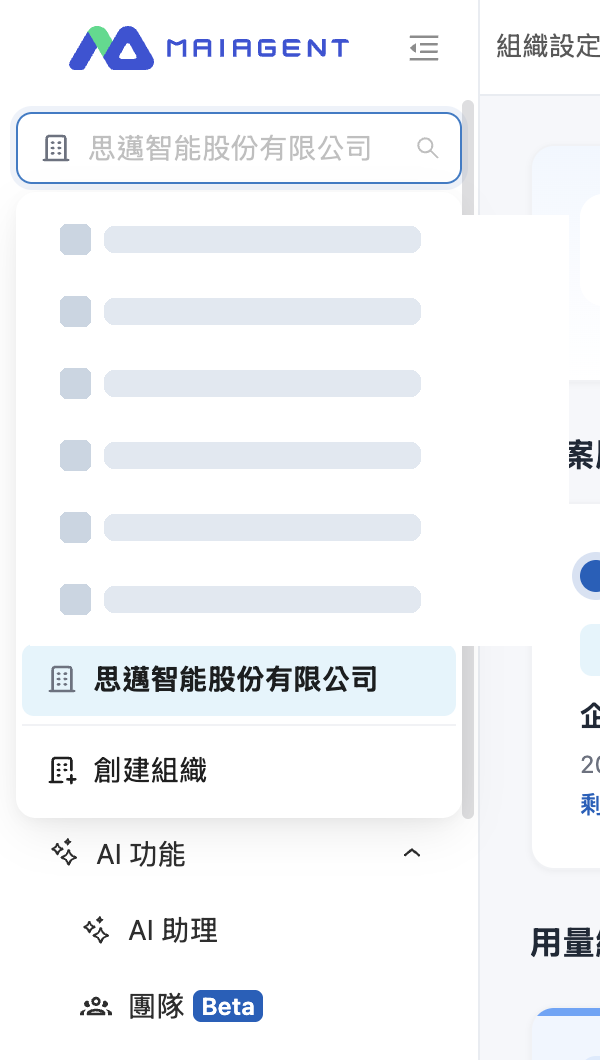
點左側選單最上方的組織名稱，展開組織清單，點最下面的 <mark style="color:blue;">創建組織</mark>。

<figure><img src="https://1593648278-files.gitbook.io/~/files/v0/b/gitbook-x-prod.appspot.com/o/spaces%2Fmzb5NG9GDzFP2YDKeYVl%2Fuploads%2Fgit-blob-be24796b02d2cd727fefeb257b7c8579055adfc1%2Forg-switcher.png?alt=media" alt="左側選單最上方的組織切換選單，最下面是創建組織" width="420"><figcaption><p>左側選單最上方是組織切換選單，清單最下面是「創建組織」</p></figcaption></figure>

### 2. 填寫組織資料 <a href="#fill-in-form" id="fill-in-form"></a>

<figure><img src="https://1593648278-files.gitbook.io/~/files/v0/b/gitbook-x-prod.appspot.com/o/spaces%2Fmzb5NG9GDzFP2YDKeYVl%2Fuploads%2Fgit-blob-3e632d283a84a672737b732f46fc2fa0780f5aec%2Forg-create-dialog.png?alt=media" alt="新增組織視窗" width="480"><figcaption><p>「新增組織」視窗</p></figcaption></figure>

<table><thead><tr><th width="140">欄位</th><th width="90">必填</th><th>說明</th></tr></thead><tbody><tr><td>名稱</td><td>是</td><td>組織在平台上顯示的名稱，之後可以在 <a href="/org/overview/organization-overview.md">組織概覽</a> 修改</td></tr><tr><td>邀請碼</td><td>否</td><td>MaiAgent 提供的<strong>試用邀請碼</strong>。貼上後公司資訊會自動帶入，建立後不用等審核就能直接使用</td></tr><tr><td>公司名稱</td><td>是</td><td>申請審核用的公司全名</td></tr><tr><td>統一編號</td><td>否</td><td>8 位數字</td></tr><tr><td>聯絡電話</td><td>是</td><td>審核有問題時聯繫用</td></tr></tbody></table>

{% hint style="info" %}
**簡單理解：**

有邀請碼就貼邀請碼，其他欄位會自動帶入。沒有邀請碼就填公司資料送審，審核通過後開通 14 天試用。註冊頁面上的「邀請碼」是平台推薦碼，跟這裡的試用邀請碼不是同一個東西。
{% endhint %}

### 3. 送出並等待審核 <a href="#submit-and-approval" id="submit-and-approval"></a>

按 <mark style="color:blue;">確認</mark> 送出。沒有邀請碼的申請會進入審核，審核通過後組織即開通 14 天試用；試用期間或到期前要延續使用，見 [Credits 計費制度](/others/credits.md) 或聯繫業務團隊。

{% hint style="warning" %}
組織沒有啟用中的方案時，組織概覽會顯示資料保留期限。期限一到資料會永久清除，請在到期前升級方案。
{% endhint %}

***

## 切換組織 <a href="#switch-organization" id="switch-organization"></a>

同一個帳號加入多個組織後，點左側選單最上方的組織名稱，在清單裡點要切換的組織即可。組織多時可以直接在上方的搜尋框輸入名稱。右上角帳號名稱下方會顯示你目前所在的組織。

{% hint style="info" %}
切換組織後看到的 Agent、知識庫、對話都會換成該組織的。找不到某個 Agent 時，先確認左上角是不是在對的組織。
{% endhint %}

***

## 擁有者要做的事 <a href="#owner-responsibilities" id="owner-responsibilities"></a>

組織擁有者略過所有權限檢查，是組織裡權限最高的人，可以有多位。建議至少指定兩位，避免單一窗口離職後沒人能管理組織。擁有者負責：

<table><thead><tr><th width="200">工作</th><th>去哪裡做</th></tr></thead><tbody><tr><td>看方案到期日、本月用量、改組織名稱</td><td><a href="/org/overview/organization-overview.md">組織概覽</a></td></tr><tr><td>把後台換成公司的 Logo 與主題色（企業版）</td><td><a href="/org/overview/organization-overview.md#org-branding">組織概覽 → 組織品牌</a></td></tr><tr><td>設計角色、決定誰能建 Agent、誰只能用</td><td><a href="/org/roles.md">角色與權限</a></td></tr><tr><td>加成員、指派角色、移除成員</td><td><a href="/org/overview/member.md">成員管理</a></td></tr><tr><td>用公司帳號登入、同步成員名單</td><td><a href="/org/sso.md">第三方登入（SSO）</a>、<a href="/org/identity-sync.md">身分同步（LDAP）</a></td></tr><tr><td>管 Credits 與成員額度</td><td><a href="/others/credits.md">Credits 計費制度</a></td></tr><tr><td>不再使用時刪除整個組織</td><td><a href="/org/overview/organization-management.md">刪除組織</a>，不可復原</td></tr></tbody></table>


---

# Agent Instructions
This documentation is published with GitBook. GitBook is the documentation platform designed so that both humans and AI agents can read, navigate, and reason over technical content effectively. Learn more at gitbook.com.

## Querying This Documentation
If you need additional information that is not directly available in this page, you can query the documentation by asking a question.

Perform an HTTP GET request on the following URL with the `ask` and `goal` query parameters:

```
GET https://docs.maiagent.ai/org/overview/organization.md?ask=<question>&goal=<user_goal>
```

`ask` is the immediate question: it should be specific, self-contained, and written in natural language.
`goal` is what the user is ultimately trying to achieve, the reason they need the answer. Sharing it helps GitBook give you a better, more relevant answer. A goal is most helpful when it describes the outcome the user wants rather than restating the question. For example, with `ask=how do I create an API token`, a goal like `automate deployments from our CI pipeline` lets GitBook tailor the answer to that use case.

The response will contain a direct answer to the question and relevant excerpts and sources from the documentation.

Use this mechanism when the answer is not explicitly present in the current page, you need clarification or additional context, or you want to retrieve related documentation sections.