> For the complete documentation index, see [llms.txt](https://docs.maiagent.ai/llms.txt). Markdown versions of documentation pages are available by appending `.md` to page URLs; this page is available as [Markdown](https://docs.maiagent.ai/org/organization-management.md).

# 刪除組織

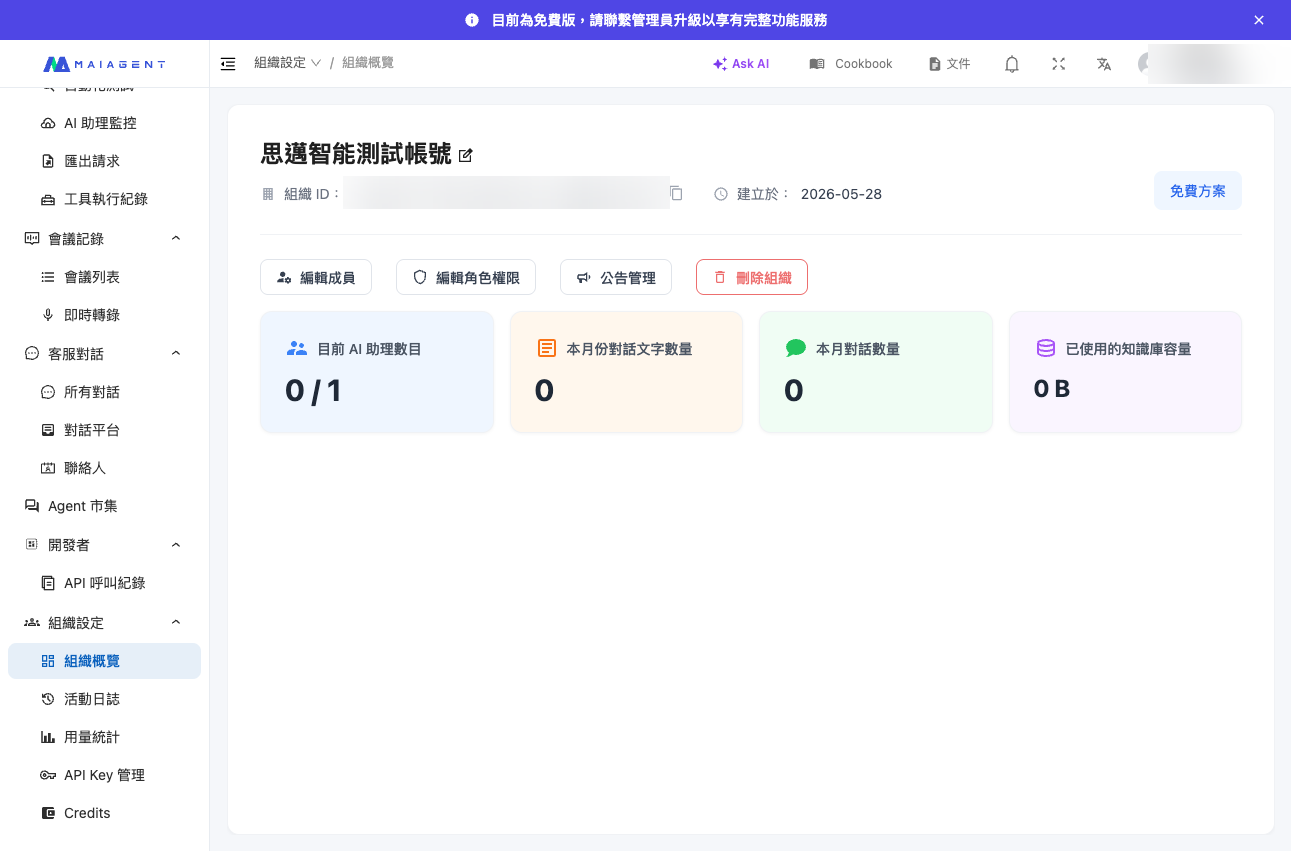
當您不再需要某個組織時，可以在 <mark style="color:blue;">組織概覽</mark> 頁面將整個組織刪除。

{% hint style="danger" %}
**此操作不可逆，組織刪除後所有資料將無法復原。**

刪除組織會**永久**移除該組織底下的所有資料，且**無法**透過任何方式恢復。執行前請務必確認。
{% endhint %}

## 什麼是刪除組織？ <a href="#what-is-delete-organization" id="what-is-delete-organization"></a>

刪除組織會將整個組織連同其所有資源一次性、永久地從系統中移除。這不是「停用」或「暫時關閉」，而是徹底刪除——一旦完成，該組織的所有內容都無法再被找回。

***

## 刪除前須知 <a href="#before-you-delete" id="before-you-delete"></a>

刪除組織後，以下資料都會被**永久刪除、無法復原**：

* 組織底下的所有 AI 助理及其設定
* 所有知識庫與已上傳的檔案
* 所有對話紀錄與統計資料
* 所有成員與角色權限設定
* 對話通路（WebChat、LINE、Messenger 等）的整合設定
* 計費與額度相關資料

對成員的影響：

* 所有成員將立即無法再存取此組織
* 透過各通路（WebChat、LINE 等）提供的對外服務會立即停止
* 成員的**個人帳號不會被刪除**，若同時屬於其他組織，仍可正常使用其他組織

{% hint style="warning" %}
若您只是暫時不使用此組織，請勿刪除。刪除無法復原，且會中斷所有對外服務。建議先匯出需要保留的資料（對話紀錄、知識庫檔案等）後再執行。
{% endhint %}

***

## 誰可以刪除組織？ <a href="#who-can-delete" id="who-can-delete"></a>

**任何能進入&#x20;**<mark style="color:blue;">**組織概覽**</mark>**&#x20;頁面、看得到&#x20;**<mark style="color:blue;">**刪除組織**</mark>**&#x20;按鈕的成員，都可以執行刪除操作。**

{% hint style="warning" %}
由於此操作不可逆，且權限範圍較廣，建議在組織內部明確規範誰有權刪除組織，避免誤刪造成無法挽回的資料損失。
{% endhint %}

***

## 操作步驟 <a href="#how-to-delete" id="how-to-delete"></a>

{% stepper %}
{% step %}

### 進入組織概覽

確認目前所在的組織就是您要刪除的組織（可檢查右上角的組織名稱），點選左側選單的 <mark style="color:blue;">組織設定</mark>，進入 <mark style="color:blue;">組織概覽</mark> 頁面。
{% endstep %}

{% step %}

### 點擊「刪除組織」按鈕

在頁面中找到 <mark style="color:blue;">刪除組織</mark> 按鈕並點擊。

<figure><img src="/files/3ogBk4y9ZlGLQswU9rFY" alt="組織設定頁面中的刪除組織按鈕"><figcaption><p>組織設定頁面中的「刪除組織」按鈕</p></figcaption></figure>
{% endstep %}

{% step %}

### 輸入組織名稱以確認

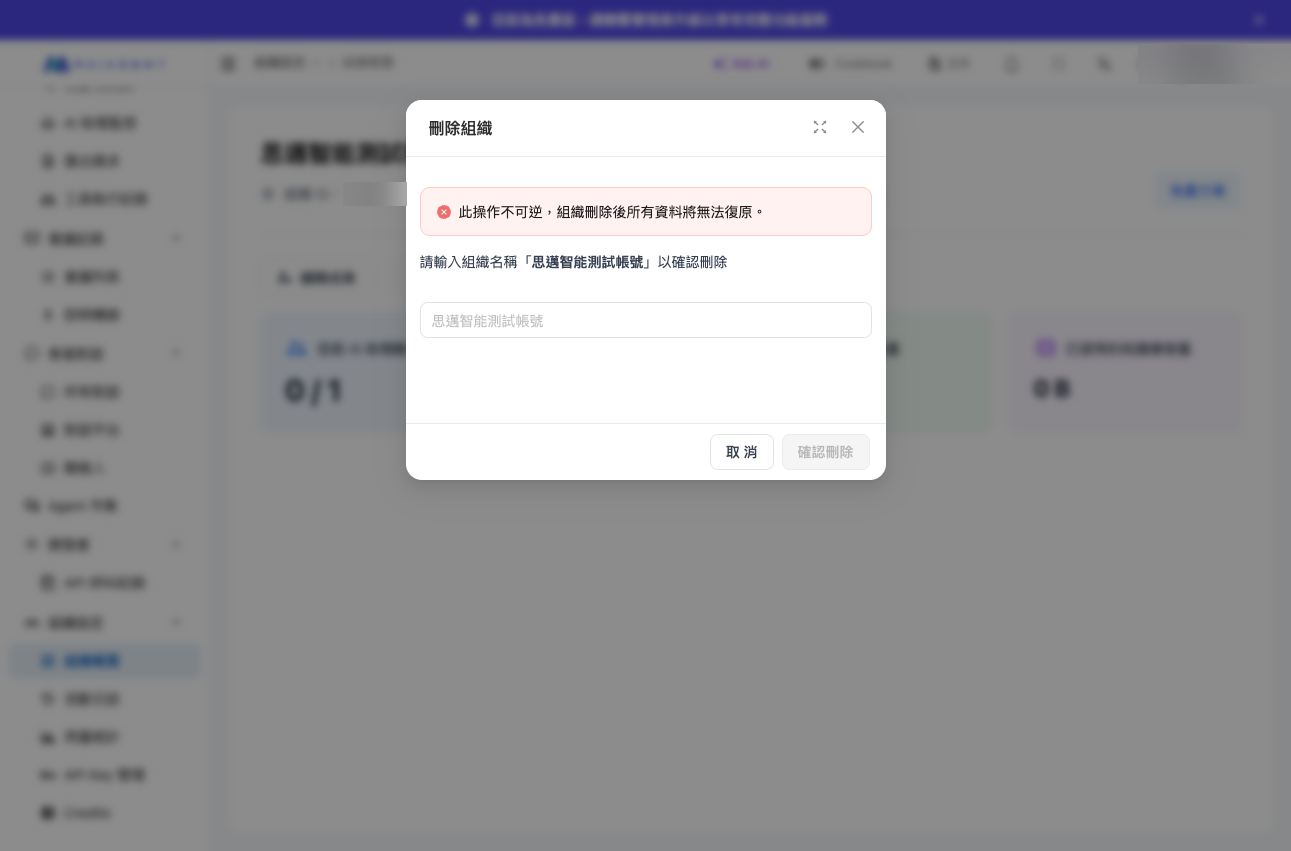
系統會跳出確認視窗，並提示「此操作不可逆，組織刪除後所有資料將無法復原。」。您必須**輸入該組織的名稱**作為二次確認，確認無誤後才能送出，藉此避免誤刪。

<figure><img src="/files/m0IoTSSUnZuxsfAHVdn1" alt="輸入組織名稱以確認刪除的視窗"><figcaption><p>需輸入組織名稱以確認刪除</p></figcaption></figure>
{% endstep %}

{% step %}

### 完成刪除

確認後組織即被永久刪除，您會被導向其他組織（若有）或登入頁面。此時該組織的所有資料皆已無法復原。
{% endstep %}
{% endstepper %}

***

## 常見問題 <a href="#faq" id="faq"></a>

**Q：組織刪除後還能恢復嗎？**

A：**不能。** 此操作不可逆，組織與其所有資料（AI 助理、知識庫、對話紀錄等）都會被永久刪除，無法透過任何方式復原。

**Q：刪除組織會把我的個人帳號也刪掉嗎？**

A：不會。刪除組織只會移除該組織本身，不影響您的個人帳號。若您同時屬於其他組織，仍可正常使用。

**Q：刪除後的付費額度怎麼處理？**

A：組織刪除後，與該組織相關的計費與額度資料會一併移除。若有費用相關問題，請聯繫業務團隊。

**Q：為什麼刪除時要我輸入組織名稱？**

A：因為刪除無法復原，輸入組織名稱是一道二次確認機制，用來避免誤觸按鈕造成意外刪除。


---

# Agent Instructions
This documentation is published with GitBook. GitBook is the documentation platform designed so that both humans and AI agents can read, navigate, and reason over technical content effectively. Learn more at gitbook.com.

## Querying This Documentation
If you need additional information that is not directly available in this page, you can query the documentation dynamically by asking a question.

Perform an HTTP GET request on the current page URL with the `ask` query parameter, and the optional `goal` query parameter:

```
GET https://docs.maiagent.ai/org/organization-management.md?ask=<question>&goal=<endgoal>
```

`ask` is the immediate question: it should be specific, self-contained, and written in natural language.
`goal` is optional and describes the broader end goal you are ultimately trying to accomplish on behalf of the user. GitBook uses it to tailor the answer towards what is most useful for that goal.

The response will contain a direct answer to the question and relevant excerpts and sources from the documentation.

Use this mechanism when the answer is not explicitly present in the current page, you need clarification or additional context, or you want to retrieve related documentation sections.