> For the complete documentation index, see [llms.txt](https://docs.maiagent.ai/llms.txt). Markdown versions of documentation pages are available by appending `.md` to page URLs; this page is available as [Markdown](https://docs.maiagent.ai/maiagent-user-guide/ja/org/overview/organization-management.md).

# 組織の削除

組織全体とそのすべてのデータを完全に削除します

組織が不要になった場合は、<mark style="color:blue;">組織の概要</mark>ページから組織全体を削除できます。

{% hint style="danger" %}
**この操作は元に戻せません。組織を削除すると、すべてのデータを復元できなくなります。**

組織を削除すると、その組織配下のすべてのデータが**完全に**削除され、いかなる方法でも**復元できません**。実行前に必ずご確認ください。
{% endhint %}

## 組織の削除とは <a href="#what-is-delete-organization" id="what-is-delete-organization"></a>

組織を削除すると、組織全体とそのすべてのリソースが一度に、完全にシステムから削除されます。これは「無効化」や「一時的な停止」ではなく、完全な削除です。削除が完了すると、その組織の内容は一切取り戻せません。

***

## 削除前の注意事項 <a href="#before-you-delete" id="before-you-delete"></a>

組織を削除すると、次のデータは**完全に削除され、復元できません**。

* 組織配下のすべての Agent とその設定
* すべてのナレッジベースとアップロード済みのファイル
* すべての会話履歴と統計データ
* すべてのメンバーとロール権限の設定
* チャットプラットフォーム（Web Chat、LINE、Messenger など）の連携設定
* 課金とクォータに関するデータ

メンバーへの影響：

* すべてのメンバーが、直ちにこの組織にアクセスできなくなります
* 各チャットプラットフォーム（Web Chat、LINE など）を通じて外部に提供しているサービスが直ちに停止します
* メンバーの**個人アカウントは削除されません**。他の組織にも所属している場合は、引き続きそれらの組織を通常どおり利用できます

{% hint style="warning" %}
一時的に組織を使用しないだけの場合は、削除しないでください。削除は元に戻せず、外部向けのすべてのサービスが中断されます。実行前に、保持したいデータ（会話履歴、ナレッジベースのファイルなど）をエクスポートしておくことをおすすめします。
{% endhint %}

***

## 組織を削除できるのは誰か <a href="#who-can-delete" id="who-can-delete"></a>

<mark style="color:blue;">**組織の概要**</mark>**ページを開け、**<mark style="color:blue;">**組織を削除**</mark>**ボタンが表示されるメンバーであれば、誰でも削除を実行できます。**

{% hint style="warning" %}
この操作は元に戻せず、権限の範囲も広いため、誤って削除して取り返しのつかないデータ損失が起きないよう、組織内で削除を許可する人を明確に定めておくことをおすすめします。
{% endhint %}

***

## 操作手順 <a href="#how-to-delete" id="how-to-delete"></a>

{% stepper %}
{% step %}

### 組織の概要を開く

現在の組織が削除したい組織であることを確認し（右上の組織名で確認できます）、左側のメニューで<mark style="color:blue;">組織設定</mark>をクリックして、<mark style="color:blue;">組織の概要</mark>ページを開きます。
{% endstep %}

{% step %}

### 「組織を削除」ボタンをクリックする

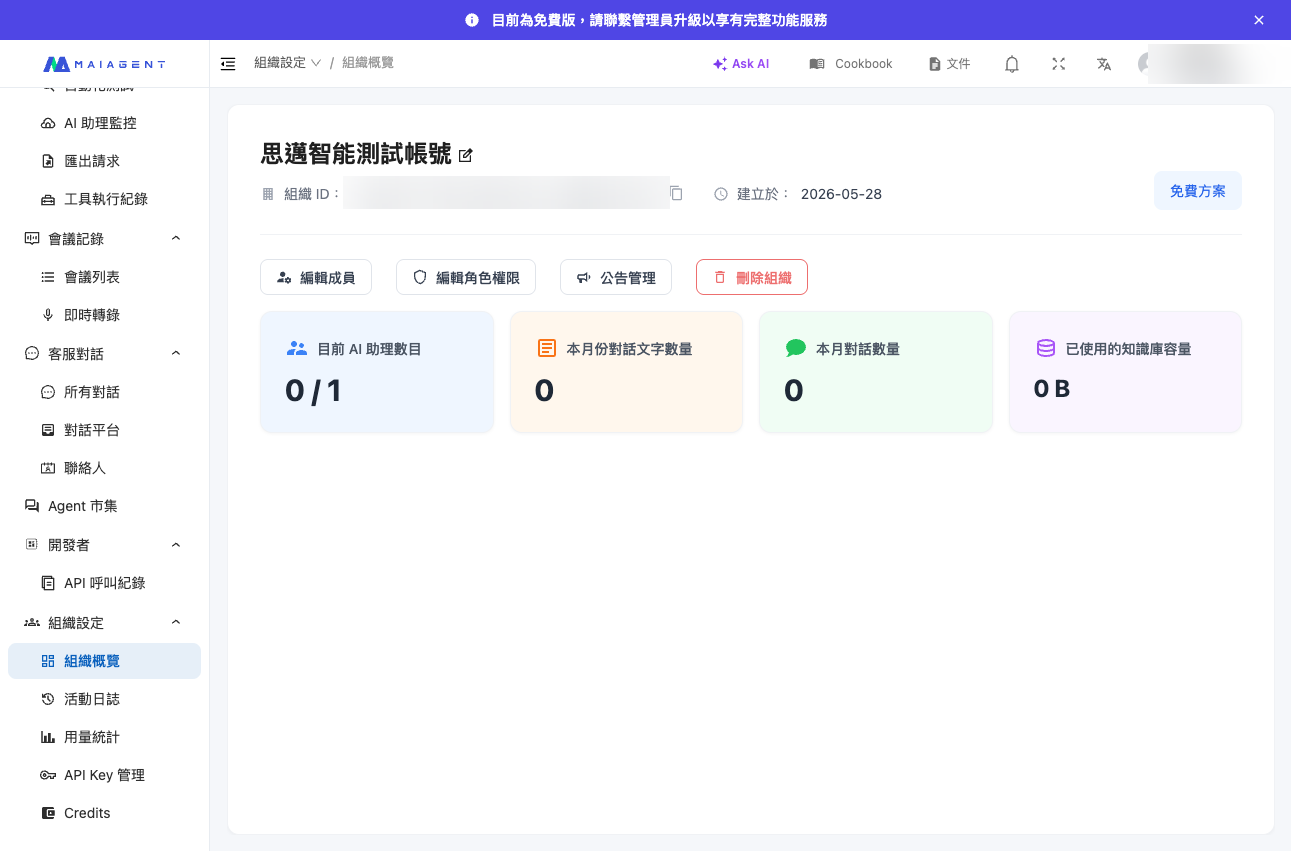
ページ内の<mark style="color:blue;">組織を削除</mark>ボタンを見つけてクリックします。

<figure><img src="https://2584873290-files.gitbook.io/~/files/v0/b/gitbook-x-prod.appspot.com/o/spaces%2FTvHx8hgwYGDTLD3A7xoW%2Fuploads%2Fgit-blob-0eca1cd6dae9eee0b17d6c9bf245b1d277c5bc02%2Forg-delete-button.png?alt=media" alt="組織設定ページの「組織を削除」ボタン"><figcaption><p>組織設定ページの「組織を削除」ボタン</p></figcaption></figure>
{% endstep %}

{% step %}

### 組織名を入力して確認する

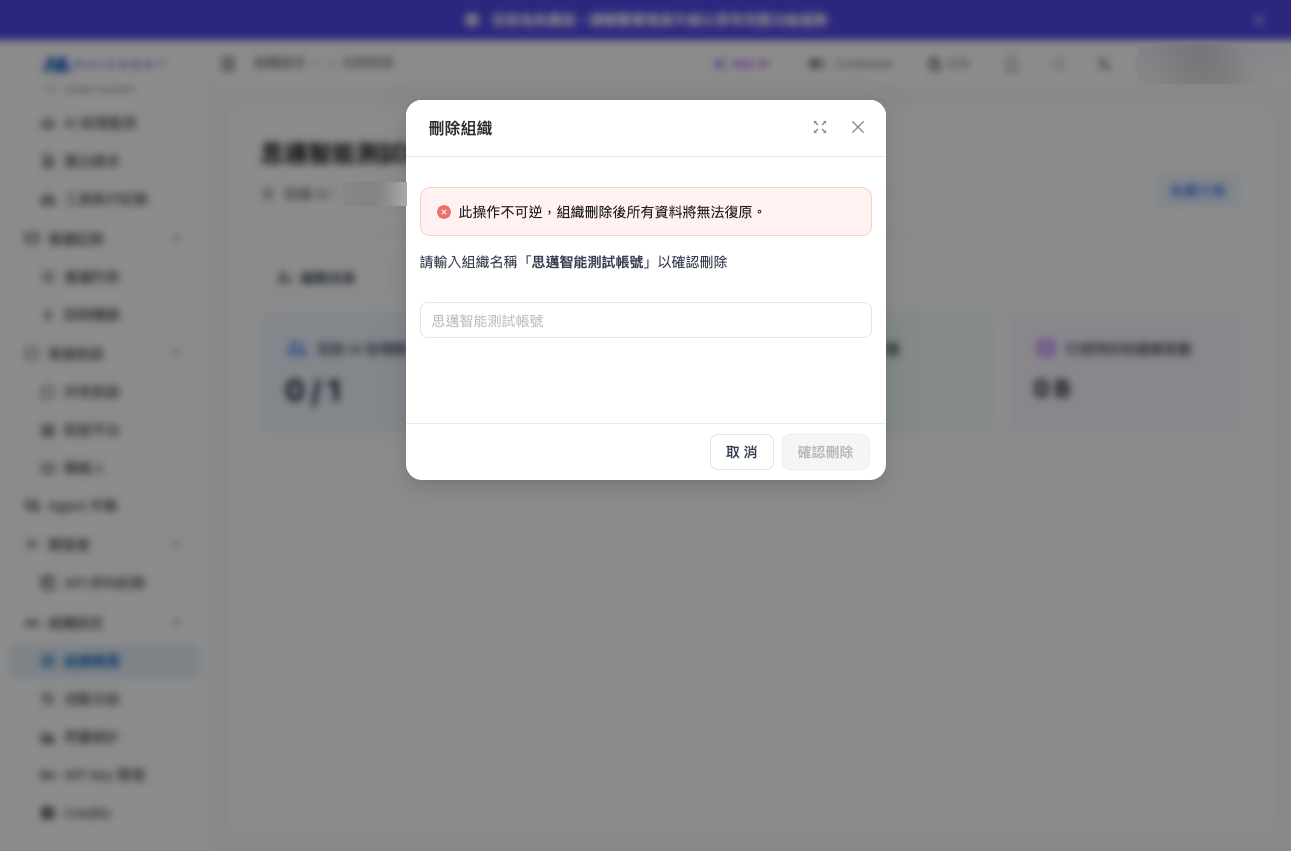
確認ダイアログが表示され、「この操作は元に戻せません。組織を削除すると、すべてのデータを復元できなくなります。」というメッセージが示されます。二次確認として**組織の名前を入力**する必要があり、入力内容に誤りがないことを確認してから送信できます。これにより誤削除を防ぎます。

<figure><img src="https://2584873290-files.gitbook.io/~/files/v0/b/gitbook-x-prod.appspot.com/o/spaces%2FTvHx8hgwYGDTLD3A7xoW%2Fuploads%2Fgit-blob-aa97f145a05cf5e862b186ce9953b53c79cafd6f%2Forg-delete-confirm-modal.png?alt=media" alt="組織名を入力して削除を確認するダイアログ"><figcaption><p>削除を確認するには組織名の入力が必要です</p></figcaption></figure>
{% endstep %}

{% step %}

### 削除を完了する

確認すると組織が完全に削除され、他の組織（ある場合）またはログインページに移動します。この時点で、その組織のすべてのデータは復元できなくなっています。
{% endstep %}
{% endstepper %}

***

## よくある質問 <a href="#faq" id="faq"></a>

**Q：組織を削除した後に復元できますか？**

A：**できません。** この操作は元に戻せず、組織とそのすべてのデータ（Agent、ナレッジベース、会話履歴など）は完全に削除され、いかなる方法でも復元できません。

**Q：組織を削除すると、自分の個人アカウントも削除されますか？**

A：いいえ。組織を削除しても、その組織自体が削除されるだけで、個人アカウントには影響しません。他の組織にも所属している場合は、引き続き通常どおり利用できます。

**Q：削除後、有料のクォータはどうなりますか？**

A：組織を削除すると、その組織に関する課金とクォータのデータも併せて削除されます。費用に関するご質問は、営業チームまでお問い合わせください。

**Q：削除するときに組織名の入力を求められるのはなぜですか？**

A：削除は元に戻せないため、組織名の入力は二次確認の仕組みとして、ボタンの誤操作による意図しない削除を防ぐ役割を果たしています。


---

# Agent Instructions
This documentation is published with GitBook. GitBook is the documentation platform designed so that both humans and AI agents can read, navigate, and reason over technical content effectively. Learn more at gitbook.com.

## Querying This Documentation
If you need additional information that is not directly available in this page, you can query the documentation by asking a question.

Perform an HTTP GET request on the following URL with the `ask` and `goal` query parameters:

```
GET https://docs.maiagent.ai/maiagent-user-guide/ja/org/overview/organization-management.md?ask=<question>&goal=<user_goal>
```

`ask` is the immediate question: it should be specific, self-contained, and written in natural language.
`goal` is what the user is ultimately trying to achieve, the reason they need the answer. Sharing it helps GitBook give you a better, more relevant answer. A goal is most helpful when it describes the outcome the user wants rather than restating the question. For example, with `ask=how do I create an API token`, a goal like `automate deployments from our CI pipeline` lets GitBook tailor the answer to that use case.

The response will contain a direct answer to the question and relevant excerpts and sources from the documentation.

Use this mechanism when the answer is not explicitly present in the current page, you need clarification or additional context, or you want to retrieve related documentation sections.