> For the complete documentation index, see [llms.txt](https://docs.maiagent.ai/llms.txt). Markdown versions of documentation pages are available by appending `.md` to page URLs; this page is available as [Markdown](https://docs.maiagent.ai/maiagent-user-guide/ja/meeting-records/meeting-records.md).
# 会議記録機能の概要
会議記録は MaiAgent プラットフォームの音声文字起こしと AI 要約機能で、**リアルタイム**と**オフライン**の2つのモードを提供します。リアルタイムモードでは、会議中に低遅延で文字起こしと翻訳を行えます。オフラインモードでは録音ファイルをアップロードし、高精度な文字起こしと話者識別を行えます。両モードとも、AI による自動要約、質問応答、ダウンロード・エクスポート、ナレッジベース連携に対応しています。
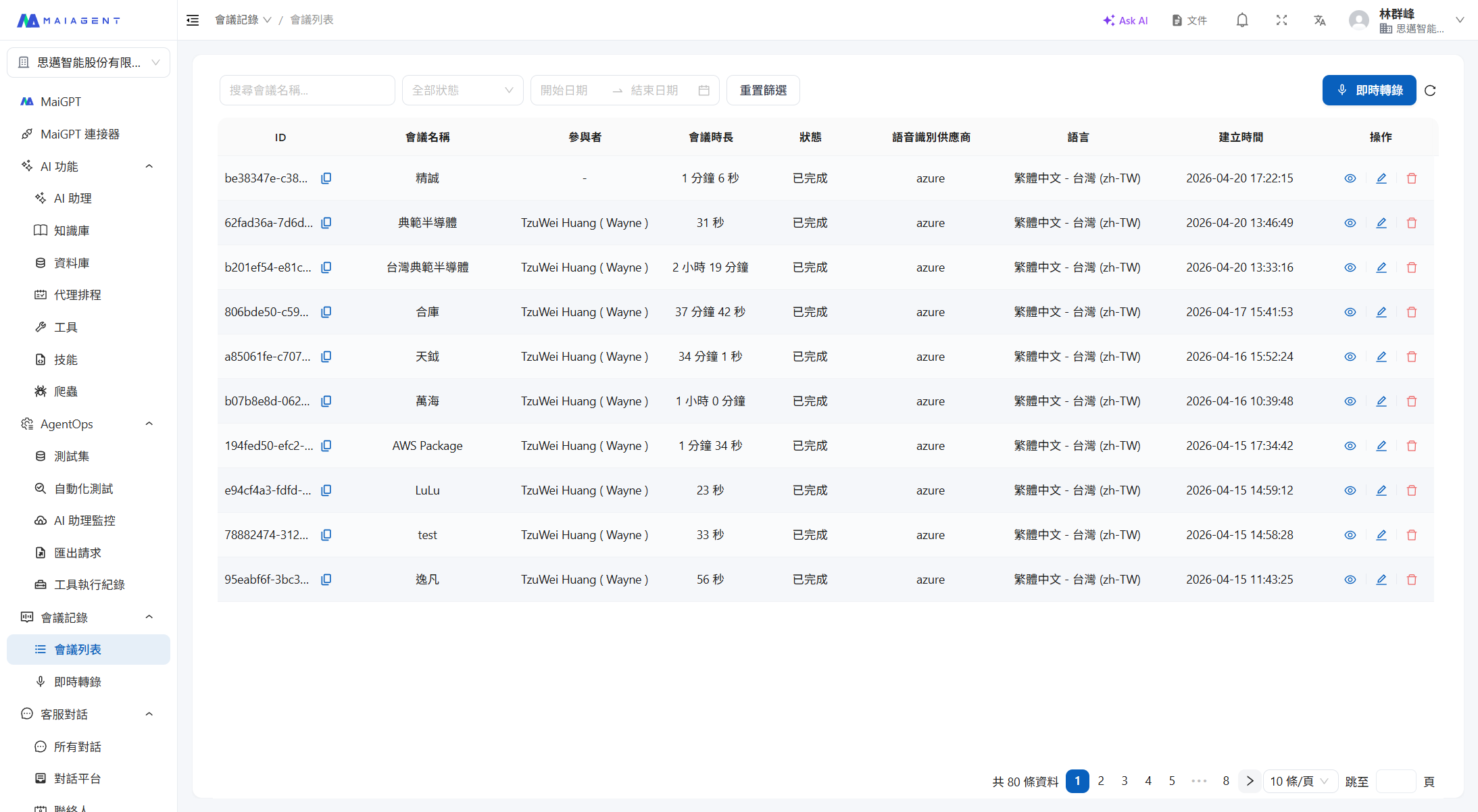
会議記録一覧
## 2つのモード
| | リアルタイム会議記録 | オフライン会議記録 |
| ------------ | ----------------------------------------------------------------------------------------------------------------------- | -------------------------------------- |
| **入力方法** | マイクによるリアルタイム録音 | 音声ファイルのアップロード(mp3, mp4, m4a, aac, wav) |
| **文字起こしの特徴** | 低遅延のリアルタイム文字起こし | 多言語対応の高精度文字起こし |
| **翻訳** | 低遅延のリアルタイム翻訳(最大3言語) | 文字起こし後に翻訳 |
| **話者識別** | STT エンジンの対応に依存 | 高精度な話者識別と管理 |
| **タイムライン** | リアルタイムマーキング | 高精度なタイムライン識別 |
| **字幕再生** | — | 音声ファイルと同期した動的字幕再生 |
| **バックアップ音声** | ブラウザでローカルバックアップ録音を同時に行い、ネットワーク切断時も音声を失いません([会議記録のバックアップ音声](/maiagent-user-guide/ja/meeting-records/backup-audio.md)を参照) | — |
## 共通機能
| 機能 | 説明 |
| ----------------------------- | ---------------------------------------------------------------------------------- |
| **多言語文字起こし** | 多言語の音声認識に対応 |
| **多言語翻訳** | 文字起こし内容を複数のターゲット言語に翻訳 |
| **自動要約** | カスタムの AI アシスタントで会議の要点を自動生成 |
| **AI 質問応答・Agent 連携によるチケット起票** | 文字起こしに対して質問できます。選択した AI アシスタントにチケット起票ツールが設定されている場合、会議の ToDo をそのままタスクやチケットとして作成できます |
| **ダウンロード・エクスポート** | 録音 MP3、テキスト文字起こし、SRT 字幕ファイルのダウンロード |
| **ナレッジベース連携** | 文字起こしをナレッジベースにアップロードし、Agent が参照できるようにする |
## 利用フロー
**リアルタイムモード:**
```
会議を作成 → STT エンジンと翻訳を設定 → 録音を開始 → 低遅延のリアルタイム文字起こし
↓
会議終了 → 文字起こしを確認
↓
AI 要約 / AI 質問応答 / ダウンロード・エクスポート
```
**オフラインモード:**
```
音声ファイルをアップロード(mp3/mp4/m4a/aac/wav) → システムが文字起こしと話者識別を実行 → 文字起こしを確認
↓
動的字幕再生 / AI 要約 / AI 質問応答 / ダウンロード・エクスポート
```
## 会議記録のステータス
| ステータス | 説明 |
| -------------------- | ------------------------------- |
| **開始待ち** (Pending) | 作成済みまたはアップロード済みで、処理がまだ開始されていない |
| **録音中** (Recording) | リアルタイムモードで文字起こしを実行中 |
| **処理中** (Processing) | 録音終了後または音声ファイルのアップロード後、システムが処理中 |
| **完了** (Completed) | 処理が完了し、文字起こしの確認や要約の生成が可能 |
| **失敗** (Failed) | 処理中にエラーが発生 |
## デプロイ方式
会議記録機能は複数のデプロイ方式に対応しています:
* **SaaS**:MaiAgent のクラウドサービスをそのまま利用
* **プライベートクラウド**:お客様のクラウド環境にデプロイ
* **オンプレミス**:お客様のローカルサーバーにインストール
## 権限について
会議記録機能は組織で有効化してから使用でき、3 つの権限に分かれています:
* **閲覧権限**:会議リストの閲覧、文字起こしの確認、ファイルのダウンロードが可能です
* **文字起こし権限**:会議の作成、録音の開始、音声ファイルのアップロード、会議記録の編集・削除が可能です
* **管理権限**:組織内のすべての会議を閲覧できるか、自分が参加した会議のみ閲覧できるかを決定します
会議リストはデフォルトで**自分が作成した会議、または参加者として追加された会議のみ**表示されます。誰がどの会議を閲覧できるか、同僚と会議を共有する方法については、[会議アクセス権限](/maiagent-user-guide/ja/meeting-records/access-control.md)をご覧ください。
---
# Agent Instructions
This documentation is published with GitBook. GitBook is the documentation platform designed so that both humans and AI agents can read, navigate, and reason over technical content effectively. Learn more at gitbook.com.
## Querying This Documentation
If you need additional information that is not directly available in this page, you can query the documentation dynamically by asking a question.
Perform an HTTP GET request on the current page URL with the `ask` query parameter, and the optional `goal` query parameter:
```
GET https://docs.maiagent.ai/maiagent-user-guide/ja/meeting-records/meeting-records.md?ask=&goal=
```
`ask` is the immediate question: it should be specific, self-contained, and written in natural language.
`goal` is optional and describes the broader end goal you are ultimately trying to accomplish on behalf of the user. GitBook uses it to tailor the answer towards what is most useful for that goal.
The response will contain a direct answer to the question and relevant excerpts and sources from the documentation.
Use this mechanism when the answer is not explicitly present in the current page, you need clarification or additional context, or you want to retrieve related documentation sections.