> For the complete documentation index, see [llms.txt](https://docs.maiagent.ai/llms.txt). Markdown versions of documentation pages are available by appending `.md` to page URLs; this page is available as [Markdown](https://docs.maiagent.ai/maiagent-user-guide/ja/build/tools/tool_description.md).
# ツール機能の概要
本ページでは、ツールとは何か、ツールが Agent をどのように支援するか、そして MaiAgent がサポートするツールの種類の概要を紹介します
## ツールとは?
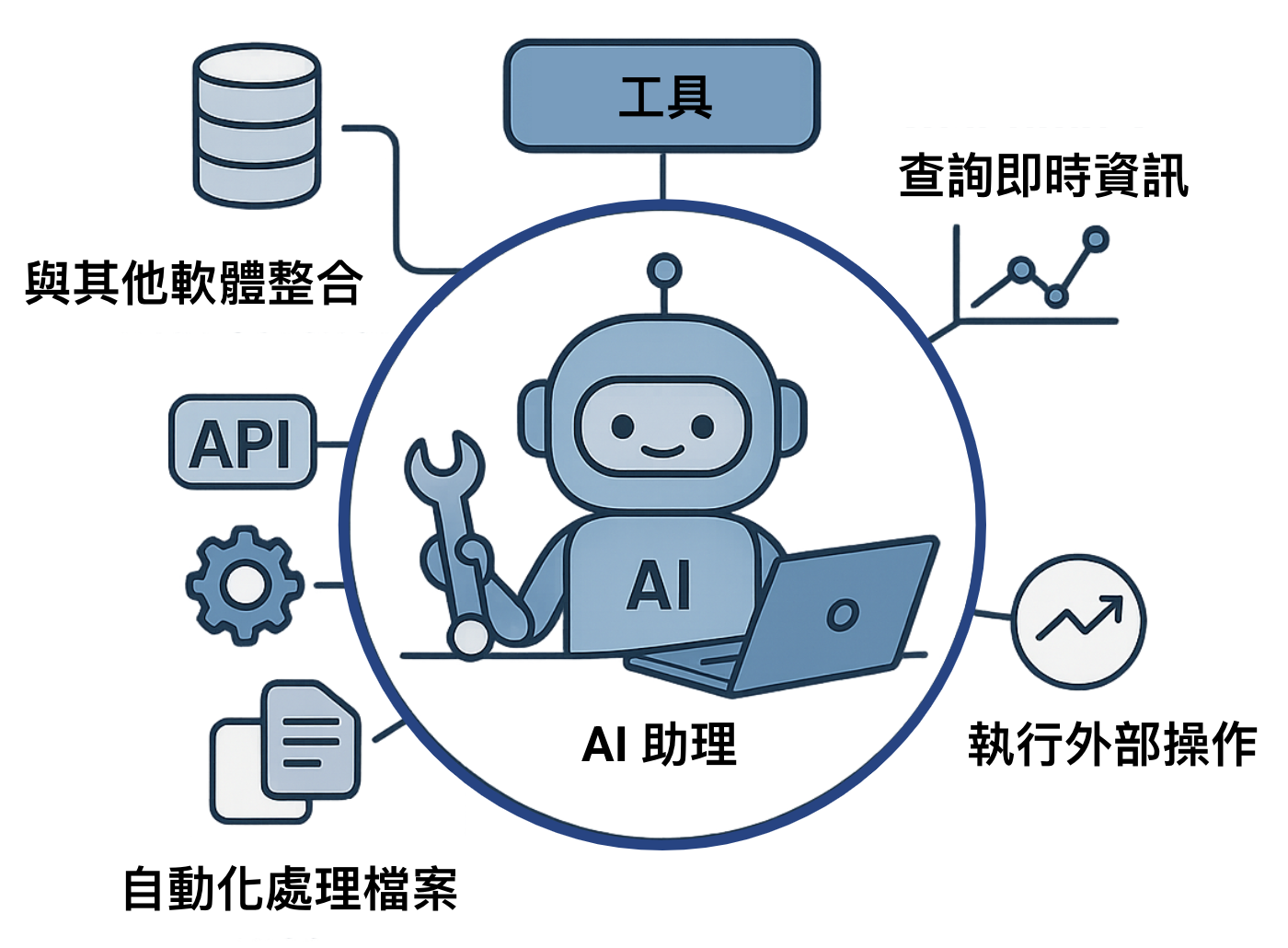
ツールは、Agent の**プラグイン**や**スキル**のようなもので、チャットだけでなくさまざまなことができるようになります。たとえば、Agent に「**天気を調べる**」ツールがあれば今日の気温を答えられ、「**音楽を再生する**」ツールがあればそのまま音楽を再生できます。
ユーザーが Agent の利用できる「ツール」を定義することで、Agent は次のことができます。
1. ユーザーの複雑なリクエストを理解する。
2. 特定のツールをいつ使う必要があるかを自動的に判断する。
3. そのツールの呼び出しに必要なパラメータを自動的に生成する。
これにより、Agent はテキストの返信を生成するだけにとどまらず、次のようなさまざまなタスクを実際に実行できます。
* **リアルタイム情報の取得:** データベースや API から、最新の株価、天気予報、フライト状況などを取得します。
* **外部操作の実行:** 予約システムの API を呼び出したり、スマートホーム機器を制御したり、メールやメッセージを送信したりします。
* **ファイルの処理:** ローカルまたはクラウド上のドキュメントを読み取り、書き込み、分析します。
* **他のソフトウェアとの連携:** CRM システム、プロジェクト管理ツール、その他の業務アプリケーションを操作します。
## ツールの動作の流れ
Agent にツールを設定すると、各ツールには名前、用途の説明、パラメータの説明が付きます。ユーザーが質問すると、Agent は説明をもとにツールを使うかどうか、どのツールを使うかを判断し、呼び出しに必要なパラメータを生成します。その後、プラットフォームがツールを実際に実行し(たとえば外部 API を呼び出し)、結果を Agent に返して返信としてまとめます。そのため、ツールの説明が明確であるほど、Agent は適切なタイミングで適切なツールを使えるようになります。呼び出しの詳しい流れと仕組みについては、技術マニュアルの [Function Calling](https://docs.maiagent.ai/tech/advanced-genai-tech/function-calling) をご覧ください。
## ツールの主なメリット
ツールを使うと、Agent はリアルタイム情報にアクセスして実際の操作を実行でき、構造化された呼び出しと戻り値によって回答ミスのリスクも減らせます。ユーザーは自然言語で要件を伝えるだけで利用できます。
## MaiAgent がサポートするツールの種類
現在、以下の主な種類をサポートしています。
### 🌐 API ツール
* **最もよく使われる種類**です。外部の HTTP/HTTPS API サービスに接続して呼び出すために使います。
* **主な用途**:天気情報の取得、外部データベースの照会、Webhook のトリガー、サードパーティサービスとの連携など。
* **必要な設定**:API エンドポイント URL、HTTP メソッド、リクエストヘッダー (Headers)、パラメータスキーマ (Parameters Schema)。詳しくは [API ツールを作成する](/maiagent-user-guide/ja/build/tools/setup_api_tool.md)をご覧ください。
### ☁️ MCP ツール
* **Model Context Protocol**(MCP)は、標準化されたプロトコルによって、サーバー、クライアント、ホストの連携を実現します。
* **適した場面**:Agent に外部ツールを呼び出させ、より複雑で実用的なタスクを実行させたい場合。
* **必要な設定**:MCP サーバーの URL、認証方式(ヘッダーまたは OAuth コネクタ)、Agent に使用を許可するツール。詳しくは [MCP ツールを作成する](/maiagent-user-guide/ja/build/tools/mcp-setup.md)をご覧ください。
---
# Agent Instructions
This documentation is published with GitBook. GitBook is the documentation platform designed so that both humans and AI agents can read, navigate, and reason over technical content effectively. Learn more at gitbook.com.
## Querying This Documentation
If you need additional information that is not directly available in this page, you can query the documentation by asking a question.
Perform an HTTP GET request on the following URL with the `ask` and `goal` query parameters:
```
GET https://docs.maiagent.ai/maiagent-user-guide/ja/build/tools/tool_description.md?ask=&goal=
```
`ask` is the immediate question: it should be specific, self-contained, and written in natural language.
`goal` is what the user is ultimately trying to achieve, the reason they need the answer. Sharing it helps GitBook give you a better, more relevant answer. A goal is most helpful when it describes the outcome the user wants rather than restating the question. For example, with `ask=how do I create an API token`, a goal like `automate deployments from our CI pipeline` lets GitBook tailor the answer to that use case.
The response will contain a direct answer to the question and relevant excerpts and sources from the documentation.
Use this mechanism when the answer is not explicitly present in the current page, you need clarification or additional context, or you want to retrieve related documentation sections.