> For the complete documentation index, see [llms.txt](https://docs.maiagent.ai/llms.txt). Markdown versions of documentation pages are available by appending `.md` to page URLs; this page is available as [Markdown](https://docs.maiagent.ai/maiagent-user-guide/ja/build/tools.md).
# ツール
ツールとは:Agent が外部サービスを呼び出してアクションを実行したりリアルタイム情報を取得したりできるようにする仕組みです。API ツールと MCP ツールの種類、スキルとの違い、作成手順を説明します。
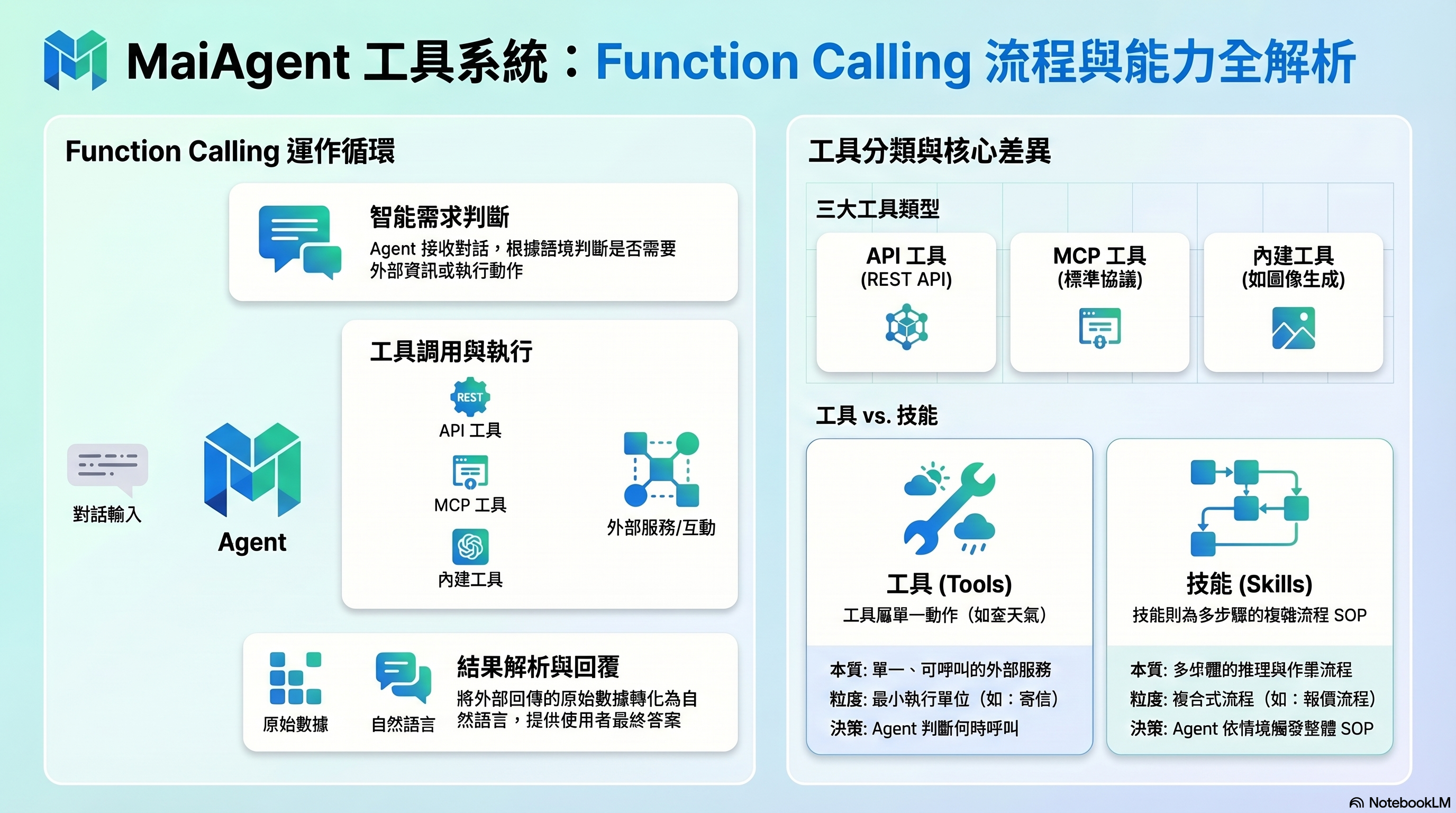
ツール:Agent は Function Calling を通じて外部サービスを呼び出します
## これは何ですか?
ツールを使うと、Agent が外部サービスを呼び出してアクションを実行したりリアルタイム情報を取得したりして、「実際に作業する」ことができるようになります。
ツールのない Agent は、すでに持っている知識だけで質問に回答します。ツールがあれば、現在の天気を調べたり、CRM に顧客データを作成したり、メールを送信したり、サードパーティ API から最新のデータを取得したりできます。
## スキルとの違いは何ですか?
| | ツール | スキル |
| ------------------ | ---------------------------- | ---------------------------- |
| **本質** | 呼び出し可能な外部サービス | 複数ステップの推論プロセス |
| **粒度** | 単一のアクション(「天気を調べる」「メールを送る」など) | 複数ステップの SOP(「見積りの一連の流れ」など) |
| **使うかどうかを決めるのは誰か** | Agent がいつ呼び出すかを自分で判断します | Agent が状況に応じてスキル内のプロセスを起動します |
| **ツールを使うかどうか** | ツール自体が最小単位です | スキルの中で複数のツールを連携させることができます |
**簡単な見分け方**:単一の機能(データの検索、アクションの実行)であればツールにします。一連のプロセス(まず A を調べ、B を行うかどうかを判断する)であればスキルにします。
## ツールの種類
### API ツール
REST API を直接呼び出します。URL、HTTP メソッド、パラメータを設定すると、Agent が会話中に使用できるようになります。
**適した用途**:社内 API、サードパーティサービスの API、シンプルな HTTP リクエスト
### MCP ツール
MCP(Model Context Protocol)を通じて外部サービスに接続します。MCP は標準化されたプロトコルで、Agent がさまざまなサービスとより簡単に連携できるようにします。
**適した用途**:すでに MCP Server があるサービス、より複雑なやり取りが必要な外部連携
### 組み込みツール
MaiAgent があらかじめ提供しているツールです(例:AI 画像生成)。追加の設定なしで使用できます。
> **補足(上級者向け)**:ツールの基盤は Function Calling 技術です。Agent は会話の内容に応じてツールを呼び出す必要があるかを判断し、パラメータの組み立て、リクエストの送信、返された結果の解釈を自動的に行い、最後に自然な言葉でユーザーに返信します。
## 何をする必要がありますか?
1. **ツールを作成する** — 種類(API / MCP)を選択し、接続情報を設定します
2. **パラメータを定義する** — ツールの用途とパラメータを記述し、どのような場面で使うかを Agent に伝えます
3. **テストする** — ツールが正常に呼び出され、結果が返ることを確認します
4. **Agent に紐づける** — Agent の設定でこのツールを構成します
## 関連ドキュメント
* [ツール機能の概要](/maiagent-user-guide/ja/build/tools/tool_description.md)
* [MCP ツールを作成する](/maiagent-user-guide/ja/build/tools/mcp-setup.md)
* [API ツールを作成する](/maiagent-user-guide/ja/build/tools/setup_api_tool.md)
* [組み込みの AI 画像生成ツール](/maiagent-user-guide/ja/build/tools/ai-image-generation-guide.md)
* [Agent にツールを構成する](/maiagent-user-guide/ja/build/tools/configure_tools.md)
---
# Agent Instructions
This documentation is published with GitBook. GitBook is the documentation platform designed so that both humans and AI agents can read, navigate, and reason over technical content effectively. Learn more at gitbook.com.
## Querying This Documentation
If you need additional information that is not directly available in this page, you can query the documentation by asking a question.
Perform an HTTP GET request on the following URL with the `ask` and `goal` query parameters:
```
GET https://docs.maiagent.ai/maiagent-user-guide/ja/build/tools.md?ask=&goal=
```
`ask` is the immediate question: it should be specific, self-contained, and written in natural language.
`goal` is what the user is ultimately trying to achieve, the reason they need the answer. Sharing it helps GitBook give you a better, more relevant answer. A goal is most helpful when it describes the outcome the user wants rather than restating the question. For example, with `ask=how do I create an API token`, a goal like `automate deployments from our CI pipeline` lets GitBook tailor the answer to that use case.
The response will contain a direct answer to the question and relevant excerpts and sources from the documentation.
Use this mechanism when the answer is not explicitly present in the current page, you need clarification or additional context, or you want to retrieve related documentation sections.