> For the complete documentation index, see [llms.txt](https://docs.maiagent.ai/llms.txt). Markdown versions of documentation pages are available by appending `.md` to page URLs; this page is available as [Markdown](https://docs.maiagent.ai/maiagent-user-guide/ja/build/knowledge-base/faq.md).

# FAQ の作成方法

ユーザーが機微な質問をする場合や、100% 正確な回答が必要な場合には、FAQ を利用して指定した回答を提供できます。回答内容が固定されている、よくある顧客の質問に適しています。

## FAQ のアップロード方法 <a href="#how-to-upload-faq" id="how-to-upload-faq"></a>

### ナレッジベースの選択 <a href="#select-knowledge-base" id="select-knowledge-base"></a>

左側のメニューで「<mark style="color:blue;">AI 機能</mark>」 → 「<mark style="color:blue;">ナレッジベース</mark>」を開き、FAQ を作成するナレッジベースをクリックします（まだ作成していない場合は、先に [ナレッジベースの作成方法：基本設定](/maiagent-user-guide/ja/build/knowledge-base/km-basic-settings.md)をご参照ください）。

### 質問と回答の追加 <a href="#add-qa-content" id="add-qa-content"></a>

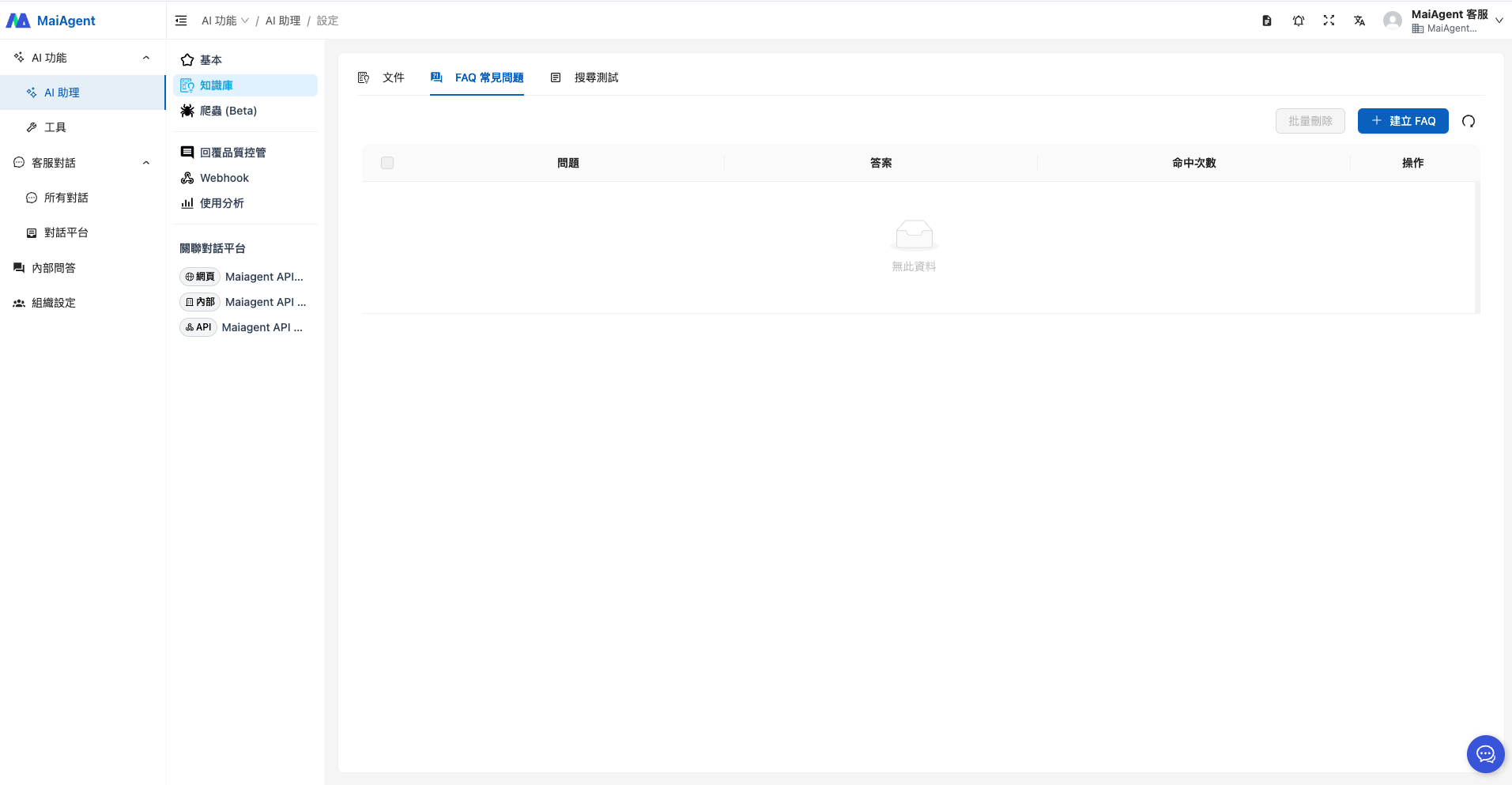
1. ナレッジベースのページを開き、「<mark style="color:blue;">FAQ</mark>」タブを選択します。右上の青い「<mark style="color:blue;">+FAQ を作成</mark>」ボタンをクリックして、質問と回答の追加を開始します。

<figure><img src="https://2584873290-files.gitbook.io/~/files/v0/b/gitbook-x-prod.appspot.com/o/spaces%2FTvHx8hgwYGDTLD3A7xoW%2Fuploads%2Fgit-blob-49a1dbecff324fc73ae24dc5d1129881ff999386%2F%E6%88%AA%E5%9C%96%202025-04-25%20%E4%B8%8A%E5%8D%8811.01.57.png?alt=media" alt=""><figcaption></figcaption></figure>

2. FAQ の作成

FAQ 編集ページでは、回答にさまざまな形式を設定できます：

* 基本的な文字装飾（太字、下線、斜体など）
* 数式
* ソースコード（HTML、XML）
* リンクの埋め込み（動画、ウェブサイト）
  * 動画はユーザー向けの参考リンクとして提供します（Agent はまだ動画の内容を読み取れません）

<div><figure><img src="https://2584873290-files.gitbook.io/~/files/v0/b/gitbook-x-prod.appspot.com/o/spaces%2FTvHx8hgwYGDTLD3A7xoW%2Fuploads%2Fgit-blob-b4615a80311723cd5f59386748f5c77c6343c5b8%2Fimage%20(161).png?alt=media" alt=""><figcaption></figcaption></figure> <figure><img src="https://2584873290-files.gitbook.io/~/files/v0/b/gitbook-x-prod.appspot.com/o/spaces%2FTvHx8hgwYGDTLD3A7xoW%2Fuploads%2Fgit-blob-aaf188abfa96d664489bfe41ceef988b4813ac9b%2Fimage%20(144).png?alt=media" alt=""><figcaption><p>回答形式の例</p></figcaption></figure></div>

さまざまな形式を使って回答の要点を明確に示し、情報を漏れなく伝えられます。

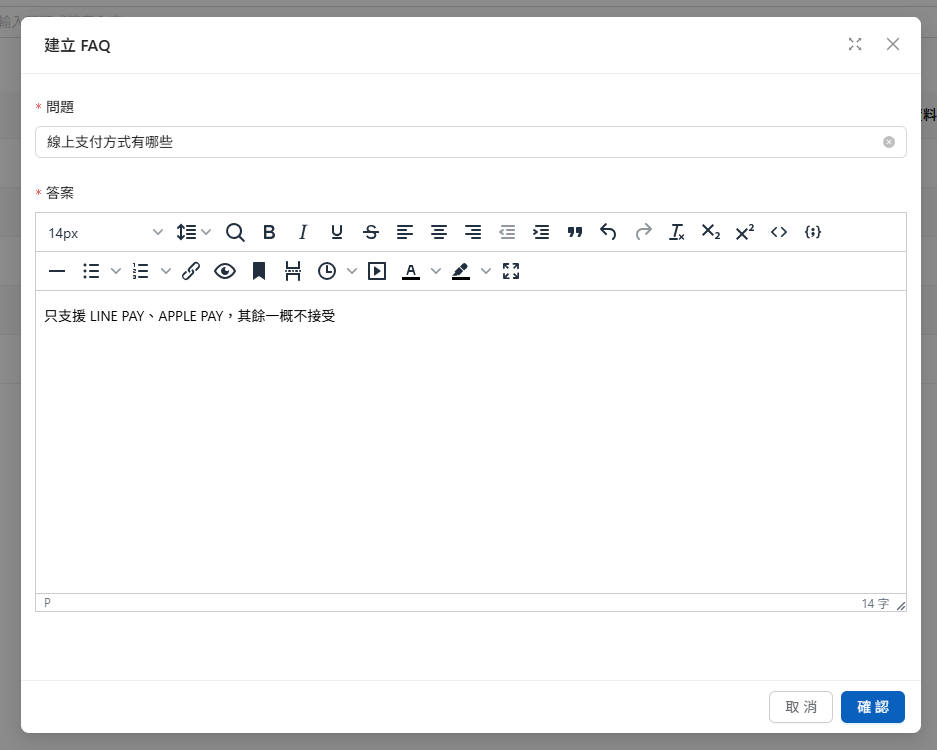
例えば、EC サイトの支払い方法について、次の質問を追加してオンライン決済の方法を説明できます：

<figure><img src="https://2584873290-files.gitbook.io/~/files/v0/b/gitbook-x-prod.appspot.com/o/spaces%2FTvHx8hgwYGDTLD3A7xoW%2Fuploads%2Fgit-blob-08cd11dea147bebfc6f110f3753681db466ce006%2F%E8%9E%A2%E5%B9%95%E6%93%B7%E5%8F%96%E7%95%AB%E9%9D%A2%202025-08-28%20113655.png?alt=media" alt=""><figcaption></figcaption></figure>

作成後はプレビューをクリックして、回答内容を確認できます：

<div><figure><img src="https://2584873290-files.gitbook.io/~/files/v0/b/gitbook-x-prod.appspot.com/o/spaces%2FTvHx8hgwYGDTLD3A7xoW%2Fuploads%2Fgit-blob-20c330d653c8723fa69be5633277e702d5b9ffa3%2Fimage%20(149).png?alt=media" alt=""><figcaption></figcaption></figure> <figure><img src="https://2584873290-files.gitbook.io/~/files/v0/b/gitbook-x-prod.appspot.com/o/spaces%2FTvHx8hgwYGDTLD3A7xoW%2Fuploads%2Fgit-blob-1ea572e00438069f51438eb98d0bc6d14d25b063%2Fimage%20(148).png?alt=media" alt=""><figcaption></figcaption></figure></div>

追加後に「<mark style="color:blue;">確認</mark>」をクリックすると FAQ の作成が完了し、Agent は回答時に、設定した回答を参照できるようになります：

<figure><img src="https://2584873290-files.gitbook.io/~/files/v0/b/gitbook-x-prod.appspot.com/o/spaces%2FTvHx8hgwYGDTLD3A7xoW%2Fuploads%2Fgit-blob-25391c06171945cc1c914bc863aecd3c04b29d3f%2Fimage%20(145).png?alt=media" alt=""><figcaption></figcaption></figure>

顧客がオンライン決済の方法について質問すると、LLM は FAQ の内容に基づいて回答します：

<figure><img src="https://2584873290-files.gitbook.io/~/files/v0/b/gitbook-x-prod.appspot.com/o/spaces%2FTvHx8hgwYGDTLD3A7xoW%2Fuploads%2Fgit-blob-1e7527fa3c7ef9bb3fa09a3c8e8005a0a24f25d4%2Fimage%20(146).png?alt=media" alt=""><figcaption></figcaption></figure>

このように Agent の回答範囲を制限し、誤った内容や企業の規定に沿わない内容を回答することを防げます。

{% hint style="info" %}
ユーザーの質問は、FAQ の質問と一字一句同じである必要はありません。FAQ もナレッジベースのドキュメントと同様に意味に基づく検索を行うため、表現を変えても同じ FAQ が見つかる場合があります。上記の支払い方法の例では、「カードで支払えますか？」「どのような支払い方法がありますか？」のどちらも、この FAQ を検索できる可能性があります。公開前に[検索テスト](/maiagent-user-guide/ja/build/knowledge-base/test-search-result.md)でよくある質問の表現をいくつか入力し、いずれも見つかることを確認できます。
{% endhint %}

## Excel による FAQ の一括インポート <a href="#bulk-import-faq-excel" id="bulk-import-faq-excel"></a>

質問と回答が多い場合は、Excel で一括インポートできます。各行から 1 件の FAQ が作成され、個別に作成した FAQ と同じように一覧に表示され、それぞれ編集できます。

{% stepper %}
{% step %}

### テンプレートのダウンロード <a href="#faq-excel-download-template" id="faq-excel-download-template"></a>

ナレッジベースの「<mark style="color:blue;">FAQ</mark>」タブで、右上の「<mark style="color:blue;">FAQ を一括インポート</mark>」をクリックし、「<mark style="color:blue;">アップロード</mark>」タブで「<mark style="color:blue;">FAQ テンプレートファイルをダウンロード</mark>」をクリックします。ダウンロードした Excel の最初の行はサンプルで、その後にこのナレッジベースの既存の FAQ が続きます。
{% endstep %}

{% step %}

### 質問と回答の入力 <a href="#faq-excel-fill" id="faq-excel-fill"></a>

`question` 列に質問、`answer` 列に回答を入力します。列名は変更しないでください。アップロードする前に、サンプル行と、再度インポートする必要のない既存の FAQ を削除してください。
{% endstep %}

{% step %}

### アップロードとインポート <a href="#faq-excel-upload" id="faq-excel-upload"></a>

ファイルをアップロード領域にドラッグするか、クリックしてアップロードします（`.xlsx`、`.xls` に対応）。次に「<mark style="color:blue;">アップロードして更新</mark>」をクリックします。インポートはバックグラウンドで実行されるため、ウィンドウを閉じても構いません。完了すると、インポートされた件数が通知されます。
{% endstep %}

{% step %}

### インポート結果の確認 <a href="#faq-excel-history" id="faq-excel-history"></a>

「<mark style="color:blue;">インポート履歴</mark>」タブで、各インポートの状態、進捗、作成済み件数、エラーを確認します。質問または回答が空白の行はインポートされず、エラーに「N 行目」として表示されます。
{% endstep %}
{% endstepper %}

{% hint style="warning" %}

* インポートでは FAQ の**追加**のみを行い、既存の質問と回答の更新や照合は行いません。ダウンロードしたファイルをそのまま再アップロードすると、既存の FAQ が重複して作成されます。
* サンプル行は自動でスキップされません。削除を忘れると 1 件の FAQ としてインポートされるため、インポート後に削除してください。
* 同じナレッジベースで同時に実行できるインポートは 1 件のみです。インポート中は「<mark style="color:blue;">アップロードして更新</mark>」をクリックできません。
  {% endhint %}

## その他の活用例 <a href="#other-use-cases" id="other-use-cases"></a>

### 製品の操作案内に関する質問と回答 <a href="#product-operation-qa" id="product-operation-qa"></a>

**MaiAgent プラットフォームの利用**を例に、新しいユーザーが MaiAgent システムを使い始められるよう支援する場合、FAQ セクションに次の質問と回答を追加できます：

**質問：** MaiAgent の使い方がわからない場合はどうすればよいですか？

{% hint style="info" %}
回答が長い場合は、プレビューをクリックして全文を確認できます
{% endhint %}

<div><figure><img src="https://2584873290-files.gitbook.io/~/files/v0/b/gitbook-x-prod.appspot.com/o/spaces%2FTvHx8hgwYGDTLD3A7xoW%2Fuploads%2Fgit-blob-da584d4c0f0186f33bf1d91c1deb22e6af87d89e%2Fimage%20(147).png?alt=media" alt=""><figcaption></figcaption></figure> <figure><img src="https://2584873290-files.gitbook.io/~/files/v0/b/gitbook-x-prod.appspot.com/o/spaces%2FTvHx8hgwYGDTLD3A7xoW%2Fuploads%2Fgit-blob-d7c3c8f4afb6da16d4dd0e9b1a73c2a6b82b14f0%2Fimage%20(150).png?alt=media" alt=""><figcaption><p>回答のプレビュー画面</p></figcaption></figure></div>

Agent は設定された回答に基づき、MaiAgent で利用できるリソースや使い始めるための手順を説明し、回答内のリンクをユーザーの参考情報として提供します：

<figure><img src="https://2584873290-files.gitbook.io/~/files/v0/b/gitbook-x-prod.appspot.com/o/spaces%2FTvHx8hgwYGDTLD3A7xoW%2Fuploads%2Fgit-blob-0f8ed42d44f41f1eed8ed96eca41f69d878d3e67%2Fimage%20(151)%20(1).png?alt=media" alt=""><figcaption></figcaption></figure>

***

### 知識の紹介 <a href="#knowledge-introduction" id="knowledge-introduction"></a>

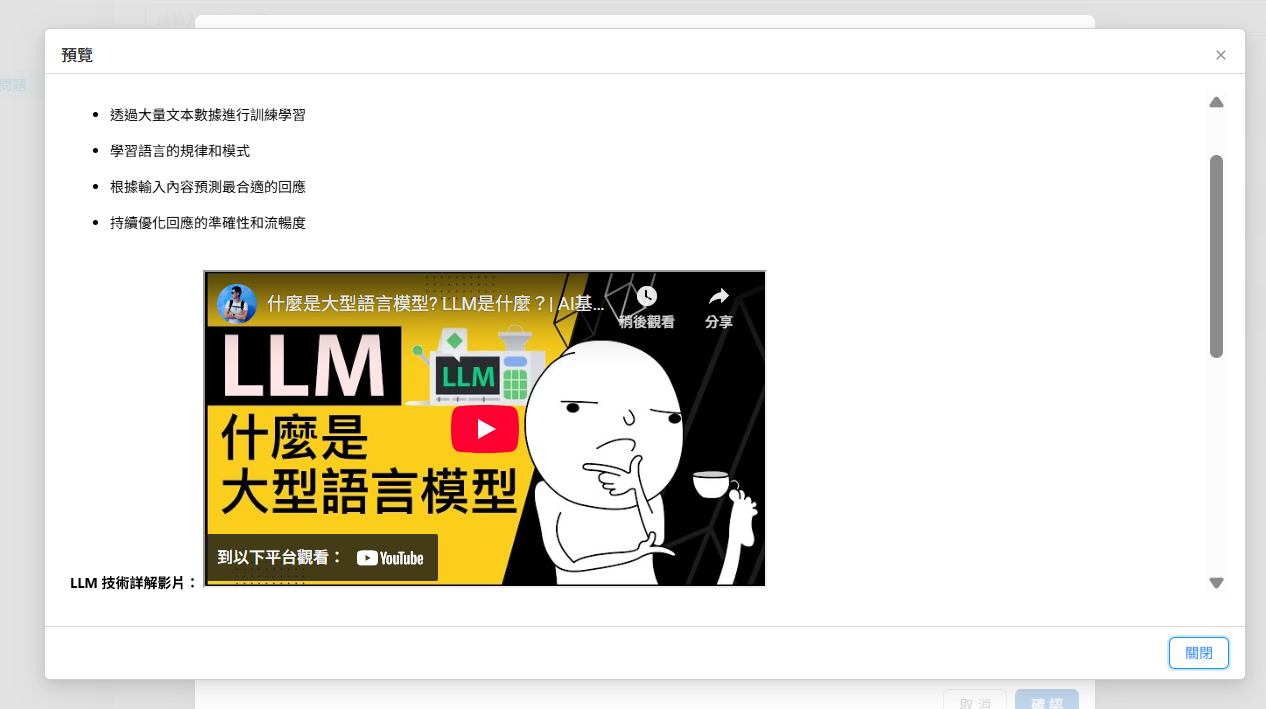
**LLM 技術の紹介**を例に、技術教育プラットフォームを運営し、一般の方に大規模言語モデル（LLM）とは何かを説明する場合、FAQ セクションに次の質問と回答を追加できます：

**質問：** LLM はどのような仕組みで動作しますか？

{% hint style="info" %}
動画のリンクは回答内に入力できます
{% endhint %}

<div><figure><img src="https://2584873290-files.gitbook.io/~/files/v0/b/gitbook-x-prod.appspot.com/o/spaces%2FTvHx8hgwYGDTLD3A7xoW%2Fuploads%2Fgit-blob-8c3ec8de860a3c41e9d54549a2d2524ebaa2e34c%2Fimage%20(153).png?alt=media" alt=""><figcaption><p>メディアの挿入/編集をクリック</p></figcaption></figure> <figure><img src="https://2584873290-files.gitbook.io/~/files/v0/b/gitbook-x-prod.appspot.com/o/spaces%2FTvHx8hgwYGDTLD3A7xoW%2Fuploads%2Fgit-blob-860ef22a1a3b9e0de2da94fac5f0a1ea0b825b45%2Fimage%20(154).png?alt=media" alt=""><figcaption><p>リンク入力の例</p></figcaption></figure></div>

<figure><img src="https://2584873290-files.gitbook.io/~/files/v0/b/gitbook-x-prod.appspot.com/o/spaces%2FTvHx8hgwYGDTLD3A7xoW%2Fuploads%2Fgit-blob-c53a1ddf17ba9a071cf2bcb39b475b10adccc1a3%2F%E8%9E%A2%E5%B9%95%E6%93%B7%E5%8F%96%E7%95%AB%E9%9D%A2%202025-08-28%20122508.png?alt=media" alt=""><figcaption><p>メディア挿入のプレビュー</p></figcaption></figure>

Agent は設定された回答に基づいて応答し、ユーザーがアクセスできるよう動画の参考リンクを提供します：

<figure><img src="https://2584873290-files.gitbook.io/~/files/v0/b/gitbook-x-prod.appspot.com/o/spaces%2FTvHx8hgwYGDTLD3A7xoW%2Fuploads%2Fgit-blob-e1d7523edbdd84e0531ae13ae8e6e558d7a1b2de%2Fimage%20(155).png?alt=media" alt=""><figcaption></figcaption></figure>

***

## FAQ の管理・保守のポイント <a href="#faq-maintenance-tips" id="faq-maintenance-tips"></a>

**コンテンツの鮮度管理**

* **イベント情報の更新**：キャンペーンや期間限定の特典が終了したら、関連する内容をすぐに削除または更新します
* **ポリシー変更の反映**：会社のポリシー（返品・交換の条件や利用規約など）が変更された場合は、FAQ の内容も更新します
* **製品情報の保守**：新製品の発売、仕様変更、販売終了などの情報を、関連する質問と回答に速やかに反映します

**データに基づく最適化**

* **回答品質の向上**：よくある質問の回答を改善し、より詳しく実用的な情報を提供します
* **gap 分析**：顧客からのフィードバックやカスタマーサポートの記録を通じて、FAQ でカバーしていないよくある質問を見つけます

**品質管理の仕組み**

* **内容の正確性の確認**：FAQ 内のリンク、連絡先情報、技術資料が正しいか定期的に確認します
* **語調の統一**：すべての FAQ の内容を、ブランドの語調やコミュニケーションスタイルに合わせます
* **多言語版の同期**：複数の言語が必要な場合は、各言語版を同期して更新します

{% hint style="info" %}
FAQ のヒット数を確認すると、ユーザーが最もよく質問するカテゴリを把握し、定期的に更新できます。

ヒット数の説明は、[検索テスト](/maiagent-user-guide/ja/build/knowledge-base/test-search-result.md)をご参照ください。
{% endhint %}

<figure><img src="https://2584873290-files.gitbook.io/~/files/v0/b/gitbook-x-prod.appspot.com/o/spaces%2FTvHx8hgwYGDTLD3A7xoW%2Fuploads%2Fgit-blob-169fdace8672126bd716e283852b2476d9328279%2Fimage%20(157).png?alt=media" alt=""><figcaption></figcaption></figure>

このような管理の仕組みにより、Agent は常に正確で最新の、ユーザーのニーズに合った回答を提供でき、カスタマーサービス全体の体験を向上させられます。


---

# Agent Instructions
This documentation is published with GitBook. GitBook is the documentation platform designed so that both humans and AI agents can read, navigate, and reason over technical content effectively. Learn more at gitbook.com.

## Querying This Documentation
If you need additional information that is not directly available in this page, you can query the documentation by asking a question.

Perform an HTTP GET request on the following URL with the `ask` and `goal` query parameters:

```
GET https://docs.maiagent.ai/maiagent-user-guide/ja/build/knowledge-base/faq.md?ask=<question>&goal=<user_goal>
```

`ask` is the immediate question: it should be specific, self-contained, and written in natural language.
`goal` is what the user is ultimately trying to achieve, the reason they need the answer. Sharing it helps GitBook give you a better, more relevant answer. A goal is most helpful when it describes the outcome the user wants rather than restating the question. For example, with `ask=how do I create an API token`, a goal like `automate deployments from our CI pipeline` lets GitBook tailor the answer to that use case.

The response will contain a direct answer to the question and relevant excerpts and sources from the documentation.

Use this mechanism when the answer is not explicitly present in the current page, you need clarification or additional context, or you want to retrieve related documentation sections.