> For the complete documentation index, see [llms.txt](https://docs.maiagent.ai/llms.txt). Markdown versions of documentation pages are available by appending `.md` to page URLs; this page is available as [Markdown](https://docs.maiagent.ai/maiagent-user-guide/ja/build/knowledge-base.md).
# ナレッジベース
ナレッジベースとは何か、Agent が企業固有の質問に答えるための情報源、登録できる内容(ドキュメント、FAQ、Web ページ)、データベースとの用途の違い、作成手順を説明します。
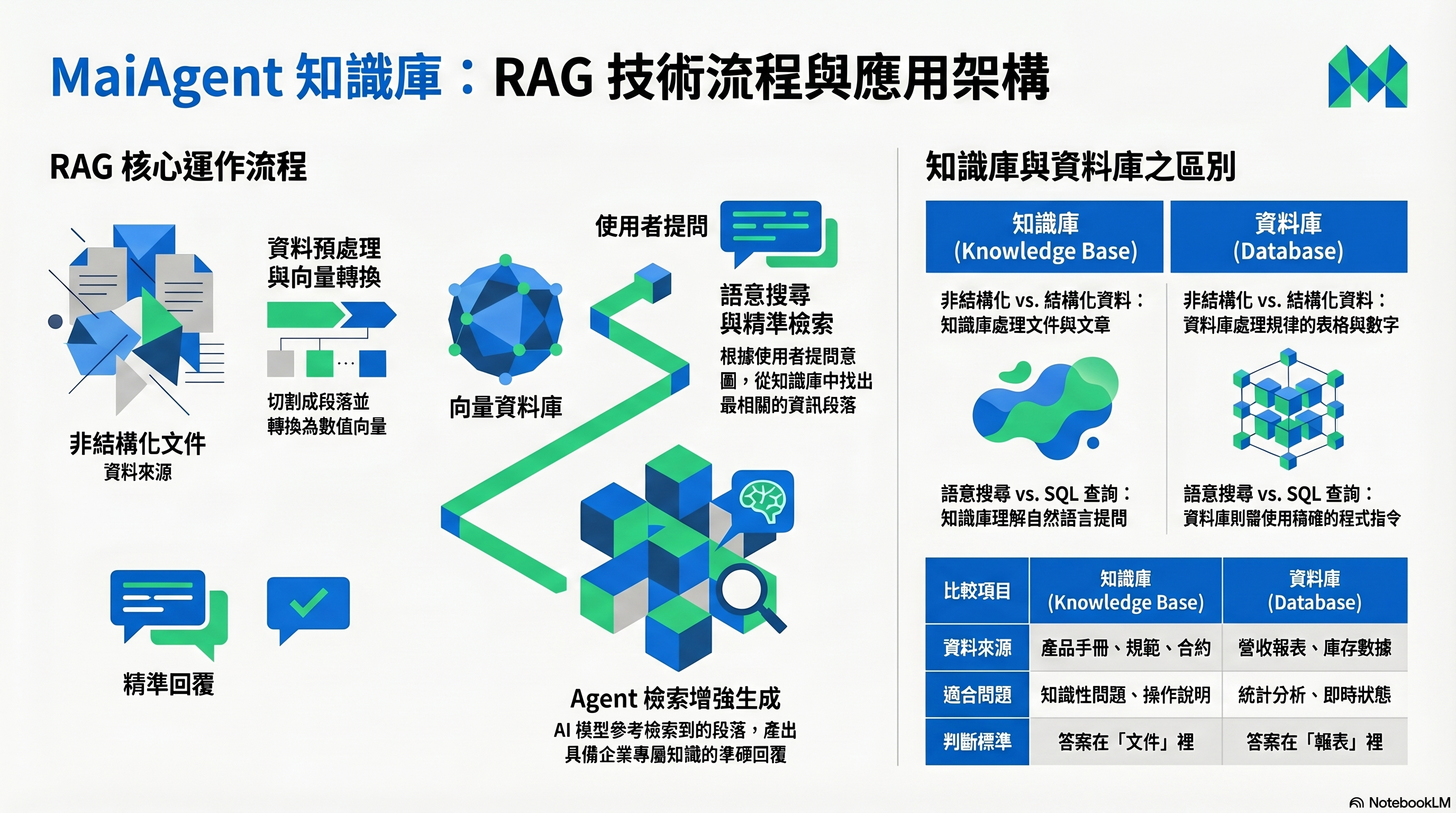
ナレッジベースの RAG フロー:ドキュメントのアップロードから Agent による参照・回答まで
## どのようなものですか?
ナレッジベースは、Agent が使う企業の知識百科です。会社のドキュメント、FAQ、Web ページの内容を登録すると、Agent はその情報に基づいてユーザーの質問に答えられます。
ナレッジベースがない Agent は、言語モデルの一般的な知識だけで回答します。ナレッジベースがあれば、「当社の返品ポリシーは何ですか?」といった企業固有の質問に答えられます。
## ナレッジベースには何を登録できますか?
| データの種類 | 説明 | 適した用途 |
| ----------------- | ----------------------- | --------------------------- |
| **ドキュメントのアップロード** | PDF、Word、Excel、TXT などです | 製品マニュアル、社内規定、契約書のひな形に適しています |
| **FAQ** | 質問と回答のペアです | よくある質問、定型回答に適しています |
| **クローラーによるインポート** | Web ページから内容を自動取得します | 公式サイトの情報、公開データに適しています |
## データベースとの違いは何ですか?
特によく寄せられる質問です。
| | ナレッジベース | データベース |
| ------------ | ----------------------------- | ----------------------------- |
| **データ形式** | 非構造化データ(ドキュメント、記事、FAQ)です | 構造化データ(表、フィールド、数値)です |
| **検索方法** | 意味に基づく検索(「返品ポリシーは何ですか?」)を使います | SQL クエリ(「先月の売上はいくらですか?」)を使います |
| **回答に適した内容** | 知識に関する質問、ポリシーや規定、操作手順です | データの照会、統計分析、リアルタイムの状況です |
**簡単な選び方**:答えが「ドキュメント」にある場合はナレッジベース、「レポート」にある場合はデータベースを使います。
> **技術的な説明**:ナレッジベースは RAG(Retrieval-Augmented Generation)技術を使います。アップロードしたドキュメントをチャンクに分割してベクトルに変換し、ユーザーが質問すると、最も関連性の高いチャンクを探して Agent に回答の根拠として渡します。
## ファイルライブラリとの違いは何ですか?
ナレッジベースは試験で使うカンニングペーパーのようなもので、Agent が素早く答えを見つけてユーザーに回答するため、社外向けのカスタマーサポートや FAQ に適しています。[ファイルライブラリ](/maiagent-user-guide/ja/work/file-library.md)は、宿題をするときに手元に置く教科書全体のようなもので、AI が元のファイル全体を読んで文章の作成、要約、書き換えを行います。Web Widget や LINE などの会話プラットフォームでは、ナレッジベースだけを使います。
**簡単な選び方**:「答えを探す」にはナレッジベース、「ファイル全体を処理する」にはファイルライブラリを使います。詳しくは[ナレッジベースとファイルライブラリ:用途の違いと選び方](/maiagent-user-guide/ja/work/file-library/vs-knowledge-base.md)をご覧ください。
## 何をすればよいですか?
1. **ナレッジベースを作成します** — 名前を付け、Embedding モデルを選びます
2. **データをインポートします** — ドキュメントのアップロード、FAQ の作成、クローラーによる取得を行います
3. **検索テストを行います** — 想定される質問で、ナレッジベースが正しい答えを見つけられるか確認します
4. **Agent に接続します** — Agent の設定でナレッジベースを関連付けます
## 関連ドキュメント
* [ナレッジベースの概要](/maiagent-user-guide/ja/build/knowledge-base/km.md)
* [ナレッジベースとファイルライブラリ:用途の違いと選び方](/maiagent-user-guide/ja/work/file-library/vs-knowledge-base.md)
* [ナレッジベースの作成方法:基本設定](/maiagent-user-guide/ja/build/knowledge-base/km-basic-settings.md)
* [FAQ の作成方法](/maiagent-user-guide/ja/build/knowledge-base/faq.md)
* [ドキュメント管理:タグとメタデータ](/maiagent-user-guide/ja/build/knowledge-base/tags-and-metadata.md)
* [検索テスト](/maiagent-user-guide/ja/build/knowledge-base/test-search-result.md)
---
# Agent Instructions
This documentation is published with GitBook. GitBook is the documentation platform designed so that both humans and AI agents can read, navigate, and reason over technical content effectively. Learn more at gitbook.com.
## Querying This Documentation
If you need additional information that is not directly available in this page, you can query the documentation by asking a question.
Perform an HTTP GET request on the following URL with the `ask` and `goal` query parameters:
```
GET https://docs.maiagent.ai/maiagent-user-guide/ja/build/knowledge-base.md?ask=&goal=
```
`ask` is the immediate question: it should be specific, self-contained, and written in natural language.
`goal` is what the user is ultimately trying to achieve, the reason they need the answer. Sharing it helps GitBook give you a better, more relevant answer. A goal is most helpful when it describes the outcome the user wants rather than restating the question. For example, with `ask=how do I create an API token`, a goal like `automate deployments from our CI pipeline` lets GitBook tailor the answer to that use case.
The response will contain a direct answer to the question and relevant excerpts and sources from the documentation.
Use this mechanism when the answer is not explicitly present in the current page, you need clarification or additional context, or you want to retrieve related documentation sections.