> For the complete documentation index, see [llms.txt](https://docs.maiagent.ai/llms.txt). Markdown versions of documentation pages are available by appending `.md` to page URLs; this page is available as [Markdown](https://docs.maiagent.ai/maiagent-user-guide/ja/build/integrate/farmingsearch.md).

# 農業データの検索

農業データ照会の活用例：API ツールで農業部のオープンデータと連携し、Agent が農産物の取引相場をリアルタイムで照会して、価格や動向に関する質問に回答できるようにします。

## 活用シーン：農業リアルタイムデータ照会アシスタントの構築 <a href="#use-case-build-agriculture-realtime-data-assistant" id="use-case-build-agriculture-realtime-data-assistant"></a>

農家、卸売業者、小売業者などの農業従事者の方や、農業関連の行政機関で政策立案に携わる方が、各種農産物（米、果物、野菜、畜産物など）の市場価格や取引動向を分析・予測する際には、農業部が公開している API と連携することで、農産物の取引データをリアルタイムに照会し、さらなるデータ分析や意思決定の効率化に役立てることができます。

## 活用フロー <a href="#application-workflow" id="application-workflow"></a>

### 1. 農産物取引相場照会ツールの作成 <a href="#step1-create-crop-price-query-tool" id="step1-create-crop-price-query-tool"></a>

#### API 設定の取得 <a href="#get-api-config" id="get-api-config"></a>

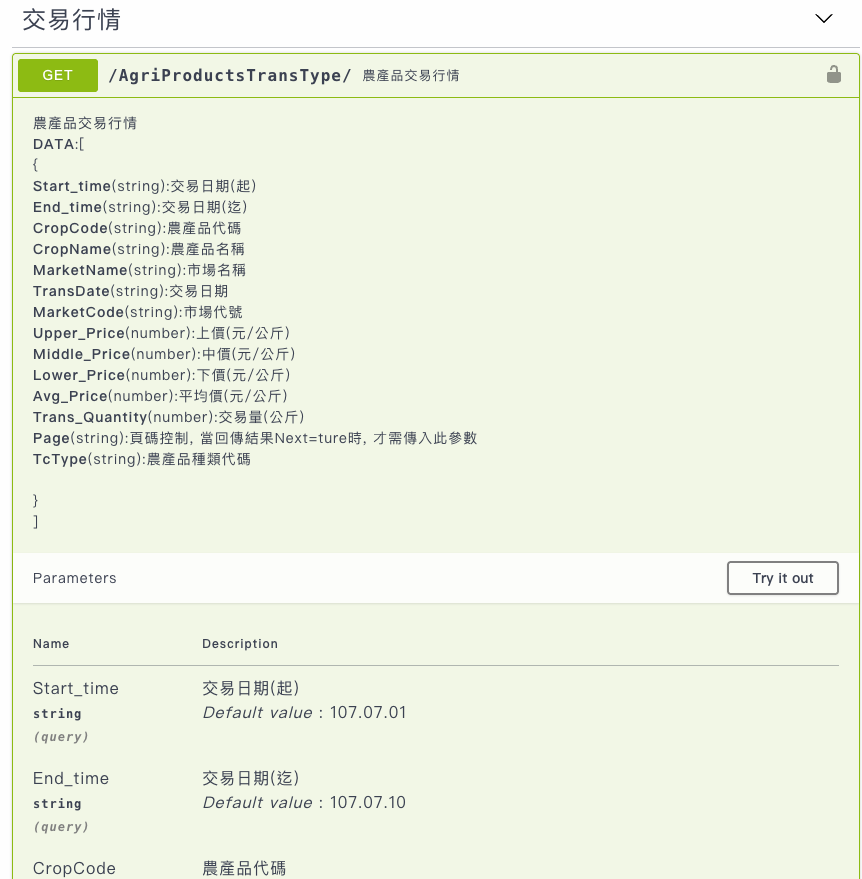
まず、農業データオープンプラットフォームの API 専用ページから、必要に応じてデータ連携元を取得します。

{% hint style="info" %}
<https://data.moa.gov.tw/api.aspx>
{% endhint %}

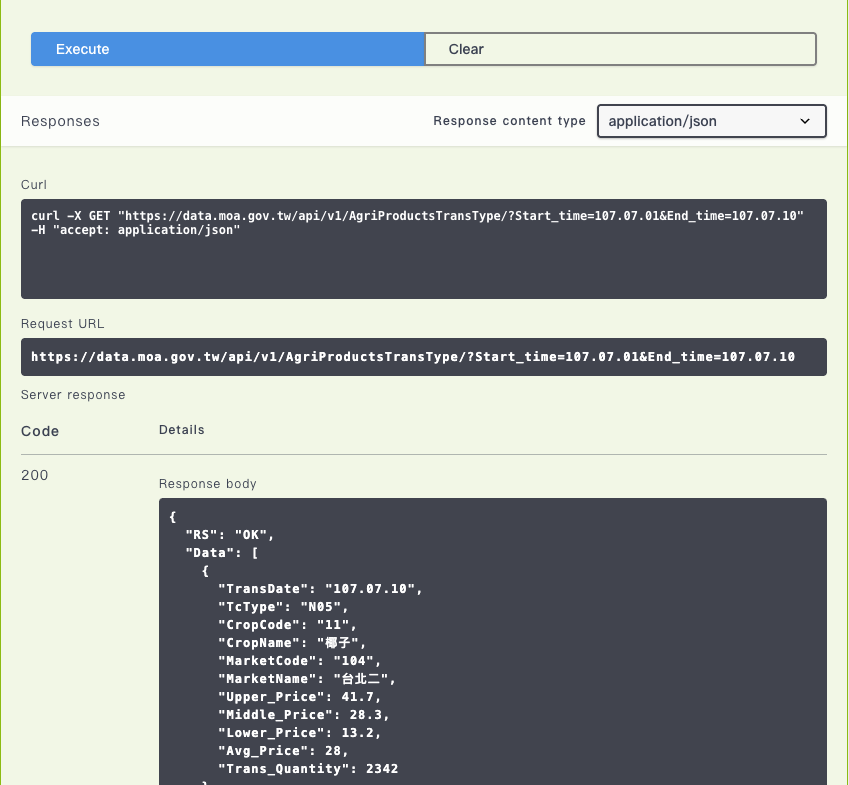
ここでは、農産物取引相場をツール構築の例として使用します。Parameters セクションで <mark style="color:blue;">「Try it out」</mark> ボタンをクリックし、続いて <mark style="color:blue;">「Execute」</mark> をクリックすると、API 設定データを取得できます。

<figure><img src="https://2584873290-files.gitbook.io/~/files/v0/b/gitbook-x-prod.appspot.com/o/spaces%2FTvHx8hgwYGDTLD3A7xoW%2Fuploads%2Fgit-blob-62660f70253893c902138ac2831a20ab6b9ebc23%2F%E6%88%AA%E5%9C%96%202025-05-07%20%E4%B8%AD%E5%8D%8812.49.30.png?alt=media" alt=""><figcaption></figcaption></figure>

<figure><img src="https://2584873290-files.gitbook.io/~/files/v0/b/gitbook-x-prod.appspot.com/o/spaces%2FTvHx8hgwYGDTLD3A7xoW%2Fuploads%2Fgit-blob-013b252bd4a4748ba5eb98f5a9e552cd92e751cd%2F%E6%88%AA%E5%9C%96%202025-05-07%20%E4%B8%AD%E5%8D%8812.52.47.png?alt=media" alt=""><figcaption></figcaption></figure>

#### API ツールの作成 <a href="#create-api-tool" id="create-api-tool"></a>

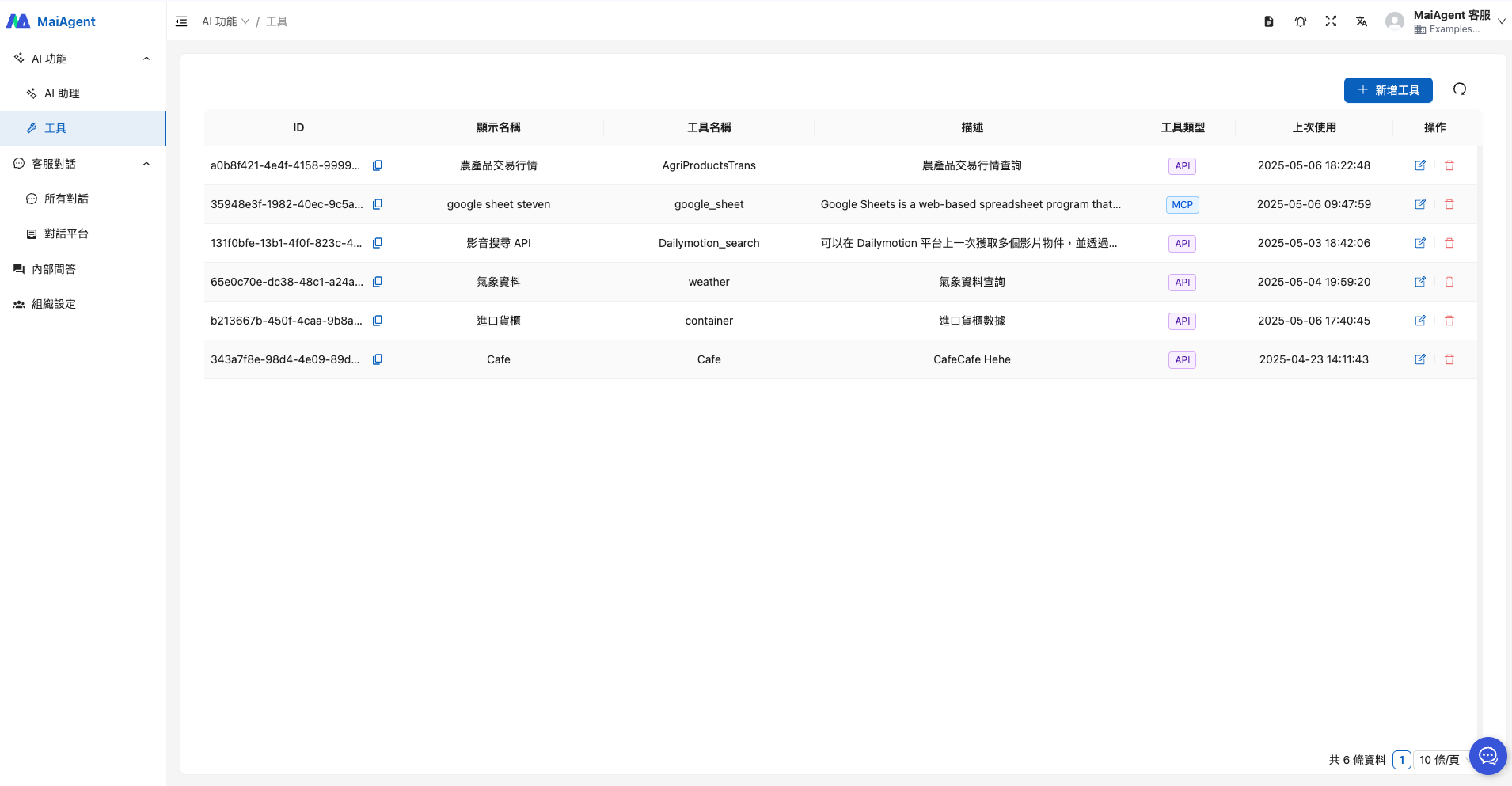
MaiAgent プラットフォームの左側の機能メニューで「ツール」をクリックし、「ツールを追加」をクリックします。

<figure><img src="https://2584873290-files.gitbook.io/~/files/v0/b/gitbook-x-prod.appspot.com/o/spaces%2FTvHx8hgwYGDTLD3A7xoW%2Fuploads%2Fgit-blob-d6e35a8068eb1f8e19e4d6fd86e727ea8ee6c59d%2F%E6%88%AA%E5%9C%96%202025-05-07%20%E4%B8%AD%E5%8D%8812.38.12.png?alt=media" alt=""><figcaption></figcaption></figure>

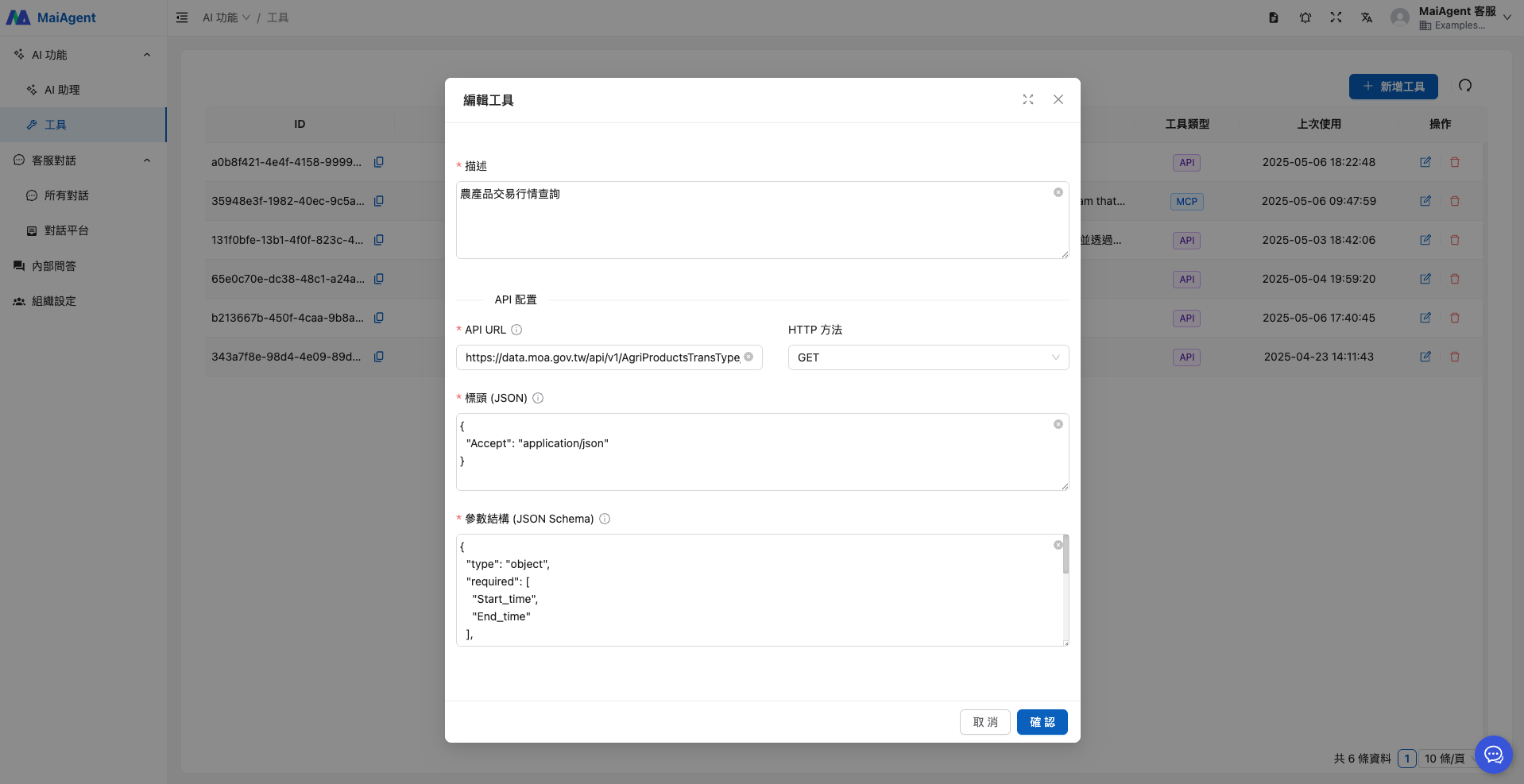
表示名とツール名を入力し、ツールの種類で API を選択して、このツールの説明を記入します。

下部の API 設定では、農業データオープンプラットフォーム上の API 情報画面をスクリーンショットして MaiAgent ツール作成 Agent に貼り付けることで、API URL、HTTP メソッド、ヘッダー、パラメータ構造の内容をすばやく取得できます。

{% hint style="info" %}
[ツール作成 Agent](https://chat.maiagent.ai/web-chats/27934296-105a-4f3f-80f0-7e9dcdb638d3)
{% endhint %}

<figure><img src="https://2584873290-files.gitbook.io/~/files/v0/b/gitbook-x-prod.appspot.com/o/spaces%2FTvHx8hgwYGDTLD3A7xoW%2Fuploads%2Fgit-blob-3b7d7aabecf51c8e3cd6c4f614818d7f95ce5ef0%2F%E6%88%AA%E5%9C%96%202025-05-07%20%E4%B8%8B%E5%8D%882.18.44.png?alt=media" alt=""><figcaption></figcaption></figure>

* API URL の例：`https://data.moa.gov.tw/api/v1/AgriProductsTransType/`
* HTTP メソッドの例：`GET`
* ヘッダー (JSON) の例：

```
{
  "Accept": "application/json"
}
```

* パラメータ構造 (JSON Schema) の例：

```
{
  "type": "object",
  "required": [
    "Start_time",
    "End_time"
  ],
  "properties": {
    "End_time": {
      "type": "string",
      "description": "照会終了日 (形式: 民国年.月.日, 例: 107.07.10)"
    },
    "Start_time": {
      "type": "string",
      "description": "照会開始日 (形式: 民国年.月.日, 例: 107.07.01)"
    }
  }
}
```

### 2. 農業データ照会 Agent の作成 <a href="#step2-create-agriculture-data-query-assistant" id="step2-create-agriculture-data-query-assistant"></a>

#### Agent の作成 <a href="#create-ai-agent" id="create-ai-agent"></a>

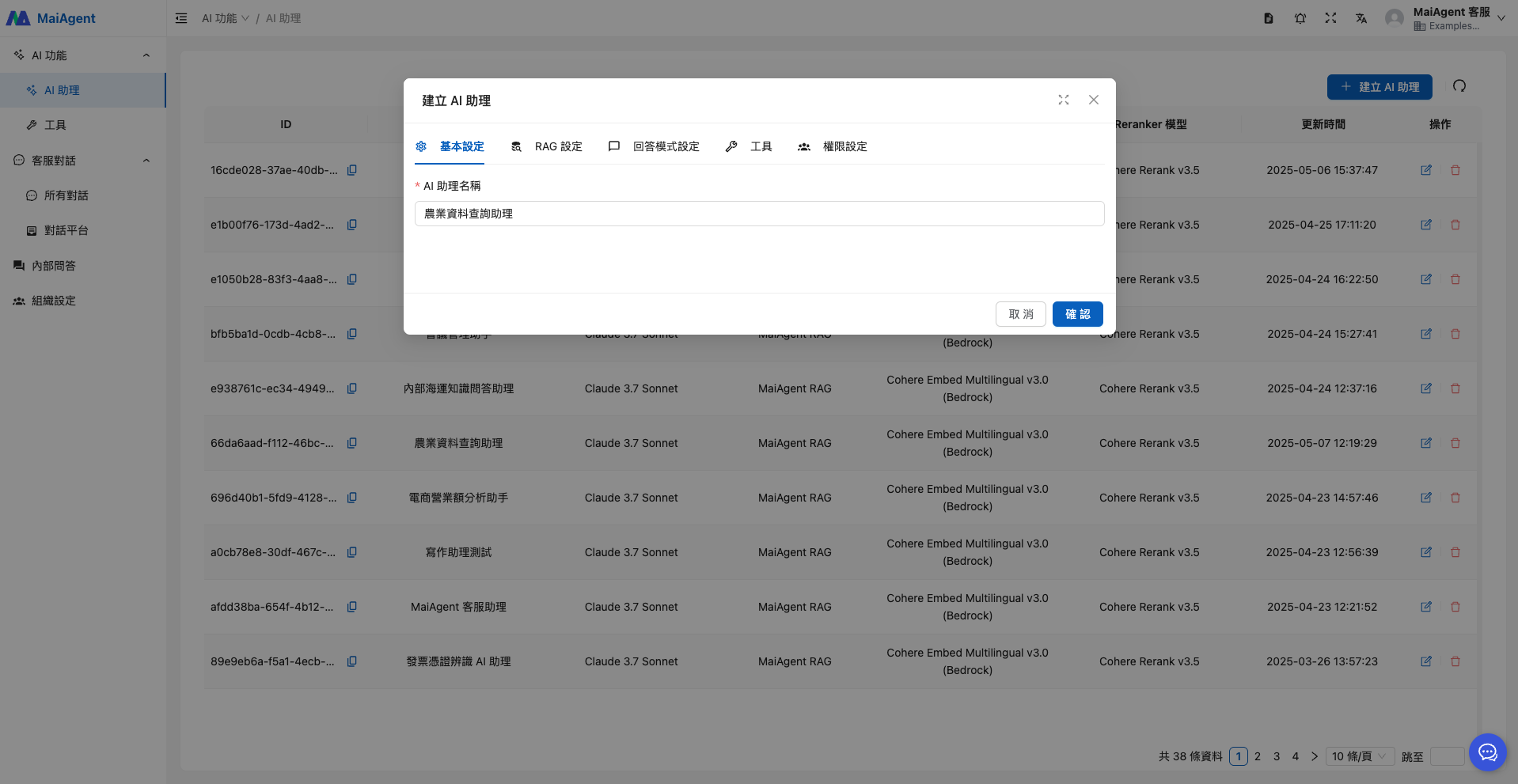
MaiAgent プラットフォームの左側の機能メニューで「AI アシスタント」をクリックし、「AI アシスタントを作成」をクリックします。

<figure><img src="https://2584873290-files.gitbook.io/~/files/v0/b/gitbook-x-prod.appspot.com/o/spaces%2FTvHx8hgwYGDTLD3A7xoW%2Fuploads%2Fgit-blob-ee2d91ee39ff78ee9fe01e2ccf295d603651ea70%2F%E6%88%AA%E5%9C%96%202025-05-07%20%E4%B8%8B%E5%8D%882.31.33.png?alt=media" alt=""><figcaption></figcaption></figure>

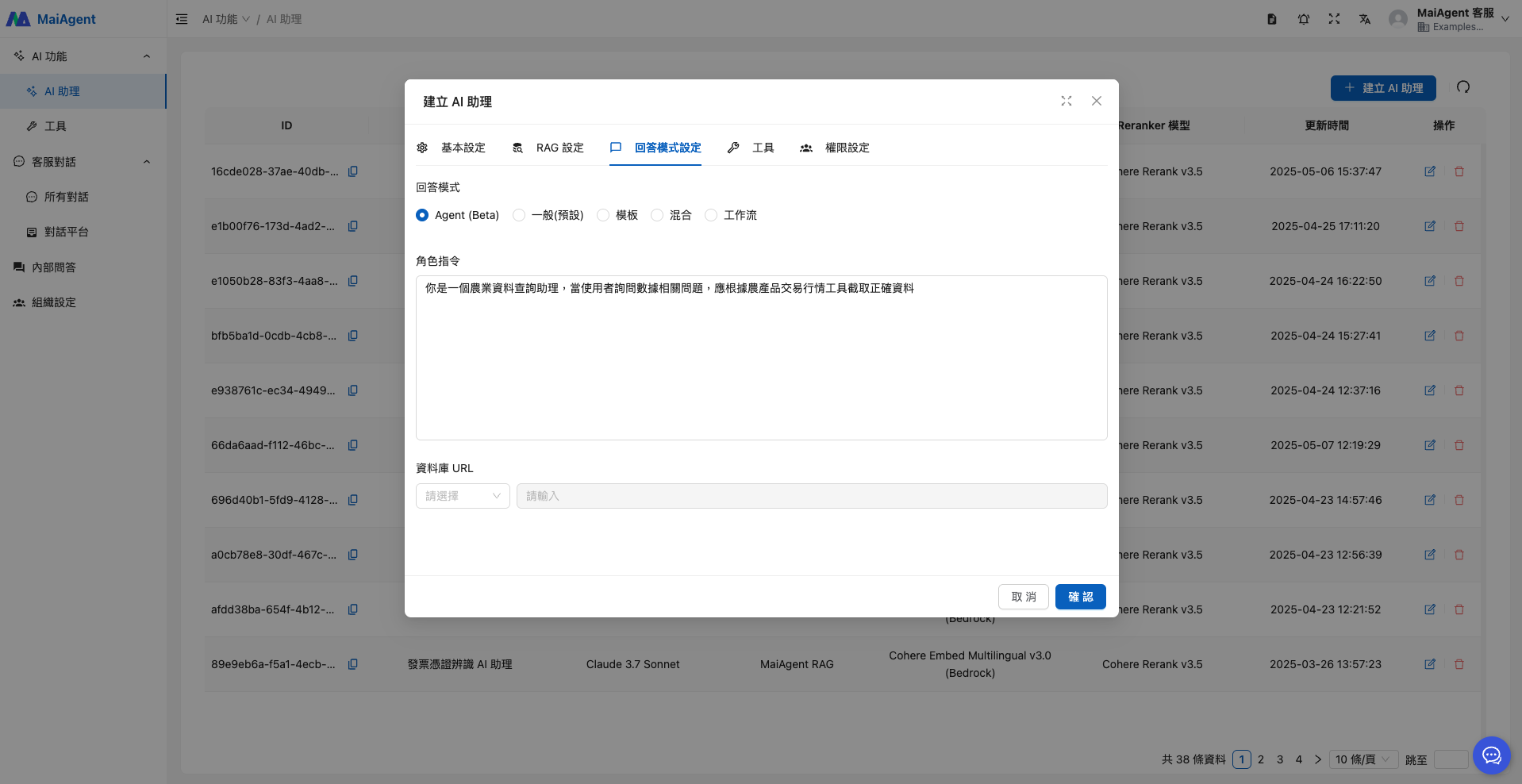
回答モードで「Agent」を選択し、ロール指示を入力します。

<figure><img src="https://2584873290-files.gitbook.io/~/files/v0/b/gitbook-x-prod.appspot.com/o/spaces%2FTvHx8hgwYGDTLD3A7xoW%2Fuploads%2Fgit-blob-249656b2da2b645f520bc51731c60c17b7a58b3d%2F%E6%88%AA%E5%9C%96%202025-05-07%20%E4%B8%8B%E5%8D%882.32.11.png?alt=media" alt=""><figcaption></figcaption></figure>

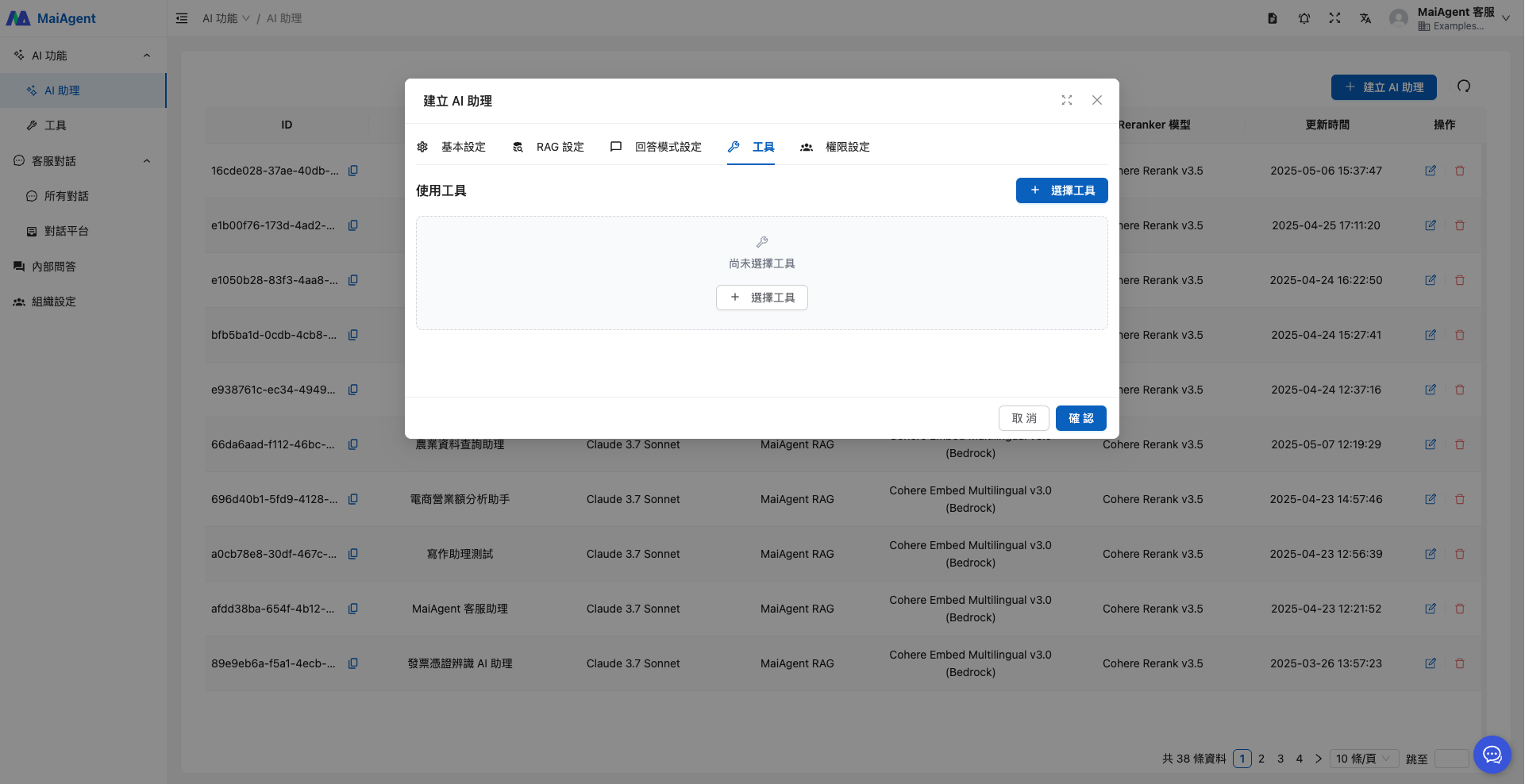
#### Agent へのツール設定 <a href="#configure-tools-for-assistant" id="configure-tools-for-assistant"></a>

「ツール」タブを選択し、<mark style="color:blue;">「＋ツールを選択」</mark>をクリックします。

<figure><img src="https://2584873290-files.gitbook.io/~/files/v0/b/gitbook-x-prod.appspot.com/o/spaces%2FTvHx8hgwYGDTLD3A7xoW%2Fuploads%2Fgit-blob-e95758678a9a11f4be9344de150d28cf5f946180%2F%E6%88%AA%E5%9C%96%202025-05-07%20%E4%B8%8B%E5%8D%882.34.49.png?alt=media" alt=""><figcaption></figcaption></figure>

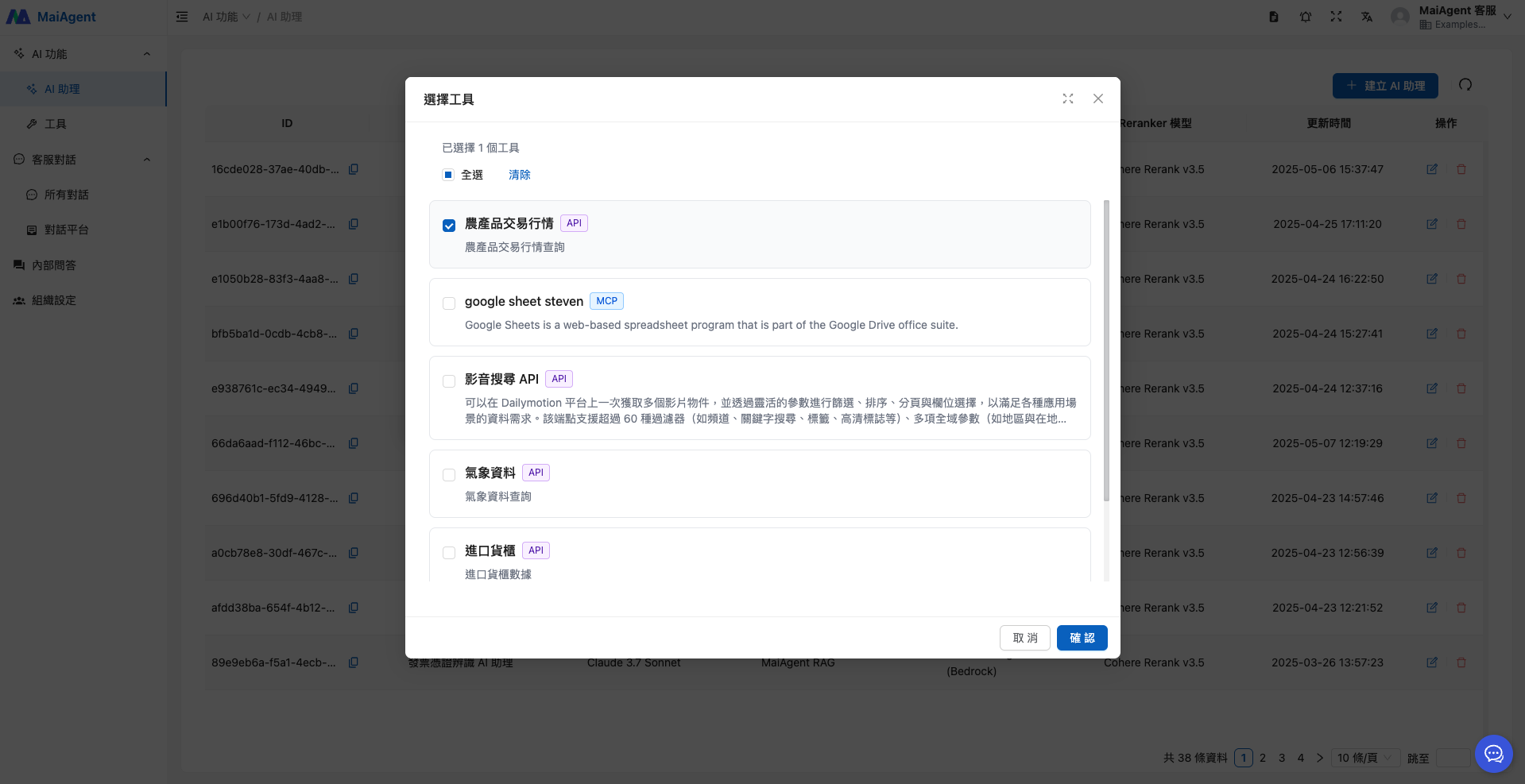
先ほど作成した農産物取引相場照会ツールを選択し、確認をクリックします。

<figure><img src="https://2584873290-files.gitbook.io/~/files/v0/b/gitbook-x-prod.appspot.com/o/spaces%2FTvHx8hgwYGDTLD3A7xoW%2Fuploads%2Fgit-blob-1d7a988840ccefa5844f037cf8378f26de09d830%2F%E6%88%AA%E5%9C%96%202025-05-07%20%E4%B8%8B%E5%8D%882.36.20.png?alt=media" alt=""><figcaption></figcaption></figure>

### 3. Agent の公開と活用 <a href="#step3-ai-agent-go-live" id="step3-ai-agent-go-live"></a>

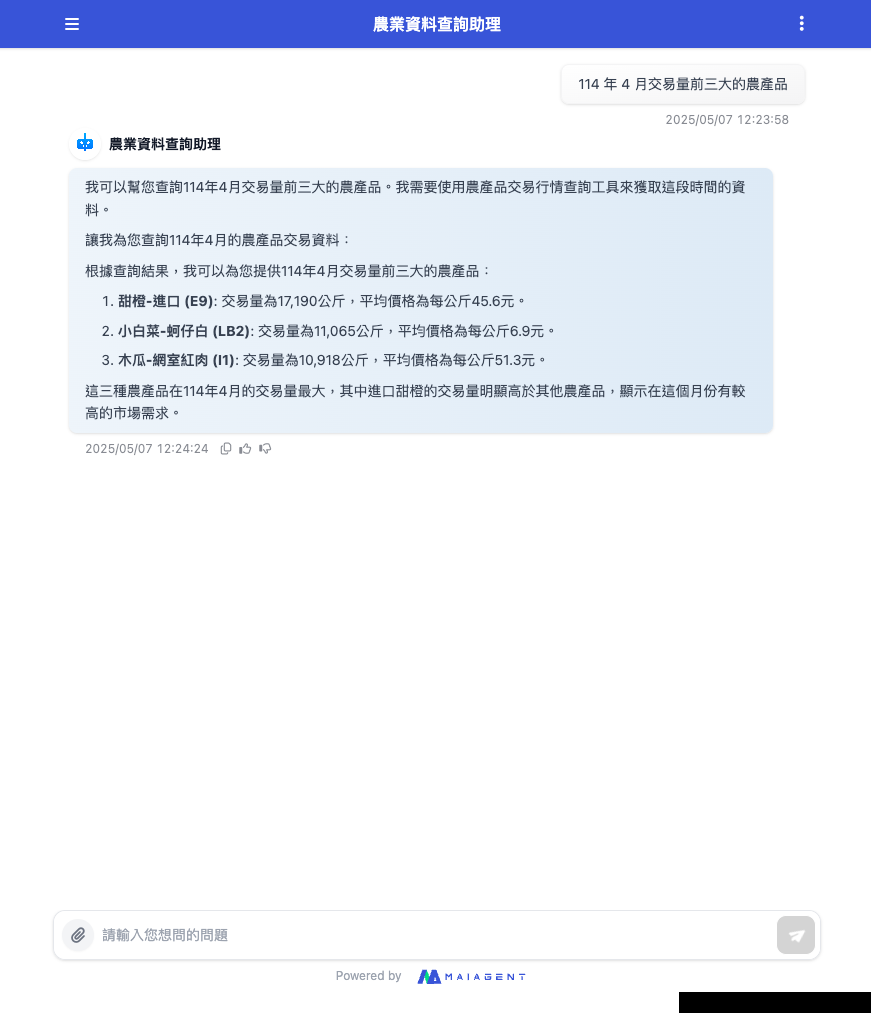
これで、Agent のチャット画面から直接質問して、農産物の取引量や平均価格の推移などの情報をすばやく照会できます。市場価格や取引動向をリアルタイムに把握し、さらなるデータ分析や意思決定の効率化にお役立てください。

<figure><img src="https://2584873290-files.gitbook.io/~/files/v0/b/gitbook-x-prod.appspot.com/o/spaces%2FTvHx8hgwYGDTLD3A7xoW%2Fuploads%2Fgit-blob-4528af3c211ef0e6a152c6d1b1c3f678db0f6cb1%2Fimage%20(1)%20(1)%20(1)%20(1)%20(1)%20(1).png?alt=media" alt=""><figcaption></figcaption></figure>

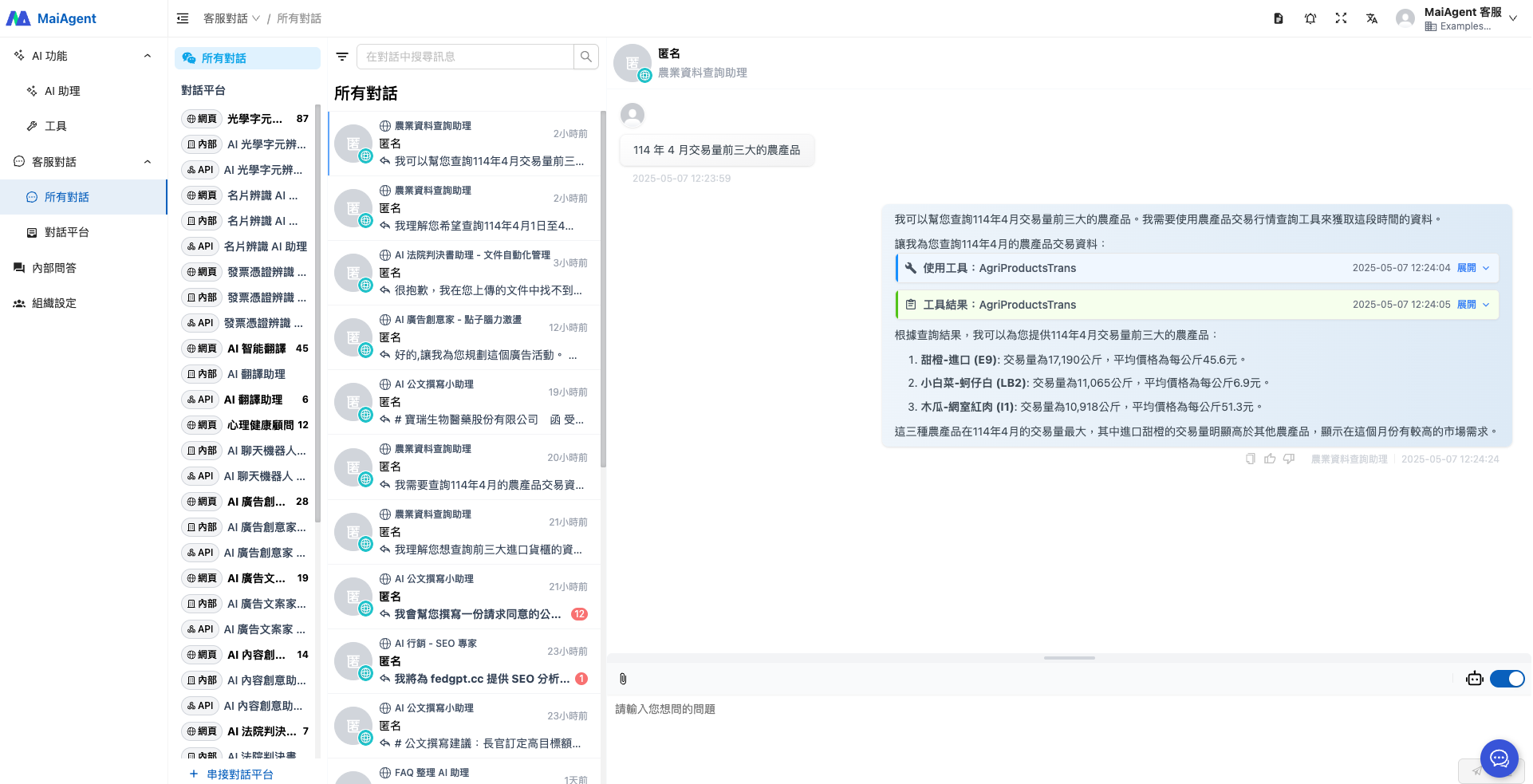
MaiAgent プラットフォームの「すべての会話」機能から、Agent の回答時に呼び出されたツールの記録を確認することもできます。

<figure><img src="https://2584873290-files.gitbook.io/~/files/v0/b/gitbook-x-prod.appspot.com/o/spaces%2FTvHx8hgwYGDTLD3A7xoW%2Fuploads%2Fgit-blob-d039c958da6c415aedb62201fd01d1222acd16eb%2F%E6%88%AA%E5%9C%96%202025-05-07%20%E4%B8%8B%E5%8D%882.42.07.png?alt=media" alt=""><figcaption></figcaption></figure>


---

# Agent Instructions
This documentation is published with GitBook. GitBook is the documentation platform designed so that both humans and AI agents can read, navigate, and reason over technical content effectively. Learn more at gitbook.com.

## Querying This Documentation
If you need additional information that is not directly available in this page, you can query the documentation by asking a question.

Perform an HTTP GET request on the following URL with the `ask` and `goal` query parameters:

```
GET https://docs.maiagent.ai/maiagent-user-guide/ja/build/integrate/farmingsearch.md?ask=<question>&goal=<user_goal>
```

`ask` is the immediate question: it should be specific, self-contained, and written in natural language.
`goal` is what the user is ultimately trying to achieve, the reason they need the answer. Sharing it helps GitBook give you a better, more relevant answer. A goal is most helpful when it describes the outcome the user wants rather than restating the question. For example, with `ask=how do I create an API token`, a goal like `automate deployments from our CI pipeline` lets GitBook tailor the answer to that use case.

The response will contain a direct answer to the question and relevant excerpts and sources from the documentation.

Use this mechanism when the answer is not explicitly present in the current page, you need clarification or additional context, or you want to retrieve related documentation sections.