> For the complete documentation index, see [llms.txt](https://docs.maiagent.ai/llms.txt). Markdown versions of documentation pages are available by appending `.md` to page URLs; this page is available as [Markdown](https://docs.maiagent.ai/maiagent-user-guide/ja/build/database.md).
# データベース
データベース(Text to SQL)の概要、Agent が自然言語で構造化データを検索する仕組み、対応するデータベースの種類、ナレッジベースとの違い、安全性、作成手順について説明します。
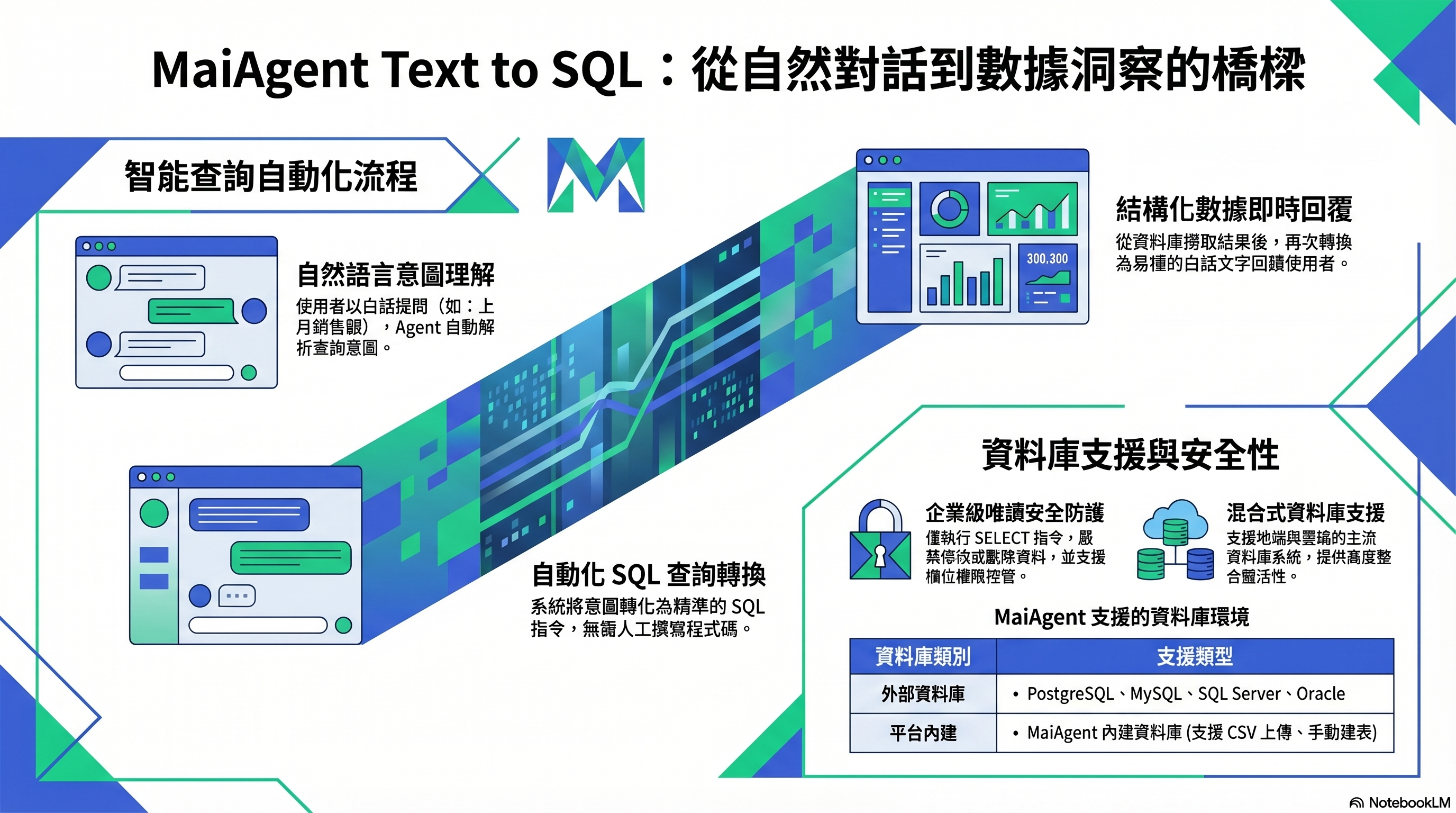
Text to SQL:自然言語 → SQL クエリ → わかりやすい言葉での回答
## これは何ですか?
データベースを使うと、Agent が自然言語で構造化データを検索できます。ユーザーが「先月、ノートパソコンは何台売れましたか?」と質問すると、Agent が自動的にその質問を SQL クエリに変換し、データベースから答えを取得して、わかりやすい言葉で回答します。
この機能の技術的な名称は **Text to SQL** です。
## どのようなときに必要ですか?
次のような用途で使用します。
* **データの検索**:注文状況、在庫数、売上高
* **統計分析**:「今四半期の売上は前四半期と比べてどれくらい伸びましたか?」
* **リアルタイムの状況確認**:「現在、未処理のチケットは何件ありますか?」
これらの質問の答えは文書ではなく構造化されたテーブルに保存されているため、ナレッジベースではなくデータベースが必要です。
## どのデータベースに対応していますか?
| 種類 | 説明 |
| --------------------- | ------------------------------------------------------------------- |
| **MaiAgent 内蔵データベース** | プラットフォームに付属するデータベースです。Excel、CSV、JSON ファイルをアップロードすると、自動的にテーブルが作成されます |
| **外部データベース** | お使いの PostgreSQL、MySQL、SQL Server、Oracle、SynxDB に接続します |
## 安全ですか?
Agent は**読み取り専用クエリ**(SELECT)のみを実行し、データを変更・削除しません。外部データベースでは、テーブルを指定で Agent が検索できるテーブルを制限できます。実際にアクセスできるテーブルとカラムは、指定したデータベースアカウントの権限によって決まります。読み取り専用アカウントの使用をおすすめします。機密性の高いカラムがある場合は、必要なカラムだけを含むビュー(View)を使用できます。
> **補足説明**:Text to SQL の精度は、テーブル構造の明確さによって変わります。Agent が各カラムの意味を理解できるように、テーブルとカラムに中国語の説明を追加することをおすすめします。
## 何をすればよいですか?
1. **データベースを作成します** — スプレッドシートをアップロードして MaiAgent データベースを作成するか、外部データベースの接続文字列を入力し、データベースを有効化をオンにします
2. **検索可能なテーブルを設定します** — 外部データベースでは、テーブルを指定で対象を絞り込めます
3. **カラムの説明を追加します** — テーブルとカラムに説明を追加して、検索精度を高めます
4. **Agent に関連付けます** — Agent は Agent モードを使用する必要があります。データベース設定でデータベースを選択します
5. **クエリをテストします** — 会話で自然言語の質問を入力し、Agent が正しく検索できることを確認します
## 関連情報
* [Text to SQL 機能](/maiagent-user-guide/ja/build/database/text2sql.md)
* [データベースの作成と設定](/maiagent-user-guide/ja/build/database/create-database.md)
* [MaiAgent データベースで Text to SQL を使用する](/maiagent-user-guide/ja/build/database/text-to-sql-maiagent.md)
* [Supabase で Text to SQL を使用する](/maiagent-user-guide/ja/build/database/text-to-sql-supabase.md)
---
# Agent Instructions
This documentation is published with GitBook. GitBook is the documentation platform designed so that both humans and AI agents can read, navigate, and reason over technical content effectively. Learn more at gitbook.com.
## Querying This Documentation
If you need additional information that is not directly available in this page, you can query the documentation by asking a question.
Perform an HTTP GET request on the following URL with the `ask` and `goal` query parameters:
```
GET https://docs.maiagent.ai/maiagent-user-guide/ja/build/database.md?ask=&goal=
```
`ask` is the immediate question: it should be specific, self-contained, and written in natural language.
`goal` is what the user is ultimately trying to achieve, the reason they need the answer. Sharing it helps GitBook give you a better, more relevant answer. A goal is most helpful when it describes the outcome the user wants rather than restating the question. For example, with `ask=how do I create an API token`, a goal like `automate deployments from our CI pipeline` lets GitBook tailor the answer to that use case.
The response will contain a direct answer to the question and relevant excerpts and sources from the documentation.
Use this mechanism when the answer is not explicitly present in the current page, you need clarification or additional context, or you want to retrieve related documentation sections.