> For the complete documentation index, see [llms.txt](https://docs.maiagent.ai/llms.txt). Markdown versions of documentation pages are available by appending `.md` to page URLs; this page is available as [Markdown](https://docs.maiagent.ai/maiagent-user-guide/ja/build/cross-conversation-search.md).
# 対話横断検索
AI アシスタントが同じ連絡先との最近の対話から関連する内容を検索できるようにします
対話横断検索を使用すると、AI アシスタントが回答時に、同じ受信トレイ内にある同じ連絡先との最近の対話を検索できます。サービス履歴を引き継ぐ必要がある一方で、ユーザーが新しい対話を頻繁に開始する場合に適しています。
{% hint style="info" %}
この機能はデフォルトで無効になっています。有効にしても AI アシスタントの検索範囲が広がるだけで、異なる連絡先や異なる受信トレイの内容が混在することはありません。
{% endhint %}
## 対話横断検索を有効にする
{% stepper %}
{% step %}
左側のメニューで「AI アシスタント」をクリックします。
{% endstep %}
{% step %}
設定する AI アシスタントを選択し、「設定」を開きます。
{% endstep %}
{% step %}
「詳細設定」を開きます。
{% endstep %}
{% step %}
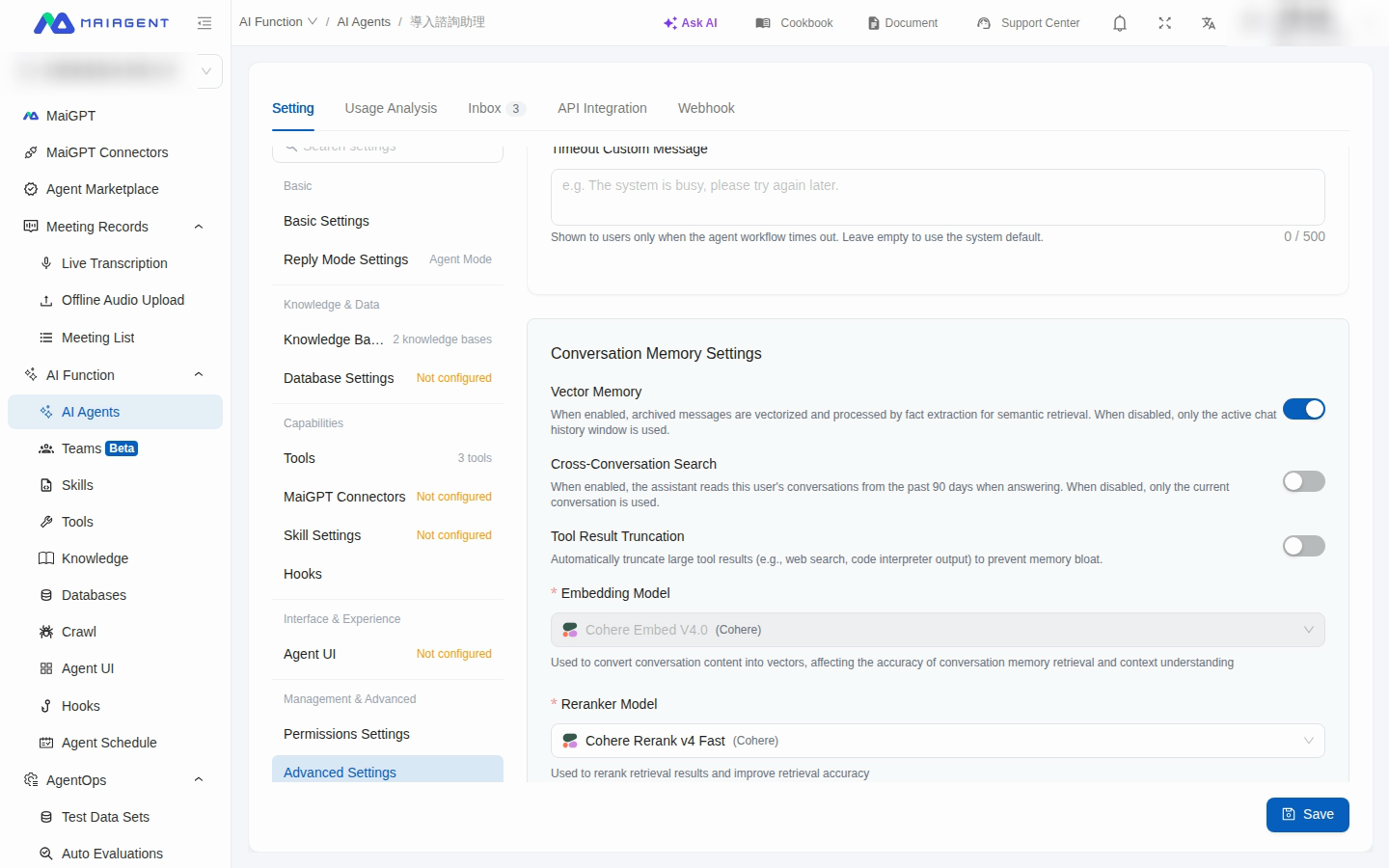
対話メモリの設定で「対話横断検索」を有効にします。
{% endstep %}
{% step %}
「遡及日数」に 1~365 日を入力します。デフォルトは 90 日です。
詳細設定で対話横断検索を有効にし、最近の対話を検索する範囲を設定します
{% endstep %}
{% step %}
「保存」をクリックします。
{% endstep %}
{% endstepper %}
{% hint style="warning" %}
遡及日数が長いほど、検索できる履歴の範囲が広がります。サービス要件に応じて設定し、組織のデータ利用およびプライバシーポリシーに従ってください。
{% endhint %}
## 利用例
MaiAgent のカスタマーサポートアシスタントがアフターサービス案件を追跡しています。顧客は先週の対話で注文状況を伝え、今日は別の新しい対話を開始して進捗を問い合わせました。管理者がカスタマーサポートアシスタントの対話横断検索を有効にし、遡及日数を 30 日に設定します。設定を保存すると、アシスタントは対話履歴ツールを使用して、同じ顧客との最近の対話から関連する内容を見つけ、その記録に基づいて回答できます。
## 機能範囲
対話横断検索の対象範囲は次のとおりです。
* 同じ連絡先
* 同じ受信トレイ
* 削除されていない通常のチャット対話
* 最後のメッセージが設定した日数以内にある対話
遡及範囲に該当する対話では、遡及期間内のメッセージだけでなく、すべてのメッセージが対象になります。システムは最近アクティブだった対話を最大 200 件選択します。現在の対話は遡及日数の制限を受けず、常に検索範囲に含まれます。
この機能を無効にすると、アシスタントは現在の対話のみを検索します。対話横断検索と「ベクトルメモリ」は独立した設定で、それぞれ個別に有効または無効にできます。
---
# Agent Instructions
This documentation is published with GitBook. GitBook is the documentation platform designed so that both humans and AI agents can read, navigate, and reason over technical content effectively. Learn more at gitbook.com.
## Querying This Documentation
If you need additional information that is not directly available in this page, you can query the documentation dynamically by asking a question.
Perform an HTTP GET request on the current page URL with the `ask` query parameter, and the optional `goal` query parameter:
```
GET https://docs.maiagent.ai/maiagent-user-guide/ja/build/cross-conversation-search.md?ask=&goal=
```
`ask` is the immediate question: it should be specific, self-contained, and written in natural language.
`goal` is optional and describes the broader end goal you are ultimately trying to accomplish on behalf of the user. GitBook uses it to tailor the answer towards what is most useful for that goal.
The response will contain a direct answer to the question and relevant excerpts and sources from the documentation.
Use this mechanism when the answer is not explicitly present in the current page, you need clarification or additional context, or you want to retrieve related documentation sections.