> For the complete documentation index, see [llms.txt](https://docs.maiagent.ai/llms.txt). Markdown versions of documentation pages are available by appending `.md` to page URLs; this page is available as [Markdown](https://docs.maiagent.ai/maiagent-user-guide/ja/build/agent/schedule.md).
# Agent スケジュール
エージェントのスケジュールとは:Agent が指定時刻に自動でタスクを実行する仕組み(定期タスク、能動的な通知送信)、Cron/間隔/単発の3種類のスケジュール、実行モード、結果の配信方法を説明します。
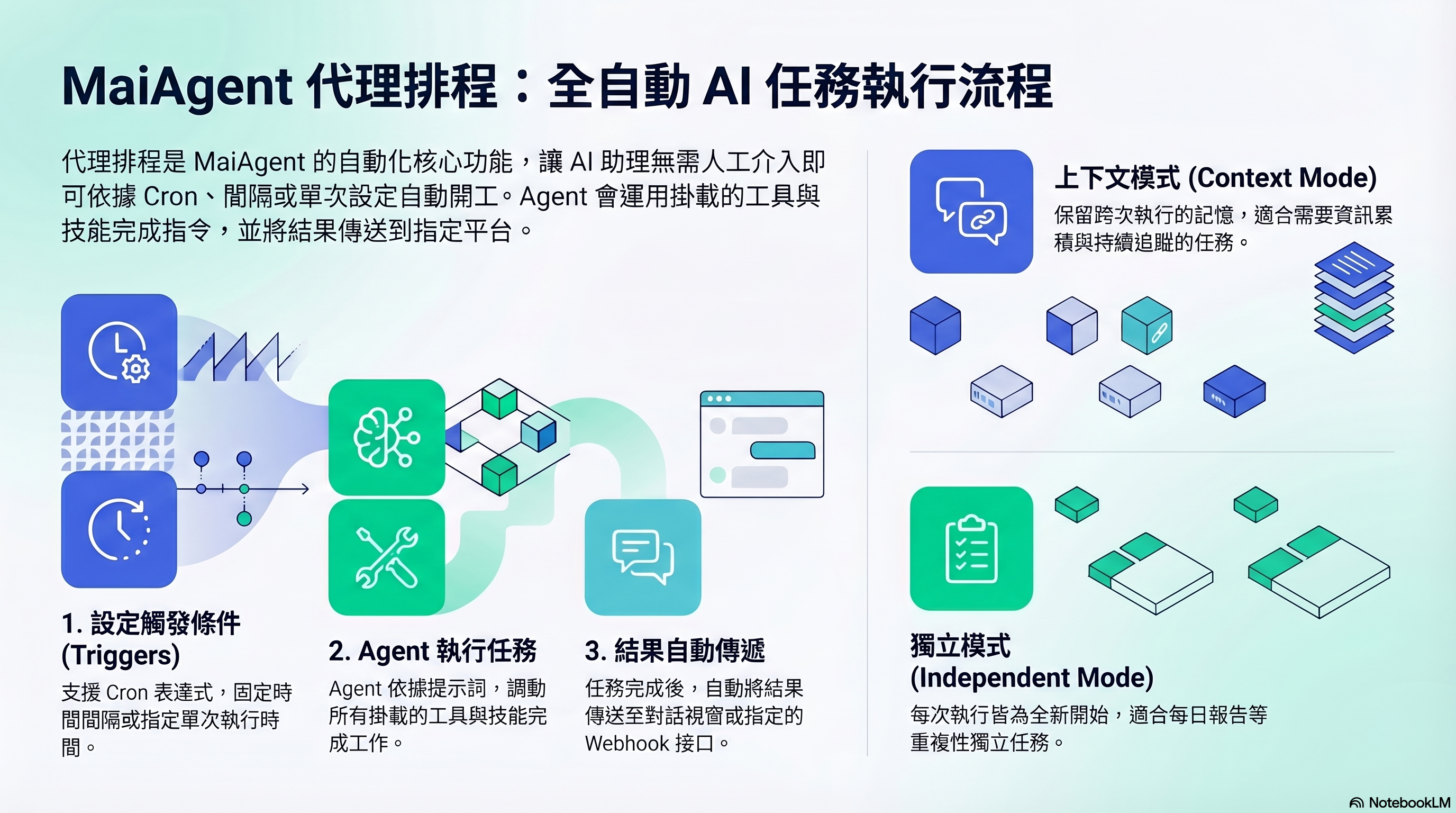
エージェントのスケジュール:指定時刻にトリガー → Agent が自動実行 → 結果を送信
## どのような機能ですか?
エージェントのスケジュールを使うと、Agent は人からの質問を待たずに、設定した時刻にタスクを自動実行できます。プロンプトを指定し、スケジュールを設定すると、Agent が指定時刻に実行し、結果を指定の場所に送信します。
Agent に目覚まし時計を設定するような仕組みです。時間になると、自動的に作業を開始します。
## どのようなときに使いますか?
* **定期レポート**:毎朝9時に前日のカスタマーサポートの概要をまとめます
* **監視チェック**:1時間ごとにシステムの状態を確認し、異常があれば通知します
* **データ処理**:毎週月曜日に先週の売上データを整理します
* **単発タスク**:指定時刻に特定の操作を1回実行します
## スケジュールの種類
| 種類 | 説明 | 例 |
| -------- | -------------------- | ---------------------------- |
| **Cron** | Cron 式で正確な実行時刻を設定します | `0 9 * * 1-5`(月曜日から金曜日の午前9時) |
| **間隔** | 一定の間隔で実行します | 30分ごと、2時間ごと |
| **単発実行** | 指定時刻に1回実行します | 2026-04-15 14:00 |
## 実行モード
| モード | 説明 | 適した用途 |
| ------------- | ---------------------------- | ---------------------- |
| **コンテキストモード** | 実行間で記憶を保持し、次の実行で前回の内容を引き継げます | 情報の蓄積が必要なタスク(継続的な追跡など) |
| **独立モード** | 毎回最初から開始し、前回の記憶を引き継ぎません | 独立した繰り返しタスク(日次レポートなど) |
## 結果の配信
実行完了後、結果を次の場所に送信できます。
* **会話**:指定した会話プラットフォームの会話に送信します
* **Webhook**:外部 URL に POST します(Slack、LINE などと連携できます)
> **詳細説明**:エージェントのスケジュールは、回答モードが Agent モードの Agent のみをサポートします。スケジュール実行時、Agent は設定したプロンプトを指示として、接続されているすべてのツールとスキルを使ってタスクを完了します。
スケジュールで実行するのは1回の「会話」であり、ファイルの一括処理ではありません。Agent ができることは、会話で依頼できることと同じです。プラットフォームには「PDF から画像への変換」のようなファイル変換機能は組み込まれていません。スケジュールでファイルを処理するには、その処理に必要な機能を Agent に接続してください。[Code Interpreter](/maiagent-user-guide/ja/build/agent/code-interpreter.md) は、サンドボックス内のプログラムでナレッジベースや会話内のファイルを処理し、新しいファイルを生成できます。外部システムとの固定的な連携が必要な場合は、[API ツール](/maiagent-user-guide/ja/build/tools/setup_api_tool.md) または MCP ツールを使用してください。処理結果は会話または Webhook で送信され、ナレッジベースに自動で書き戻されることはありません。
## 何をすればよいですか?
1. **Agent を選択** — 作成済みの Agent を選択します(Agent モードである必要があります)
2. **プロンプトを記述** — Agent が実行のたびに行う作業を記述します
3. **スケジュールを設定** — スケジュールの種類と時刻を選択します
4. **配信を設定** — 結果の送信先を決めます
5. **有効化** — スケジュールを有効にして、自動実行を開始します
## 次のステップ
詳しい操作手順は、[エージェントのスケジュールの設定方法](/maiagent-user-guide/ja/build/agent/schedule/schedule-setup.md)をご覧ください。
---
# Agent Instructions
This documentation is published with GitBook. GitBook is the documentation platform designed so that both humans and AI agents can read, navigate, and reason over technical content effectively. Learn more at gitbook.com.
## Querying This Documentation
If you need additional information that is not directly available in this page, you can query the documentation by asking a question.
Perform an HTTP GET request on the following URL with the `ask` and `goal` query parameters:
```
GET https://docs.maiagent.ai/maiagent-user-guide/ja/build/agent/schedule.md?ask=&goal=
```
`ask` is the immediate question: it should be specific, self-contained, and written in natural language.
`goal` is what the user is ultimately trying to achieve, the reason they need the answer. Sharing it helps GitBook give you a better, more relevant answer. A goal is most helpful when it describes the outcome the user wants rather than restating the question. For example, with `ask=how do I create an API token`, a goal like `automate deployments from our CI pipeline` lets GitBook tailor the answer to that use case.
The response will contain a direct answer to the question and relevant excerpts and sources from the documentation.
Use this mechanism when the answer is not explicitly present in the current page, you need clarification or additional context, or you want to retrieve related documentation sections.