> For the complete documentation index, see [llms.txt](https://docs.maiagent.ai/llms.txt). Markdown versions of documentation pages are available by appending `.md` to page URLs; this page is available as [Markdown](https://docs.maiagent.ai/maiagent-user-guide/ja/build/agent/multi-language-support.md).
# 多言語対応
多言語対応:Web Chat の13言語のインターフェース、ナレッジベースの全言語コンテンツ処理、回答言語の設定方法、言語をまたぐ質問応答の活用シーンです。
MaiAgent は複数のレベルで言語対応機能を提供しています。**Web Chat は13言語のインターフェースに対応**し、**ナレッジベースはすべての言語のコンテンツ処理に対応**しています。また、**管理画面では中国語と英語のインターフェースを提供**しています。Agent は世界中のユーザーと自然で円滑な対話を行い、言語の壁を越えてビジネスの対象を広げることができます。
## **🌍 対応言語一覧**
MaiAgent Web Chat は現在、以下の13言語に対応しています。
#### **中国語**
* **繁体字中国語** (Traditional Chinese) - zh-TW
* **簡体字中国語** (Simplified Chinese) - zh-CN
#### **国際的に使われる言語**
* **英語** (English) - en
#### **東南アジアの言語**
* **タイ語** (Thai) - th
* **マレー語** (Malay) - ms
* **ベトナム語** (Vietnamese) - vi
* **インドネシア語** (Indonesian) - id
* **フィリピノ語** (Filipino) - fil
* **ビルマ語** (Burmese) - my
* **クメール語** (Khmer) - km
* **ラオス語** (Lao) - lo
#### **東アジアの言語**
* **日本語** (Japanese) - ja
* **韓国語** (Korean) - ko
**継続的な更新**:ユーザーのニーズに応じて、対応言語を順次追加しています。特定の言語への対応が必要な場合は、技術チームにお問い合わせください。
***
## **⚙️ 言語の設定方法**
#### **1. JavaScript による設定**
{% hint style="info" %}
[技術者向けマニュアル—Web Chat の埋め込みと SDK(`locale` 設定)](https://docs.maiagent.ai/tech/serve/web-chat-sdk#config-basic)をご参照ください。
{% endhint %}
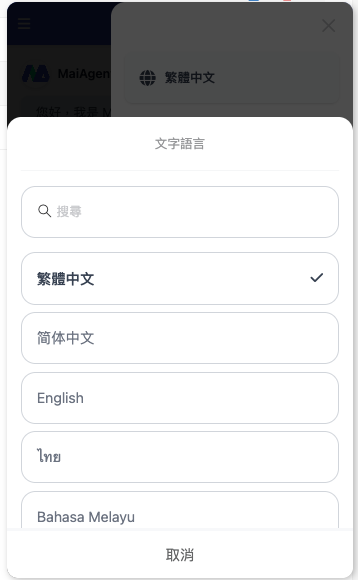
#### **2. Web Chat のチャット設定**
**設定手順:**
1. ウィンドウ右上の `⋮` をクリックします。
2. 「繁体字中国語」をクリックします。
3. 使用したい言語を選択します。
***
## **🎯 多言語機能の特徴**
#### **1. インテリジェントな言語検出と回答**
* **自動認識(中国語・英語)**:中国語と英語を自動的に認識し、対応する言語で回答します。
* **多言語設定**:複数の言語に対応しています。設定で表示言語を切り替え、選択すると、その言語で回答します。
* **高い精度**:先進的な NLP 技術に基づき、言語検出精度は98%に達します。
#### **2. 自然言語理解**
* **意味の理解**:単なる翻訳にとどまらず、さまざまな言語の意味を理解します。
* **文化への適応**:文化的背景によって異なる表現の習慣を考慮します。
* **俗語の認識**:一般的な俗語や口語表現を理解できます。
#### **3. ローカライズされた回答**
* **語句の選択**:現地の習慣に合った語句や表現を使用します。
* **形式の調整**:言語に応じて日付、数値、通貨の形式を調整します。
***
## **📚** ナレッジベースとインターフェースの言語について
#### **1. インターフェースの言語対応レベル**
**MaiAgent 管理画面**
* 繁体字中国語、簡体字中国語、英語の3言語に対応しています。
* システム管理や設定操作に使用します。
**Web Chat のチャットインターフェース**
* 13言語すべてのインターフェース表示に対応しています。
* 音声認識と音声による回答機能を含みます。
* 対応言語:中国語(繁体字・簡体字)、英語、タイ語、日本語、韓国語、マレー語、ベトナム語、インドネシア語、フィリピノ語、ビルマ語、クメール語、ラオス語です。
#### **2. ナレッジベースのコンテンツ処理能力**
**すべての言語のドキュメントに対応**
* ナレッジベースは、あらゆる言語のドキュメントの内容を解析・処理できます。
* ドキュメントの言語に制限はなく、世界各地の言語形式に対応しています。
* インテリジェントな検索機能により、多言語のナレッジベースを高精度で検索できます。
**アップロード手順:**
1\. **ナレッジベース管理**を開きます。
2\. **ドキュメントを追加**を選択します。
3\. 任意の言語のドキュメントをアップロードします(言語の制限はありません)。
4\. システムがドキュメントの言語を自動認識し、多言語インデックスを作成します。
#### **3. 言語をまたぐ質問応答機能**
#### 主な特徴
* **多言語での質問**:13言語で自由に質問できます。
* **全言語での検索**:多言語のナレッジベース全体から関連するコンテンツを検索します。
* **インテリジェントな翻訳**:検索結果をユーザーが希望する言語に自動翻訳します。
* **正確な回答**:回答の完全性と正確性を確保します。
#### 処理の流れ
1. **質問を受け取る** - ユーザーが対応言語(タイ語、日本語、韓国語など)で質問します。
2. **インテリジェントな検索** - システムが言語をまたいで最も関連性の高いコンテンツを検索します。
3. **コンテンツの統合** - LLM が多言語の情報を分析・統合します。
4. **言語変換** - ユーザーが選択した表示言語に翻訳します。
5. **回答の出力** - 完全な回答を提供します。
***
## **🚀 活用シーン**
#### **1. 東南アジア市場への展開**
* **地域のカバー範囲**:東南アジアの主要8言語に対応し、6億人以上をカバーします。
* **ローカライズされたサービス**:各国の文化の違いや商習慣を理解します。
* **越境 EC**:さまざまな国の顧客に、母語でのショッピング体験を提供します。
#### **2. 国際カスタマーサービスセンター**
* **グローバル対応**:アジアの主要市場におけるカスタマーサービスのニーズに対応します。
* **24時間サービス**:タイムゾーンをまたぐ多言語のカスタマーサポートを提供します。
* **文化への配慮**:文化ごとに異なるコミュニケーション方法や丁寧な表現を理解します。
#### **3. 多国籍企業の社内利用**
* **従業員支援**:さまざまな国籍の従業員に社内向け質問応答サービスを提供します。
* **知識共有**:言語の壁を越えて知識の共有を促進します。
* **研修支援**:多言語の研修コンテンツと質問応答を提供します。
#### **4. 旅行・観光業**
* **旅行者向けサービス**:さまざまな国から訪れる旅行者を即座にサポートします。
* **観光スポットの紹介**:多言語で観光スポットの情報やガイドサービスを提供します。
* **宿泊・チケット予約**:多言語での予約や問い合わせに対応します。
---
# Agent Instructions
This documentation is published with GitBook. GitBook is the documentation platform designed so that both humans and AI agents can read, navigate, and reason over technical content effectively. Learn more at gitbook.com.
## Querying This Documentation
If you need additional information that is not directly available in this page, you can query the documentation by asking a question.
Perform an HTTP GET request on the following URL with the `ask` and `goal` query parameters:
```
GET https://docs.maiagent.ai/maiagent-user-guide/ja/build/agent/multi-language-support.md?ask=&goal=
```
`ask` is the immediate question: it should be specific, self-contained, and written in natural language.
`goal` is what the user is ultimately trying to achieve, the reason they need the answer. Sharing it helps GitBook give you a better, more relevant answer. A goal is most helpful when it describes the outcome the user wants rather than restating the question. For example, with `ask=how do I create an API token`, a goal like `automate deployments from our CI pipeline` lets GitBook tailor the answer to that use case.
The response will contain a direct answer to the question and relevant excerpts and sources from the documentation.
Use this mechanism when the answer is not explicitly present in the current page, you need clarification or additional context, or you want to retrieve related documentation sections.
%20(1).png?alt=media)
%20(1)%20(1)%20(1).png?alt=media)
%20(1).png?alt=media)