> For the complete documentation index, see [llms.txt](https://docs.maiagent.ai/llms.txt). Markdown versions of documentation pages are available by appending `.md` to page URLs; this page is available as [Markdown](https://docs.maiagent.ai/maiagent-user-guide/ja/build/agent/explain.md).

# Agent の機能

Agent の機能と用途について、企業での一般的な活用例と、MaiAgent で Agent を構築する 4 つの段階（作成、ナレッジベース、ツール、会話プラットフォーム）を説明します。

## Agent を構築する目的と用途 <a href="#ai-agent-purpose-and-use" id="ai-agent-purpose-and-use"></a>

Agent は幅広い業種や利用シーンに対応し、企業の反復作業の自動化や業務効率の向上を支援します。チームは付加価値の高い業務や、強みの向上に集中できます。

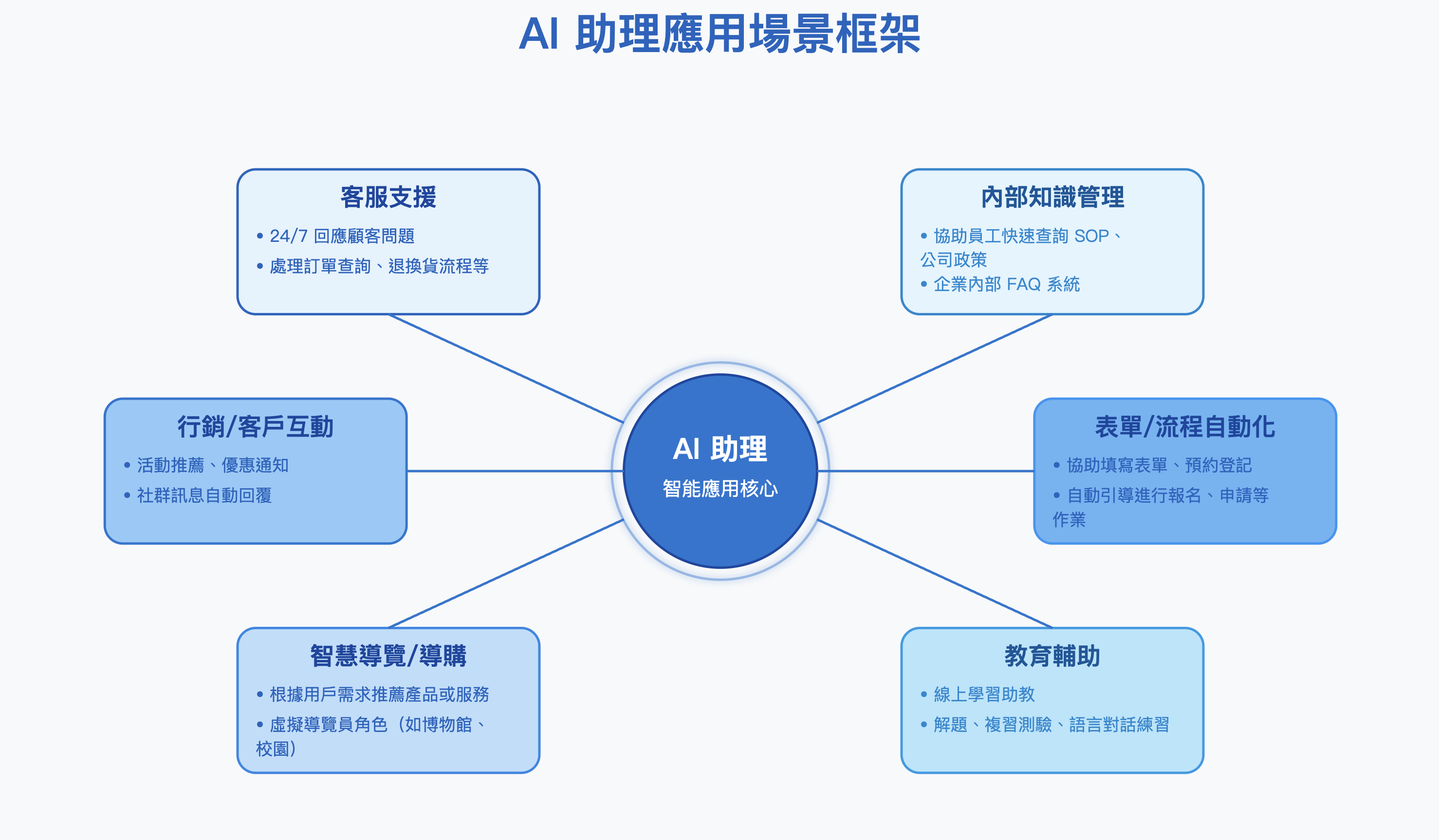
企業の一般的なワークフローにおける Agent の活用例を以下に示します。

<figure><img src="https://2584873290-files.gitbook.io/~/files/v0/b/gitbook-x-prod.appspot.com/o/spaces%2FTvHx8hgwYGDTLD3A7xoW%2Fuploads%2Fgit-blob-bf43aacb68fe112214ee71f970e0a230ef416879%2F%E6%88%AA%E5%9C%96%202025-04-22%20%E4%B8%8B%E5%8D%882.46.51.png?alt=media" alt=""><figcaption></figcaption></figure>

Agent はさまざまな業種で、インテリジェントな自動化とリアルタイムの対話を通じて、業務プロセスの最適化、サービス品質とユーザー体験の向上を支援します。各業種でよく使われる Agent の活用シーンを以下に示します。

<table><thead><tr><th width="214.15234375">業種</th><th>活用シーン</th></tr></thead><tbody><tr><td>EC・小売</td><td>インテリジェントなカスタマーサービス、購入商品の提案、返品処理に活用できます</td></tr><tr><td>金融・保険</td><td>保険契約の相談、資産運用の提案、リスクに関する質疑応答に活用できます</td></tr><tr><td>教育</td><td>授業の補助、学習状況の診断、語学練習に活用できます</td></tr><tr><td>医療</td><td>健康相談、診療予約、患者教育の支援に活用できます</td></tr><tr><td>行政機関</td><td>公共サービスの問い合わせ、政策に関する質疑応答、住民からの意見収集に活用できます</td></tr><tr><td>製造業</td><td>社内ナレッジ管理、保守作業の案内に活用できます</td></tr><tr><td>旅行・観光</td><td>旅程の提案、観光案内、リアルタイムの質疑応答支援に活用できます</td></tr></tbody></table>

## MaiAgent での Agent 設定の 4 段階 <a href="#maiagent-ai-agent-setup-four-stages" id="maiagent-ai-agent-setup-four-stages"></a>

MaiAgent での Agent の設定は、大きく 4 つの段階に分かれます。以下では各段階の目的と機能を簡単に説明します。詳しい操作手順は、以降の章でご紹介します。

### 1. 新しい Agent を作成する <a href="#create-new-ai-agent" id="create-new-ai-agent"></a>

必要に応じて Agent をカスタマイズし、適切な言語モデルを選択します。<mark style="color:blue;">ナレッジベース設定</mark>で RAG（検索拡張生成）に必要なナレッジベースを連携し、Agent のロールとタスクを定義することで、企業の利用シーンに合ったインテリジェントなアシスタントを構築できます。

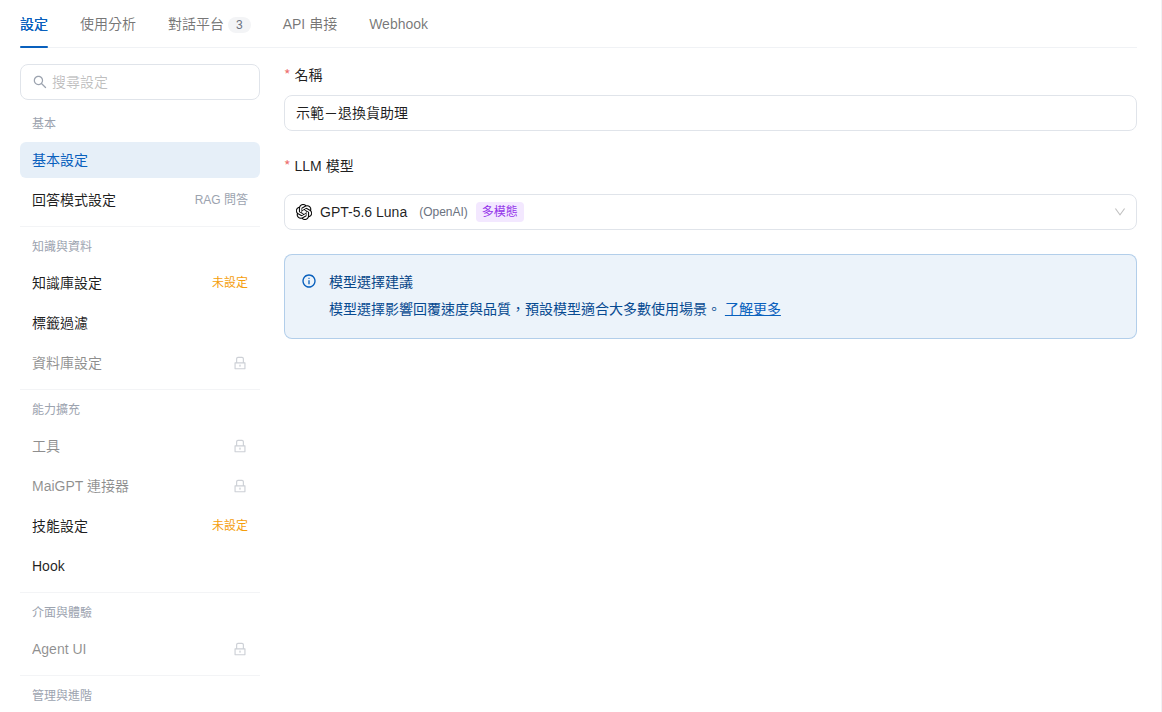
Agent の<mark style="color:blue;">設定</mark>ページでは、左側に<mark style="color:blue;">基本</mark>、<mark style="color:blue;">ナレッジとデータ</mark>、<mark style="color:blue;">機能拡張</mark>、<mark style="color:blue;">インターフェースと体験</mark>、<mark style="color:blue;">管理と詳細</mark>のグループ別に設定項目が表示されます。<mark style="color:blue;">基本設定</mark>、<mark style="color:blue;">回答モード設定</mark>、<mark style="color:blue;">ナレッジベース設定</mark>、<mark style="color:blue;">権限設定</mark>などがあります。

<figure><img src="https://2584873290-files.gitbook.io/~/files/v0/b/gitbook-x-prod.appspot.com/o/spaces%2FTvHx8hgwYGDTLD3A7xoW%2Fuploads%2Fgit-blob-ea27e7a463185fe624aec017f06797d609848339%2Fai-agent-settings-nav.png?alt=media" alt="Agent 設定ページです。上部に設定、利用分析、会話プラットフォーム、API 連携、Webhook のタブがあり、左側にグループ別の設定項目が表示されます"><figcaption><p>Agent 設定ページと左側の設定グループです</p></figcaption></figure>

### 2. Agent に参考資料を提供する <a href="#provide-ai-agent-reference-materials" id="provide-ai-agent-reference-materials"></a>

<mark style="color:blue;">ナレッジベース</mark>の設定、ナレッジベース内での <mark style="color:blue;">FAQ（よくある質問）</mark>の作成、<mark style="color:blue;">クローラー</mark>を使った Web ページなどのデータソースの取り込みにより、Agent の知識基盤を充実させ、回答の正確性と有用性を高めます。

### 3. Agent を公開する <a href="#launch-ai-agent" id="launch-ai-agent"></a>

必要に応じて、Agent を外部に公開するか、社内利用に限定するかを選択できます。Agent の<mark style="color:blue;">会話プラットフォーム</mark>タブには、<mark style="color:blue;">Web Widget</mark>（外部向けで、埋め込みコードを取得して会社の Web サイトに設置できます）、<mark style="color:blue;">内部チャット</mark>（社内向け）、<mark style="color:blue;">API</mark>の 3 つの入口が用意されています。LINE や Messenger などで顧客にサービスを提供する場合は、<mark style="color:blue;">チャネルを接続</mark>をクリックして連携し、既存のプラットフォームに柔軟に組み込めます。

<figure><img src="https://2584873290-files.gitbook.io/~/files/v0/b/gitbook-x-prod.appspot.com/o/spaces%2FTvHx8hgwYGDTLD3A7xoW%2Fuploads%2Fgit-blob-3fb5cd9ff7ebdb63393f641081d57eb020ec18ca%2Fai-agent-platforms-tab.png?alt=media" alt="Agent の会話プラットフォームタブです。Web Widget、内部チャット、API の 3 つの標準チャネルとチャネルを接続ボタンが表示されます"><figcaption><p>会話プラットフォームタブの標準チャネルとチャネル接続機能です</p></figcaption></figure>

### 4. Agent の運用効果を追跡する <a href="#track-ai-agent-performance" id="track-ai-agent-performance"></a>

<mark style="color:blue;">すべての会話</mark>、Agent の<mark style="color:blue;">利用分析</mark>（回答品質スコアなどの監視指標を含みます）、<mark style="color:blue;">Webhook</mark>の機能を使って性能を追跡し、Agent の継続的な改善とユーザー体験の向上に役立てます。

Agent の作成を始める前に、以下の役立つ記事もご覧ください。

{% hint style="info" %}
🗣️[LLM（大規模言語モデル）の選び方は？](https://docs.maiagent.ai/tech/quickstart/llm)
{% endhint %}

{% hint style="info" %}
🔎[RAG（Retrieval-Augmented Generation、検索拡張生成）とは？](https://docs.maiagent.ai/tech/quickstart/rag)
{% endhint %}

{% hint style="info" %}
👨‍👩‍👧‍👦[ロール指示とは？](/maiagent-user-guide/ja/build/agent/system-prompt.md)
{% endhint %}


---

# Agent Instructions
This documentation is published with GitBook. GitBook is the documentation platform designed so that both humans and AI agents can read, navigate, and reason over technical content effectively. Learn more at gitbook.com.

## Querying This Documentation
If you need additional information that is not directly available in this page, you can query the documentation by asking a question.

Perform an HTTP GET request on the following URL with the `ask` and `goal` query parameters:

```
GET https://docs.maiagent.ai/maiagent-user-guide/ja/build/agent/explain.md?ask=<question>&goal=<user_goal>
```

`ask` is the immediate question: it should be specific, self-contained, and written in natural language.
`goal` is what the user is ultimately trying to achieve, the reason they need the answer. Sharing it helps GitBook give you a better, more relevant answer. A goal is most helpful when it describes the outcome the user wants rather than restating the question. For example, with `ask=how do I create an API token`, a goal like `automate deployments from our CI pipeline` lets GitBook tailor the answer to that use case.

The response will contain a direct answer to the question and relevant excerpts and sources from the documentation.

Use this mechanism when the answer is not explicitly present in the current page, you need clarification or additional context, or you want to retrieve related documentation sections.