> For the complete documentation index, see [llms.txt](https://docs.maiagent.ai/llms.txt). Markdown versions of documentation pages are available by appending `.md` to page URLs; this page is available as [Markdown](https://docs.maiagent.ai/maiagent-user-guide/ja/build/agent-builder/decision-guide.md).
# X を実現するには何を使えばよいですか?
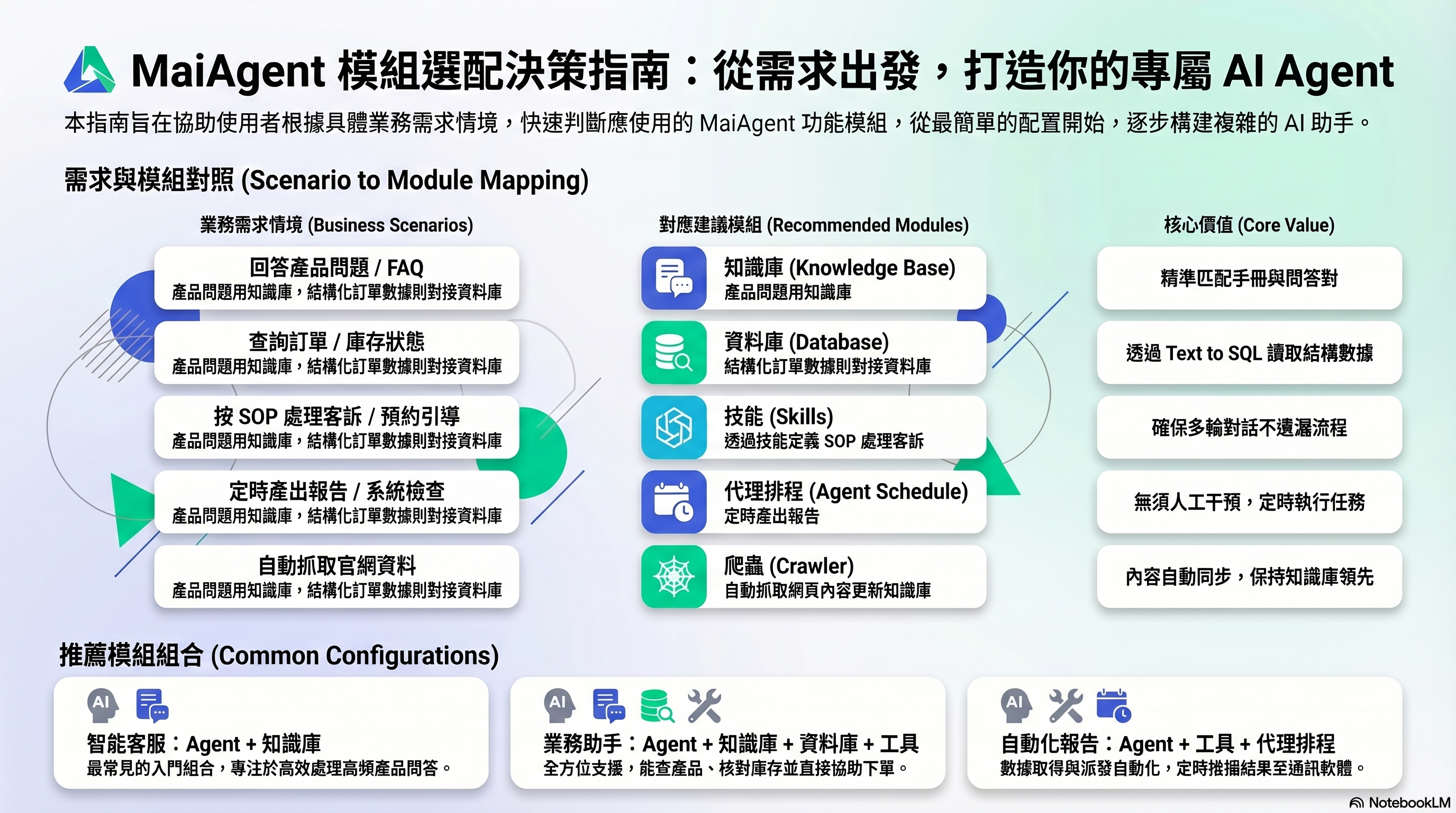
X を実現するにはどのモジュールを使えばよいでしょうか。用途に応じてナレッジベース、データベース、ツール、スキル、クローラー、エージェントスケジュール、Agent Teams、Hook を選ぶ方法と、よく使うモジュールの組み合わせを紹介します。
用途 → モジュール対応表:適切な出発点をすばやく見つけられます
どのモジュールを使うか迷っていますか?やりたいことから、適切な出発点を見つけましょう。
## 用途別の対応表
### Agent が質問に答えられるようにします
| やりたいこと | 使用するモジュール | 理由 |
| ---------------------------------- | ---------------- | ---------------------------------------- |
| Agent に製品に関する質問に答えてもらいたい | **ナレッジベース** | 製品マニュアルをアップロードすると、Agent がその中から答えを見つけられます |
| Agent によくある質問に答えてもらいたい | **ナレッジベース**(FAQ) | FAQ の質問と回答のペアを作成し、よくある質問に正確に対応できます |
| Agent に注文状況を確認してもらいたい | **データベース** | 注文は構造化されたテーブルに保存されており、Text to SQL が必要です |
| Agent にリアルタイム情報(天気、為替レート)を調べてもらいたい | **ツール** | 最新のデータを取得するには、外部 API の呼び出しが必要です |
### Agent が作業を実行できるようにします
| やりたいこと | 使用するモジュール | 理由 |
| ---------------------------- | --------- | ------------------------------ |
| Agent に通知メールを送信してもらいたい | **ツール** | Email API と連携し、Agent が送信を実行します |
| Agent に CRM で顧客情報を作成してもらいたい | **ツール** | CRM API と連携し、Agent が作成操作を実行します |
| Agent に SOP に沿って苦情対応をしてもらいたい | **スキル** | 一連の対応手順を定義し、手順の抜け漏れを防ぎます |
| Agent に顧客の予約完了まで案内してもらいたい | **スキル** | 複数ターンの会話で情報を集め、手順に沿って進めます |
### Agent を自動化します
| やりたいこと | 使用するモジュール | 理由 |
| --------------------------- | ---------------- | ------------------------------ |
| 毎朝、自動でレポートを作成したい | **エージェントスケジュール** | 定時実行を設定し、結果を自動送信します |
| 1 時間ごとにシステムの状態を確認したい | **エージェントスケジュール** | 実行間隔を設定し、ツールで状態を確認します |
| 公式サイトの内容を自動的にナレッジベースに取り込みたい | **クローラー** | Web ページの内容を取得して、ナレッジベースに取り込みます |
## よく使うモジュールの組み合わせ
多くの用途では複数のモジュールを使用します。よく使う組み合わせは次のとおりです。
### インテリジェントなカスタマーサポート
```
Agent + ナレッジベース + FAQ
```
最も基本的で、よく使われる組み合わせです。Agent はナレッジベースを使って製品に関する質問に答え、FAQ でよくある質問に対応します。
### 営業アシスタント
```
Agent + ナレッジベース + データベース + ツール
```
製品情報の検索(ナレッジベース)、在庫や価格の確認(データベース)に加え、顧客の注文を支援する操作(ツール)も実行できます。
### レポートの自動作成
```
Agent + ツール + エージェントスケジュール
```
Agent がツールでデータを取得し、エージェントスケジュールが定時に実行を開始します。結果は Slack や LINE に自動送信されます。
### 業務フロー案内ボット
```
Agent + スキル + ツール + ナレッジベース
```
スキルで SOP 全体を定義します。処理の途中では、ナレッジベースで参考情報を調べ、ツールで操作を実行します。
## まだ迷っていますか?
最もシンプルな **Agent + ナレッジベース** から始めましょう。まずは Agent が質問に答えられるようにします。公開後、実際のユーザーのフィードバックに基づいて、追加する機能を決めてください。
---
# Agent Instructions
This documentation is published with GitBook. GitBook is the documentation platform designed so that both humans and AI agents can read, navigate, and reason over technical content effectively. Learn more at gitbook.com.
## Querying This Documentation
If you need additional information that is not directly available in this page, you can query the documentation by asking a question.
Perform an HTTP GET request on the following URL with the `ask` and `goal` query parameters:
```
GET https://docs.maiagent.ai/maiagent-user-guide/ja/build/agent-builder/decision-guide.md?ask=&goal=
```
`ask` is the immediate question: it should be specific, self-contained, and written in natural language.
`goal` is what the user is ultimately trying to achieve, the reason they need the answer. Sharing it helps GitBook give you a better, more relevant answer. A goal is most helpful when it describes the outcome the user wants rather than restating the question. For example, with `ask=how do I create an API token`, a goal like `automate deployments from our CI pipeline` lets GitBook tailor the answer to that use case.
The response will contain a direct answer to the question and relevant excerpts and sources from the documentation.
Use this mechanism when the answer is not explicitly present in the current page, you need clarification or additional context, or you want to retrieve related documentation sections.