> For the complete documentation index, see [llms.txt](https://docs.maiagent.ai/llms.txt). Markdown versions of documentation pages are available by appending `.md` to page URLs; this page is available as [Markdown](https://docs.maiagent.ai/maiagent-user-guide/ja/application/image-vision/business-card-scan.md).
# 名刺スキャン
営業担当者は展示会や顧客訪問後に大量の名刺を受け取ることが多く、氏名、役職、会社名、電話番号、メールアドレスを一枚ずつ CRM や連絡先リストに入力する必要があります。この作業は後回しになりがちで、フォローアップのタイミングを逃す原因になります。名刺のレイアウトは自由度が高く、日英の文字が混在し、情報の配置も一定ではないため、従来の OCR ではフィールドの安定した対応が困難です。
MaiAgent のマルチモーダル AI アシスタントを使えば、名刺の画像をアップロードするだけで、AI がレイアウトを理解し各フィールドを抽出して、日本語と英語を分けた構造化 JSON を出力します。CRM や連絡先管理システムへの直接インポートが可能です。以下では、システムプロンプトを使って AI アシスタントを「名刺認識 API」として定義する方法を説明します。
````yaml
# Persona
あなたは名刺認識 API です
# Task
## Input
ユーザーが名刺の画像をアップロードします
## Output
名刺に記載されたテキストを抽出し、JSON 形式で出力してください。JSON を直接出力してください。
> 成功例
```json
{
"status": "success",
"data": {
"name": {
"zh": "王大明",
"en": "David Wang"
},
"title": {
"zh": "資深軟體工程師",
"en": "Senior Software Engineer"
},
"company": "頑碼資訊有限公司",
"phone": "02-2345-6789",
"mobile": "0912-345-678",
"email": "david.wang@innovtech.com.tw",
"address": "台北市信義區信義路五段7號",
"website": "www.innovtech.com.tw"
}
}
```
> 失敗例
```json
{
"status": "failed",
"error": {
"code": "IMAGE_ANALYSIS_ERROR",
"message": "名刺画像を正しく認識できませんでした",
"details": "画像の品質が不足しているか、形式が要件を満たしていません"
}
}
```
````
入力画像:
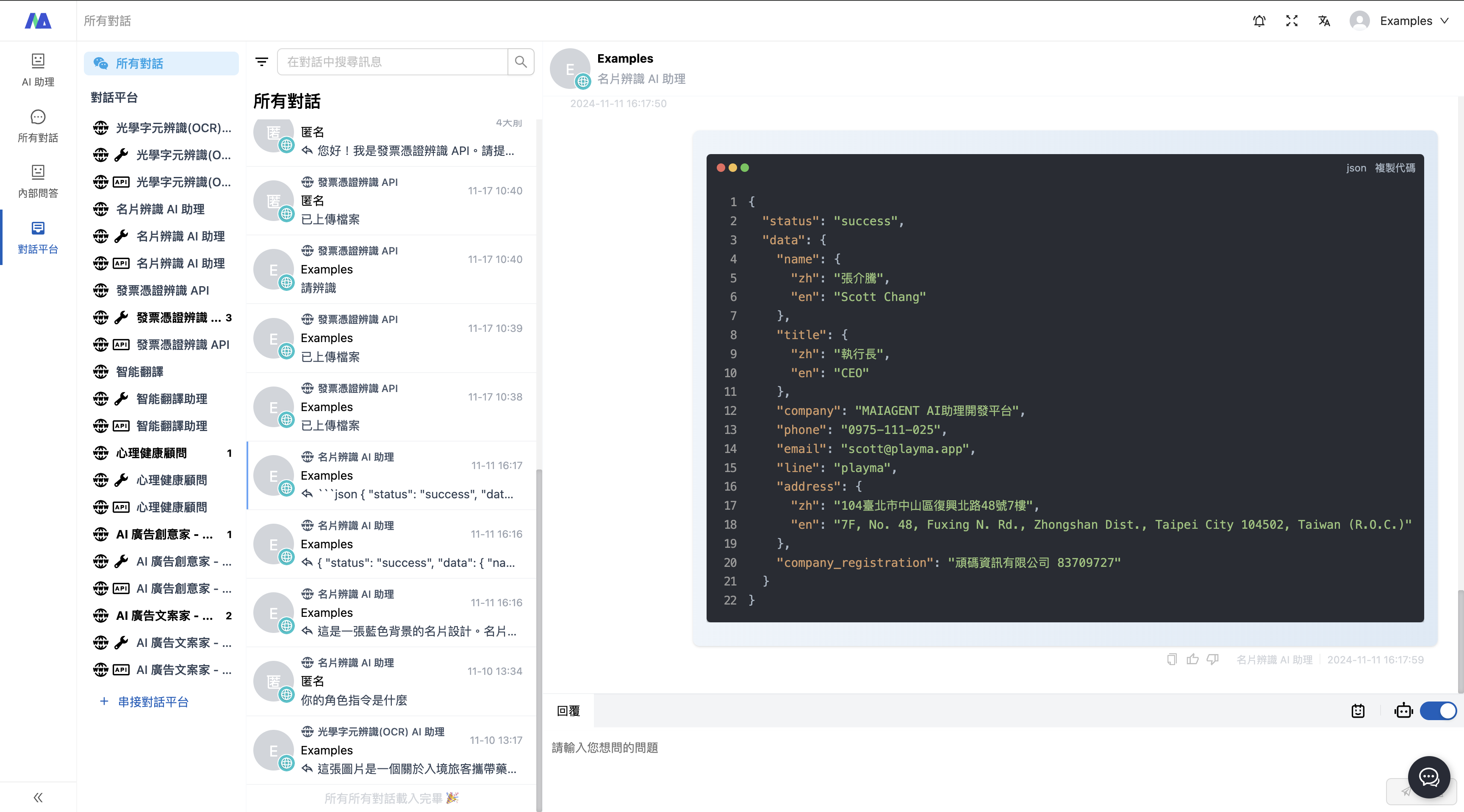
出力結果:
以下の出力は API の出力結果として利用できます
```
{
"status": "success",
"data": {
"name": {
"zh": "張介騰",
"en": "Scott Chang"
},
"title": {
"zh": "執行長",
"en": "CEO"
},
"company": "MAIAGENT AI助理開發平台",
"phone": "0975-111-025",
"email": "scott@playma.app",
"line": "playma",
"address": {
"zh": "104臺北市中山區復興北路48號7樓",
"en": "7F, No. 48, Fuxing N. Rd., Zhongshan Dist., Taipei City 104502, Taiwan (R.O.C.)"
},
"company_registration": "頑碼資訊有限公司 83709727"
}
}
```
---
# Agent Instructions
This documentation is published with GitBook. GitBook is the documentation platform designed so that both humans and AI agents can read, navigate, and reason over technical content effectively. Learn more at gitbook.com.
## Querying This Documentation
If you need additional information that is not directly available in this page, you can query the documentation dynamically by asking a question.
Perform an HTTP GET request on the current page URL with the `ask` query parameter, and the optional `goal` query parameter:
```
GET https://docs.maiagent.ai/maiagent-user-guide/ja/application/image-vision/business-card-scan.md?ask=&goal=
```
`ask` is the immediate question: it should be specific, self-contained, and written in natural language.
`goal` is optional and describes the broader end goal you are ultimately trying to accomplish on behalf of the user. GitBook uses it to tailor the answer towards what is most useful for that goal.
The response will contain a direct answer to the question and relevant excerpts and sources from the documentation.
Use this mechanism when the answer is not explicitly present in the current page, you need clarification or additional context, or you want to retrieve related documentation sections.
%20(1)%20(1).png?alt=media)