> For the complete documentation index, see [llms.txt](https://docs.maiagent.ai/llms.txt). Markdown versions of documentation pages are available by appending `.md` to page URLs; this page is available as [Markdown](https://docs.maiagent.ai/maiagent-user-guide/ja/agent-builder/agent-builder.md).
# Agent Builder とは?
Agent Builder は MaiAgent プラットフォームの中核となる構築エリアです。ここでは、さまざまなモジュールを組み合わせて、質問への回答、データの検索、タスクの実行が可能な AI Agent を作成できます。
## 全体像:Agent と各モジュールの関係
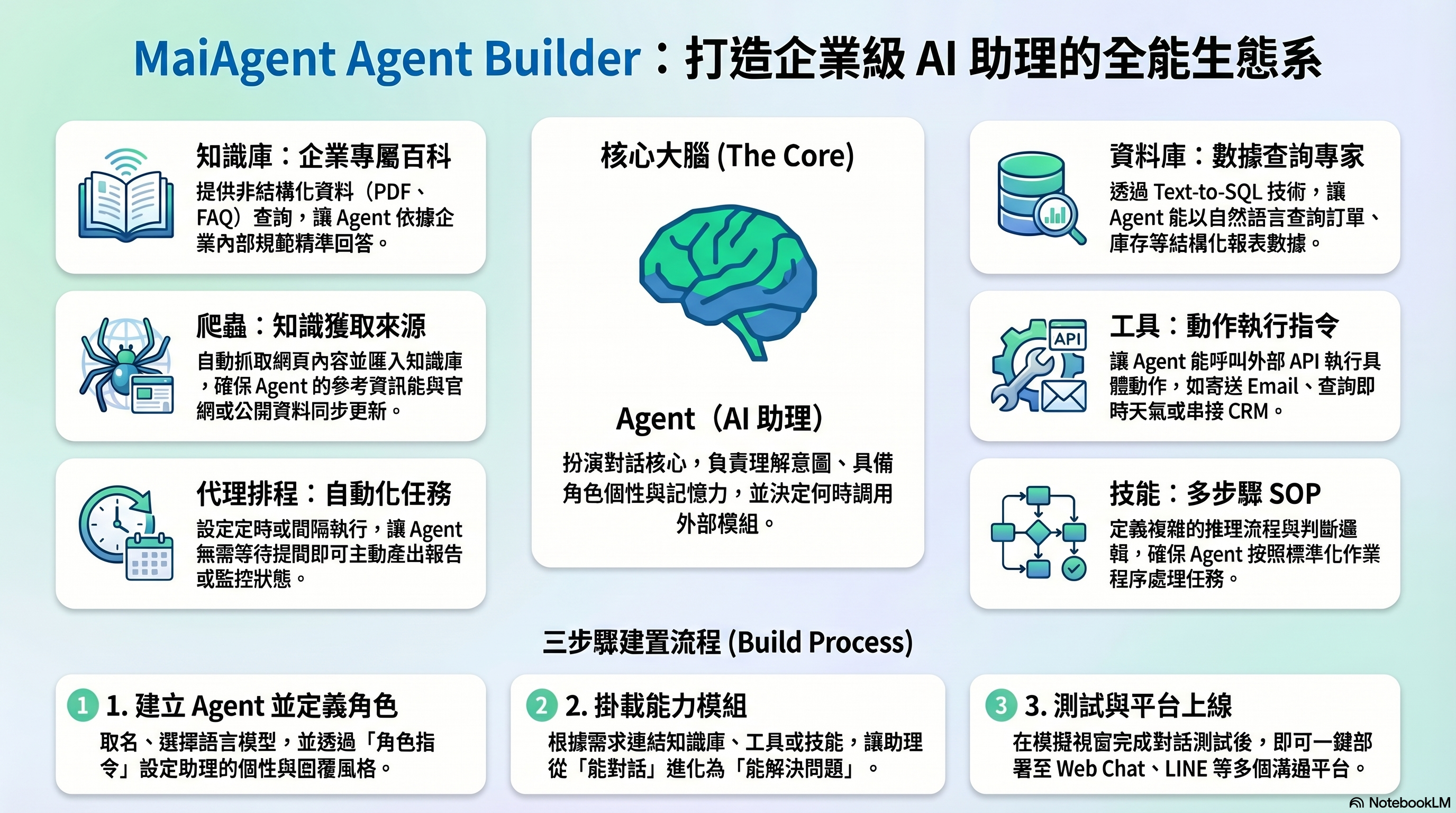
Agent Builder モジュール全体像
Agent は中核となる頭脳であり、ユーザーの質問を理解して回答を生成します。その他のモジュールは Agent の能力を拡張するものです。ナレッジベースは専門知識を参照可能にし、データベースはデータの検索を可能にし、ツールはアクションの実行を可能にし、スキルは SOP に従った複雑なタスクの処理を可能にし、スケジュールタスクは定期的な自動実行を可能にします。クローラーはナレッジベースのデータソースの一つです。タスクが複雑になると、Agent Teams が複数の専門 Agent をチームとして編成し分担させます。Hook は AI のメッセージ入出力の際に、安全性と品質を自動的にチェックします。
## 12 個のモジュール一覧
| モジュール | 機能 | 代表的な用途 |
| --------------------------------------------------------------------------------- | ------------------------------------------------------ | ---------------------------------------- |
| [**Agent(AI アシスタント)**](/maiagent-user-guide/ja/agent-builder/agent.md) | 会話の中核。意図を理解し、回答を生成します | カスタマーサービスボット、社内 Q\&A、業務アシスタント |
| [**ナレッジベース**](/maiagent-user-guide/ja/agent-builder/knowledge-base.md) | Agent が参照できる企業固有の知識を提供します | 製品マニュアル、社内規定、FAQ |
| [**データベース**](/maiagent-user-guide/ja/agent-builder/database.md) | Text2SQL により Agent が自然言語で構造化データを検索できます | 注文検索、在庫検索、レポート分析 |
| [**スケジュールタスク**](/maiagent-user-guide/ja/agent-builder/schedule.md) | Agent がスケジュールに従ってタスクを自動実行できます | 日次サマリーレポート、定期データチェック |
| [**ツール**](/maiagent-user-guide/ja/agent-builder/tools.md) | Agent が外部サービスを呼び出してアクションを実行できます | メール送信、天気確認、CRM 連携 |
| [**Code Interpreter**](/maiagent-user-guide/ja/agent-builder/code-interpreter.md) | サンドボックスで Python を実行し、ファイル処理と計算を行います | Word/プレゼン生成、データ分析、グラフ作成 |
| [**Browser Tool**](/maiagent-user-guide/ja/agent-builder/browser-tool.md) | ブラウザを操作してウェブページの閲覧、要素の操作、スクリーンショットの取得と判読を行います | API のないウェブサイトの操作、ログイン後のデータ取得、ウェブフローの自動化 |
| [**音声アシスタント**](/maiagent-user-guide/ja/agent-builder/voice-agent.md) | Agent が「聞く」と「話す」でお客様に対応します(Realtime / STT + LLM + TTS) | 電話カスタマーサービス、IVR、音声検索、両手がふさがっている場面 |
| [**スキル**](/maiagent-user-guide/ja/agent-builder/skills.md) | Agent の多段階推論と判断フローを定義します | 見積もりプロセス、トラブルシューティング SOP |
| [**クローラー**](/maiagent-user-guide/ja/agent-builder/crawler.md) | ウェブページからコンテンツを自動取得し、ナレッジベースにインポートします | 公式サイトのクロール、公開情報のスクレイピング |
| [**Agent Teams(チーム)**](/maiagent-user-guide/ja/teams/teams.md) | 複数の専門 Agent を協力チームとして編成し、ハンドオフと委任で自動的に分担します | カスタマーサービスの振り分け、注文/返品交換/レコメンドのマルチエージェント連携 |
| [**Hook(メッセージインターセプト)**](/maiagent-user-guide/ja/hook/hook.md) | メッセージが AI に入る前・回答が送信される前に自動的に介入してチェックします | 個人情報のマスキング、悪意あるプロンプトの遮断、回答品質の管理 |
## どれを使えばよいかわからない場合
[**X をしたい場合、何を使えばよいですか?**](/maiagent-user-guide/ja/agent-builder/decision-guide.md) で一般的なシナリオの対照表をご確認ください。
## 推奨される構築順序
MaiAgent を初めてご利用になる場合は、以下の順序で操作することをお勧めします:
```
ステップ 1 → Agent を作成し、ロール指示を設定します(どのような役割を演じ、どのように応答するか)
ステップ 2 → ナレッジベースを構築し、ドキュメントや FAQ をアップロードします(参照できる情報を用意します)
ステップ 3 → 必要に応じて拡張:ツール、データベース、スキルを追加します(シナリオに必要な機能に応じて)
ステップ 4 → 会話プラットフォームに接続して公開します(Web Chat、LINE、Messenger...)
```
> すべてのモジュールを一度に設定する必要はありません。まず Agent + ナレッジベースで稼働させ、その後段階的に機能を拡張してください。
---
# Agent Instructions
This documentation is published with GitBook. GitBook is the documentation platform designed so that both humans and AI agents can read, navigate, and reason over technical content effectively. Learn more at gitbook.com.
## Querying This Documentation
If you need additional information that is not directly available in this page, you can query the documentation dynamically by asking a question.
Perform an HTTP GET request on the current page URL with the `ask` query parameter, and the optional `goal` query parameter:
```
GET https://docs.maiagent.ai/maiagent-user-guide/ja/agent-builder/agent-builder.md?ask=&goal=
```
`ask` is the immediate question: it should be specific, self-contained, and written in natural language.
`goal` is optional and describes the broader end goal you are ultimately trying to accomplish on behalf of the user. GitBook uses it to tailor the answer towards what is most useful for that goal.
The response will contain a direct answer to the question and relevant excerpts and sources from the documentation.
Use this mechanism when the answer is not explicitly present in the current page, you need clarification or additional context, or you want to retrieve related documentation sections.