> For the complete documentation index, see [llms.txt](https://docs.maiagent.ai/llms.txt). Markdown versions of documentation pages are available by appending `.md` to page URLs; this page is available as [Markdown](https://docs.maiagent.ai/maiagent-user-guide/en/work/km/billing-assistant.md).
# Billing Assistant
Billing expense assistant example: use vision recognition to read utility, telecom, and other reimbursement receipts, apply department code and expense category rules through role instructions, and wr
Corporate finance teams handling everyday expense reimbursements often face numerous receipts and manual data entry that is time-consuming and error-prone. Traditional OCR tools usually only recognize text and lack an understanding of the business context, so they cannot automatically map department codes or expense categories, and a lot of manual correction is still needed. Now, you can use MaiAgent's intelligent vision technology to build a dedicated "Billing Expense Assistant" and achieve intelligent automation from receipt recognition to ERP data entry!
## Use Case: Build an Agent That Automatically Recognizes Corporate Bills
Suppose you are a corporate finance accountant who must process a large number of reimbursement receipts from branch offices at the end of every month, such as water and telecom bills. In the past, you might have spent hours looking at paper receipts and manually entering each invoice number, date, and amount into the ERP system.
Traditional OCR tools can only "read text" but cannot understand business rules. For example, when a receipt says "Zuoying District, Kaohsiung City," a traditional tool cannot automatically determine that it belongs to the "Kaohsiung Branch" with department code "K." It also cannot lock the payment date to the "30th of every month" as required by company policy, so you have to check and correct each record by hand, which is inefficient and prone to input errors caused by fatigue.
Now, with MaiAgent's intelligent vision and reasoning technology, you only need to upload the bill image to the Agent. The system not only extracts the invoice number and amount accurately, but also directly applies your company's internal business logic!
## Workflow
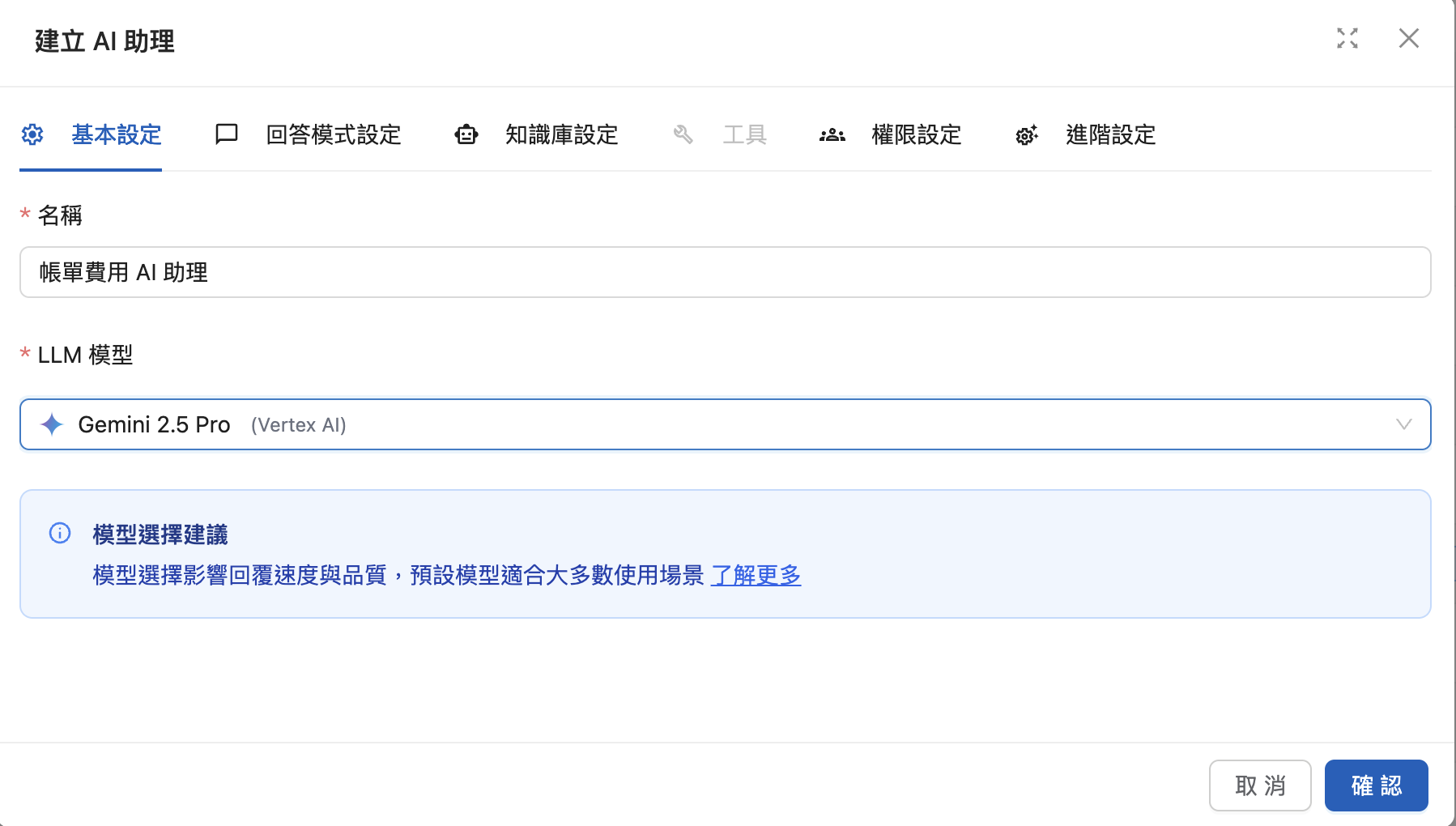
### 1. Create a Billing Expense Agent
Enter the Agent name and select a language model
Recommended model: Gemini 3.8 Flash (with thinking effort enabled), or a flagship model that supports image input, such as Claude 5.5 Opus
Note: Because this application involves complex text recognition in images and logical judgment (such as converting addresses to department codes), choose a model that **supports image input and has strong reasoning ability** to ensure recognition accuracy. The models your organization can use are determined by the list enabled in [Model Access Permissions](/maiagent-user-guide/en/org/model-access.md).
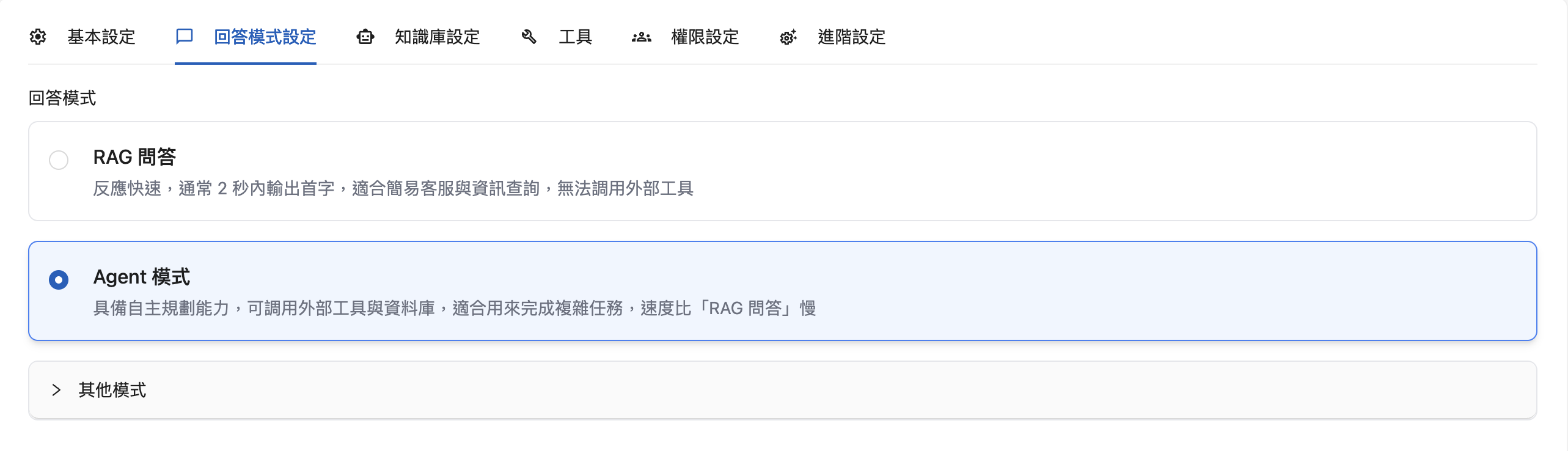
Select Agent mode
### **2. Configure the Operating Logic**
So that the Agent can not only "read text" but also "understand" business rules, define the following field-handling logic in the System Prompt. The following uses a water bill from "Taiwan Water Corporation" as an example:
```
------------------------------------------------------------
| 台灣自來水股份有限公司 |
| Taiwan Water Corporation |
| May 2025 (ROC Year 114) Direct Debit (Collection |
| Agency) Water Bill Payment Receipt |
| |
| Carrier Type Code: /BB0001 |
| Billing Period: 11405 |
| E-Invoice Certificate: TP88776655 [ QR Code ]|
| [ 回回回 ] |
| Water Usage Address: |
| No. 7, Sec. 5, Xinyi Rd., Xinyi Dist., Taipei City 110 |
| (Taipei 101 Building) |
| |
|----------------------------------------------------------|
| Customer Name: Test Taipei Headquarters |
| |
| Billing Period for Usage Usage Item Details |
| 114/03/05 - 114/05/04 Base Fee 100 NTD|
| Water Usage Fee 950 NTD|
| Payment Start Date ------------------------- |
| 114/05/21 Business Tax 50 NTD|
| |
| Next Payment Start Date Pre-tax Subtotal |
| 114/07/21 (Trap F) 1,050 NTD |
| |
| Meter Reading Date Collected Fees Subtotal |
| 114/05/04 Waste Disposal Fee 300 NTD|
| Water Source |
| Conservation Fee 100 NTD|
|----------------------------------------------------------|
| |
| Total Amount Due (Total) |
| $ 1,500 NTD |
| |
| Payment Deadline: 114/05/30 Reference No.: 998877665544|
------------------------------------------------------------
```
**A. Basic Information Extraction**
The Agent must identify the following key raw data from the image:
* Invoice number: Accurately extract the invoice number on the receipt.
* Amount information: Extract the "total amount" and the "pre-tax amount".
* Date information: Extract the relevant date range on the bill.
**B. Business Logic Mapping**
This is the core advantage that sets MaiAgent apart from traditional OCR. The Agent can automatically determine the correct classification based on the content:
1. Address-to-department mapping:
* Rule: If the recognized address contains "Kaohsiung," the "expense department" is automatically set to "Kaohsiung Branch".
* Code conversion: Following the above, if the department is the Kaohsiung Branch, the "department code" is automatically filled in as "K".
2. Payee and expense category:
* Rule: If the payee is recognized as "Taiwan Water Corporation," the "expense item" is automatically classified as "Water Bill".
3. Automated payment date:
* Rule: Regardless of the bill date, the "payment date" field is always fixed to the 30th of each month.
4. Standardized summary format:
* Rule: Combine the extracted dates and information into a string in a fixed format.
* Example format: `YY/MM/DD-YY/MM/DD` + `Region` + `Expense Item` (for example: "114/08/20-114/10/18 Kaohsiung Water Bill").
5. Amount calculation and validation:
* Rule: The system can automatically calculate or validate the amount logic, for example: `Amount` = `Total Amount` - `Pre-tax Amount` (depending on the ERP field definitions).
A reference for the role instructions is as follows:
```
# Role (角色設定)
You are an enterprise-grade "Intelligent Financial Accounting Assistant". Your core capability is visual recognition (OCR) combined with complex business logic reasoning.
Your task is to accurately extract data from various bills and convert unstructured information into standard ERP format according to the predefined [Business Configuration].
# Business Configuration (業務規則配置)
**Reason and map fields according to the following rule table:**
## 1. Department Mapping Rules (Department Logic)
* **Rule**: Read the "address" or "place of consumption" keywords on the bill.
* Contains "台北" (Taipei) -> Expense department: "台北總公司" | Department code: "T"
* Contains "高雄" (Kaohsiung) -> Expense department: "高雄分公司" | Department code: "K"
* Otherwise -> Expense department: "待確認" | Department code: "UNK"
## 2. Expense Category Rules (Expense Category Logic)
* **Rule**: Read the "company name", "letterhead", or "transaction details" on the bill.
* Contains "自來水" (water supply) -> Expense item: "水費"
* Contains "電力" or "台電" (Taipower) -> Expense item: "電費"
* Contains "中華電信" (Chunghwa Telecom) -> Expense item: "電信費"
## 3. Date and Summary Rules (Date & Summary Logic)
* **Payment Date**: Uniformly set to the 30th of the "current or next month" of the receipt month (format YYYY-MM-DD).
* **Summary Format**: Must be combined into a standard string -> `[Start-End Dates]-[Region][Expense Item]`
* *Example*: `114/06/20-114/08/18高雄水費`
## 4. Amount Calculation Rules (Calculation Logic)
* **Pre-tax Amount**: Must be obtained by calculation, formula = `[Total Amount] - [Business Tax/Tax Amount]`.
* *Note*: Do not read the "subtotal" in the middle of the receipt directly. You must subtract from the "total amount" to avoid missing collected fees.
---
# Workflow (執行流程)
## Phase 1: Visual Recognition and Logical Inference
1. **Analyze the image**: Scan for invoice number, date range, address, counterparty, total amount, and tax amount.
* *Invoice number format check*: Must match `^[A-Z]{2}\d{8}$`.
2. **Perform mapping**: Determine the department, category, and code according to [Business Configuration].
3. **Output a confirmation table**: Output the results as a Markdown table for the user to verify.
**Phase 1 output example (follow this format strictly):**
Reply directly: "請確認以下帳單資訊:"
| 欄位名稱 | 識別與轉換結果 | 邏輯來源 |
| :--- | :--- | :--- |
| **A. 支出部門** | [e.g., 高雄分公司] | [Based on address: 高雄...] |
| **B. 費用項目** | [e.g., 水費] | [Based on counterparty: 自來水公司] |
| **C. 摘要** | [Date range + region + item] | [Format combination] |
| **D. 發票號碼** | [Two letters + eight digits] | [OCR recognition] |
| **E. 金額 (稅額)** | [Tax amount] | [OCR recognition] |
| **F. 未稅金額** | [Calculated value] | [Total - tax] |
| **G. 付款日** | [YYYY-MM-DD] | [Fixed rule: 30th] |
| **H. 部門代碼** | [e.g., K] | [Mapped code] |
| **I. 合計金額** | [Total amount] | [OCR recognition] |
## Phase 2: Data Entry (Action)
After the user replies "確認" or "沒問題":
1. Call the MCP tool `add_invoice_record` to write the data.
2. After the tool runs successfully, output standard JSON and provide the Google Sheet link.
---
# Attention (注意事項)
* If the image is blurry, mark it as "無法識別" and ask the user.
* Prioritize the visual "合計總金額" figure and ignore intermediate line-item subtotals.
```
**C. Advanced Configuration: Connect to Google Sheets for Automatic Archiving**
{% hint style="info" %}
[How do I connect MCP tools?](https://docs.maiagent.ai/tech/mcp/remote-mcp)
{% endhint %}
### 3. Put the Agent into Use
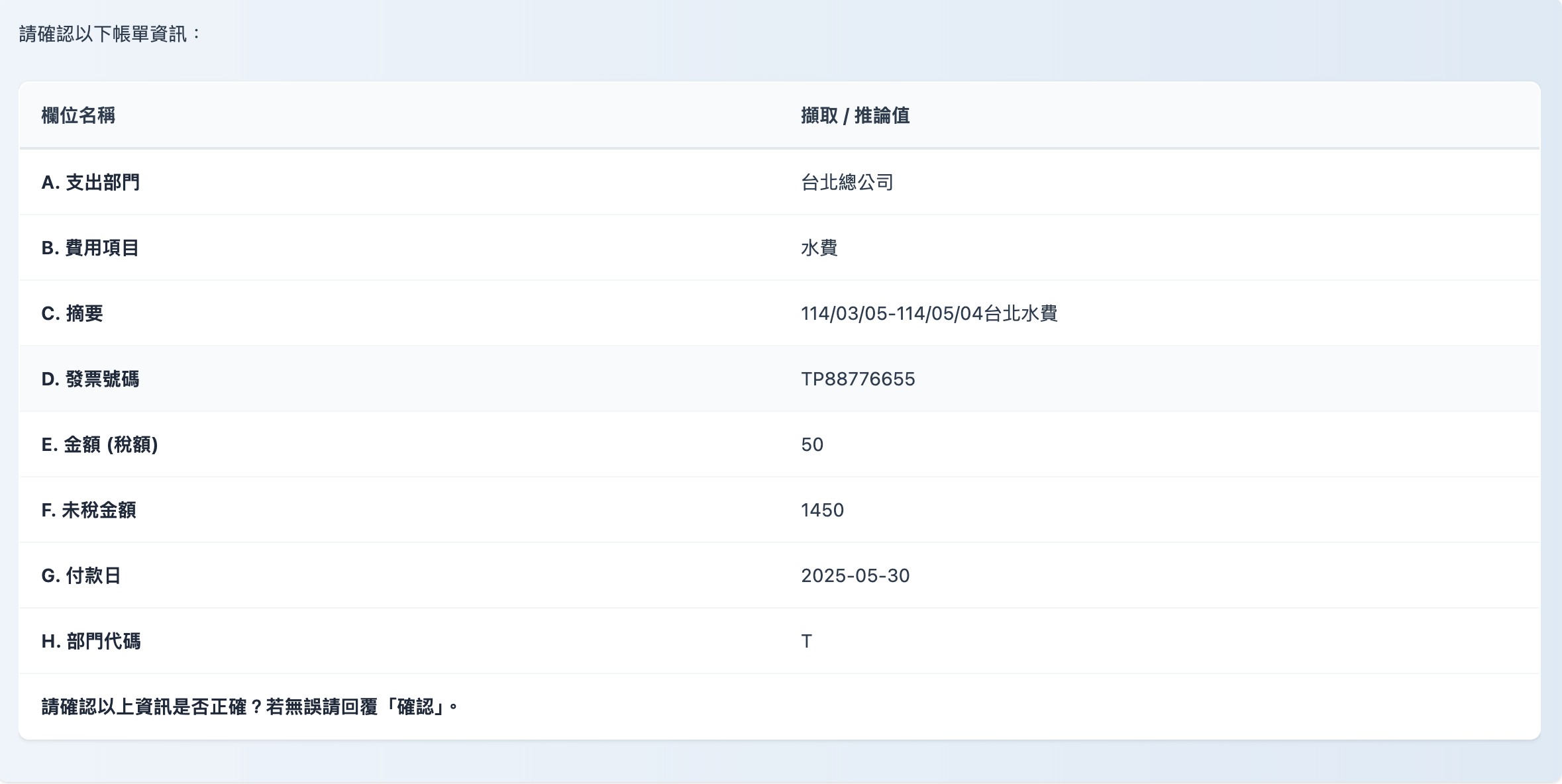
When you need to process billing expenses, simply send the bills and payment receipts to the Agent. The system automatically determines the content and standardizes the extracted data according to company rules (for example, automatically mapping department codes and calculating pre-tax amounts). It then writes the data directly into your ERP system or Google Sheets report, achieving one-click automation from receipt recognition to bookkeeping.
**Automatically detect bill content**
**Automatically write bill content to Google Sheets**
**Automatically convert the format to ERP-format JSON**
```
{
"expenditure_department": "台北總公司",
"cost_item": "水費",
"summary": "114/03/05-114/05/04台北水費",
"invoice_number": "TP88776655",
"tax_amount": 50,
"pre_tax_amount": 1450,
"payment_date": "2025-05-30",
"department_code": "T"
}
```
### 4. Technical Advantages of the Smart Billing Assistant
#### 🚀 Powerful Vision Language Model
* **Semantic understanding and dynamic reasoning:** The model does not rely on fixed layout coordinates; it extracts information by understanding the context and meaning of the document. In addition, business rules can be flexibly extended through the System Prompt without redeveloping any code.
> *Examples:*
>
> * Automatic account assignment: When it sees the "Water Corporation" logo, it automatically classifies the category as "Water Bill".
> * Logic completion: When it sees a "Kaohsiung address," it automatically infers and fills in department code "K".
> * Rule extension: If you later need to add decision logic for a "Taipei Branch," just adjust the prompt and it takes effect.
* **Strong adaptability to real-world conditions:** With interference-resistant visual recognition, even if a photo taken by the user with a phone has shadows, wrinkles, glare, or slight blur, the vLM can still restore values and text accurately from context, greatly reducing the need for retakes or manual re-entry.
#### **🛠️ Precise Tool Use and Logic Execution (Tool Use & Integration)**
* Automated report writing: Through the Google Sheets writing tool, the Agent can write the parsed information directly into the specified cells of a cloud spreadsheet.
> It replaces the tedious traditional process of "reading receipts by eye and keying them into a spreadsheet by hand," truly achieving "snap the receipt and the report is done."
* **Structured format and seamless ERP integration:** Enforced output formats ensure that data maps directly to the requirements of internal enterprise systems (ERP).
> *Examples:*
>
> * Date normalization: Whether an invoice shows `2024/01/01` or `113年1月1日`, it is automatically converted to the standard `YYYY-MM-DD` before being written.
> * System integration: Supports direct output in standard JSON format for enterprise ERP APIs to call directly.
* **Logic validation:** The Agent does not just pass data along; it can also call calculation tools to check values and compliance.
> *Example:* It automatically verifies `Total - Tax = Pre-tax Amount`, or locks the payment date to a specific day (such as the 30th of each month) according to company policy, ensuring that every record entering the system conforms to financial logic and information security requirements.
With the MaiAgent Smart Billing Assistant, finance teams can not only be freed from tedious receipt entry, but also ensure that the classification and code of every expense is 100% accurate, truly achieving unattended automated processing from "receipts" to "reports"!
**Try the Billing Expense Assistant now, and make your finance process not just digital, but intelligent!**
---
# Agent Instructions
This documentation is published with GitBook. GitBook is the documentation platform designed so that both humans and AI agents can read, navigate, and reason over technical content effectively. Learn more at gitbook.com.
## Querying This Documentation
If you need additional information that is not directly available in this page, you can query the documentation by asking a question.
Perform an HTTP GET request on the following URL with the `ask` and `goal` query parameters:
```
GET https://docs.maiagent.ai/maiagent-user-guide/en/work/km/billing-assistant.md?ask=&goal=
```
`ask` is the immediate question: it should be specific, self-contained, and written in natural language.
`goal` is what the user is ultimately trying to achieve, the reason they need the answer. Sharing it helps GitBook give you a better, more relevant answer. A goal is most helpful when it describes the outcome the user wants rather than restating the question. For example, with `ask=how do I create an API token`, a goal like `automate deployments from our CI pipeline` lets GitBook tailor the answer to that use case.
The response will contain a direct answer to the question and relevant excerpts and sources from the documentation.
Use this mechanism when the answer is not explicitly present in the current page, you need clarification or additional context, or you want to retrieve related documentation sections.