> For the complete documentation index, see [llms.txt](https://docs.maiagent.ai/llms.txt). Markdown versions of documentation pages are available by appending `.md` to page URLs; this page is available as [Markdown](https://docs.maiagent.ai/maiagent-user-guide/en/org/usage.md).
# Usage Analytics
Provides backend monitoring data to understand user information.
## How to View
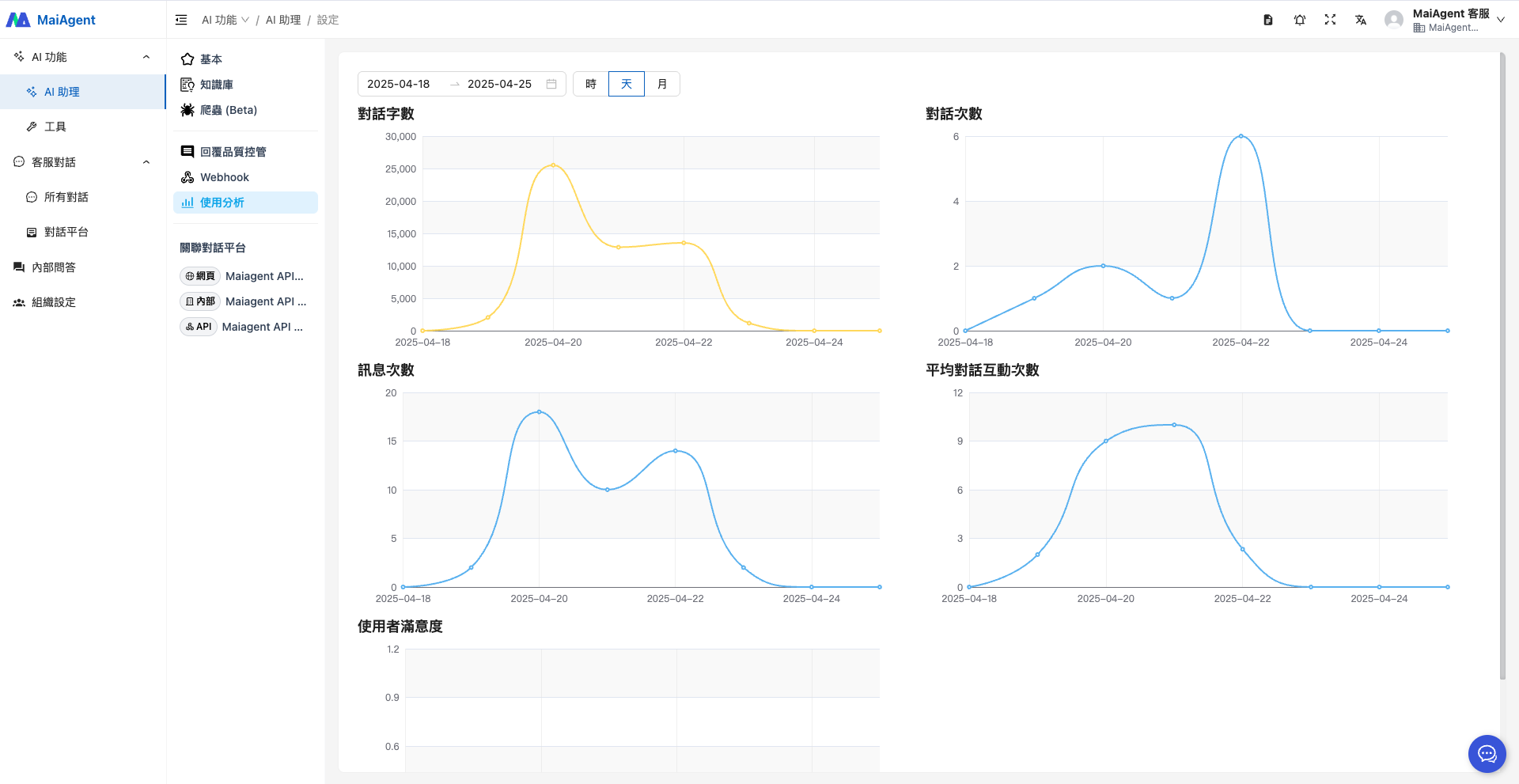
Go to "AI Assistant" in the left menu and select "Usage Analytics" to view the AI Assistant conversation dashboard.
* Word count
* Conversation count
* Message count
* Average messages per conversation
* User satisfaction
* Time filters (by date, month, day, hour)
These metrics allow you to understand AI Assistant usage from multiple perspectives.
## Detailed Metric Descriptions
### 1. Word Count (Words Count)
**Calculation Method:**
* **Text word count**: Counts the number of characters in message content
* **Image cost**: Each image is calculated based on the configured image word cost
* **Total word count** = Message content word count + (Number of images × Image word cost)
**Scope:** Includes both user input messages and AI Assistant reply messages. Supports daily and monthly granularity.
***
### 2. Conversation Count (Conversations Count)
**Calculation Method:**
* Each time a new conversation is created, the counter increments by 1
* When the first message in a conversation is created, it triggers a conversation statistics update
**Update Trigger:** When a user starts a new conversation (first message)
{% hint style="info" %}
"Conversation Count" differs from "Conversations" on the AgentOps "AI Assistant Monitoring" dashboard. Here, each conversation counts once; the dashboard's "Conversations" metric counts the number of AI Assistant responses, so each turn with an AI response in the same conversation counts once. See [Automated Evaluation and AI Assistant Monitoring](/maiagent-user-guide/en/build/agent-ops/evaluations.md#conversation-count-definition) for details.
{% endhint %}
**Scope:** Supports hourly, daily, and monthly granularity.
***
### 3. Message Count (Messages Count)
**Calculation Method:**
* Each time a new message is created, the counter increments by 1
* Includes both user input messages and AI Assistant reply messages
**Update Trigger:** Each message creation triggers a statistics update
**Scope:** Supports hourly, daily, and monthly granularity.
***
### 4. Average Messages per Conversation (Average Messages per Conversation)
**Formula:**
```
Average messages per conversation = Message count ÷ Conversation count (displays 0 if conversation count is 0)
```
**Description:**
* Represents the average number of messages per conversation
* Reflects the depth of interaction between users and the AI Assistant
* Higher values indicate deeper and more frequent interactions
**Scope:** Supports hourly, daily, and monthly granularity.
***
### 5. User Satisfaction (User Satisfaction Rate)
**Formula:**
```
User satisfaction = Likes ÷ Total feedback (displays 0 if total feedback is 0)
Total feedback = Likes + Dislikes
```
**Description:**
* Represents the percentage of positive feedback (like rate)
* Value range: 0% to 100%
* Higher values indicate greater user satisfaction with AI Assistant responses
**Feedback Mechanism:**
* Users can give a "like" or "dislike" to AI Assistant responses
* Statistics are updated in real time
**Update Trigger:** When users provide feedback (create, update, or delete)
**Scope:** Supports hourly, daily, and monthly granularity.
***
## Statistics Update Mechanism
**Real-time updates:** Statistics are immediately updated when relevant events occur (new message, new conversation, feedback change)
**Time granularity support:**
* **Hourly**: Suitable for real-time monitoring
* **Daily**: Suitable for daily report analysis
* **Monthly**: Suitable for monthly reports and trend analysis
## Use Case: Effectiveness Assessment
Observe trends in "User Satisfaction" and interaction counts to evaluate whether the AI Assistant's response quality meets expectations, serving as a basis for optimization.
---
# Agent Instructions
This documentation is published with GitBook. GitBook is the documentation platform designed so that both humans and AI agents can read, navigate, and reason over technical content effectively. Learn more at gitbook.com.
## Querying This Documentation
If you need additional information that is not directly available in this page, you can query the documentation by asking a question.
Perform an HTTP GET request on the following URL with the `ask` and `goal` query parameters:
```
GET https://docs.maiagent.ai/maiagent-user-guide/en/org/usage.md?ask=&goal=
```
`ask` is the immediate question: it should be specific, self-contained, and written in natural language.
`goal` is what the user is ultimately trying to achieve, the reason they need the answer. Sharing it helps GitBook give you a better, more relevant answer. A goal is most helpful when it describes the outcome the user wants rather than restating the question. For example, with `ask=how do I create an API token`, a goal like `automate deployments from our CI pipeline` lets GitBook tailor the answer to that use case.
The response will contain a direct answer to the question and relevant excerpts and sources from the documentation.
Use this mechanism when the answer is not explicitly present in the current page, you need clarification or additional context, or you want to retrieve related documentation sections.