> For the complete documentation index, see [llms.txt](https://docs.maiagent.ai/llms.txt). Markdown versions of documentation pages are available by appending `.md` to page URLs; this page is available as [Markdown](https://docs.maiagent.ai/maiagent-user-guide/en/org/querymetadata/query-builder.md).

# Get Started with the Query Builder

Query Builder: graphically create query metadata for contacts, conversation messages, or Web Chat preload parameters to limit the knowledge base scope an Agent can retrieve from.

## Contact Query Metadata Setup <a href="#contact-query-metadata-setup" id="contact-query-metadata-setup"></a>

You can use the "Query Builder" in the MaiAgent service to create query metadata graphically. The following example shows how to create query metadata for a contact:

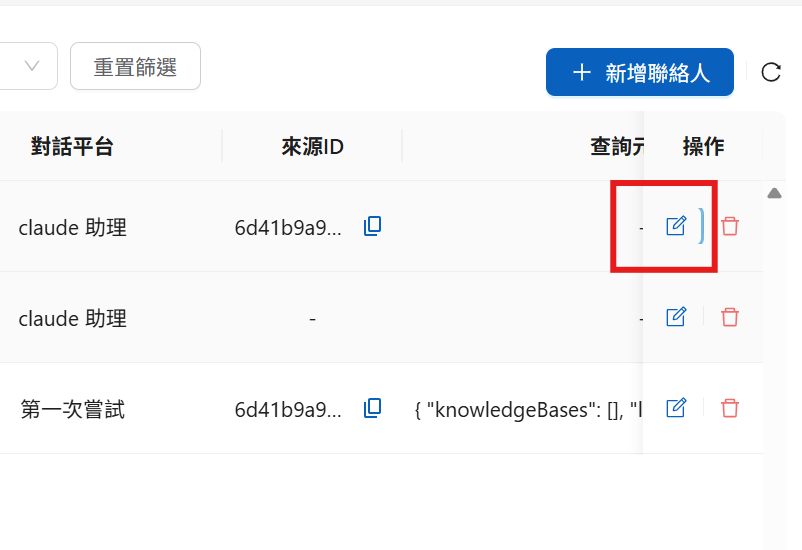
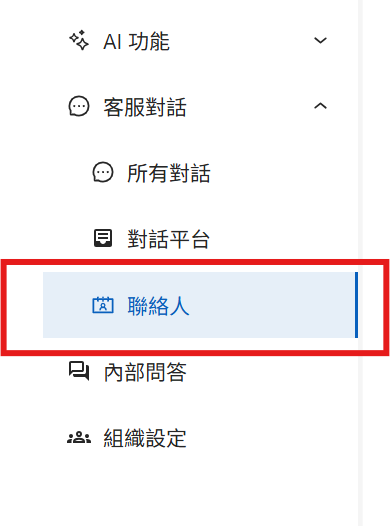
### Step 1: Go to the Contacts Area in the MaiAgent Admin Console <a href="#step-1-enter-contact-area" id="step-1-enter-contact-area"></a>

<figure><img src="https://1360999650-files.gitbook.io/~/files/v0/b/gitbook-x-prod.appspot.com/o/spaces%2F6v6TNkkOQVfRYfcNirHL%2Fuploads%2Fgit-blob-e1193c589be2e94dd3b408588d7ea9a426bb3d2a%2F%E8%9E%A2%E5%B9%95%E6%93%B7%E5%8F%96%E7%95%AB%E9%9D%A2%202025-08-07%20165727.png?alt=media" alt=""><figcaption><p>Contacts area entry point</p></figcaption></figure>

### Step 2: Configure the Contact <a href="#step-2-configure-contact" id="step-2-configure-contact"></a>

1. Find the contact you want to configure and click Edit

<figure><img src="https://1360999650-files.gitbook.io/~/files/v0/b/gitbook-x-prod.appspot.com/o/spaces%2F6v6TNkkOQVfRYfcNirHL%2Fuploads%2Fgit-blob-3e040c93c8149b98cec909c9f006f59876673de0%2F%E8%9E%A2%E5%B9%95%E6%93%B7%E5%8F%96%E7%95%AB%E9%9D%A2%202025-08-07%20165859.png?alt=media" alt=""><figcaption><p>Contact edit entry point</p></figcaption></figure>

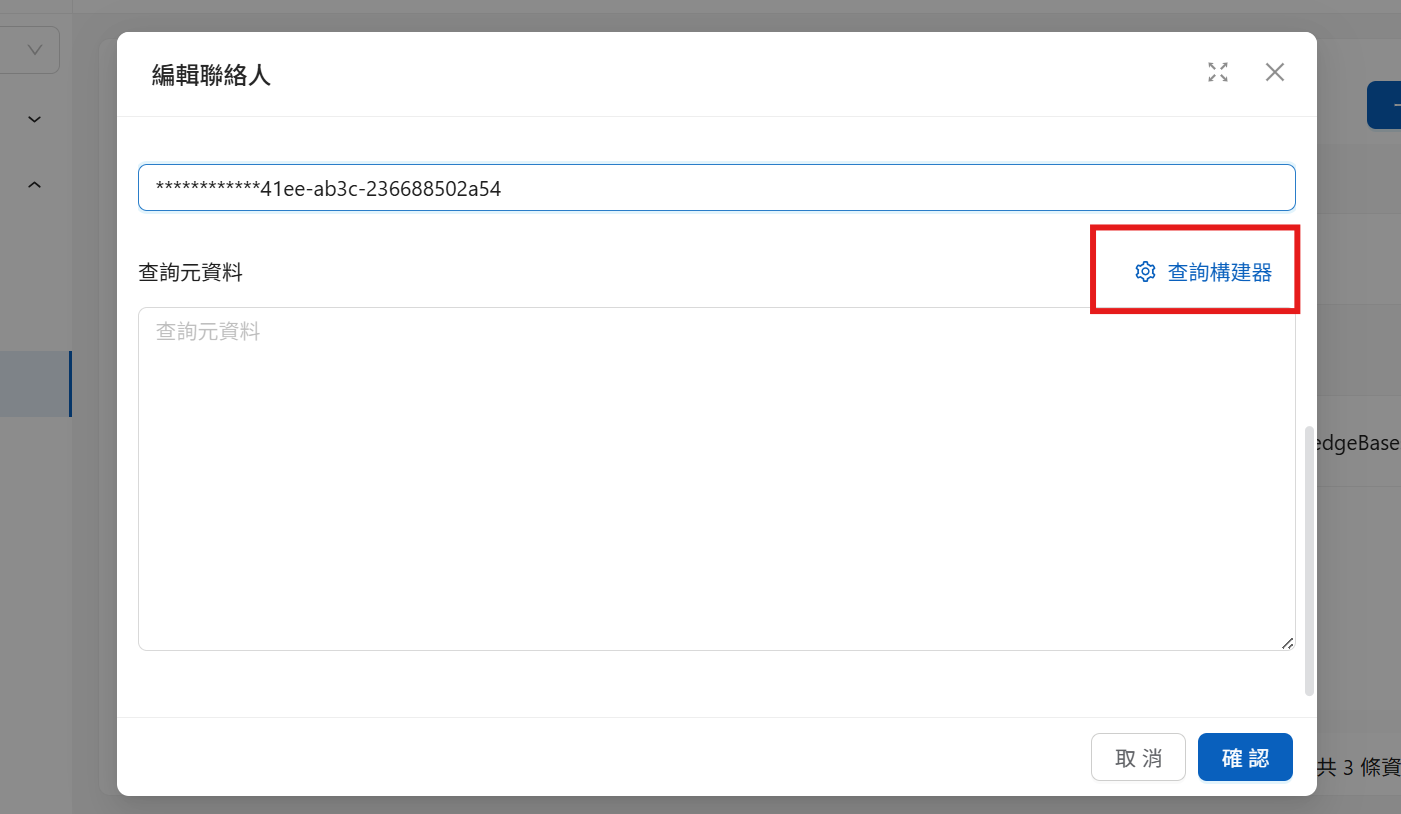
2\. The following screen appears after you click

<figure><img src="https://1360999650-files.gitbook.io/~/files/v0/b/gitbook-x-prod.appspot.com/o/spaces%2F6v6TNkkOQVfRYfcNirHL%2Fuploads%2Fgit-blob-ce1f2353f60000f676e26df8cd028b2729a238e1%2Fquery%20metadata%20maker.png?alt=media" alt=""><figcaption><p>Query Builder entry point</p></figcaption></figure>

Click Query Builder to open the graphical interface.

### Step 3: Select the Permissions to Grant <a href="#step-3-select-permissions" id="step-3-select-permissions"></a>

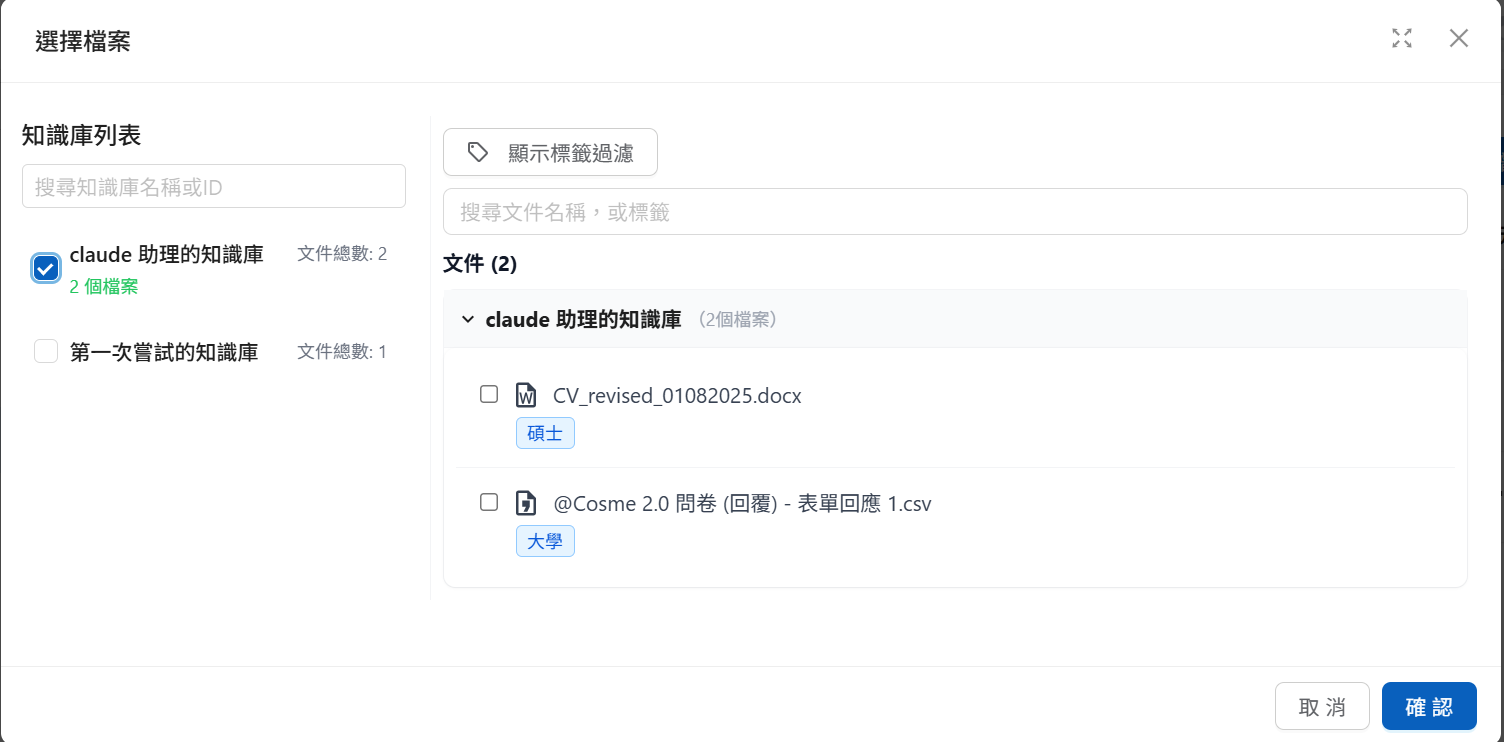
1. Select the knowledge bases you want to make available. You can also select only some of the documents within a knowledge base

<figure><img src="https://1360999650-files.gitbook.io/~/files/v0/b/gitbook-x-prod.appspot.com/o/spaces%2F6v6TNkkOQVfRYfcNirHL%2Fuploads%2Fgit-blob-3cb875fe8a74fe9532e04d2d816b04dab3c3f3b3%2F%E8%9E%A2%E5%B9%95%E6%93%B7%E5%8F%96%E7%95%AB%E9%9D%A2%202025-08-07%20170306.png?alt=media" alt=""><figcaption><p>Select knowledge bases and documents</p></figcaption></figure>

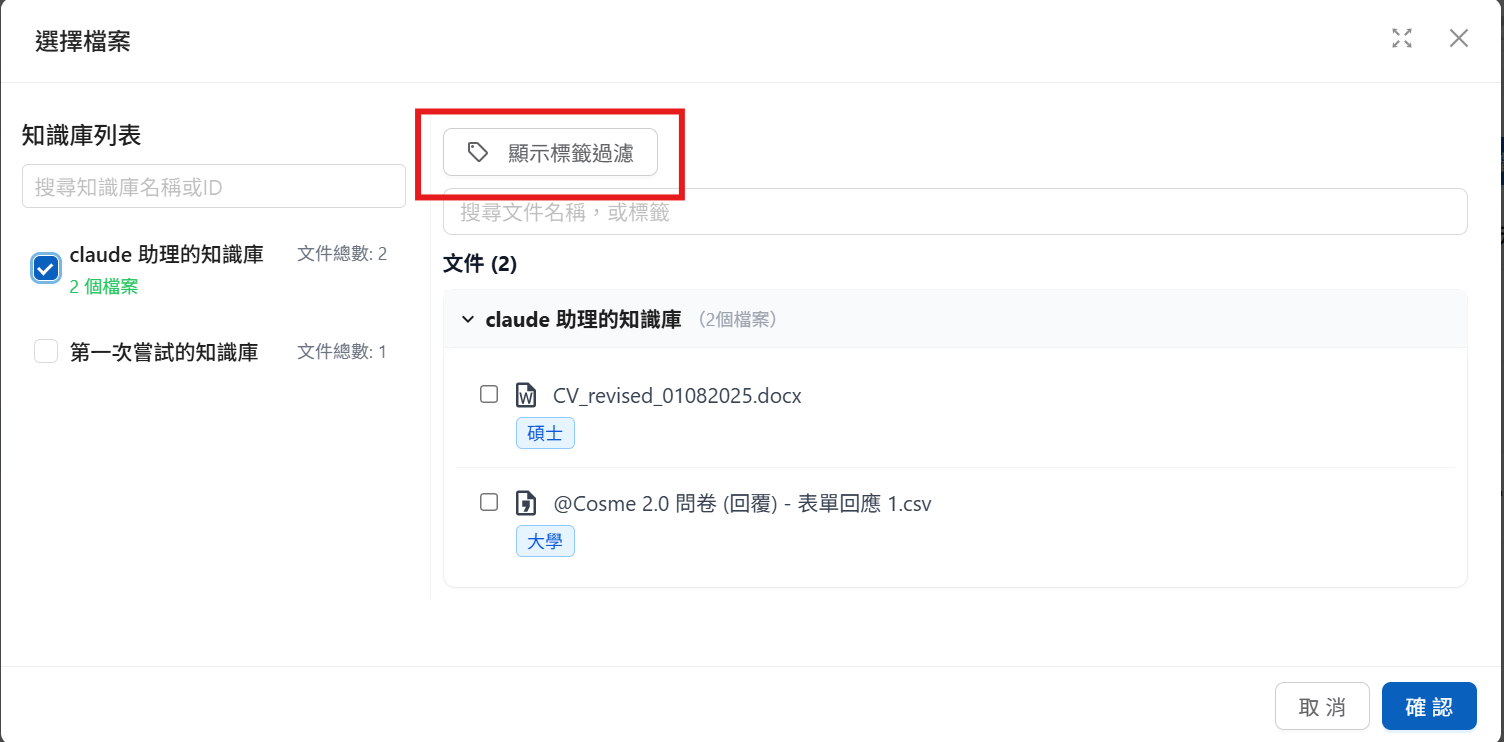
2\. To make documents available based on specific tags, click "Show Tag Filter" to open the tag settings area

<figure><img src="https://1360999650-files.gitbook.io/~/files/v0/b/gitbook-x-prod.appspot.com/o/spaces%2F6v6TNkkOQVfRYfcNirHL%2Fuploads%2Fgit-blob-4858e1ff92d8efc4cd28216d2ff05c207215aaca%2F%E8%9E%A2%E5%B9%95%E6%93%B7%E5%8F%96%E7%95%AB%E9%9D%A2%202025-08-07%20170306-1.png?alt=media" alt=""><figcaption><p>Tag filter settings</p></figcaption></figure>

Here you can add tags and choose how they are evaluated: within a single group of tags, choose "<mark style="color:blue;">Contains all tags (AND)</mark>" or "<mark style="color:blue;">Contains any tag (OR)</mark>"; across multiple groups of conditions, choose "<mark style="color:blue;">Every group must match (AND)</mark>" or "<mark style="color:blue;">Matching any one group is enough (OR)</mark>" (older screenshots show these as AND/OR buttons, which mean the same thing). These serve as the criteria for which documents in the opened knowledge bases are made available. The "Affected files" panel below the builder shows in real time which files can be retrieved.

{% hint style="info" %}
To have an Agent apply the same tag conditions by default on all conversation platforms, you can set them on the Agent settings page instead. See [Knowledge Base Tag Filtering](/maiagent-user-guide/en/build/agent/label-filter.md). A contact's query metadata takes precedence over the Agent's default conditions.
{% endhint %}

## Conversation Settings (Message) <a href="#message-settings" id="message-settings"></a>

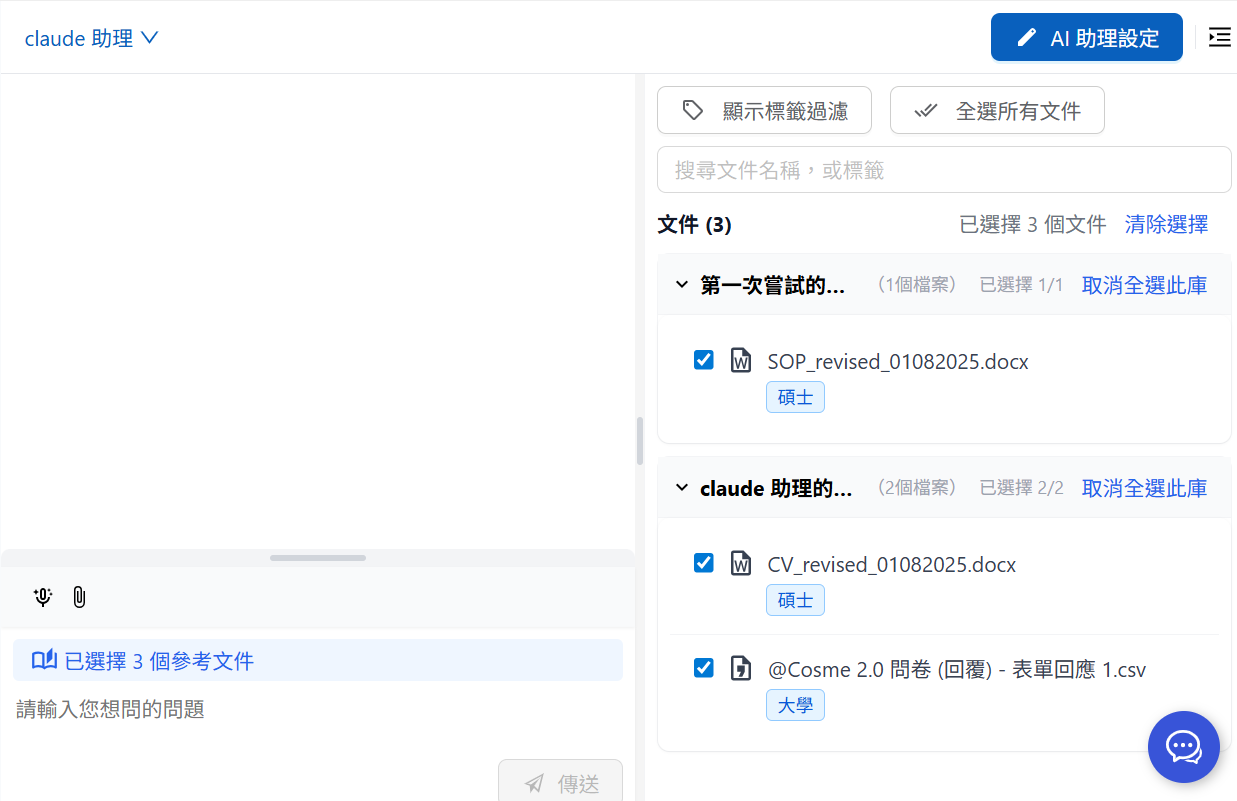
You can also use the right-hand menu shown below to select the knowledge permissions you want to make available:

<figure><img src="https://1360999650-files.gitbook.io/~/files/v0/b/gitbook-x-prod.appspot.com/o/spaces%2F6v6TNkkOQVfRYfcNirHL%2Fuploads%2Fgit-blob-c197581d7292296d9555671138c8d7ed62ce5a70%2F%E8%9E%A2%E5%B9%95%E6%93%B7%E5%8F%96%E7%95%AB%E9%9D%A2%202025-08-08%20095028.png?alt=media" alt=""><figcaption><p>Internal conversation: select available knowledge permissions</p></figcaption></figure>

You can likewise use "Show Tag Filter" to set tag filter conditions.

{% hint style="info" %}
Before sending each new message, you can still change the permissions on the right to manage knowledge access.
{% endhint %}

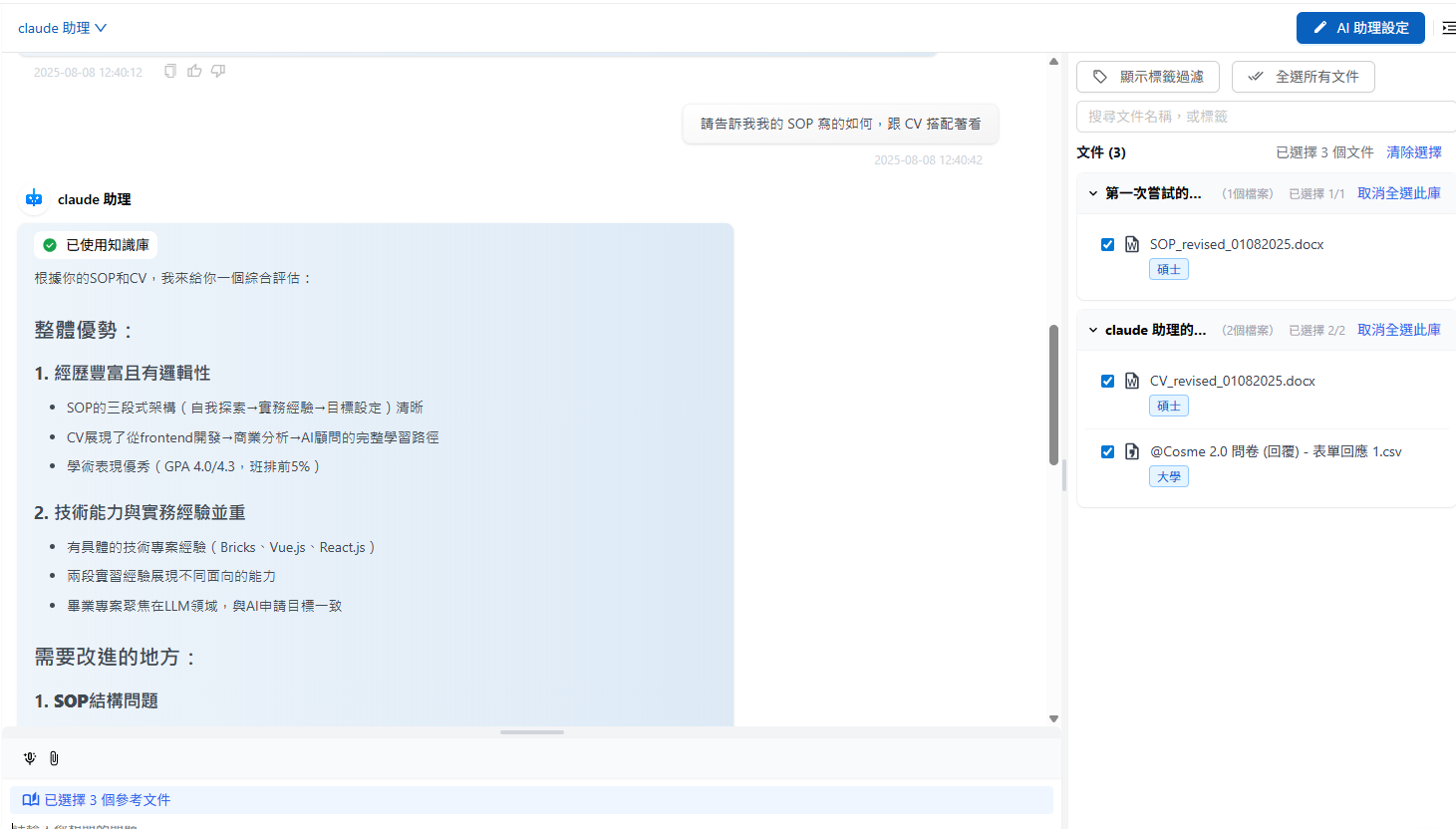
<figure><img src="https://1360999650-files.gitbook.io/~/files/v0/b/gitbook-x-prod.appspot.com/o/spaces%2F6v6TNkkOQVfRYfcNirHL%2Fuploads%2Fgit-blob-1fd810ec8e5c4b185673a93858d73a36bca5d085%2F%E8%9E%A2%E5%B9%95%E6%93%B7%E5%8F%96%E7%95%AB%E9%9D%A2%202025-08-08%20124143.png?alt=media" alt=""><figcaption><p>Available document list</p></figcaption></figure>

<figure><img src="https://1360999650-files.gitbook.io/~/files/v0/b/gitbook-x-prod.appspot.com/o/spaces%2F6v6TNkkOQVfRYfcNirHL%2Fuploads%2Fgit-blob-e6b0091dcec82fe35f8d8f6f859ed8fd886249a0%2F%E8%9E%A2%E5%B9%95%E6%93%B7%E5%8F%96%E7%95%AB%E9%9D%A2%202025-08-08%20124344.png?alt=media" alt=""><figcaption><p>Selected documents status</p></figcaption></figure>

The Agent can currently reference three files: CV, SOP, and Survey.

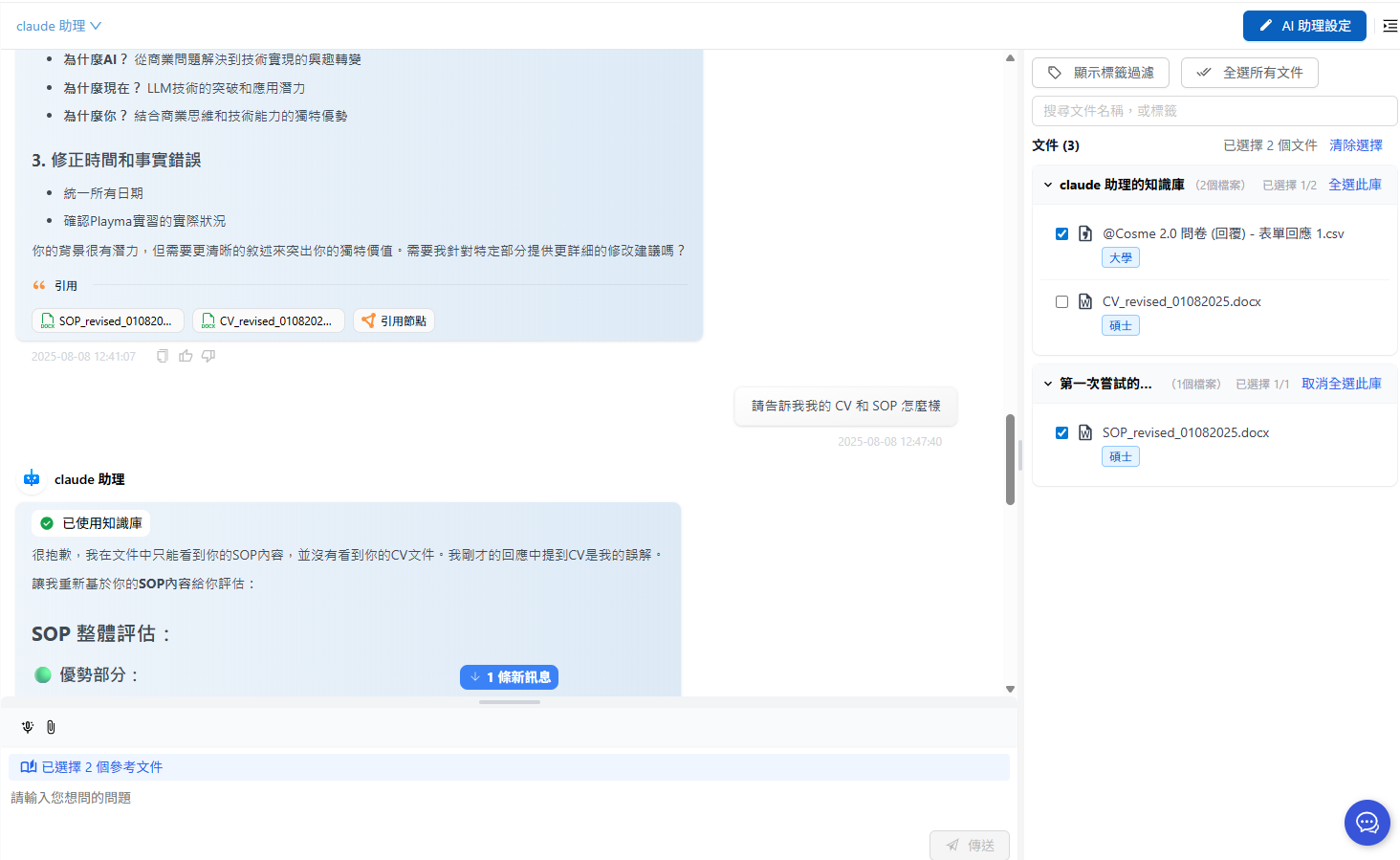
Uncheck CV for the next message, then send the message again:

<figure><img src="https://1360999650-files.gitbook.io/~/files/v0/b/gitbook-x-prod.appspot.com/o/spaces%2F6v6TNkkOQVfRYfcNirHL%2Fuploads%2Fgit-blob-9805fef0555d8b09f66eebd0114738a62852f580%2F%E8%9E%A2%E5%B9%95%E6%93%B7%E5%8F%96%E7%95%AB%E9%9D%A2%202025-08-08%20124830.png?alt=media" alt=""><figcaption><p>Example of unchecking a document</p></figcaption></figure>

The Agent can no longer use the CV file, and the citation library no longer shows CV citations:

<figure><img src="https://1360999650-files.gitbook.io/~/files/v0/b/gitbook-x-prod.appspot.com/o/spaces%2F6v6TNkkOQVfRYfcNirHL%2Fuploads%2Fgit-blob-18ee67d0a77a1ce864386d755225372b9f15fd63%2F%E8%9E%A2%E5%B9%95%E6%93%B7%E5%8F%96%E7%95%AB%E9%9D%A2%202025-08-08%20124958.png?alt=media" alt=""><figcaption><p>Citation library change: after removing CV</p></figcaption></figure>

You can adjust permissions before sending each message, which affects the content that can be cited in that turn's answer.

## Web Chat Preload Settings <a href="#webchat-preload-settings" id="webchat-preload-settings"></a>

MaiAgent lets you preset query metadata before Web Chat is formally initialized. If you want to restrict conversation content before a contact exists (for example, when providing Web Chat service to customers who have not registered a contact account), you can supply query metadata when embedding. The system will then enable message-level knowledge base document filtering by default.

For Web Chat setup, see: [Technical Manual: Getting Started—Using JSON Format](https://docs.maiagent.ai/tech/identity-and-access/zhi-shi-guan-li-quan-xian-query-metadata-cha-xun-yuan-zi-liao-zong-lan/json-interfaces#webchat-chu-shi-hua-she-ding)

{% hint style="info" %}
You can also build query metadata in JSON format. See [Technical Manual: Getting Started](https://docs.maiagent.ai/tech/identity-and-access/zhi-shi-guan-li-quan-xian-query-metadata-cha-xun-yuan-zi-liao-zong-lan/json-interfaces)[—](https://docs.maiagent.ai/tech/identity-and-access/zhi-shi-guan-li-quan-xian-query-metadata-cha-xun-yuan-zi-liao-zong-lan/json-interfaces)[Using JSON Format](https://docs.maiagent.ai/tech/identity-and-access/zhi-shi-guan-li-quan-xian-query-metadata-cha-xun-yuan-zi-liao-zong-lan/json-interfaces)
{% endhint %}


---

# Agent Instructions
This documentation is published with GitBook. GitBook is the documentation platform designed so that both humans and AI agents can read, navigate, and reason over technical content effectively. Learn more at gitbook.com.

## Querying This Documentation
If you need additional information that is not directly available in this page, you can query the documentation by asking a question.

Perform an HTTP GET request on the following URL with the `ask` and `goal` query parameters:

```
GET https://docs.maiagent.ai/maiagent-user-guide/en/org/querymetadata/query-builder.md?ask=<question>&goal=<user_goal>
```

`ask` is the immediate question: it should be specific, self-contained, and written in natural language.
`goal` is what the user is ultimately trying to achieve, the reason they need the answer. Sharing it helps GitBook give you a better, more relevant answer. A goal is most helpful when it describes the outcome the user wants rather than restating the question. For example, with `ask=how do I create an API token`, a goal like `automate deployments from our CI pipeline` lets GitBook tailor the answer to that use case.

The response will contain a direct answer to the question and relevant excerpts and sources from the documentation.

Use this mechanism when the answer is not explicitly present in the current page, you need clarification or additional context, or you want to retrieve related documentation sections.