> For the complete documentation index, see [llms.txt](https://docs.maiagent.ai/llms.txt). Markdown versions of documentation pages are available by appending `.md` to page URLs; this page is available as [Markdown](https://docs.maiagent.ai/maiagent-user-guide/en/org/querymetadata.md).
# Knowledge Management Permissions: Query Metadata
This article explains how to use query metadata to control the data and knowledge scope that AI assistants can reference.
## Feature Description
When deploying an AI conversation system, organizations typically need fine-grained control over the available scope of "Knowledge Bases / AI Assistants / Conversation Platforms" based on user permissions and usage requirements.
In MaiAgent, you can use query metadata attached to different conversation / identity levels to determine "what content this person / this conversation can reference."
### What Is Query Metadata?
Query metadata is a set of dynamic conditions that define the query scope. It can specify which "knowledge bases, FAQs, and documents matching tag conditions" a user can query on a given conversation platform.
It does not replace roles or contacts; rather, it enables these identities to "function conditionally," achieving conversation-level least privilege control.
> **Roles / Contacts / Conversations are containers; query metadata is the condition settings that actually control the visible scope**
{% hint style="info" %}
Learn more from the following articles:
* [**Contacts**](/maiagent-user-guide/en/serve/contact.md)
* [**Role Permission Management**](/maiagent-user-guide/en/org/roles/role-permission.md)
{% endhint %}
## Permission Level Concept
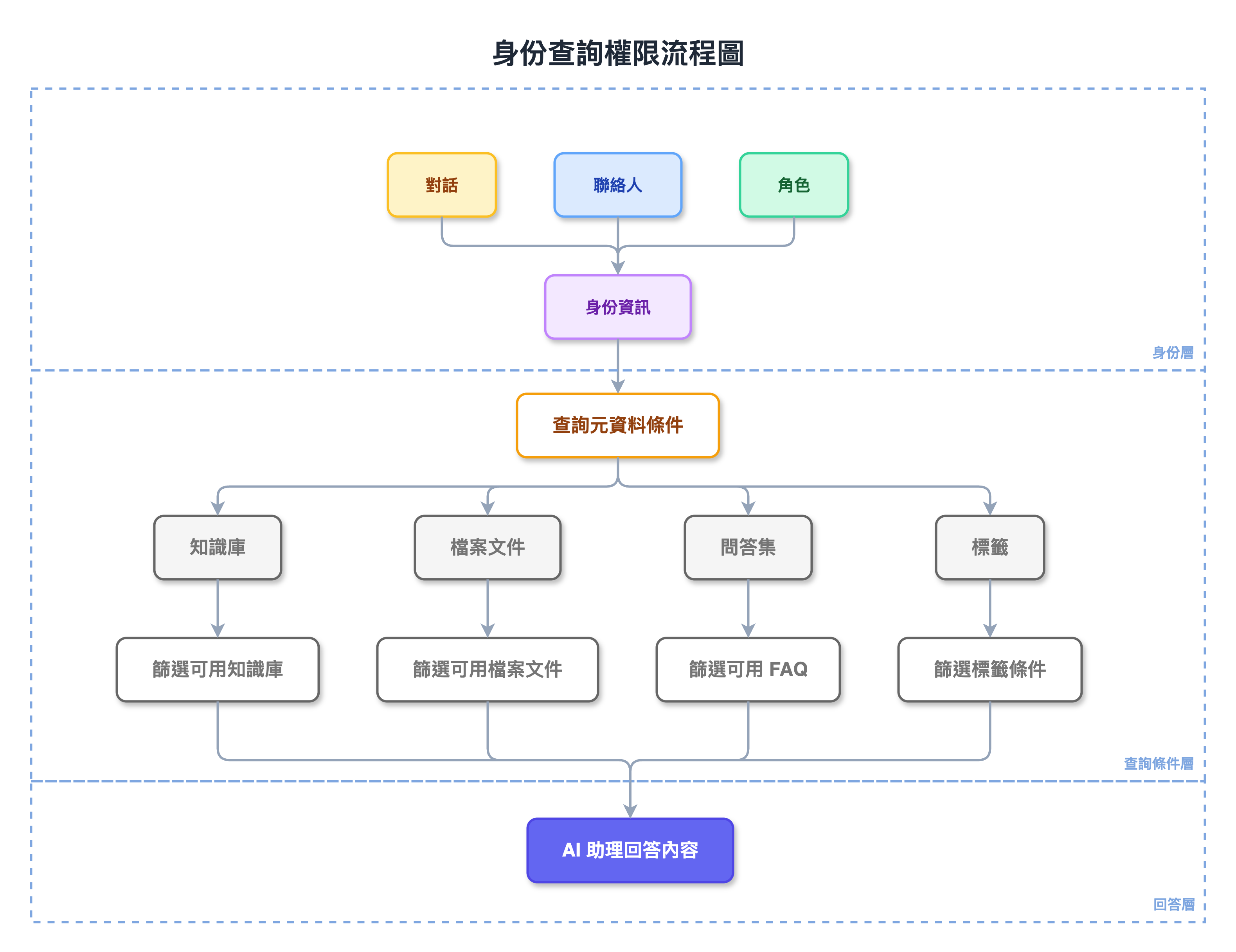
Before constructing a service, the Agent verifies all available knowledge bases through query metadata at different levels. The permission level reference order is as follows:
```
AI Assistant > Conversation Platform > User (Conversation / Contact / Role) > Query Metadata > Query Permissions
```
You can specify permissions at each level using the graphical interface or JSON format
{% hint style="info" %}
The AI assistant itself can also have a default set of tag filtering conditions as the lowest-priority fallback. These conditions apply only when no query metadata is specified at the message, conversation, or contact level. See [Knowledge Base Tag Filtering](/maiagent-user-guide/en/build/agent/label-filter.md) for setup instructions.
{% endhint %}
> See the following documentation for instructions:
>
> 1. [Getting Started — Using the "Query Builder"](/maiagent-user-guide/en/org/query-builder.md)
> 2. Technical Manual: [JSON Interface Configuration Guide (Contacts, Web Chat Embed Settings)](https://docs.maiagent.ai/tech/authorization-integration/json-interfaces)
* Contacts / Roles are identity containers
* Conversations correspond to internal conversations where you can control the knowledge bases used through filtering
* Query metadata is the "set of filter conditions" actually applied during conversations
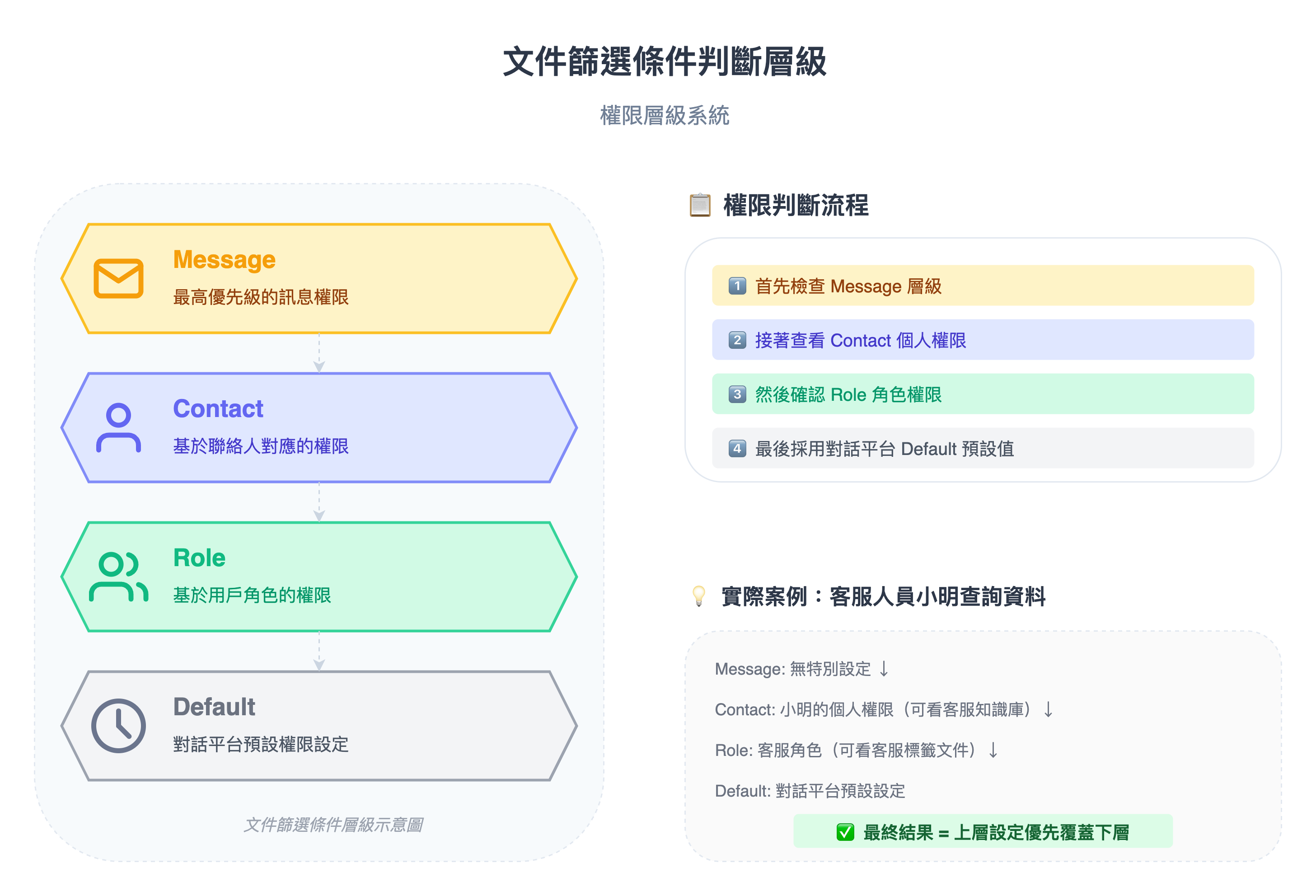
### Document Filtering Condition Level Hierarchy
Through layer-by-layer transmission, query metadata becomes the actual decision-making basis for AI response logic
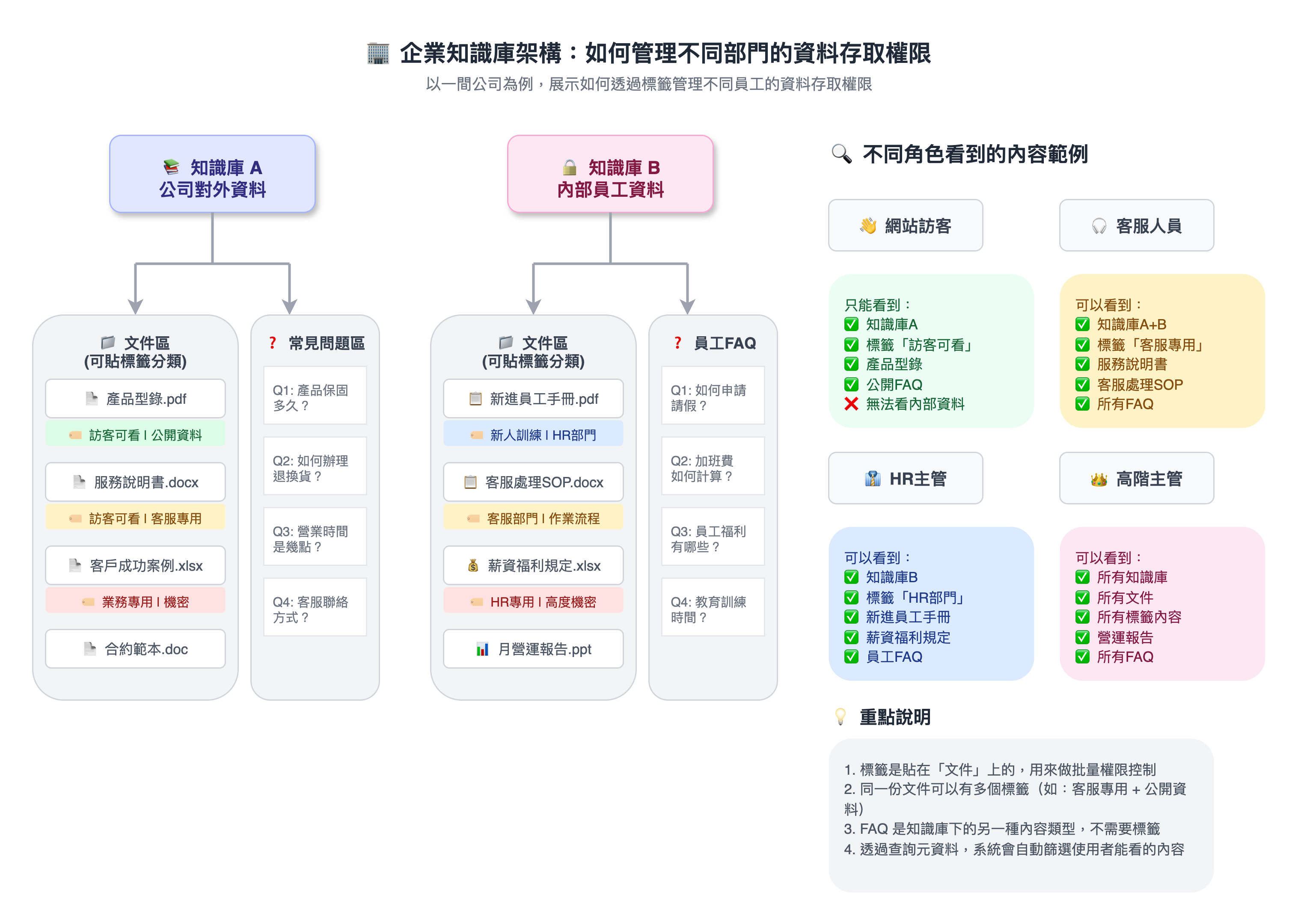
## Practical Use Cases
***
## Summary: The Value of Query Metadata for Enterprises
🎯 **Multi-dimensional identity cross-control** (role + region + product line)
🎯 **Real-time query control**: No need to duplicate assistants — just change the conditions to switch between scenarios
🎯 **Flexible large-scale knowledge base management**: Tags and knowledge bases can be split and authorized by scenario
> **Incorporate query metadata into your product architecture core to achieve maximum authorization flexibility with minimal configuration,**\
> **ensuring knowledge security while improving conversation experience and operational efficiency.**
---
# Agent Instructions
This documentation is published with GitBook. GitBook is the documentation platform designed so that both humans and AI agents can read, navigate, and reason over technical content effectively. Learn more at gitbook.com.
## Querying This Documentation
If you need additional information that is not directly available in this page, you can query the documentation by asking a question.
Perform an HTTP GET request on the following URL with the `ask` and `goal` query parameters:
```
GET https://docs.maiagent.ai/maiagent-user-guide/en/org/querymetadata.md?ask=&goal=
```
`ask` is the immediate question: it should be specific, self-contained, and written in natural language.
`goal` is what the user is ultimately trying to achieve, the reason they need the answer. Sharing it helps GitBook give you a better, more relevant answer. A goal is most helpful when it describes the outcome the user wants rather than restating the question. For example, with `ask=how do I create an API token`, a goal like `automate deployments from our CI pipeline` lets GitBook tailor the answer to that use case.
The response will contain a direct answer to the question and relevant excerpts and sources from the documentation.
Use this mechanism when the answer is not explicitly present in the current page, you need clarification or additional context, or you want to retrieve related documentation sections.