> For the complete documentation index, see [llms.txt](https://docs.maiagent.ai/llms.txt). Markdown versions of documentation pages are available by appending `.md` to page URLs; this page is available as [Markdown](https://docs.maiagent.ai/maiagent-user-guide/en/org/overview.md).

# Organization & Member Management

The three-tier structure of organizations, roles, and members, and the three things contained in a role—feature permissions, creation permissions, and resource assignments. Read this page before setti

## What Is Organization and Member Management? <a href="#what-is-organization-member-management" id="what-is-organization-member-management"></a>

MaiAgent's organization and member management works like setting up a "digital office" for your company: first create an organization for your company, add departments (roles), decide what each department can use, and then add colleagues to the appropriate departments.

This design is based on **RBAC** (Role-Based Access Control): permissions are assigned to roles, not directly to individuals.

{% hint style="info" %}
**In simple terms:**

RBAC means "define a position first, then add people to it." You first define what the "Customer Service Agent" role can do. When you add members to this role, they automatically receive all permissions assigned to a customer service agent, without having to configure each member individually.
{% endhint %}

***

## Three-Tier Structure: Organization → Role → Member <a href="#three-tier-structure" id="three-tier-structure"></a>

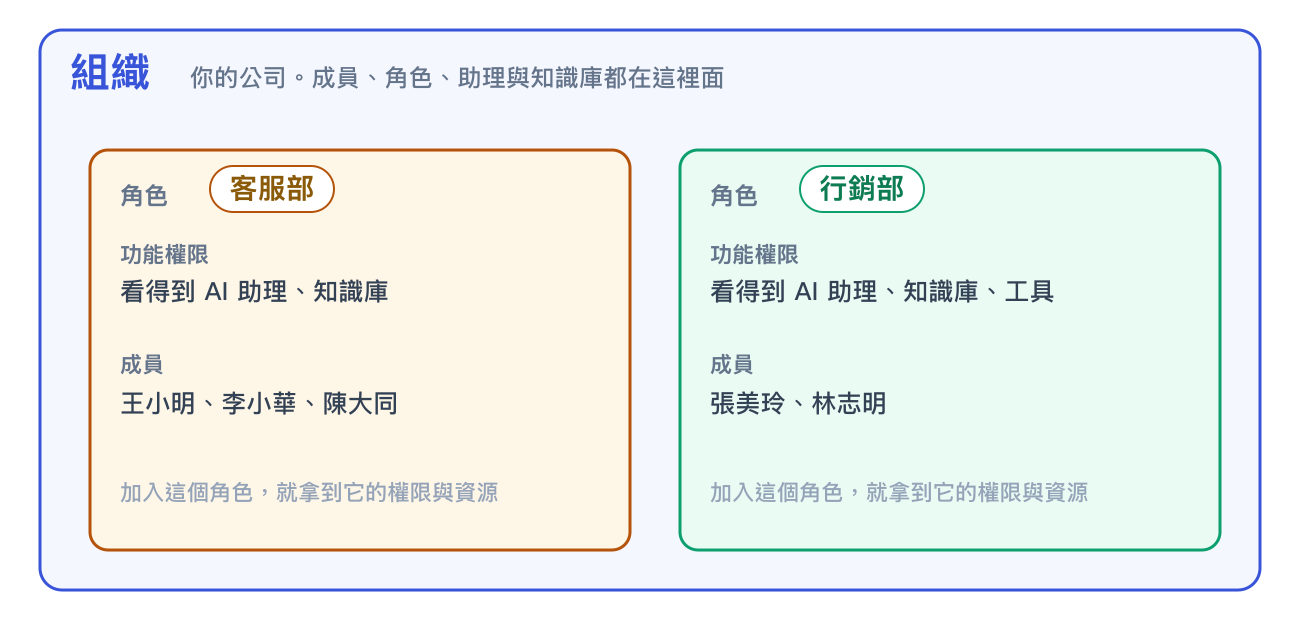
<figure><img src="https://1360999650-files.gitbook.io/~/files/v0/b/gitbook-x-prod.appspot.com/o/spaces%2F6v6TNkkOQVfRYfcNirHL%2Fuploads%2Fgit-blob-1e68b73f3dd87c7d0aacaaa5f90d0f5444f7912f%2Forg-structure.png?alt=media" alt="Three-tier structure of organizations, roles, and members"><figcaption><p>An organization contains multiple roles. When members join a role, they receive that role's permissions and resources.</p></figcaption></figure>

<table><thead><tr><th width="140">Level</th><th width="220">Company Equivalent</th><th>Description</th></tr></thead><tbody><tr><td><strong>Organization</strong></td><td>Your company</td><td>The top-level management unit. Members, roles, AI assistants, and knowledge bases all belong to an organization. Organizations are completely isolated from one another.</td></tr><tr><td><strong>Role</strong></td><td>Department or position</td><td>A container for permissions and resources. A member can belong to multiple roles at the same time and receives the combined permissions of all those roles.</td></tr><tr><td><strong>Member</strong></td><td>Employee</td><td>A user in the organization. Members have no permissions of their own; all permissions come from the roles to which they belong.</td></tr></tbody></table>

***

## What a Role Contains <a href="#what-a-role-holds" id="what-a-role-holds"></a>

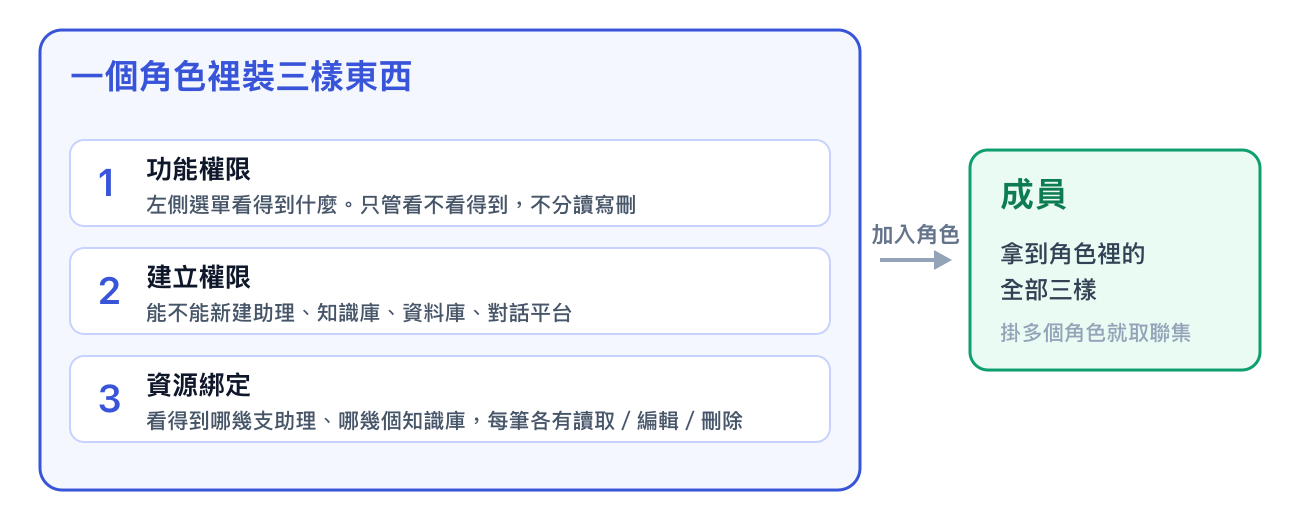
Many people think of permissions in terms of "create/read/update/delete," but the platform organizes them differently. A role contains three elements, and all three apply together:

<figure><img src="https://1360999650-files.gitbook.io/~/files/v0/b/gitbook-x-prod.appspot.com/o/spaces%2F6v6TNkkOQVfRYfcNirHL%2Fuploads%2Fgit-blob-5b0f9f797f33ee2191be97491b9767429d8e5dd6%2Forg-role-contents.png?alt=media" alt="The three elements in a role: feature permissions, creation permissions, and resource assignments"><figcaption><p>To let members create assistants, enable both "AI Assistants" under feature permissions and "Allow creating AI assistants" under creation permissions.</p></figcaption></figure>

<table><thead><tr><th width="150">Layer</th><th width="250">What It Determines</th><th>Where to Configure It</th></tr></thead><tbody><tr><td><strong>Feature permissions</strong></td><td>Which items appear in the left sidebar. These permissions only control visibility; they do not distinguish between read, edit, and delete access.</td><td>The <mark style="color:blue;">Role Permissions</mark> tab for the role. Selecting a parent permission automatically includes all child permissions, or you can select only specific child permissions.</td></tr><tr><td><strong>Creation permissions</strong></td><td>Whether members can create assistants, knowledge bases, databases, and conversation platforms.</td><td>The "Allow creating" checkbox at the top of each resource assignment tab.</td></tr><tr><td><strong>Resource assignments</strong></td><td>Which assistants and knowledge bases members can access. Each item has separate read, edit, and delete controls.</td><td>The role's <mark style="color:blue;">Assign AI Assistants</mark>, <mark style="color:blue;">Assign Knowledge Bases</mark>, and other resource tabs.</td></tr></tbody></table>

{% hint style="info" %}
**In simple terms:**

Feature permissions determine "which rooms you can see," creation permissions determine "whether you can build something new in a room," and resource assignments determine "which items in the room you can access and modify." All three keys are attached to roles, and people receive them by joining a role.
{% endhint %}

### Resources That Can Be Assigned to Roles <a href="#assignable-resources" id="assignable-resources"></a>

The tabs on the role editing page show the resources you can assign:

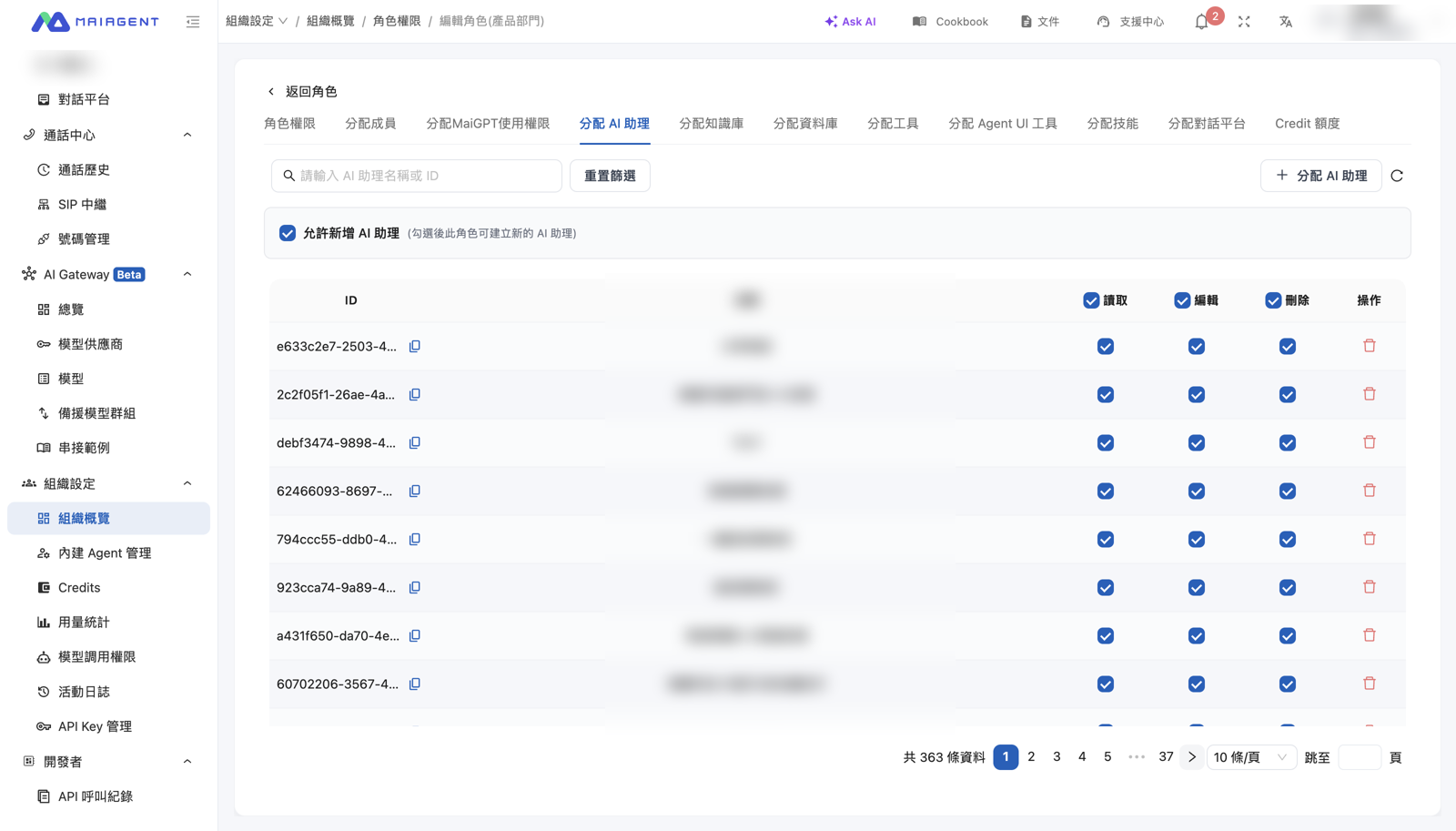
* **AI Assistants**, **Knowledge Bases**, **Databases**, and **Conversation Platforms**: Each includes read, edit, and delete permissions
* **Tools**, **Skills**, and **Agent UI Tools**: Capabilities that members of the role can attach to assistants
* **MaiGPT Access**: Whether members of the role can use MaiGPT
* **Credit Quota**: The usage limit for the role. See [Credit Billing](/maiagent-user-guide/en/org/credits.md) for details

<figure><img src="https://1360999650-files.gitbook.io/~/files/v0/b/gitbook-x-prod.appspot.com/o/spaces%2F6v6TNkkOQVfRYfcNirHL%2Fuploads%2Fgit-blob-35a58fc73f8a7799cbbf9f69149587f18c42bdc1%2Frole-design-assign-chatbots.png?alt=media" alt="Assign AI Assistants tab on the role editing page"><figcaption><p>Role editing page: the tabs at the top list assignable resources, "Allow creating" controls creation permissions, and the read/edit/delete controls in each row define resource assignments.</p></figcaption></figure>

***

## Core Concepts <a href="#core-concepts" id="core-concepts"></a>

### Three Types of Roles <a href="#role-types" id="role-types"></a>

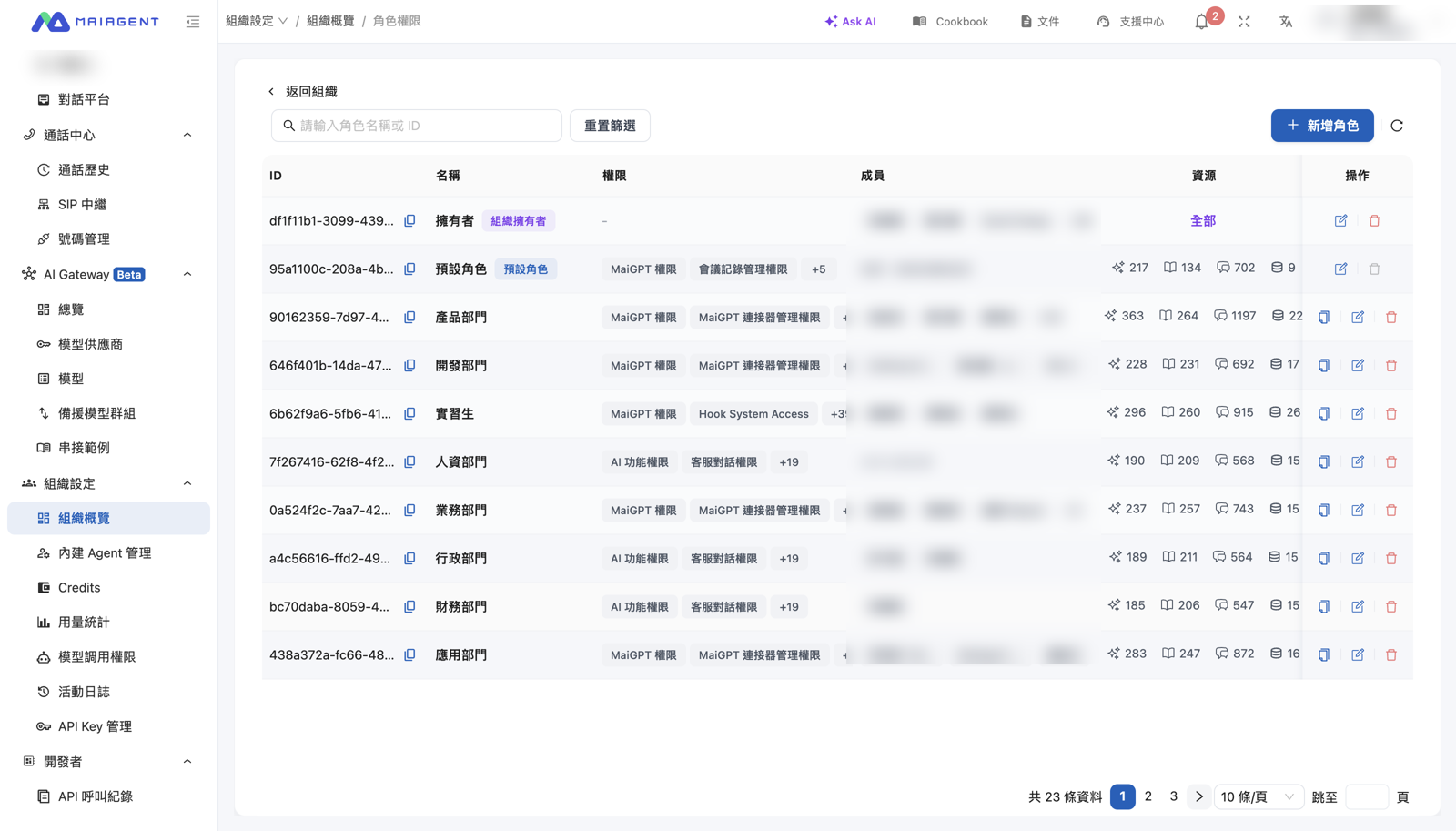
<table><thead><tr><th width="150">Type</th><th width="250">Who It Includes</th><th>Characteristics</th></tr></thead><tbody><tr><td><strong>Owner</strong></td><td>The organization creator or designated administrators</td><td>Bypasses all permission checks and can view and modify every resource in the organization. An organization can have multiple owners.</td></tr><tr><td><strong>Default Role</strong></td><td>All members, who are assigned automatically</td><td>Any permission it grants is available company-wide, and any assistant assigned to it is visible to everyone. We recommend granting only minimum permissions and assigning no resources.</td></tr><tr><td><strong>Custom Role</strong></td><td>Assigned members</td><td>Created by department or position. Custom roles can be duplicated and assigned in batches.</td></tr></tbody></table>

<figure><img src="https://1360999650-files.gitbook.io/~/files/v0/b/gitbook-x-prod.appspot.com/o/spaces%2F6v6TNkkOQVfRYfcNirHL%2Fuploads%2Fgit-blob-3d1c9633678d3a9d5a13981ad57674eb4e02d3b4%2Forg-roles-list.png?alt=media" alt="Role permission management list"><figcaption><p>Role list: owner, default, and custom roles, each showing its permissions, members, and number of assigned resources.</p></figcaption></figure>

### Two Types of Members <a href="#member-types" id="member-types"></a>

<table><thead><tr><th width="150">Type</th><th>Permission Scope</th></tr></thead><tbody><tr><td><strong>Owner</strong></td><td>Everything. Owners can manage organization settings, roles, and members.</td></tr><tr><td><strong>Regular Member</strong></td><td>The permissions of the default role, plus the permissions from every role assigned to the member.</td></tr></tbody></table>

{% hint style="warning" %}
**Visibility is based only on roles, not on who created a resource.** Members of every role assigned to an assistant can see it. The platform does not grant additional permissions just because "I created it." The only way to make an assistant visible solely to its creator is to create one role per person. See the [Role and Permission Planning Guide](/maiagent-user-guide/en/org/roles/role-design-guide.md) for instructions.
{% endhint %}

***

## Recommended Setup Order <a href="#setup-guide" id="setup-guide"></a>

{% hint style="success" %}

1. **Create an organization**: See [Organization Management](/maiagent-user-guide/en/org/organization.md)
2. **Connect a sign-in method**: To use company accounts, configure [Third-Party Sign-In (SSO)](/maiagent-user-guide/en/org/sso.md) first. Member email addresses must match their SSO accounts
3. **Restrict the default role**: Grant only minimum permissions and do not assign any resources
4. **Create roles**: Create roles by department or position, then select feature and creation permissions. See [Role Permission Management](/maiagent-user-guide/en/org/roles/role-permission.md)
5. **Assign resources**: Assign assistants, knowledge bases, and other resources to roles, then configure read, edit, and delete access. See [Role Resource Access Permissions](/maiagent-user-guide/en/org/roles/group-resource-access.md)
6. **Add members and assign roles**: See [Member Management](/maiagent-user-guide/en/org/member.md). Use batch import for larger teams
7. **Test with a regular member account**: Owners bypass all permission checks, so an owner account does not show the actual member experience
   {% endhint %}

***

## Related Pages <a href="#related-pages" id="related-pages"></a>

* [Organization Management](/maiagent-user-guide/en/org/organization.md): Create, switch, and manage organizations
* [Roles and Permissions](/maiagent-user-guide/en/org/roles.md): Role permission management, resource access permissions, member filters, differences between roles and contacts, and the role and permission planning guide
* [Member Management](/maiagent-user-guide/en/org/member.md): Add and remove members and assign roles
* [Third-Party Sign-In (SSO)](/maiagent-user-guide/en/org/sso.md) and [Identity Sync (LDAP)](/maiagent-user-guide/en/org/identity-sync.md): Sign in with company accounts and synchronize members


---

# Agent Instructions
This documentation is published with GitBook. GitBook is the documentation platform designed so that both humans and AI agents can read, navigate, and reason over technical content effectively. Learn more at gitbook.com.

## Querying This Documentation
If you need additional information that is not directly available in this page, you can query the documentation dynamically by asking a question.

Perform an HTTP GET request on the current page URL with the `ask` query parameter, and the optional `goal` query parameter:

```
GET https://docs.maiagent.ai/maiagent-user-guide/en/org/overview.md?ask=<question>&goal=<endgoal>
```

`ask` is the immediate question: it should be specific, self-contained, and written in natural language.
`goal` is optional and describes the broader end goal you are ultimately trying to accomplish on behalf of the user. GitBook uses it to tailor the answer towards what is most useful for that goal.

The response will contain a direct answer to the question and relevant excerpts and sources from the documentation.

Use this mechanism when the answer is not explicitly present in the current page, you need clarification or additional context, or you want to retrieve related documentation sections.