For the complete documentation index, see llms.txt. This page is also available as Markdown.

Credits Billing System

MaiAgent platform's Credits billing system — one quota covers all AI features.

Credits billing system — one quota covers all AI features

Three Key Highlights of the Credits System

1. One Quota for All AI Features

All features are available by default, with each feature having its own independent Credits rate — one quota covers all AI services simultaneously, no need for separate procurement or multi-platform contracts, making billing more intuitive and budgets more controllable.

One Credits quota simultaneously supports conversations, voice, image generation, document parsing, web search, and tool calls
2. Models Billed by Tier — Budget Control Is Back in Your Hands

Cost differences between AI models can be as much as tens of times. Under the Credits system, these differences are directly reflected in your costs:

  • General customer service FAQ → Use Claude 4.5 Haiku to save costs

  • Complex analysis, deep research → Use Claude 4.6 Opus for the highest quality

  • Multiple AI assistants each using different models, with Credits deducted at tier-based rates — you decide how to allocate your budget

3. Transparent and Trackable — Financial Reconciliation Made Simple

Every Credits consumption is mapped to the model used, feature type, and AI assistant, and can be queried in real time on the management panel, filtered by any dimension, and exported to CSV for internal reports. No more wondering "where did the money go."


What Are Credits?

Credits are MaiAgent platform's universal billing unit. Every AI conversation, image generation, voice processing, document parsing, and other operation consumes corresponding Credits based on the model and feature used.

Core Principles

  • Different models, different rates: Lightweight models cost less, flagship models are billed proportionally — you decide how much each task is worth

  • All features billed uniformly: Text, images, voice, document parsing, web search, and more are all measured in Credits

  • Transparent and trackable: View Credits balance and detailed usage in real time on the management panel, with CSV export support

  • First in, first out: Credits are automatically deducted in FIFO order — Credits expiring soonest are used first to avoid waste from expiration


Main Model Credits Rates

Rates for representative models from each provider, with Input and Output priced separately (per 1 million tokens):

Model
Input Credits / 1M tokens
Output Credits / 1M tokens
Use Cases

Claude 4.6 Opus

99,000

495,000

Deep research, high-quality content creation, complex reasoning

Claude 4.6 Sonnet

59,400

297,000

Complex analysis, content generation, professional Q&A

Claude 4.5 Haiku

19,800

99,000

General customer service, FAQ, simple Q&A

GPT-5

24,750

198,000

Advanced analysis, long document processing

GPT-5-mini

4,950

39,600

General Q&A, simple tasks

Gemini 3.1 Pro

39,600

237,600

Long context, complex analysis

Gemini 3 Flash

9,900

59,400

General Q&A, multimodal

Real usage example: Using the most common Claude 4.5 Haiku, a single customer service conversation of approximately 500 characters consumes about 25–50 Credits. Purchasing 1,000,000 Credits can support tens of thousands of customer service conversations — and the same quota can also be used for voice processing, image generation, and document parsing.

The platform also supports image generation, speech-to-text, text-to-speech, document parsing, web search, and other features — all billed uniformly in Credits, with no separate add-on purchases required. For the complete rate table, go to Organization SettingsCreditsPricing.


Available Tokens Reference by Plan

Depending on the model used, the same Credits can process different amounts of tokens:

Plan
Monthly Credits
Claude 4.5 Haiku ~Can Process
Claude 4.6 Sonnet ~Can Process
Claude 4.6 Opus ~Can Process

Standard

500,000

~11.48M tokens

~3.83M tokens

~770K tokens

Professional

5,000,000

~114.78M tokens

~38.26M tokens

~7.65M tokens

Enterprise

10,000,000

~229.57M tokens

~76.52M tokens

~15.30M tokens


Credits Top-Up Plans

Credits
Claude 4.5 Haiku approx.

50,000

~1.15M tokens

500,000

~11.48M tokens

1,000,000

~22.96M tokens

2,500,000

~57.39M tokens

Expiration RulesMonthly plan quota Credits expire at the end of the current month • Top-up Credits are valid for 12 months from the purchase date; unused Credits will expire after the validity period


Plan Quota vs. Top-Up Credits

The subscription plan's "monthly quota" and "top-up Credits" are two independent but complementary pools. The system automatically handles the deduction order — you don't need to allocate manually.

Comparison

Item
Plan Quota (Monthly)
Top-Up Credits

Source

Automatically issued with subscription plan

Purchased by you at any time

Issuance Timing

Beginning of each month

Effective immediately after purchase

Validity

Expires at end of month, unused balance does not carry over

Valid for 12 months from purchase date

Use Case

Standard daily usage

Supplement when monthly quota is insufficient / unexpected demand

Deduction Order: First to Expire, First Deducted (FIFO)

The system uses FIFO (First In, First Out) logic, determining deduction order based on "expiration date":

The purpose of this design: Prevent your top-up Credits from being consumed while monthly quota goes to waste due to expiration.

Why Two Types?

  • Subscription plan quota = Stable daily budget, fixed every month

  • Top-up Credits = Flexible backup, available for immediate replenishment when business demand surges

  • Together they let you control your budget while handling fluctuations


AI Gateway Traffic Fees for Self-Hosted Models

When an organization uses an AI Gateway model with its own credentials or infrastructure, MaiAgent does not charge the platform's LLM token rates. Instead, it charges a traffic fee based on the total number of tokens in each request. The total includes input tokens, output tokens, prompt cache writes, and prompt cache reads. The actual percentage depends on the organization's settings.

The traffic fee is calculated as “total tokens × the organization's traffic fee rate,” and the result is deducted in Credits. Models hosted by MaiAgent continue to be billed at their original Input/Output rates and are not covered by this section.

Use Case

For example, an IT department connects a company-hosted model to AI Gateway, and a finance team member wants to verify the cost of these requests at the end of the month. They first check the organization's traffic fee rate under “Pricing,” then filter for platform fees under “Consumption Records.” The page lists AI Gateway traffic fees separately, allowing them to reconcile self-hosted model traffic against hosted model charges.

View Traffic Fee Rates and Consumption

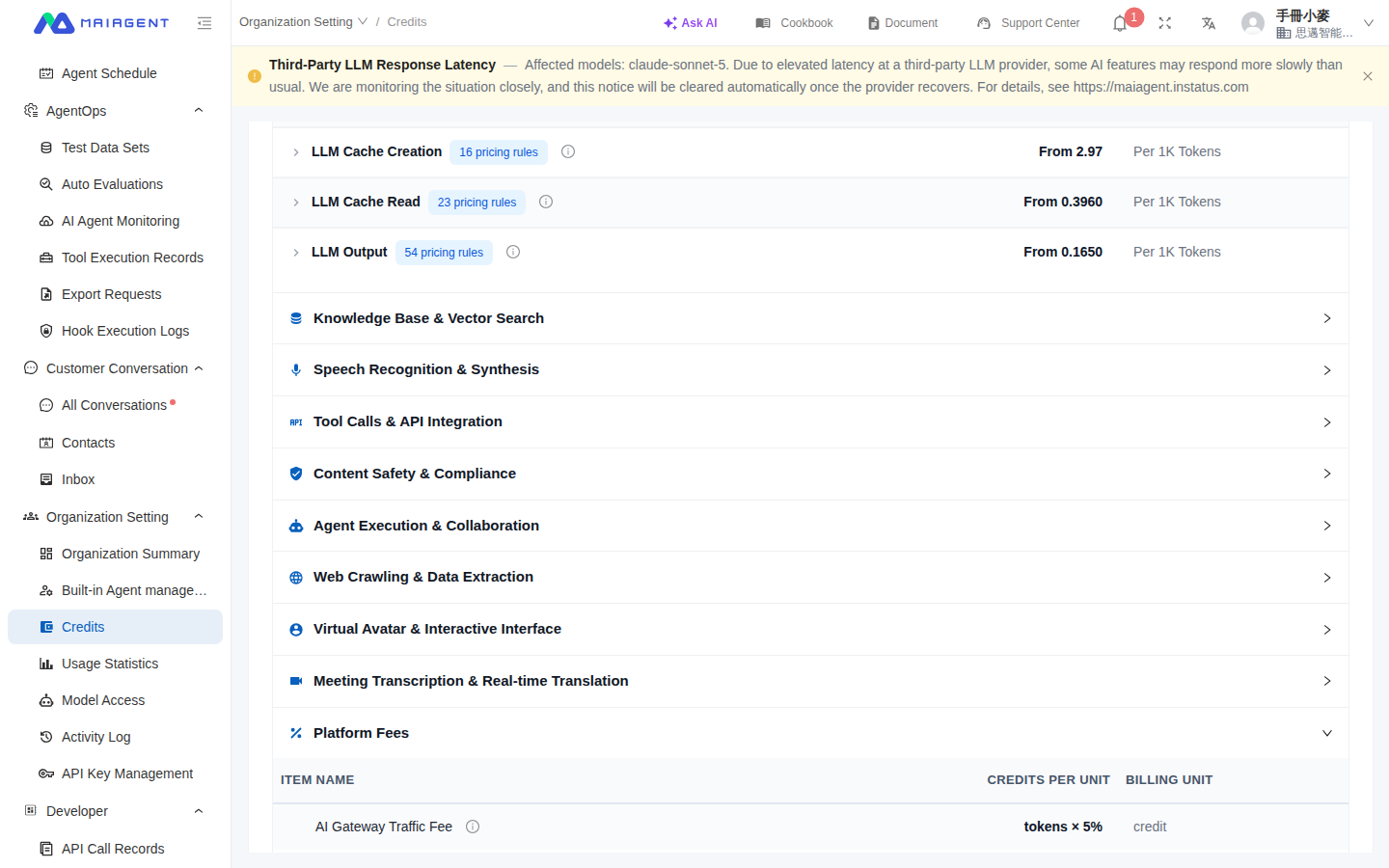
  1. Go to Organization SettingsCreditsPricing.

  2. Under “Platform Fees,” find AI Gateway Traffic Fee and review the “total tokens × percentage” rate description.

  3. Switch to Consumption Records and filter by “Platform Fees” to view actual deductions.

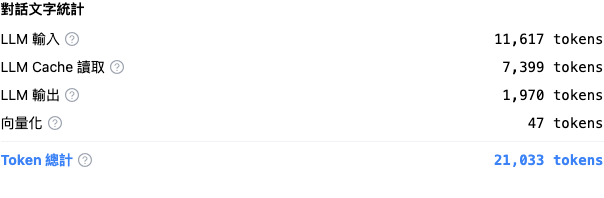
  4. Hover over an AI Gateway traffic fee entry to verify the input, output, cache write, cache read, and billing percentage details.

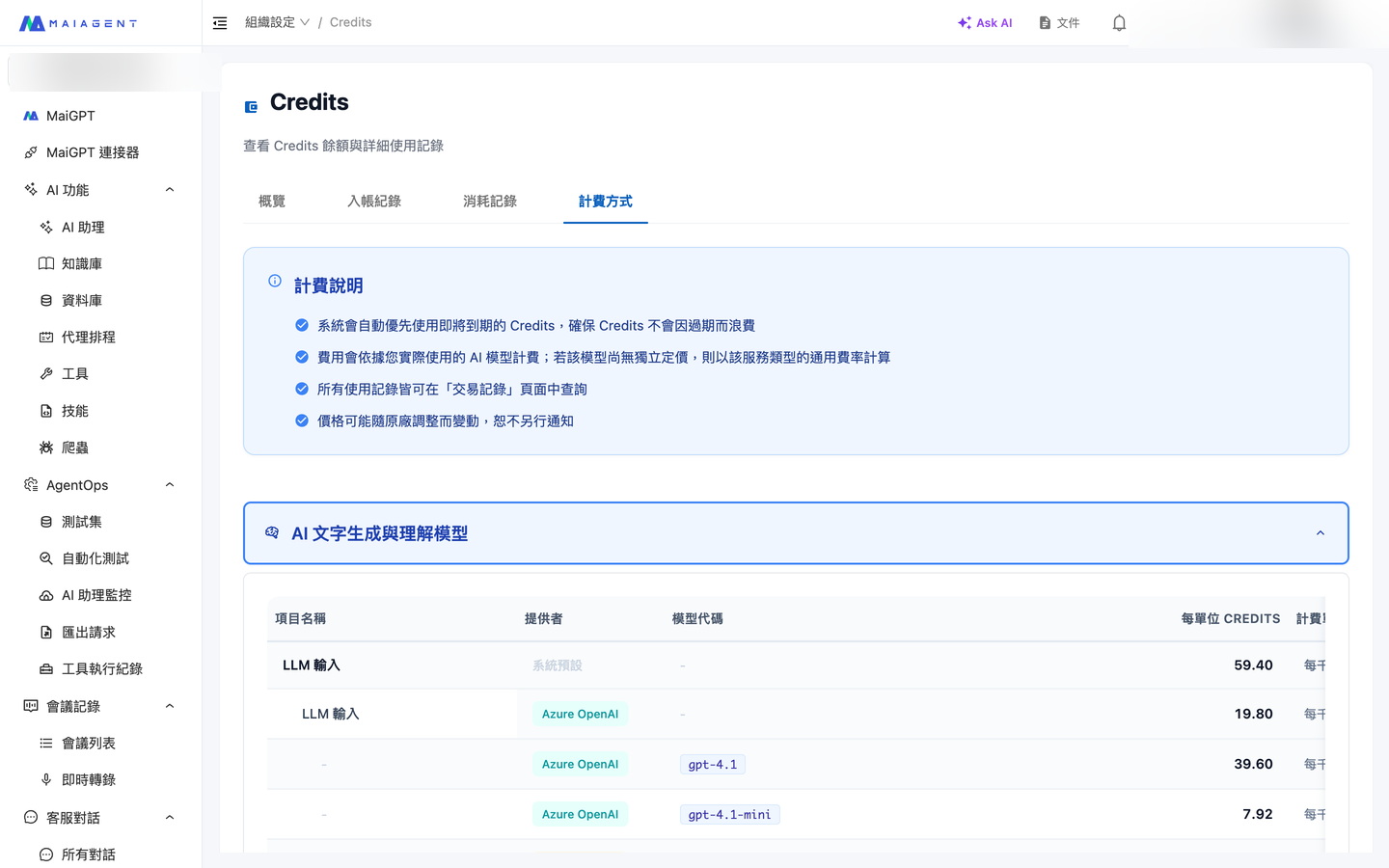
Credits Pricing tab
View Credits rates for each service under “Pricing.”
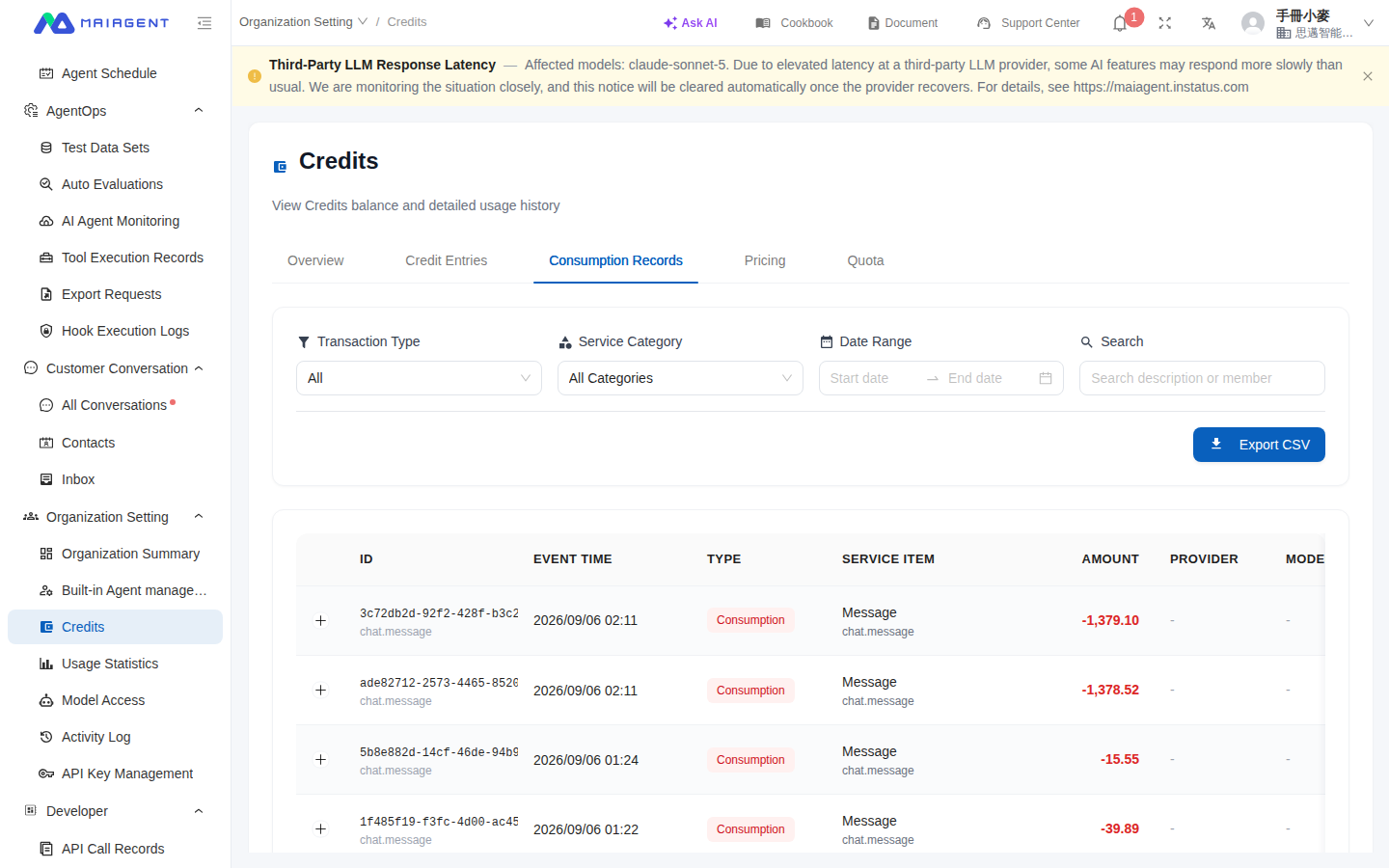
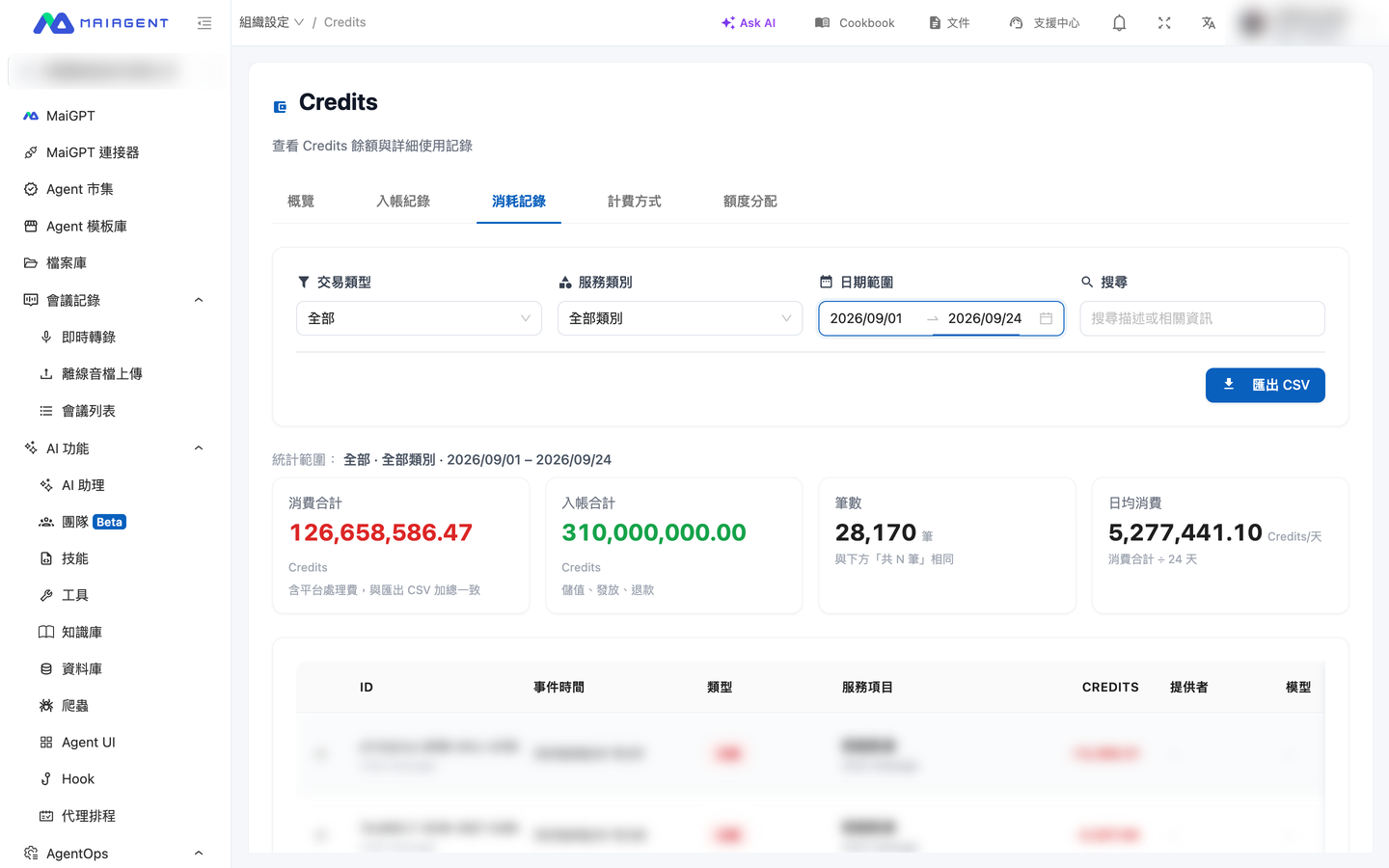
Credits Consumption Records tab
Filter actual deductions under “Consumption Records” by type, service category, date, or keyword.

Credits Management Panel

You can access the management interface at Organization SettingsCredits, which includes four tabs:

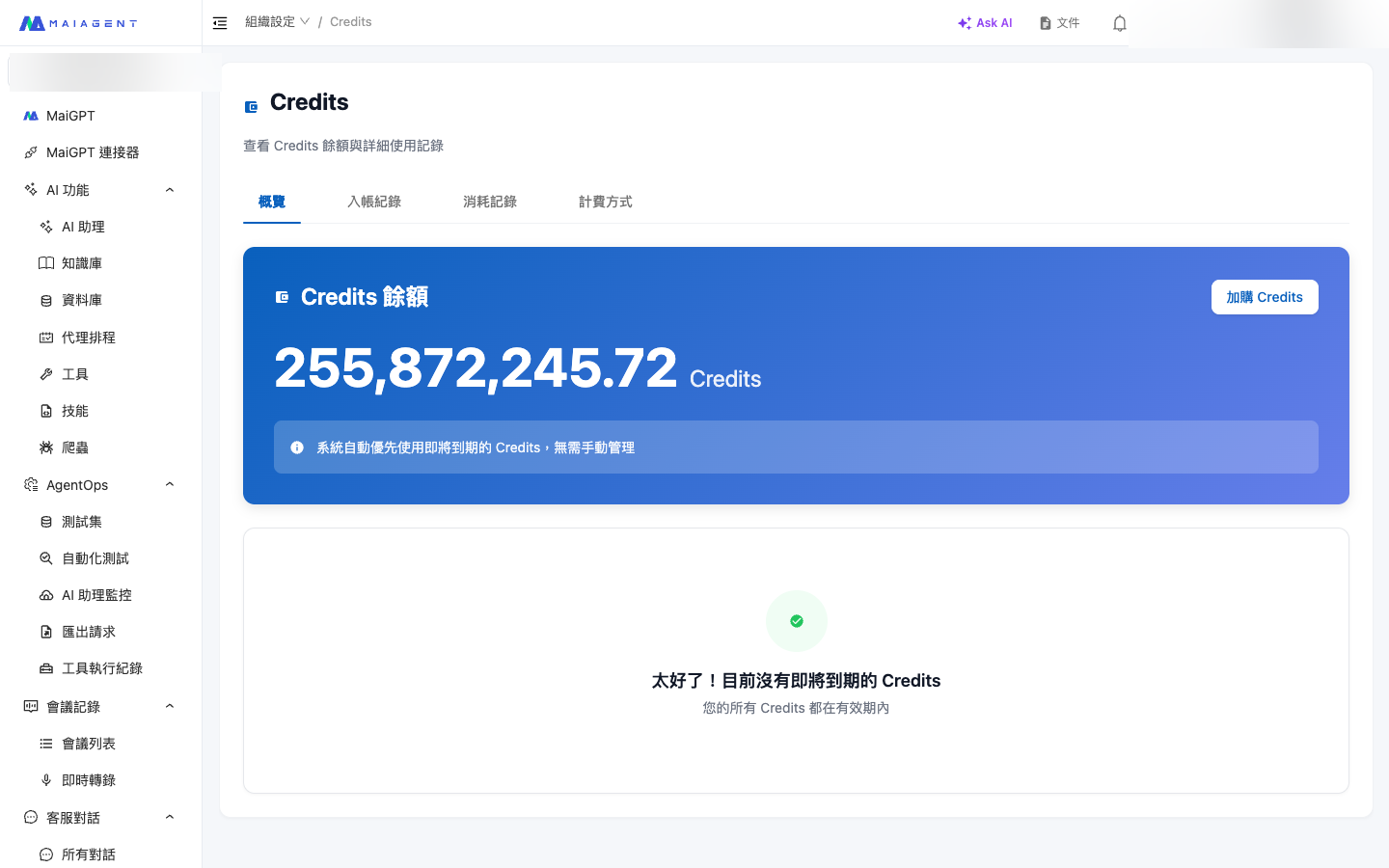
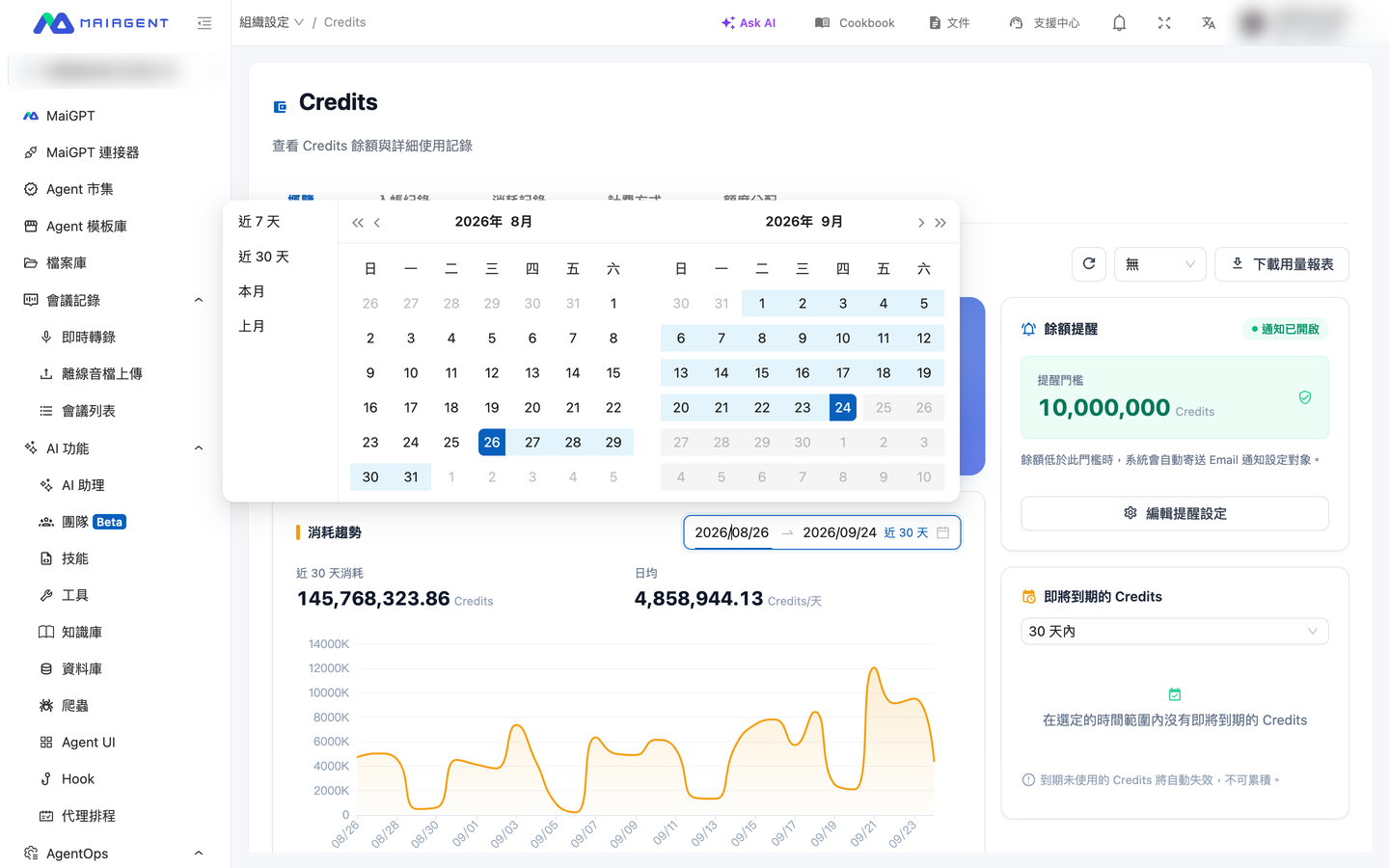
Overview

  • View total Credits balance and soon-to-expire credits in real time

  • Monthly usage trend chart

  • Expiring Credits reminders

Overview Tab: Real-time Credits balance and expiration reminders

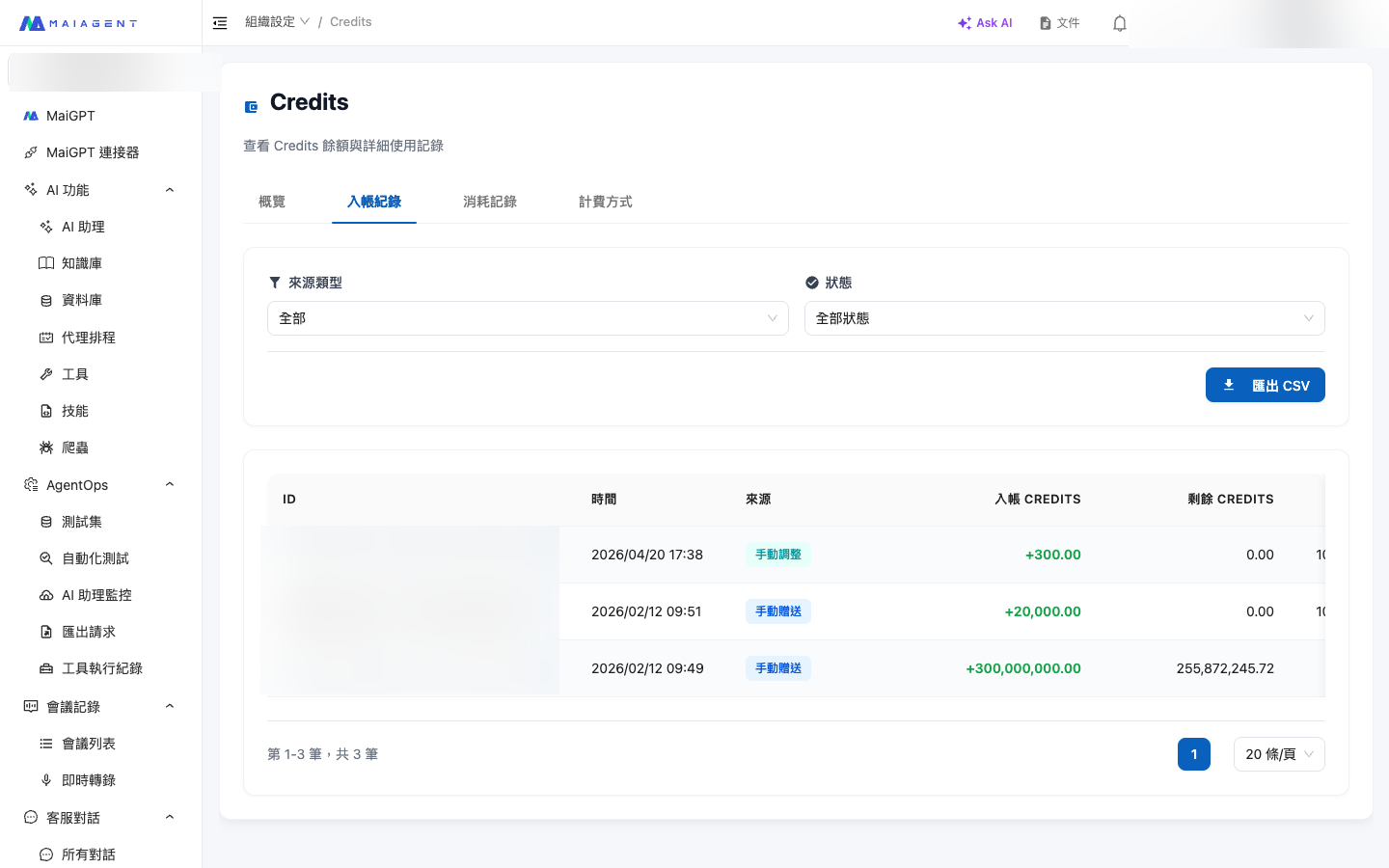
Deposit Records

  • Displays every Credits source: plan issuance, top-ups, gifts, etc.

  • Shows validity periods (monthly quota expires at month-end, top-ups valid for 12 months from purchase date)

  • Uses FIFO deduction (first to expire, first deducted), fully showing the remaining balance of each deposit

  • Supports CSV export for financial bookkeeping and annual audits

Deposit Records Tab: Complete view of Credits sources, validity periods, and remaining balances
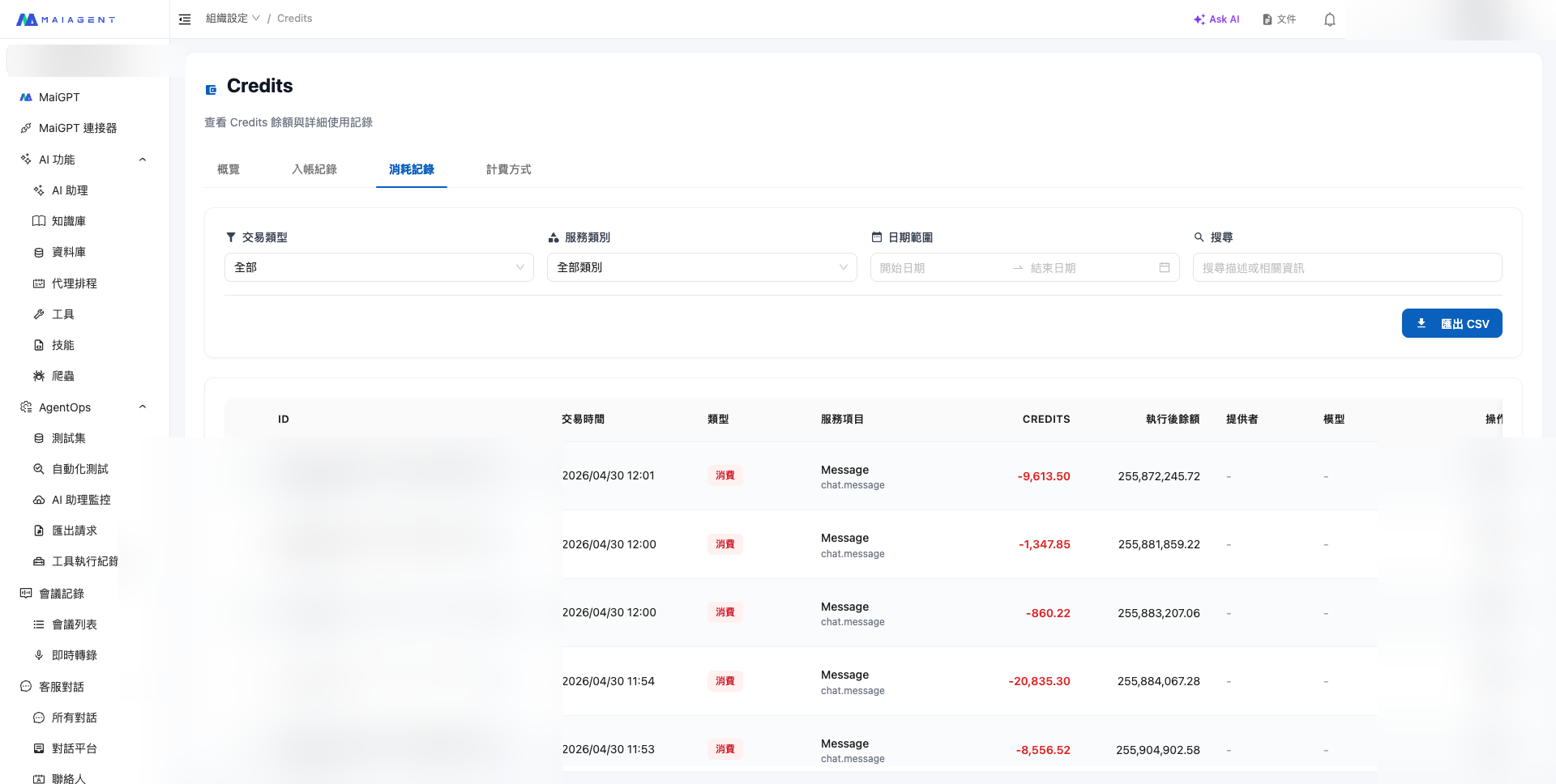
Consumption Records

  • Filter usage details by date, type, AI assistant, and other dimensions

  • Each consumption entry shows the model used, Credits consumed, and corresponding event

  • Supports CSV export for record-keeping or external analysis (a best friend for internal financial reconciliation)

Consumption Records Tab: Every usage detail maps to a model, AI assistant, and event

Pricing

  • Complete listing of all model and feature rates

  • Covers all billing categories including LLM conversations, voice, knowledge base, web scraping, tools, AI assistant computation, Avatar, and more

Pricing Tab: Complete rate table for all models and features

View Conversation Attachment and Derived File Storage Fees

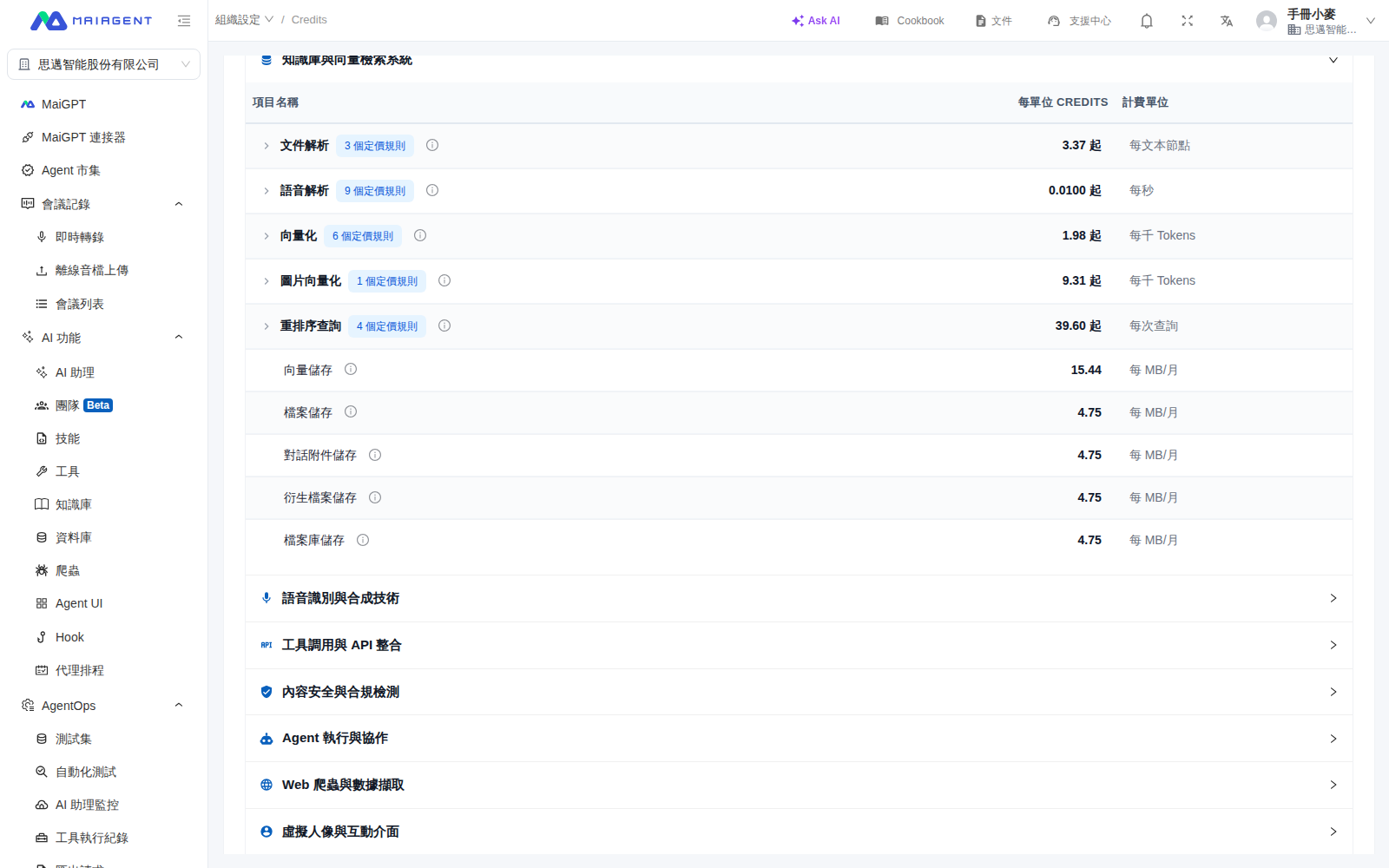
Files uploaded in conversations use "Conversation Attachment Storage." Format conversions, reprocessed copies, and speech transcription copies generated when the system processes files use "Derived File Storage." Both are billed in MB per month, with Credits deducted daily based on actual usage. Original files are billed under the corresponding storage item and are not billed again as derived files.

The retention period for conversation attachments is determined by system settings and is currently shown in the description for "Conversation Attachment Storage." The retention countdown restarts whenever a conversation receives a new message. When the retention period ends, attachments and any processing copies generated from them are automatically deleted, and billing stops. Deleted files cannot be recovered, so download any files you need to retain long-term before the deadline.

  1. Go to Organization SettingsCredits.

  2. Switch to Pricing.

  3. Expand Knowledge Base and Vector Search System.

  4. Review the Credits per unit and billing units for Conversation Attachment Storage and Derived File Storage. Hover over the information icon to view retention and billing details.

Use Case

The customer service manager at MaiAgent regularly asks visitors to upload screenshots of their issues in conversations. During month-end reconciliation, she goes to Credits "Pricing" and expands "Knowledge Base and Vector Search System" to confirm which rate applies to conversation attachments and which applies to processed copies. After reviewing the attachment retention details, she downloads any screenshots that need to be kept before the deadline. Attachments that are no longer used are automatically deleted when the retention period ends, so they no longer incur storage fees.

Quota Allocation

  • Administrators can set individual Credits spending limits and validity periods for each member

  • Supports distributing, editing, and disabling quotas, as well as a "Require Quota" toggle for access control

  • Searchable member filtering by status (Active / Expired / Unallocated)

See Member Credits Quota Management for details.


FAQ

Q: Can I use different models together?

Yes. The Credits system deducts corresponding Credits based on the model tier used — use the affordable Haiku for customer service FAQ, use Opus for deep analysis. Budget allocation is entirely in your hands.

Q: How do I view my Credits usage?

Go to Organization SettingsCredits. The Overview page shows your real-time balance, the Deposit Records page shows every Credits source and validity period, and the Consumption Records page lets you view detailed usage with CSV export support.

Q: What happens when my monthly quota runs out?

When your monthly Credits quota is exhausted, AI assistants will pause responses. You can purchase additional Credits at any time — effective immediately after purchase. Top-up Credits are valid for 12 months from the purchase date.

Q: Can I still use the platform when my plan expires or I don't have a paid plan?

Starting from 2026-06-09, organizations without an active paid plan (including free plans, expired trials, and unrenewed expired plans) will be prompted to upgrade when performing operations that require AI computation. Data is fully retained by the platform for 90 days from the plan expiration date. During this period, only storage space Credits fees are incurred (settled upon plan reactivation). Resubscribing within 90 days restores everything in full; data not claimed after 90 days will be permanently deleted and cannot be recovered. See Trials and Subscription Plans — What happens to data when a plan expires or downgrades to free? for details.

Q: Do Credits expire?

  • Monthly plan quota Credits expire at the end of the current month

  • Top-up Credits are valid for 12 months from the purchase date


Need Help? Contact Us

To learn more about how the Credits system can work with your company's budget control needs, or to get recommendations on plan configuration and top-up options, contact us through the following channels:

Thank you for choosing MaiAgent. We will continue to build a more flexible, cost-effective, and trustworthy AI service for you.

Last updated

Was this helpful?