> For the complete documentation index, see [llms.txt](https://docs.maiagent.ai/llms.txt). Markdown versions of documentation pages are available by appending `.md` to page URLs; this page is available as [Markdown](https://docs.maiagent.ai/maiagent-user-guide/en/meeting-records/meeting-records.md).
# Meeting Records Feature Overview
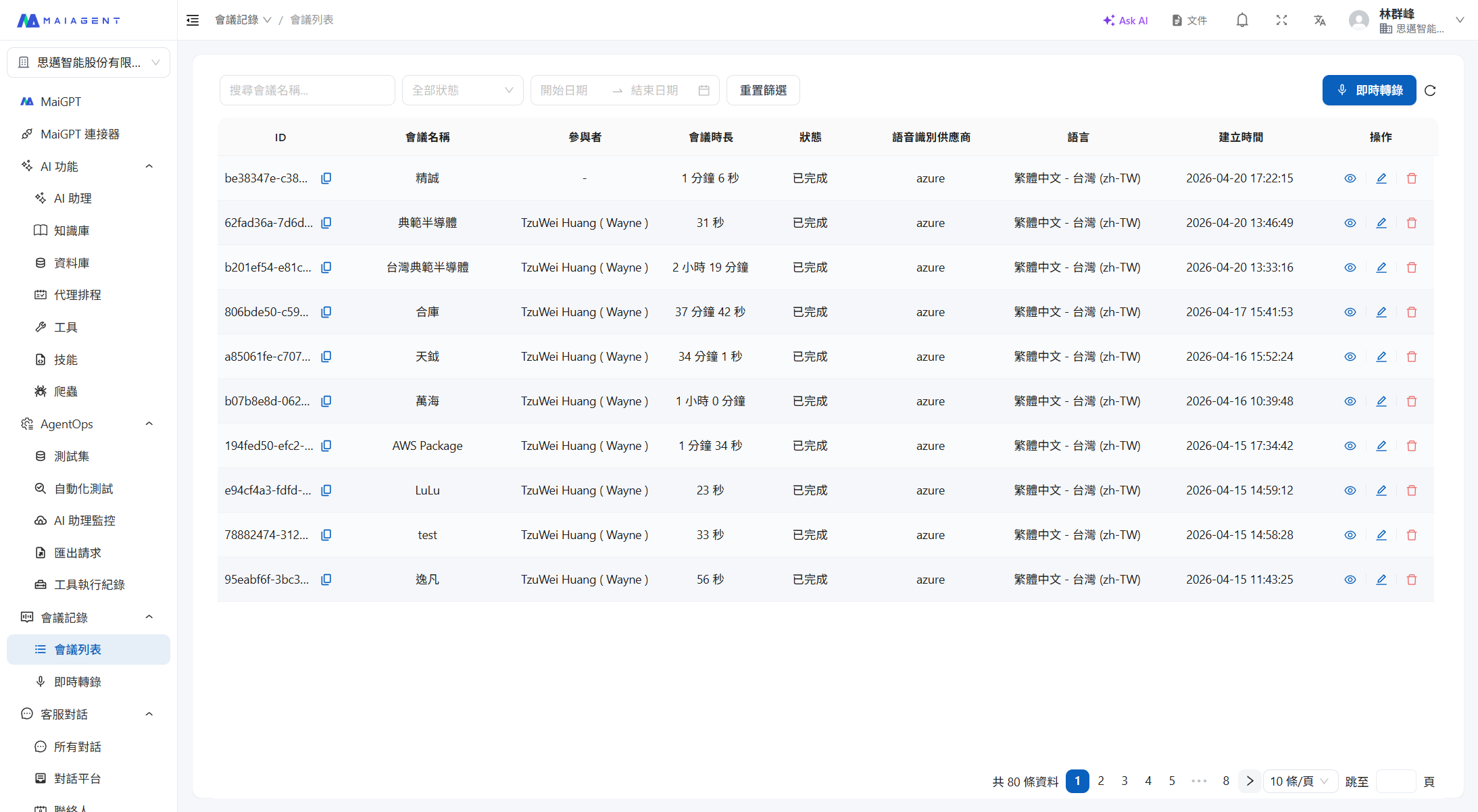
Meeting Records is the voice transcription and AI summary feature of the MaiAgent platform, offering both **live** and **offline** modes. Live mode provides low-latency transcription and translation during meetings; offline mode lets you upload audio recordings for high-accuracy transcription and speaker identification. Both modes support AI auto-summary, Q\&A, download/export, and knowledge base integration.
Meeting Records List
## Two Modes
| | Live Meeting Records | Offline Meeting Records |
| -------------------------- | ------------------------------------------------------------------------------------------------------------------------------------------------------------------------------------------ | --------------------------------------------------- |
| **Input Method** | Real-time microphone recording | Upload audio files (mp3, mp4, m4a, aac, wav) |
| **Transcription Features** | Low-latency real-time transcription | Multi-language high-accuracy transcription |
| **Translation** | Low-latency real-time translation (up to 3 languages) | Post-transcription translation |
| **Speaker Identification** | Depends on STT engine support | High-accuracy speaker identification and management |
| **Timeline** | Real-time marking | High-accuracy timeline recognition |
| **Subtitle Playback** | — | Dynamic subtitle playback, synced with audio |
| **Backup Audio** | Synchronized local backup recording in the browser prevents audio loss during network outages (see [Meeting Record Backup Audio](/maiagent-user-guide/en/meeting-records/backup-audio.md)) | — |
## Common Features
| Feature | Description |
| ---------------------------------- | ------------------------------------------------------------------------------------------------------------------------------------------------------------------------------------- |
| **Multi-language Transcription** | Supports speech recognition in multiple languages |
| **Multi-language Translation** | Translates transcribed content into multiple target languages |
| **Auto Summary** | Automatically generates meeting highlights using a custom AI assistant |
| **AI Q\&A, Agent Ticket Creation** | Ask questions about the transcript; if the selected AI assistant is configured with ticket creation tools, you can ask it to turn meeting action items directly into tasks or tickets |
| **Download & Export** | Download MP3 recordings, plain text transcripts, and SRT subtitle files |
| **Knowledge Base Integration** | Upload transcripts to the knowledge base for Agent reference |
## Workflow
**Live Mode:**
```
Create Meeting → Configure STT Engine & Translation → Start Recording → Low-latency Real-time Transcription
↓
Meeting Ends → Review Transcript
↓
AI Summary / AI Q&A / Download & Export
```
**Offline Mode:**
```
Upload Audio (mp3/mp4/m4a/aac/wav) → System Transcription & Speaker Identification → Review Transcript
↓
Dynamic Subtitle Playback / AI Summary / AI Q&A / Download & Export
```
## Meeting Record Statuses
| Status | Description |
| --------------------------- | --------------------------------------------------------------------- |
| **Pending** (Pending) | Created or uploaded, processing has not started |
| **Recording** (Recording) | Transcription in progress in live mode |
| **Processing** (Processing) | After recording ends or audio upload, the system is processing |
| **Completed** (Completed) | Processing complete, transcript can be viewed and summaries generated |
| **Failed** (Failed) | An error occurred during processing |
## Deployment Options
Meeting Records supports multiple deployment options:
* **SaaS**: Use the MaiAgent cloud service directly
* **Private Cloud**: Deploy in the customer's cloud environment
* **On-Premises**: Install on the customer's local servers
## Permissions
Meeting Records requires organization-level activation before use, with three permission levels:
* **View Permission**: Browse the meeting list, view transcripts, and download files
* **Transcription Permission**: Create meetings, start recordings, upload audio files, edit and delete meeting records
* **Management Permission**: Determines whether a user can see all meetings in the organization, or only meetings they participate in
The meeting list **only shows meetings you created or were added to** by default. For details on who can see which meetings and how to share meetings with colleagues, see [Meeting Access Control](/maiagent-user-guide/en/meeting-records/access-control.md).
---
# Agent Instructions
This documentation is published with GitBook. GitBook is the documentation platform designed so that both humans and AI agents can read, navigate, and reason over technical content effectively. Learn more at gitbook.com.
## Querying This Documentation
If you need additional information that is not directly available in this page, you can query the documentation dynamically by asking a question.
Perform an HTTP GET request on the current page URL with the `ask` query parameter, and the optional `goal` query parameter:
```
GET https://docs.maiagent.ai/maiagent-user-guide/en/meeting-records/meeting-records.md?ask=&goal=
```
`ask` is the immediate question: it should be specific, self-contained, and written in natural language.
`goal` is optional and describes the broader end goal you are ultimately trying to accomplish on behalf of the user. GitBook uses it to tailor the answer towards what is most useful for that goal.
The response will contain a direct answer to the question and relevant excerpts and sources from the documentation.
Use this mechanism when the answer is not explicitly present in the current page, you need clarification or additional context, or you want to retrieve related documentation sections.