> For the complete documentation index, see [llms.txt](https://docs.maiagent.ai/llms.txt). Markdown versions of documentation pages are available by appending `.md` to page URLs; this page is available as [Markdown](https://docs.maiagent.ai/maiagent-user-guide/en/km/km-basic-settings.md).
# How to Create a Knowledge Base: Basic Settings
## Basic Settings
### General Information
You can define the name of the knowledge base and add a description on the following page:
#### Retrieved Chunks
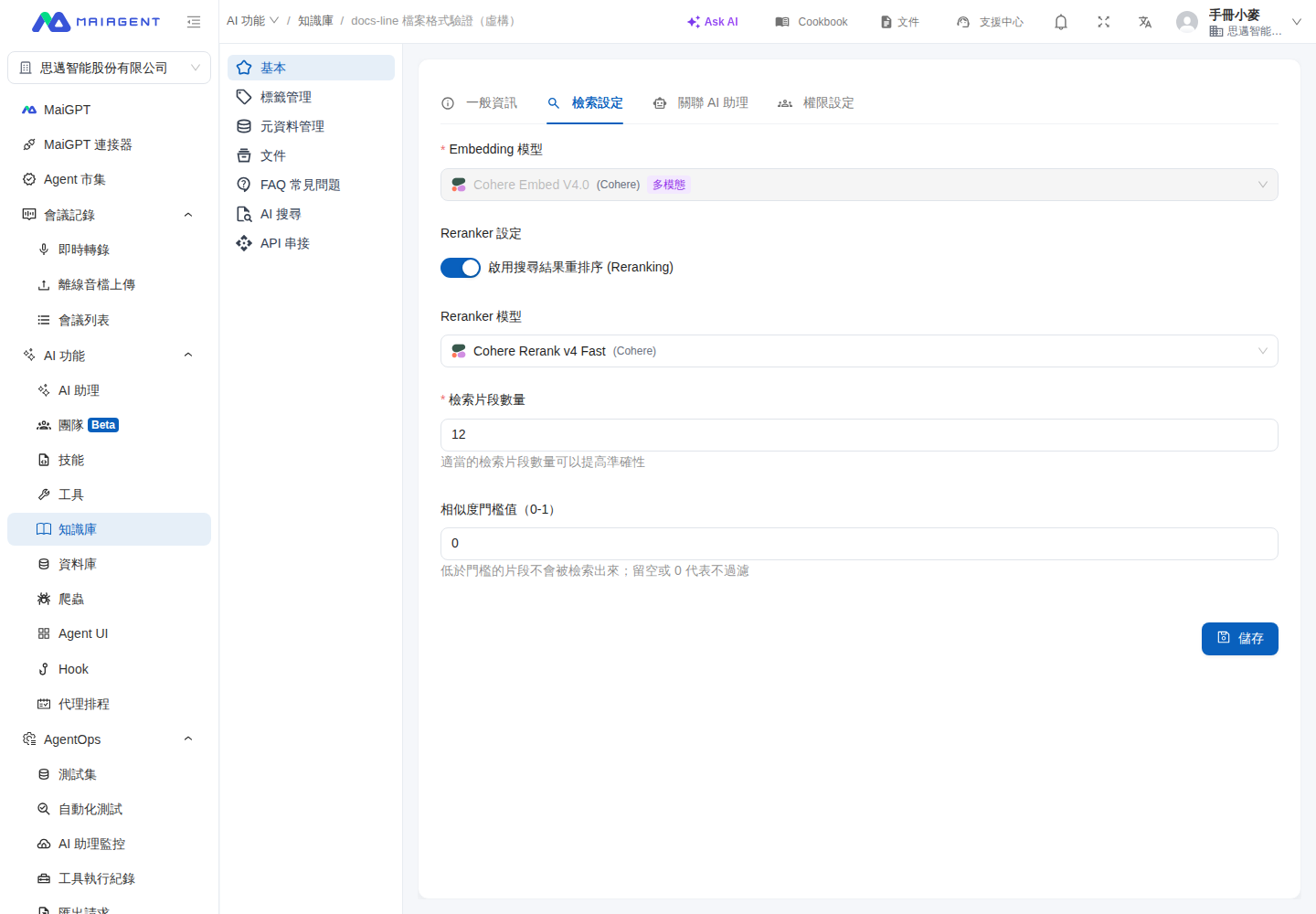
The number of retrieved chunks represents the maximum number of data chunks the AI assistant will reference when answering. The system default is "12", meaning the AI assistant will retrieve the 12 most relevant chunks for each response.
You can increase or decrease the number of retrieved chunks to adjust the amount of information the AI assistant references when answering.
#### Similarity Threshold
The similarity threshold excludes chunks that are not sufficiently relevant to the question. Chunks with a similarity score below the threshold will not be retrieved. Enter a value from `0` to `1` in increments of `0.01`. Leave it blank or set it to `0` to disable filtering.
{% hint style="warning" %}
A higher threshold narrows the retrieval results, but it may also exclude useful content. Make small adjustments each time and compare the search results using the same set of questions.
{% endhint %}
**Use case:** Customer service manager Ching notices that search tests for "return conditions" occasionally include unrelated delivery information. She first records the original retrieval results, then raises the similarity threshold and saves the setting. Finally, she tests again using the same question. If the return policy chunk still appears while the delivery information is excluded, she can keep this setting.
{% stepper %}
{% step %}
Go to Knowledge Bases and click "Edit" on the right of the knowledge base you want to adjust.
{% endstep %}
{% step %}
Switch to Retrieval Settings.
{% endstep %}
{% step %}
Enter a value in "Similarity Threshold (0–1)."
{% endstep %}
{% step %}
Click "Save," then use [Search Test](/maiagent-user-guide/en/km/test-search-result.md) to retest the original question.
{% endstep %}
{% endstepper %}
Adjust the similarity threshold in Retrieval Settings
### What Is a Parser?
A parser enables the system to "understand" the content in uploaded documents, making it searchable, editable, or convertible to other formats.
#### Document Parsers
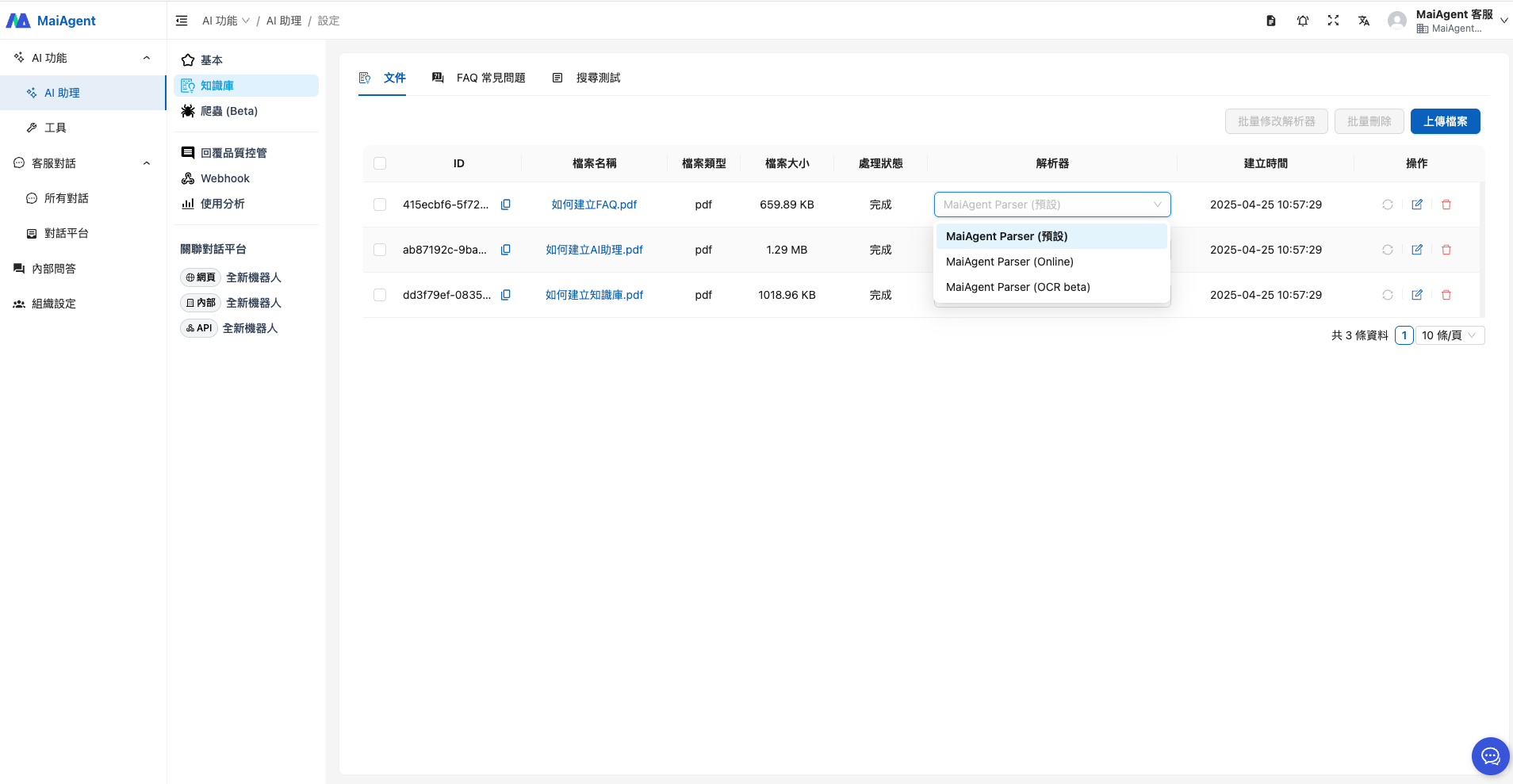
When uploading PDF, Word, or other documents, you can choose from the following four parsers:
* **MaiAgent Parser (Default)**: Low cost, fast speed, suitable for plain text documents, supports 22 formats
* **MaiAgent Parser (Online)**: Uses LLM, can OCR-parse text in images, supports 20 formats
* **MaiAgent Parser (Offline)**: OCR + AI semantic understanding of images, best structure preservation, deployable on-premises, supports 20 formats
* **Vision Parser**: AI visual understanding, best image parsing results, supports 7 formats
#### Speech-to-Text Parsers
When uploading audio files, you can choose from the following four speech-to-text parsers:
* **Azure Speech**: Real-time transcription with high accuracy
* **Whisper (Groq)**: Fastest speed, low cost
* **Whisper (OpenAI)**: Stable and reliable cloud solution
* **Whisper (Offline)**: Fully local deployment, free with data privacy protection
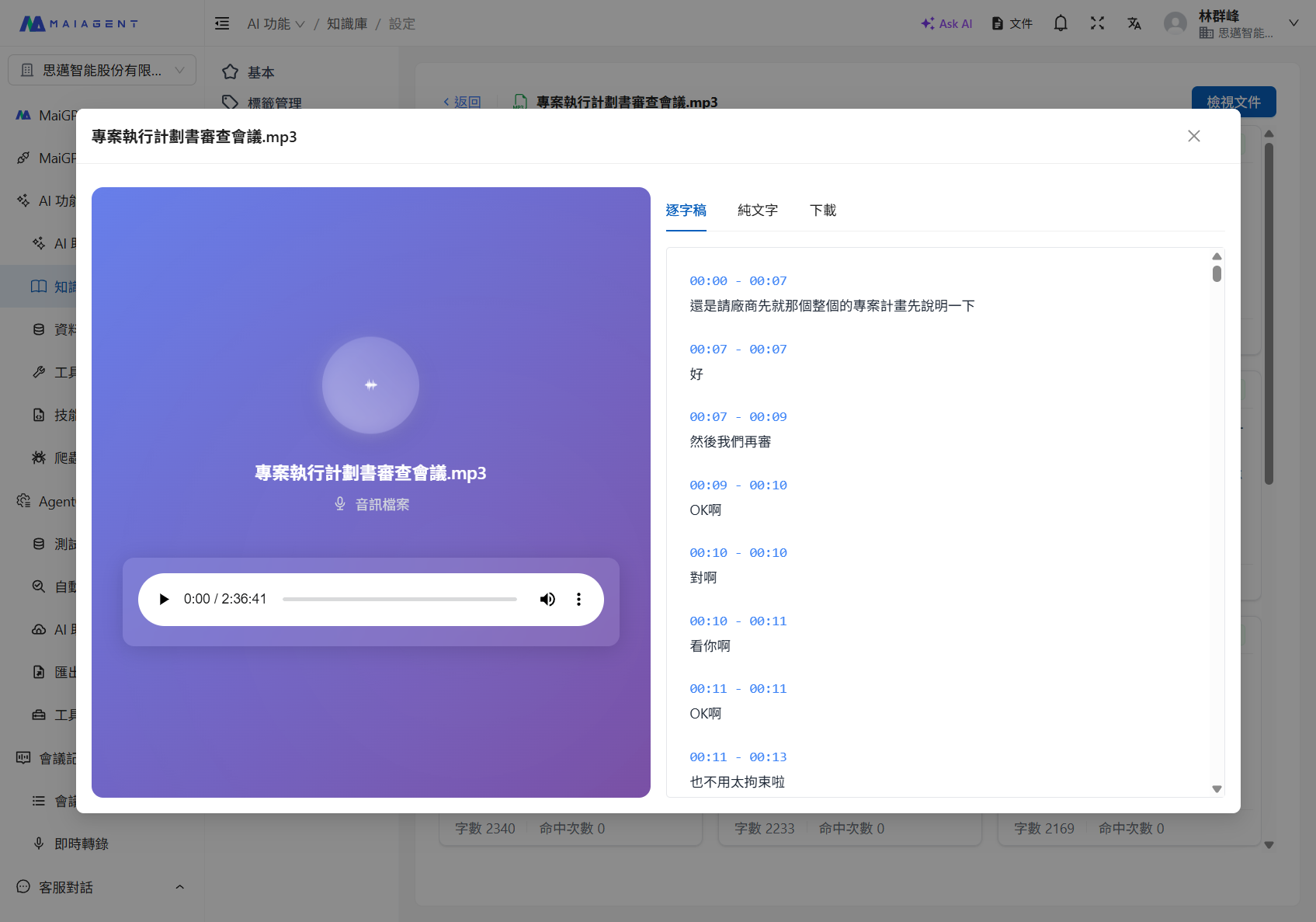
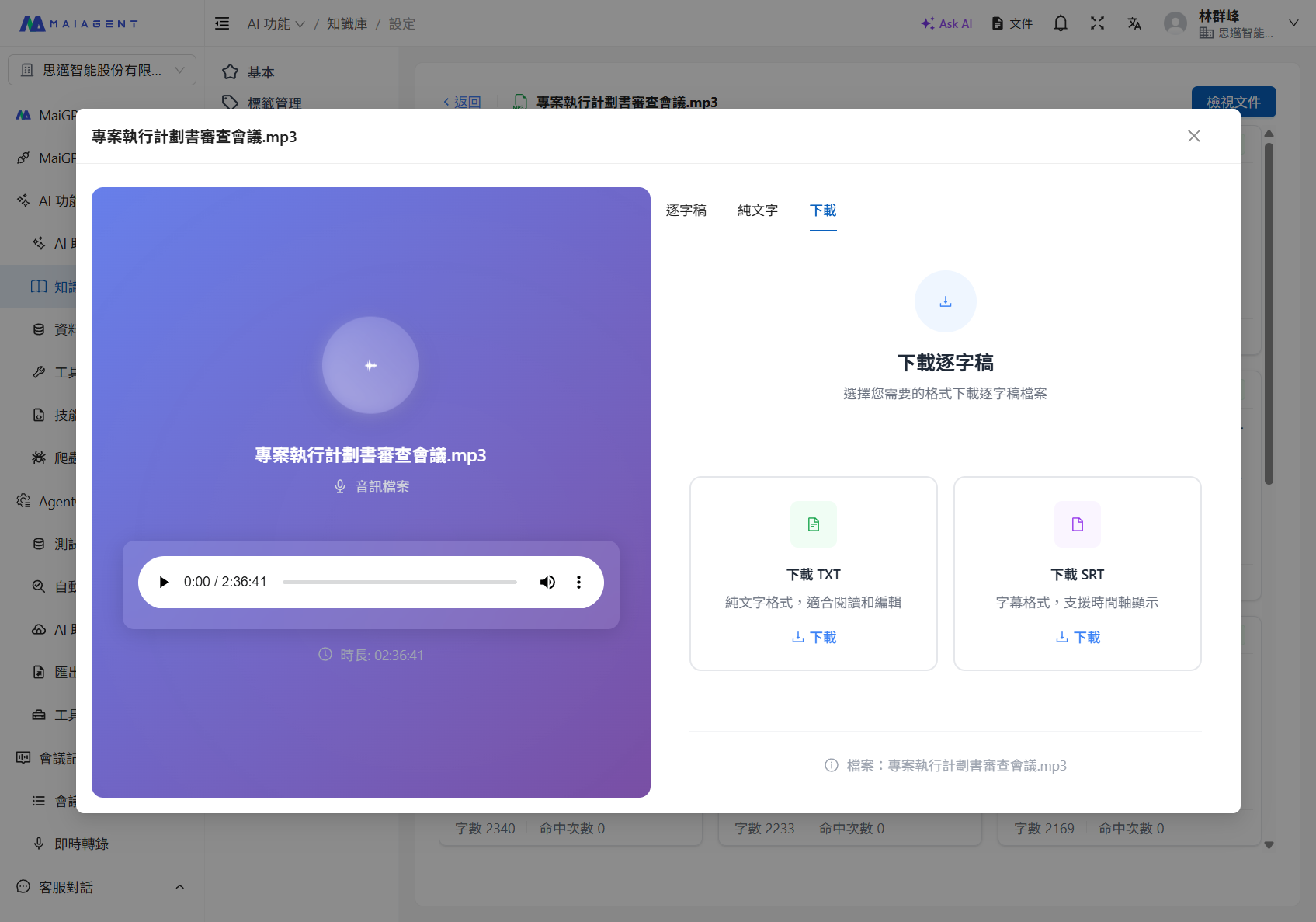
After audio parsing is complete, you can view the transcript via "View Document" and download the transcript file in TXT or SRT format:
Transcript view
Download transcript (supports TXT and SRT formats)
{% hint style="info" %}
For a detailed comparison of each parser, refer to: [Technical Manual - Parser Tools](https://docs.maiagent.ai/tech/quickstart/parser)
{% endhint %}
If issues occur during data parsing, you can click the \[Re-parse] icon to have the parser reprocess the data.
#### How to Adjust Documents with Complex Layouts
For documents such as product catalogs and specification sheets that contain two-column layouts, tables spanning multiple pages, and images, correct parsing does not guarantee that complete content will be retrieved for every question. We recommend checking each stage in order: parsing results → retrieval results → response results.
1. **Choose a parser suited to the content first**: Use the default parser for plain-text documents. When fields and table structures must be preserved, prioritize comparing the results from MaiAgent Parser (Offline). If the questions focus on labels in images, the appearance of parts, or relationships between images and text, compare the results from Vision Parser.
2. **Inspect the parsed Markdown**: Open "View Document" on the document page and confirm that the reading order of the left and right columns, table titles, column names, row data, and image descriptions remain in the same section. If content is interleaved or missing at this stage, switch parsers and parse the document again. If necessary, convert the source document to a single-column layout, or save important tables separately as `.xlsx`, `.csv`, or Markdown files and upload them.
3. **Run search tests with representative questions**: Test the product name, exact fields in tables, and questions that require comparisons across rows. Confirm that the required data appears in the retrieved chunks. If the correct chunk falls outside the retrieval range, gradually increase the number of "Retrieved Chunks" and compare the results. Increasing the number of chunks also introduces more irrelevant content, so we do not recommend setting it to the maximum immediately.
4. **Make each chunk independently understandable**: If a table is split, add the product name, specification category, field names, and units to each section. For data that requires highly complete responses, you can also create an FAQ that organizes frequently asked comparison questions into complete question-and-answer pairs.
5. **Confirm the purpose of images**: A Parser can recognize text or visual semantics in images, but this does not guarantee that responses will automatically display the original images. If users must see an image, confirm that the parsed Markdown retains it and that the chunk containing the image is retrieved. Also test how it is displayed in the actual conversation channel being used. If you only need specification details from an image, include the key text, figure number, and image description in the document.
{% hint style="info" %}
Adjust only one setting at a time and rerun the [search test](/maiagent-user-guide/en/km/test-search-result.md) with the same set of questions. This lets you determine whether the improvement comes from the parser, document content, or retrieval settings.
{% endhint %}
### Retrieval Model Settings
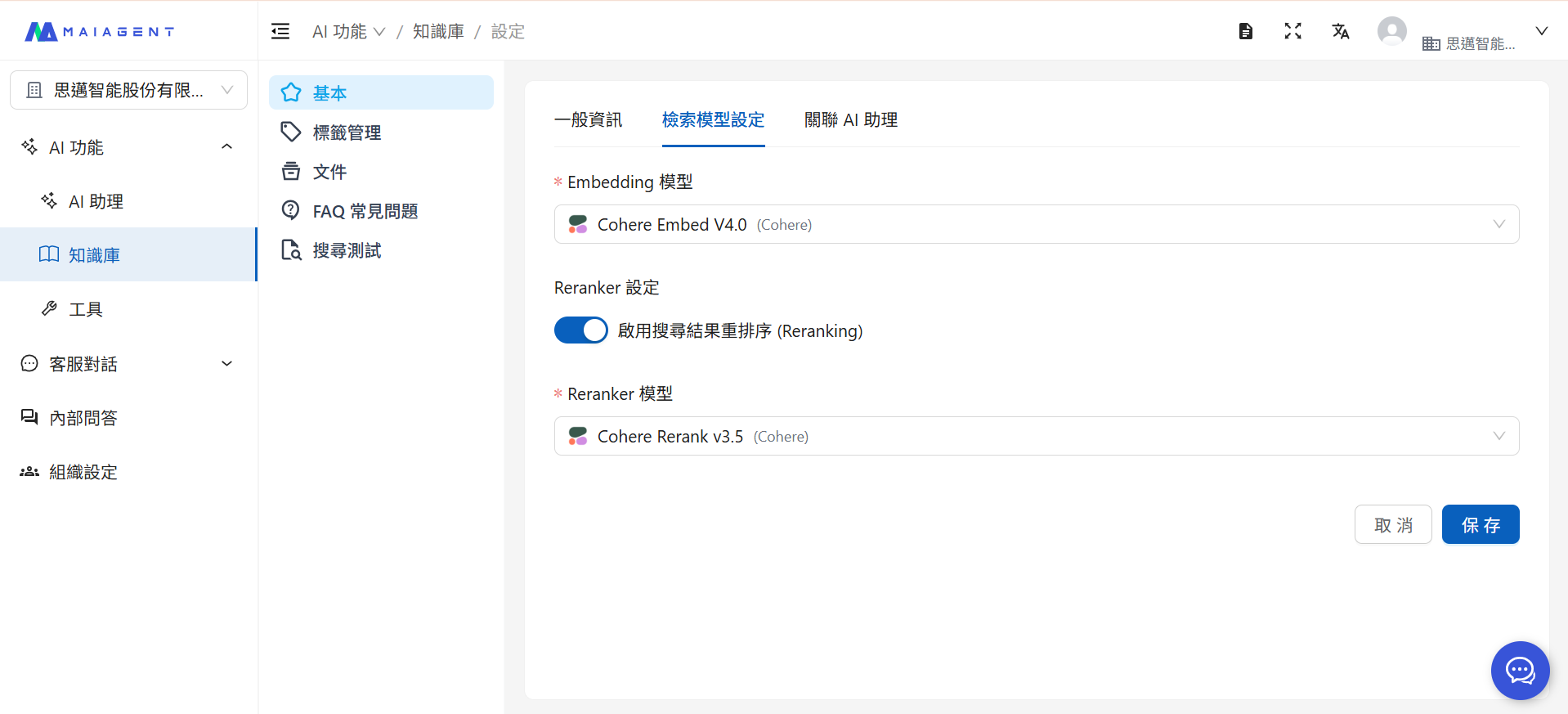
In the knowledge base settings, you can select the Embedding model and Reranker model you want to use.
#### Embedding Model
Embedding is like translating human language into a "numerical language" that AI can understand, enabling computers to comprehend the true meaning of text. This process is called "vectorization." Different Embedding models have different characteristics, such as the languages they handle best and the deployment environments they support. Different model settings in the knowledge base can be used to adjust the vectorization results when documents are uploaded. You can choose the most suitable Embedding model for different scenarios.
You can freely choose from multiple Embedding models:
{% hint style="info" %}
For details on Embedding model differences, refer to: [Technical Manual - Embedding Models](https://docs.maiagent.ai/tech/quickstart/embedding#maiagent-zhi-yuan-de-embedding-mo-xing)
{% endhint %}
#### Reranker Model
A Reranker acts like a professional judge that re-evaluates which data best answers the customer's question from the initial search results. What is the difference between using a Reranker and not using one?
When a customer asks: "What tent is suitable for beginners? Budget under 8,000 NTD"
**Without Reranker:**
```
AI may respond:
"We have tents at various price points. Products at 8,000 NTD include..."
(May mention advanced models, not targeted enough for beginner needs)
```
**With Reranker:**
```
AI responds:
"Here are some specially recommended tents under 8,000 NTD for beginners..."
(Precisely targeted for beginners + budget + product recommendations)
```
When search result reranking is enabled, the AI assistant will re-sort the retrieved knowledge base chunks and respond based on the most relevant documents.
{% hint style="info" %}
For details on the Reranker model, refer to: [Technical Manual - Reranker Models](https://docs.maiagent.ai/tech/quickstart/reranker#maiagent-ti-gong-de-reranker-mo-xing)
{% endhint %}
In summary, using Embedding combined with Reranker enables the AI assistant to understand the knowledge you provide, review content importance after retrieving chunks, and respond using the knowledge most relevant to the question.
***
### Associated AI Assistants
#### Multiple AI Assistants Sharing a Knowledge Base
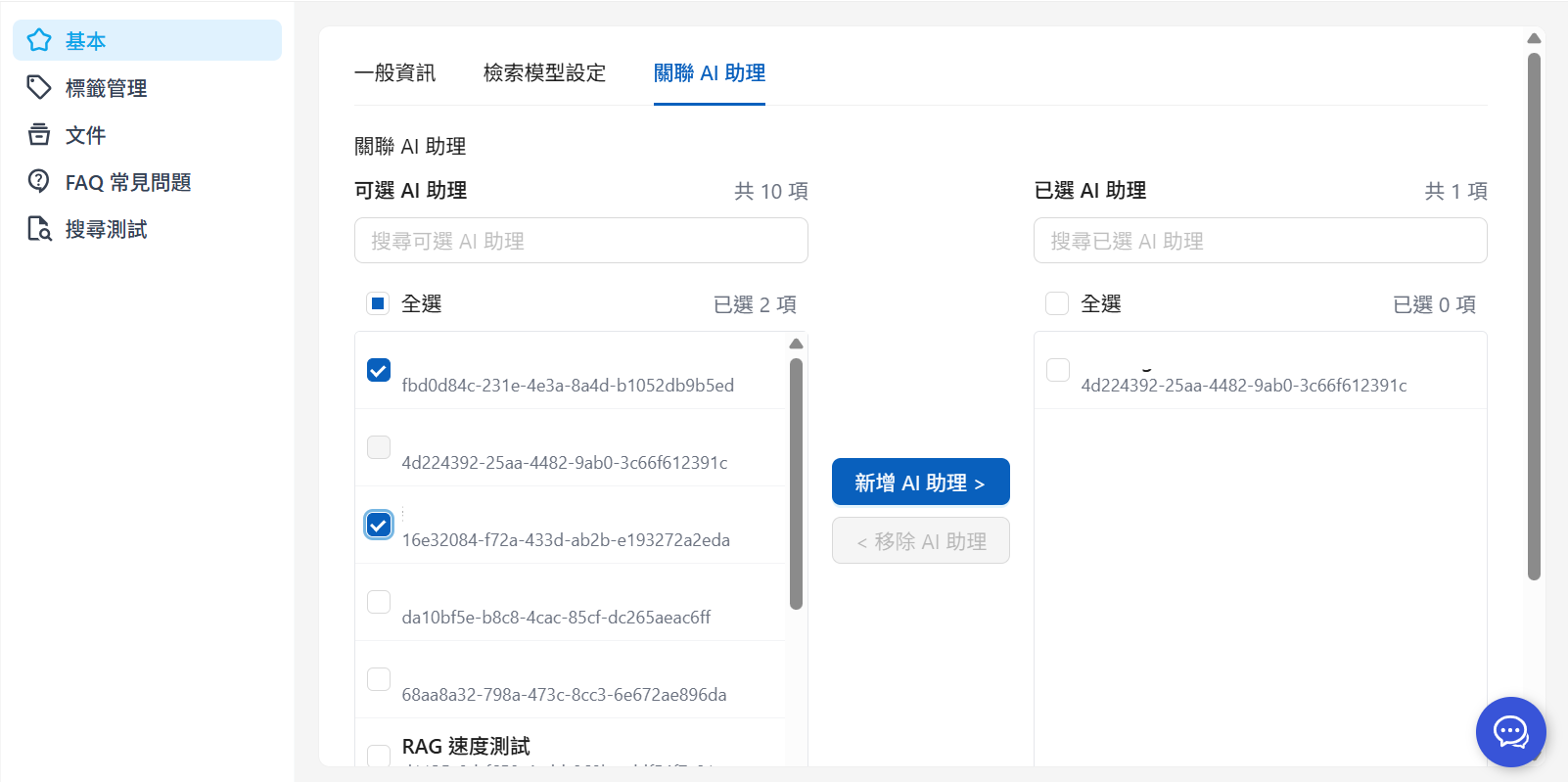
Associating AI assistants means authorizing specific AI assistants to use this knowledge base. If you have two AI assistants:
* **Product Customer Service AI**
* **Order Customer Service AI**
When both need to answer return-related questions, you can associate both AI assistants under the "Return Policy" knowledge base settings:
Diagram of associating multiple AI assistants
1. Select the AI assistants to associate
2. Click to add the AI assistant
After adding, it will appear in the selected AI assistants area. Click "Save" in the bottom-right corner to complete the association.
Once associated, both AI assistants can share the "Return Policy" knowledge base and respond based on the same content. For ongoing maintenance, you only need to **update one knowledge base** to ensure the AI assistants use the latest data.
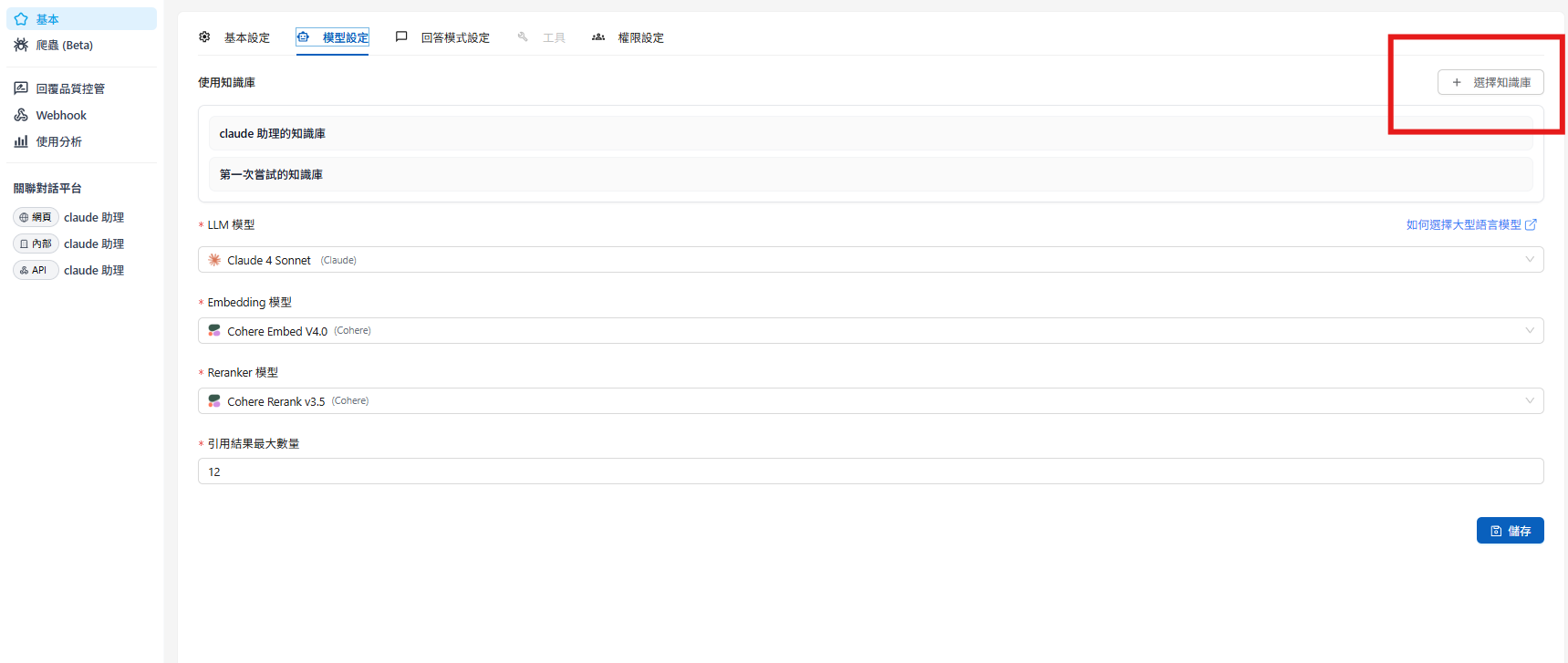
#### One AI Assistant Using Multiple Knowledge Bases
In addition to sharing knowledge bases, a single AI assistant can also use multiple knowledge bases.
1. Go to the AI assistant page, select the AI assistant you want to configure, and click Settings
2. Go to Model Settings and click "Select Knowledge Base"
3. Select the knowledge bases to use and click Confirm. The selected knowledge bases will appear in the list
4. Finally, click "Save" and the AI assistant will be able to use multiple knowledge bases
---
# Agent Instructions
This documentation is published with GitBook. GitBook is the documentation platform designed so that both humans and AI agents can read, navigate, and reason over technical content effectively. Learn more at gitbook.com.
## Querying This Documentation
If you need additional information that is not directly available in this page, you can query the documentation dynamically by asking a question.
Perform an HTTP GET request on the current page URL with the `ask` query parameter, and the optional `goal` query parameter:
```
GET https://docs.maiagent.ai/maiagent-user-guide/en/km/km-basic-settings.md?ask=&goal=
```
`ask` is the immediate question: it should be specific, self-contained, and written in natural language.
`goal` is optional and describes the broader end goal you are ultimately trying to accomplish on behalf of the user. GitBook uses it to tailor the answer towards what is most useful for that goal.
The response will contain a direct answer to the question and relevant excerpts and sources from the documentation.
Use this mechanism when the answer is not explicitly present in the current page, you need clarification or additional context, or you want to retrieve related documentation sections.
%20(1).png?alt=media)
.png?alt=media)
%20(2).png?alt=media)
.png?alt=media)
.png?alt=media)
.png?alt=media)
.png?alt=media)
.png?alt=media)