> For the complete documentation index, see [llms.txt](https://docs.maiagent.ai/llms.txt). Markdown versions of documentation pages are available by appending `.md` to page URLs; this page is available as [Markdown](https://docs.maiagent.ai/maiagent-user-guide/en/build/tools.md).
# Tools
What tools are: let an Agent call external services to perform actions or get real-time information; the types of API and MCP tools, how they differ from skills, and the steps to create one.
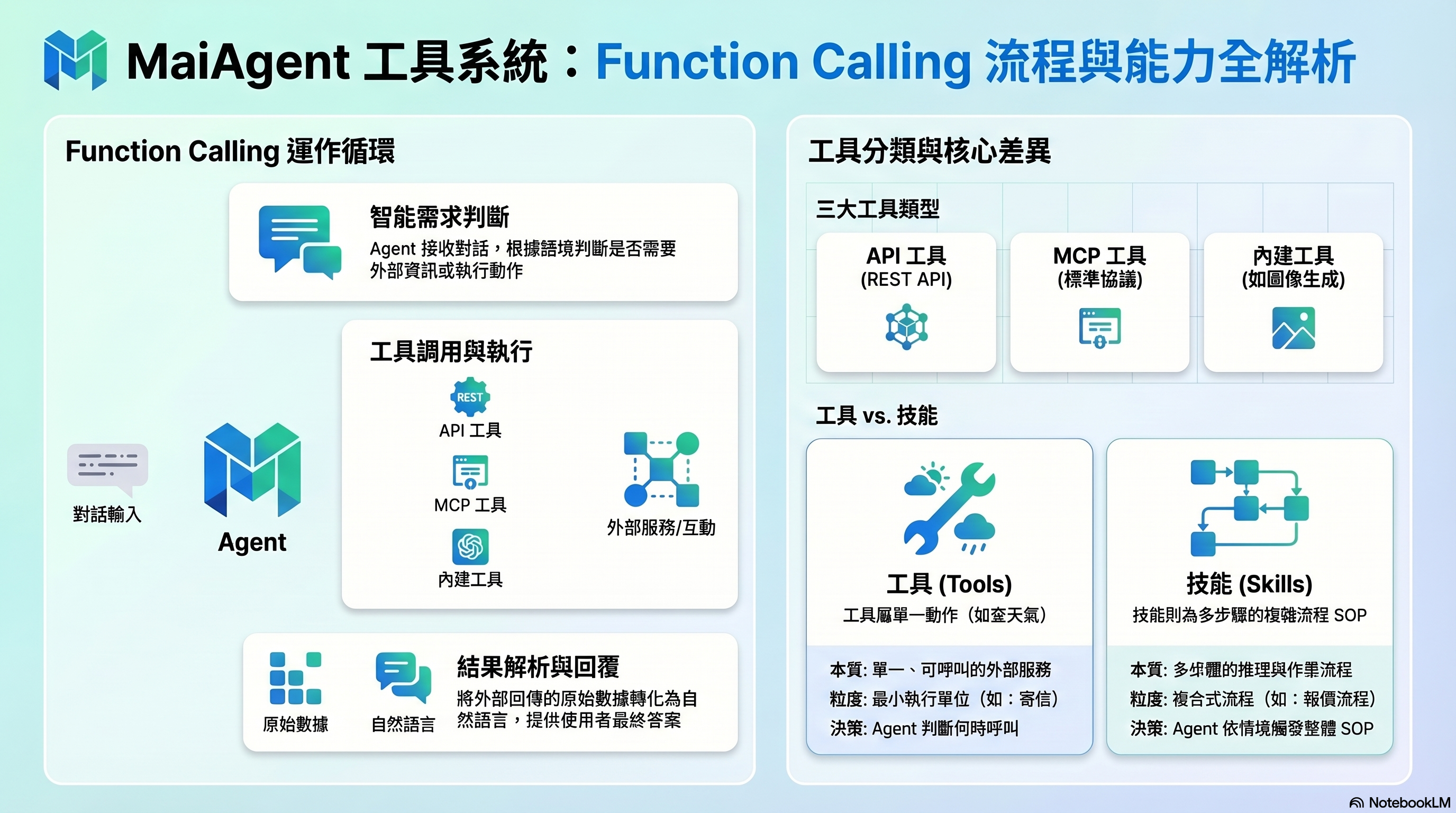
Tools: Agents call external services through Function Calling
## What Is This?
Tools let an Agent "get things done" by calling external services to perform actions or get real-time information.
An Agent without tools can only answer questions from the knowledge it already has. With tools, it can check the current weather, create a customer record in a CRM, send an email, or fetch the latest data from a third-party API.
## How Are Tools Different from Skills?
| | Tools | Skills |
| --------------------------------- | ---------------------------------------------------------------- | ------------------------------------------------------------------ |
| **Nature** | A callable external service | A multi-step reasoning process |
| **Granularity** | A single action (such as "check the weather" or "send an email") | A multi-step SOP (such as "complete quotation process") |
| **Who decides whether to use it** | The Agent decides when to call it | The Agent triggers the process in the skill based on the situation |
| **Whether tools are used** | A tool is the smallest unit | A skill can chain multiple tools together |
**Rule of thumb**: If it is a single capability (looking up data, performing an action), make it a tool. If it is a whole process (look up A first, then decide whether to do B), make it a skill.
## Tool Types
### API Tools
Call a REST API directly. You set the URL, HTTP method, and parameters, and the Agent can then use it in conversations.
**Best for**: internal company APIs, third-party service APIs, simple HTTP requests
### MCP Tools
Connect to external services through MCP (Model Context Protocol). MCP is a standardized protocol that makes it easier for an Agent to integrate with a wide range of services.
**Best for**: services that already have an MCP Server, external integrations that need more complex interactions
### Built-in Tools
Tools that MaiAgent provides by default, such as AI image generation. They can be used without additional setup.
> **Advanced note**: Tools are built on Function Calling. Based on the conversation, the Agent decides whether a tool needs to be called, automatically assembles the parameters, sends the request, interprets the returned result, and finally replies to the user in natural language.
## What Do I Need to Do?
1. **Create a tool** — Choose the type (API / MCP) and configure the connection details
2. **Define parameters** — Describe the tool's purpose and parameters so the Agent knows when to use it
3. **Test** — Confirm the tool can be called and returns results correctly
4. **Attach it to an Agent** — Configure the tool in the Agent's settings
## Further Reading
* [Tools Overview](/maiagent-user-guide/en/build/tools/tool_description.md)
* [Create an MCP Tool](/maiagent-user-guide/en/build/tools/mcp-setup.md)
* [Create an API Tool](/maiagent-user-guide/en/build/tools/setup_api_tool.md)
* [Built-in AI Image Generation Tool](/maiagent-user-guide/en/build/tools/ai-image-generation-guide.md)
* [Configure Tools for an Agent](/maiagent-user-guide/en/build/tools/configure_tools.md)
---
# Agent Instructions
This documentation is published with GitBook. GitBook is the documentation platform designed so that both humans and AI agents can read, navigate, and reason over technical content effectively. Learn more at gitbook.com.
## Querying This Documentation
If you need additional information that is not directly available in this page, you can query the documentation by asking a question.
Perform an HTTP GET request on the following URL with the `ask` and `goal` query parameters:
```
GET https://docs.maiagent.ai/maiagent-user-guide/en/build/tools.md?ask=&goal=
```
`ask` is the immediate question: it should be specific, self-contained, and written in natural language.
`goal` is what the user is ultimately trying to achieve, the reason they need the answer. Sharing it helps GitBook give you a better, more relevant answer. A goal is most helpful when it describes the outcome the user wants rather than restating the question. For example, with `ask=how do I create an API token`, a goal like `automate deployments from our CI pipeline` lets GitBook tailor the answer to that use case.
The response will contain a direct answer to the question and relevant excerpts and sources from the documentation.
Use this mechanism when the answer is not explicitly present in the current page, you need clarification or additional context, or you want to retrieve related documentation sections.