> For the complete documentation index, see [llms.txt](https://docs.maiagent.ai/llms.txt). Markdown versions of documentation pages are available by appending `.md` to page URLs; this page is available as [Markdown](https://docs.maiagent.ai/maiagent-user-guide/en/build/teams.md).

# Agent Teams

Agent Teams: multi-agent collaboration. Combine multiple specialized agents into a team and let one agent call another (a sub-agent) through "handoff" and "delegate" to divide the work automatically—u

## <mark style="color:blue;">1. What Is Agent Teams?</mark> <a href="#what-is-teams" id="what-is-teams"></a>

In the past, a single Agent had to handle everything: customer service routing, order inquiries, returns and exchanges, product recommendations—all crammed into one set of role instructions, one knowledge base, and one set of tools. As tasks piled up, this "do-everything assistant" began to drop the ball—the role instructions grew too long, knowledge bases interfered with each other, and costs could not be brought down.

**Agent Teams lets you replace "one generalist" with "a group of specialists."** You can combine multiple existing Agents into a team, let each Agent focus on its own role (for example: a routing Agent, an order Agent, a returns and exchanges Agent, and a recommendation Agent), and then use the visual canvas to define "when a question should be handed to whom."

Users see only **a single conversation entry point**; behind the scenes, the team automatically routes each question to the most suitable Agent, as if they were interacting with an entire team of professionals.

{% hint style="success" %}
**What it means for you:** Each Agent keeps its own independent knowledge base, tools, and model settings without interfering with the others. Only the Agent that actually handles the question loads the relevant content, which saves tokens and keeps every Agent more focused and accurate. When you add a new business scenario, just add an Agent node and draw a connection—no need to rewrite existing Agents.
{% endhint %}

## <mark style="color:blue;">2. How Is It Different from "Single Assistant + Skills"?</mark> <a href="#vs-single-agent" id="vs-single-agent"></a>

| Aspect              | Single Agent (with skills)                                                 | Agent Teams                                                                                              |
| ------------------- | -------------------------------------------------------------------------- | -------------------------------------------------------------------------------------------------------- |
| Division of labor   | One Agent handles every scenario                                           | Multiple Agents each own their area of expertise                                                         |
| Knowledge and tools | Everything is attached to the same Agent, which easily causes interference | Each Agent independently owns its knowledge base, tools, and model                                       |
| Model cost          | One model has to handle every task                                         | Use lightweight models for simple tasks and powerful models for complex judgments, configured separately |
| Collaboration       | Cannot hand off or delegate between Agents                                 | Supports **handoff** and **delegate** between Agents                                                     |
| Extensibility       | New scenarios require changing the existing Agent's settings               | Just add a node and a connection                                                                         |

## <mark style="color:blue;">3. Three Interaction Types: Handoff, Delegate, and Auto</mark> <a href="#interaction-types" id="interaction-types"></a>

Agents in a team collaborate through **connections (directed arrows)**. Each connection can be set to one interaction type, which determines "how control flows once the question reaches the other side." The three types below can be understood with the help of the diagrams.

### Handoff <a href="#type-handoff" id="type-handoff"></a>

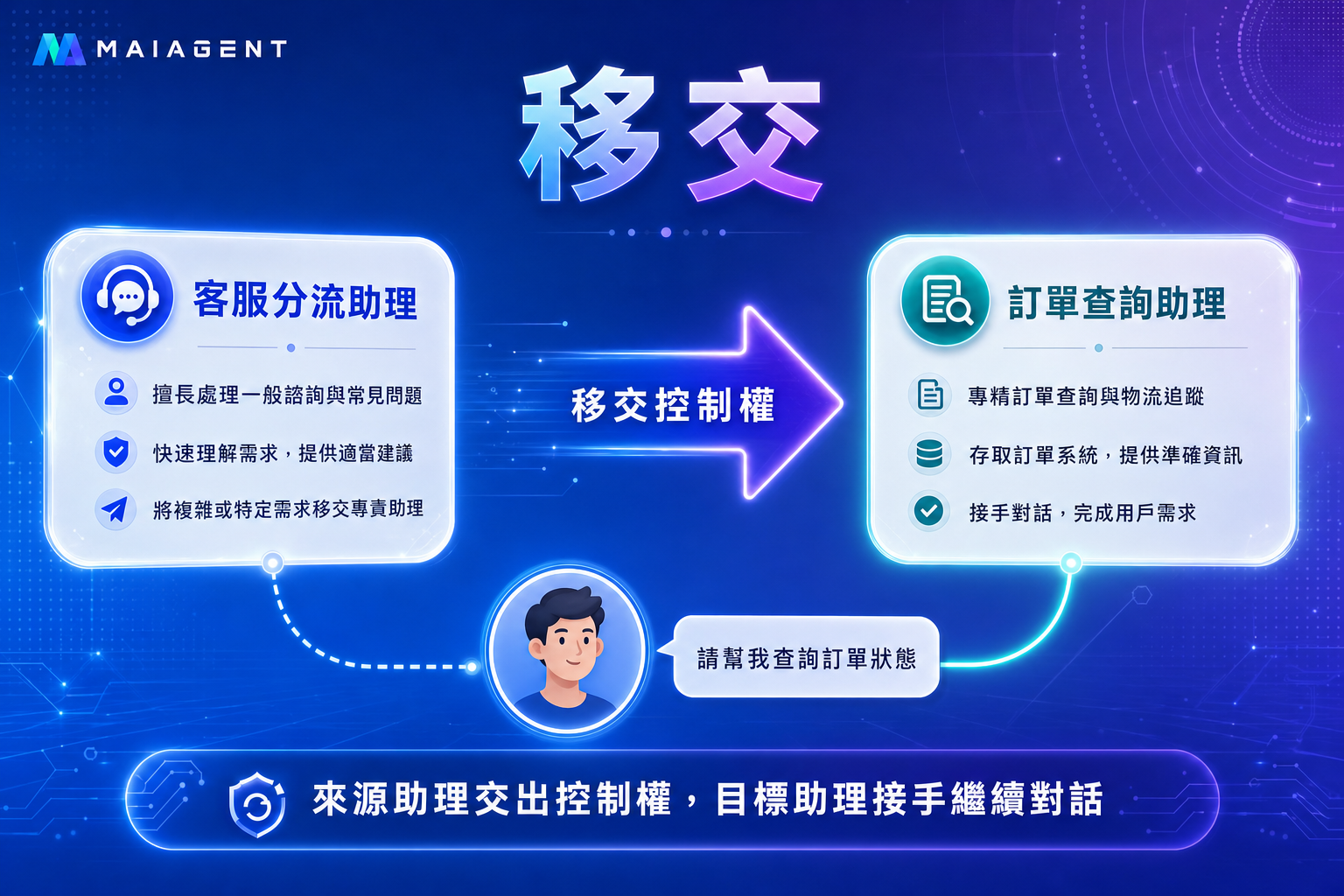
A handoff **gives away** control of the entire conversation: when the source Agent decides someone else should handle the matter, it hands the conversation to the target Agent, which **takes over and continues** talking with the user—like a support agent transferring a call to another department, after which the person who took over serves the caller.

**Best for**: parallel division of labor where each Agent has its own role. For example, after the routing Agent determines the user's intent, it hands the conversation to the order inquiry Agent or the returns and exchanges Agent to take over.

<figure><img src="https://1360999650-files.gitbook.io/~/files/v0/b/gitbook-x-prod.appspot.com/o/spaces%2F6v6TNkkOQVfRYfcNirHL%2Fuploads%2Fgit-blob-b4bdcab485a980765804effea04ffbd7e0f7fad3%2Fteams-concept-handoff.png?alt=media" alt="Handoff diagram: the source Agent hands control of the conversation to the target Agent"><figcaption><p>Handoff: the source Agent gives up control, and the target Agent takes over and continues the conversation with the user</p></figcaption></figure>

### Delegate <a href="#type-delegate" id="type-delegate"></a>

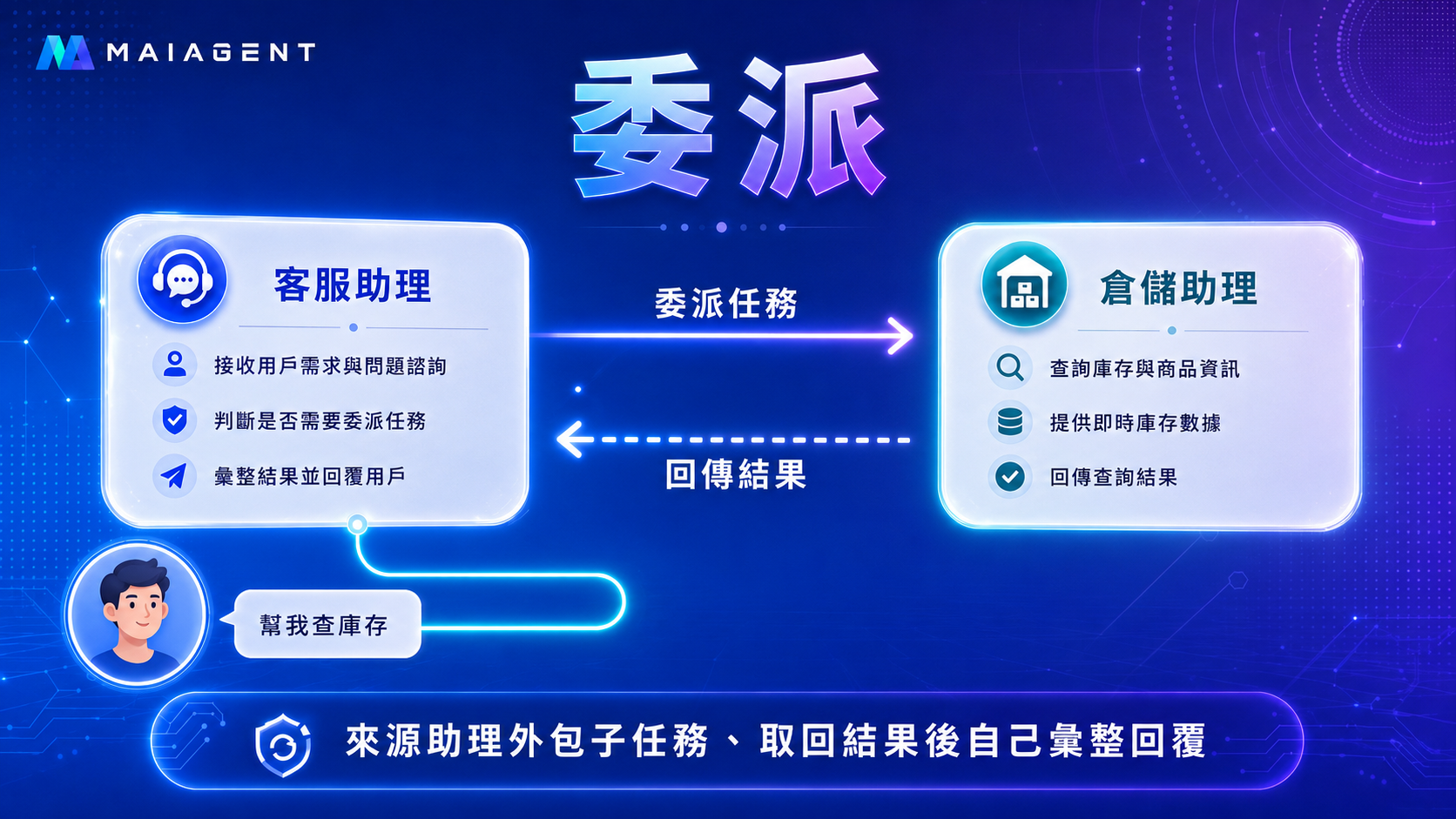
A delegate **outsources** a subtask: the source Agent asks the target Agent to handle something, and once finished, the target Agent **returns the result** while control stays with the source Agent—like a colleague looking up some information and reporting back to you, after which you still compile the final reply.

**Best for**: hierarchical collaboration. For example, when a customer service assistant receives an inventory inquiry, it delegates the lookup to a warehouse Agent, and then the customer service assistant compiles the reply to the customer.

<figure><img src="https://1360999650-files.gitbook.io/~/files/v0/b/gitbook-x-prod.appspot.com/o/spaces%2F6v6TNkkOQVfRYfcNirHL%2Fuploads%2Fgit-blob-6c884168d164fa8f6171dcc0a853adb3525cfb08%2Fteams-concept-delegate.png?alt=media" alt="Delegate diagram: the source Agent outsources a subtask to the target Agent and gets the result back"><figcaption><p>Delegate: the source Agent gives a subtask to the target Agent, gets the result back, and compiles the reply itself</p></figcaption></figure>

### Auto (Default) <a href="#type-auto" id="type-auto"></a>

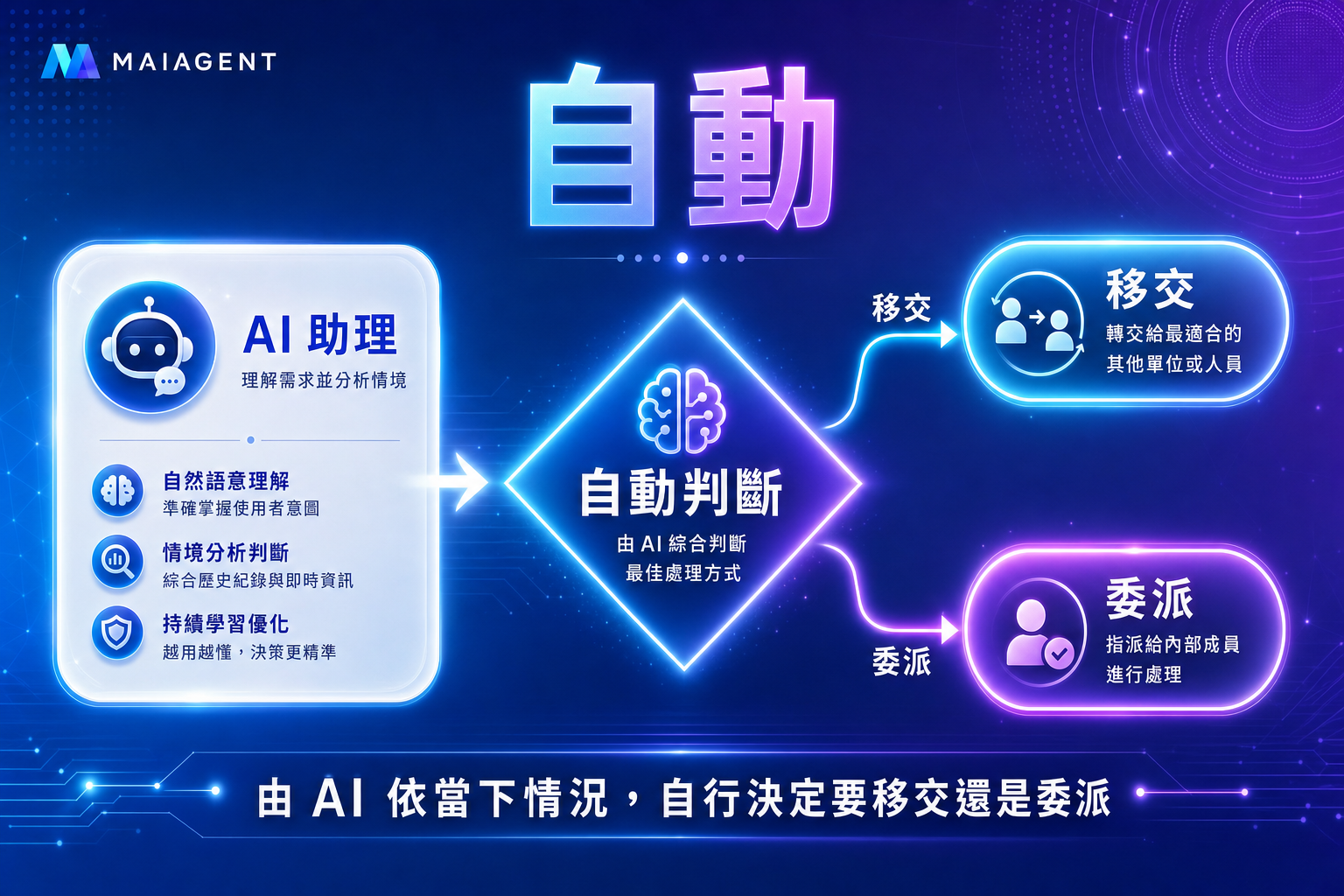
Auto leaves it to the AI to **decide based on the current situation** whether to use handoff or delegate. Use Auto when you are not sure which one to choose or want to keep things flexible.

<figure><img src="https://1360999650-files.gitbook.io/~/files/v0/b/gitbook-x-prod.appspot.com/o/spaces%2F6v6TNkkOQVfRYfcNirHL%2Fuploads%2Fgit-blob-9fb6d9b2817640519f728da4c5a9f8847470b799%2Fteams-concept-auto.png?alt=media" alt="Auto diagram: the AI decides on its own whether to hand off or delegate depending on the situation"><figcaption><p>Auto: the AI decides on its own, based on the current situation, whether to hand off or delegate</p></figcaption></figure>

### Communication Volume and Cost Differences Among the Three Types <a href="#cost-comparison" id="cost-comparison"></a>

The most common concern with multi-Agent collaboration is: **will token costs spiral out of control?** The key is that the three types differ in "how much content is passed between Agents":

| Aspect                            | Handoff                                                                                  | Delegate                                                                                                                                         | Auto                                                             |
| --------------------------------- | ---------------------------------------------------------------------------------------- | ------------------------------------------------------------------------------------------------------------------------------------------------ | ---------------------------------------------------------------- |
| **Control**                       | Given to the target Agent, which takes over                                              | Stays with the source Agent                                                                                                                      | Decided by the AI at the time                                    |
| **Content passed between Agents** | The target Agent reads the conversation context accumulated so far when it takes over    | The source Agent passes only "a single subtask" to the target Agent, with a concise and clear scope                                              | Depends on the choice made at the time                           |
| **Token / cost characteristics**  | Grows with conversation length and the number of handoffs; only one Agent runs at a time | On top of the original turn, an additional sub-Agent run (one more LLM call), but the sub-Agent's input is concise and its scope is controllable | Falls on whichever type is chosen; harder to estimate in advance |
| **Predictability**                | Medium                                                                                   | High (clear task scope)                                                                                                                          | Low (varies by situation)                                        |

{% hint style="success" %}
**Cost is both controllable and observable.** Teams have multiple built-in safeguards:

* **Maximum iterations** (default `25`): limits how many times Agents can go back and forth in a single conversation, preventing infinite loops.
* **Total token limit** (default `200000`): the upper limit of the token budget the entire team can use to process a single message.
* **Timeout (seconds)**, and the **per-message token limit for this node** that can be set individually on each node.
* **Context strategy**: if you turn off a node's "Visible original user input," that Agent receives only the summary prepared upstream instead of the full conversation, saving even more tokens.
* **Execution logs**: every execution records the total tokens and the **cost breakdown per Agent**, so you can see at a glance which Agent the spending went to (see [Team Execution Logs](/maiagent-user-guide/en/build/teams/traces.md)).
  {% endhint %}

{% hint style="info" %}
**The conversation "remembers" who is currently serving.** After a handoff, the Agent that took over continues to serve the following messages until it decides it needs to hand off again; the next message does not go back to the entry point to be routed again.
{% endhint %}

## <mark style="color:blue;">4. Typical Use Cases</mark> <a href="#scenarios" id="scenarios"></a>

* **E-commerce customer service team**: the routing Agent determines the intent → **hands off** to the order / returns and exchanges / recommendation Agent, and each Agent handles the request with its own knowledge base and tools.
* **Internal enterprise consulting**: an HR Agent + an IT Agent + a finance Agent automatically route employee questions to the corresponding contact.
* **Technical support team**: the L1 Agent does the initial troubleshooting → **delegates** to the L2 Agent for in-depth analysis → the result goes back to L1, which consolidates it and replies.

## <mark style="color:blue;">5. How It Works (Concepts)</mark> <a href="#how-it-works" id="how-it-works"></a>

Agent Teams describes a team as **a directed graph**:

* **Nodes (Agents)**: each node in the graph is an existing Agent, carrying its own role instructions, knowledge base, tools, and model.
* **Entry node**: when the team receives a message, it starts handling the conversation from this node and then hands it off to the appropriate member according to the routing instructions. A newly created team automatically comes with a built-in entry node, so you do not need to specify one separately; a team has only one entry node.
* **Connections (directed arrows)**: define "from which assistant, under what conditions, and with which interaction type, the conversation is passed to which assistant."
* **Safety guardrails**: the whole team has upper limits on maximum iterations, total token limit, and timeout seconds, preventing Agents from going back and forth endlessly. When a guardrail stops a reply, the message the user sees can be customized (see [Guardrail Custom Message](/maiagent-user-guide/en/build/teams/setup.md#guardrail-stop-message)).

When you create a team, the system automatically creates an **entry** and a corresponding **Web Chat conversation platform** for it, so you can talk to the whole team directly through the conversation platform. The entry's model, routing instructions, and knowledge base are configured on the team canvas (see [Configure the Entry](/maiagent-user-guide/en/build/teams/setup.md#entry-settings)).

## <mark style="color:blue;">6. Next Steps</mark> <a href="#next-steps" id="next-steps"></a>

* Want to start building a team? See [Create and Orchestrate Teams](/maiagent-user-guide/en/build/teams/setup.md)—how to create a team, configure the entry, drag in Agent nodes, draw connections to set interaction types, and start a conversation.
* Want to see how a team works? See [Team Execution Logs](/maiagent-user-guide/en/build/teams/traces.md)—which Agents each execution passed through, how many tokens each one used, and how long it took.

{% hint style="info" %}
**Prerequisite:** Agent Teams must be enabled for your organization by MaiAgent. If you do not see the "Teams" menu under "AI Features" in the back office, please contact the MaiAgent team to have it enabled.
{% endhint %}


---

# Agent Instructions
This documentation is published with GitBook. GitBook is the documentation platform designed so that both humans and AI agents can read, navigate, and reason over technical content effectively. Learn more at gitbook.com.

## Querying This Documentation
If you need additional information that is not directly available in this page, you can query the documentation by asking a question.

Perform an HTTP GET request on the following URL with the `ask` and `goal` query parameters:

```
GET https://docs.maiagent.ai/maiagent-user-guide/en/build/teams.md?ask=<question>&goal=<user_goal>
```

`ask` is the immediate question: it should be specific, self-contained, and written in natural language.
`goal` is what the user is ultimately trying to achieve, the reason they need the answer. Sharing it helps GitBook give you a better, more relevant answer. A goal is most helpful when it describes the outcome the user wants rather than restating the question. For example, with `ask=how do I create an API token`, a goal like `automate deployments from our CI pipeline` lets GitBook tailor the answer to that use case.

The response will contain a direct answer to the question and relevant excerpts and sources from the documentation.

Use this mechanism when the answer is not explicitly present in the current page, you need clarification or additional context, or you want to retrieve related documentation sections.