> For the complete documentation index, see [llms.txt](https://docs.maiagent.ai/llms.txt). Markdown versions of documentation pages are available by appending `.md` to page URLs; this page is available as [Markdown](https://docs.maiagent.ai/maiagent-user-guide/en/build/skills.md).
# Skills
Learn what a Skill is, what it contains, how an Agent expands a skill to execute a multistep workflow, and how skills differ from tools and when to use each. For creation and management, see Skill Man
Skills: define multistep SOPs that an Agent uses to guide conversations
## What is this?
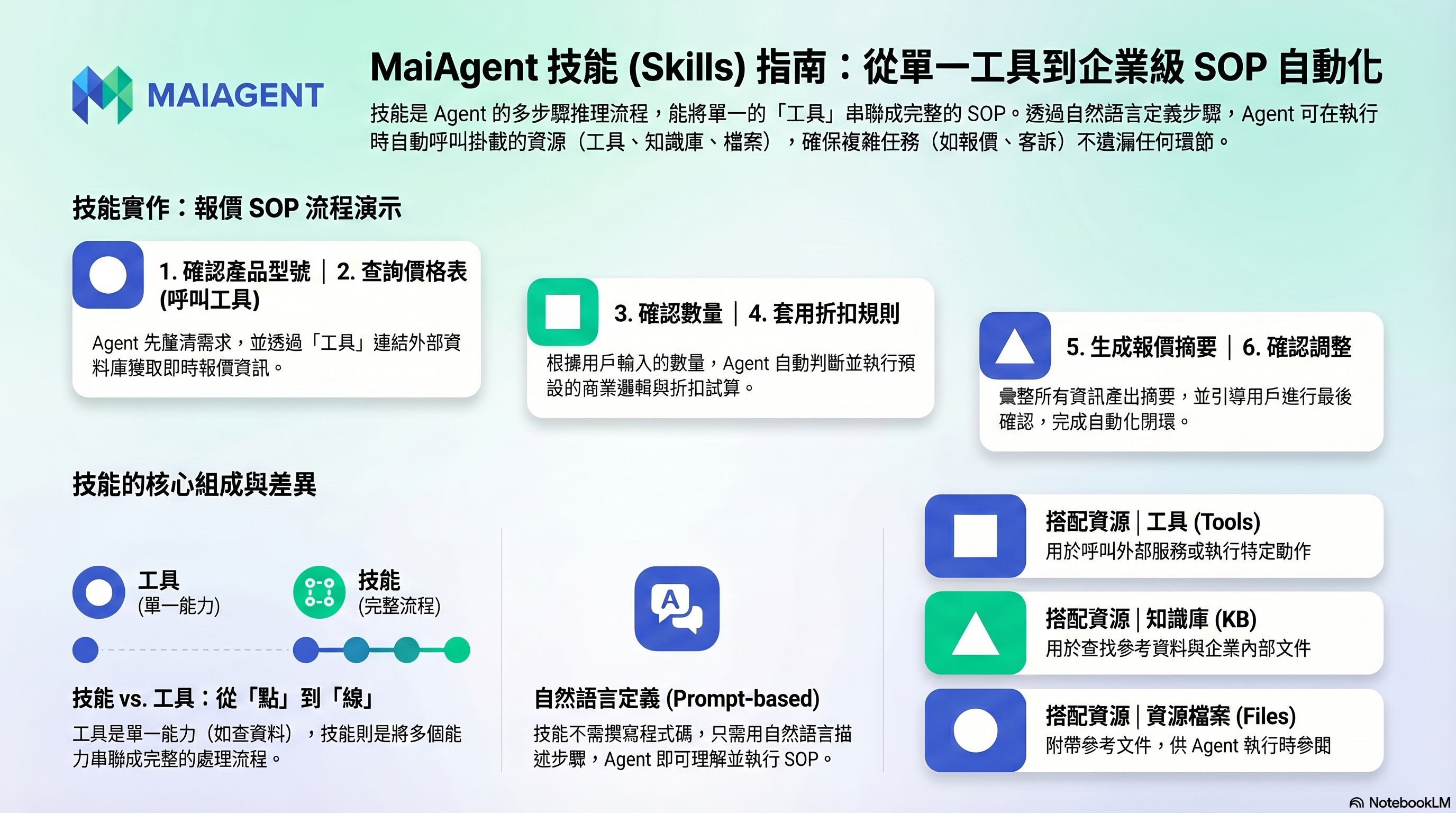
A skill is a multistep workflow for an Agent. Define an SOP in natural language, and the Agent loads and follows it step by step when a relevant situation arises in a conversation.
If a tool is an Agent's "individual capability" (like a screwdriver), a skill "combines multiple capabilities into a complete workflow" (like an assembly manual): it tells the Agent which tools to use, when and how to use them, and how to respond afterward.
## An example
Suppose you want an Agent to handle "customer quotes":
**Without a skill**: the Agent may give scattered responses and miss important information.
**With a skill**: you define a quote preparation SOP—
```
1. First confirm the product model the customer needs
2. Look up the product price list (using a tool)
3. Confirm the quantity the customer needs
4. Apply discount rules based on the quantity
5. Generate a quote summary
6. Ask whether the customer needs any adjustments
```
The Agent guides the conversation through this workflow, ensuring no steps are missed.
## What can a skill contain?
Each skill has three components. You can configure all three for skills created manually or by uploading a package:
| Component | Description |
| ------------------ | ---------------------------------------------------------------------------------------------------------------------------------------------------------------------------------------------------------------------------------------------------------------------------------------------------------------------------------- |
| **Instructions** | An SOP in Markdown that describes the complete steps and response format in natural language. Instructions can also ask the Agent to search its attached knowledge bases |
| **Attached tools** | Tools called during the skill workflow (API tools and MCP tools), provided to the Agent along with the skill |
| **Resource files** | Reference documents, templates, or scripts included with the skill. If the Agent has [Code Interpreter](/maiagent-user-guide/en/build/agent/code-interpreter.md) enabled, loading the skill places these files in the code execution environment for the Agent to read or process; otherwise, the Agent only uses the instructions |
{% hint style="info" %}
A skill is defined through plain-text prompts, rather than a flowchart or code. Describe the entire workflow in natural language, and the Agent understands and executes it.
{% endhint %}
## How skills work
1. **Create a skill**: enter a name and description, write the instructions, and attach tools and resource files as needed. Clearly describe its purpose and when it should be triggered, since the Agent uses this description to decide when to use the skill.
2. **Bind it to an Agent**: select the skills to use in the Agent's settings. An Agent can have multiple skills. Skills only take effect for Agents whose Response Mode is set to Agent Mode.
3. **The user asks a question**: for example, "Help me check how many days of leave I have."
4. **The Agent selects and loads a skill**: normally, the Agent only sees each skill's name and description. It loads the full instructions only when it determines that a skill should handle the question. This keeps unused instructions out of each conversation, even when many skills are bound to the Agent.
5. **Execute and respond**: the Agent follows the instructions to call attached tools (querying databases, calling APIs, and so on), then formats the response as specified.
For the underlying mechanism, the `SKILL.md` specification, and APIs, see [Skill Module](https://docs.maiagent.ai/tech/advanced-genai-tech/skill) in the technical manual.
## Key benefits of skills
* **Standardize complex tasks**: follow the same SOP every time for consistent response quality.
* **Precise triggering and task assignment**: different skills handle different tasks, and the Agent uses their descriptions to select the right one.
* **Reuse and sharing**: bind a skill to multiple Agents or export it as a `.skill` file to share with other organizations.
* **Package instructions and tools together**: bundle "what to do" with "what to use," without repeating extensive workflow details in the system prompt.
## Skills vs. tools
| Comparison | Tool | Skill |
| ------------- | -------------------------------------------------------- | ------------------------------------------------------------------- |
| **Nature** | A single external capability (API, MCP) | A complete execution workflow |
| **Contents** | API endpoint / MCP server | Instructions + tools + resource files |
| **Analogy** | Screwdriver | Assembly manual + screwdriver |
| **Trigger** | The Agent decides whether to call it | The Agent decides whether to load it based on the skill description |
| **Use cases** | A single action (checking the weather, sending an email) | A multistep workflow (processing returns, calculating leave) |
Skills and tools complement each other: skills use attached tools to perform actions, while skill instructions tell the Agent when to use tools and in what order.
## When should you use a skill?
* **Workflows with a fixed SOP**: quotes, complaint handling, troubleshooting
* **Collecting information across multiple turns**: reservations (asking for the date, time, and number of people)
* **Conditional decisions**: following different paths depending on the situation
* **Ensuring no steps are missed**: guided form completion, approval workflows
## When is a skill unnecessary?
* Simple questions and answers (a knowledge base is sufficient)
* Looking up a single piece of information or performing one action (a tool is sufficient)
## Example use cases
| Scenario | Skill | Trigger | Steps | Attached tools |
| --------------------------- | ------------------------------- | ------------------------------------------------------------ | ----------------------------------------------------------------------------------------------------- | ------------------------------------ |
| Enterprise customer service | Return processing workflow | A customer requests a return or exchange | Look up the order → Confirm return eligibility → Create a return request → Report the result | Order lookup API, returns system API |
| Government agency | Leave calculation | A question about remaining leave or annual leave | Confirm employee category → Retrieve regulatory examples → Compare and calculate → Produce the result | Knowledge base search |
| E-commerce platform | Customer information collection | A customer expresses purchasing interest or requests a quote | Guide the customer to provide their name, company, and contact information → Save to CRM | Google Sheet API, CRM tools |
| Marketing team | Email sending service | A request to send an email or contact a customer | Confirm the recipient → Draft the email → Send | Gmail MCP tool |
## What do I need to do?
1. **Create a skill**: write it manually or upload a `.skill` / `.zip` skill package. See [Skill Management: Create a Skill](/maiagent-user-guide/en/build/skills/skills-management.md#create-skill)
2. **Describe the workflow**: write the complete steps in natural language in the instructions
3. **Attach tools and files**: add them in the Attached Tools and Files tabs as needed. See [Edit and Configure a Skill](/maiagent-user-guide/en/build/skills/skills-management.md#edit-and-configure-skill)
4. **Bind it to an Agent**: enable the skill in the Agent's settings. See [Bind a Skill to an Agent](/maiagent-user-guide/en/build/skills/skills-management.md#bind-skill-to-ai-agent)
5. **Test**: simulate user conversations to check that the workflow runs smoothly
---
# Agent Instructions
This documentation is published with GitBook. GitBook is the documentation platform designed so that both humans and AI agents can read, navigate, and reason over technical content effectively. Learn more at gitbook.com.
## Querying This Documentation
If you need additional information that is not directly available in this page, you can query the documentation by asking a question.
Perform an HTTP GET request on the following URL with the `ask` and `goal` query parameters:
```
GET https://docs.maiagent.ai/maiagent-user-guide/en/build/skills.md?ask=&goal=
```
`ask` is the immediate question: it should be specific, self-contained, and written in natural language.
`goal` is what the user is ultimately trying to achieve, the reason they need the answer. Sharing it helps GitBook give you a better, more relevant answer. A goal is most helpful when it describes the outcome the user wants rather than restating the question. For example, with `ask=how do I create an API token`, a goal like `automate deployments from our CI pipeline` lets GitBook tailor the answer to that use case.
The response will contain a direct answer to the question and relevant excerpts and sources from the documentation.
Use this mechanism when the answer is not explicitly present in the current page, you need clarification or additional context, or you want to retrieve related documentation sections.