> For the complete documentation index, see [llms.txt](https://docs.maiagent.ai/llms.txt). Markdown versions of documentation pages are available by appending `.md` to page URLs; this page is available as [Markdown](https://docs.maiagent.ai/maiagent-user-guide/en/build/knowledge-base/faq.md).
# Create FAQs
Use FAQs to provide predefined responses when users ask sensitive questions or when you need answers to be 100% accurate. This is suitable for common customer questions with fixed answers.
## How to Upload FAQs
### Select a Knowledge Base
In the left sidebar, go to “AI Features” → “Knowledge Base”, and click the knowledge base where you want to create FAQs (if you have not created one yet, see [How to Create a Knowledge Base: Basic Settings](/maiagent-user-guide/en/build/knowledge-base/km-basic-settings.md) first).
### Add Questions and Answers
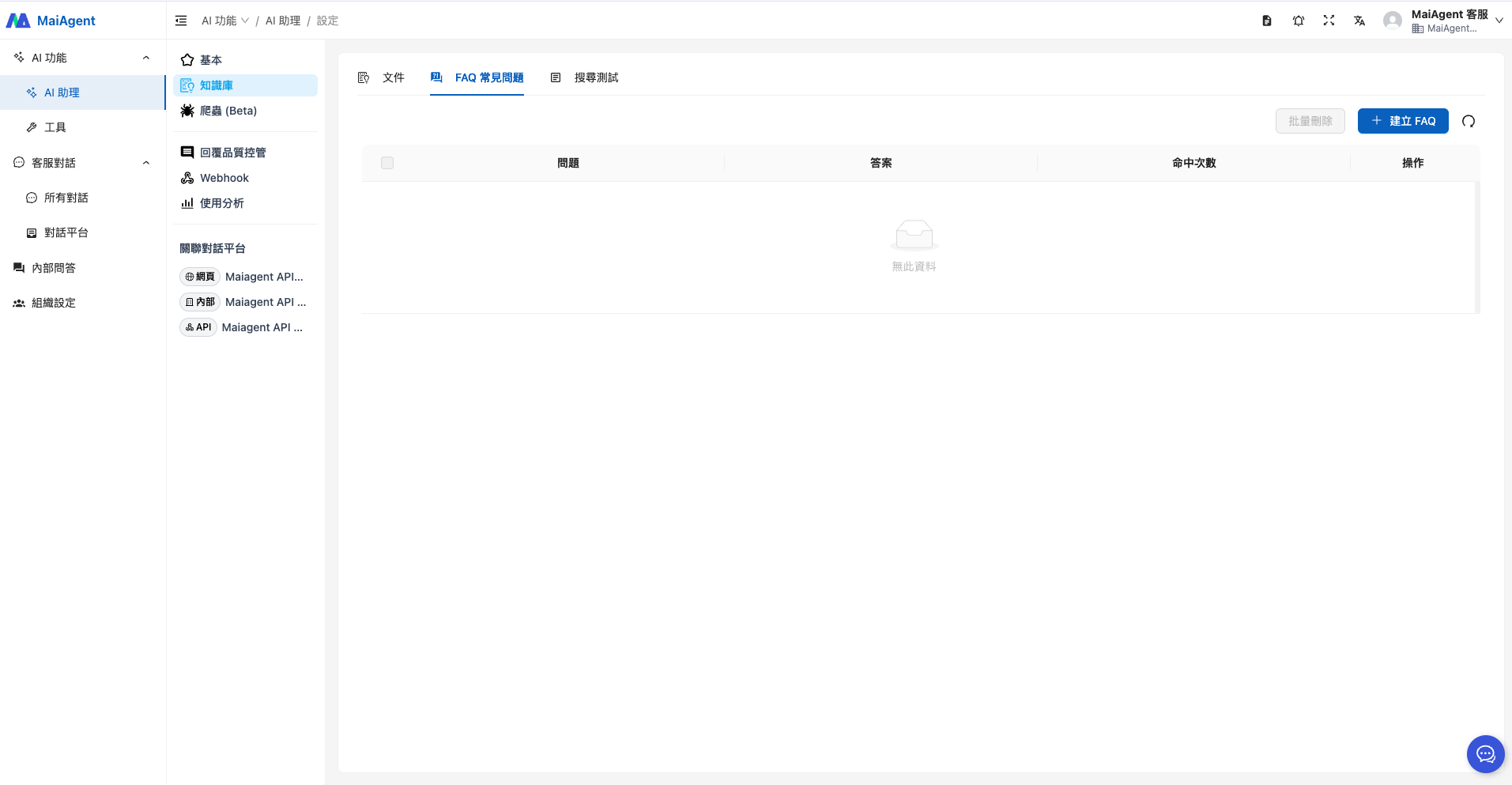
1. Open the knowledge base page, select the “FAQ” tab, and click the blue “+Create FAQ” button in the upper right to start adding questions and answers.
2. Create an FAQ
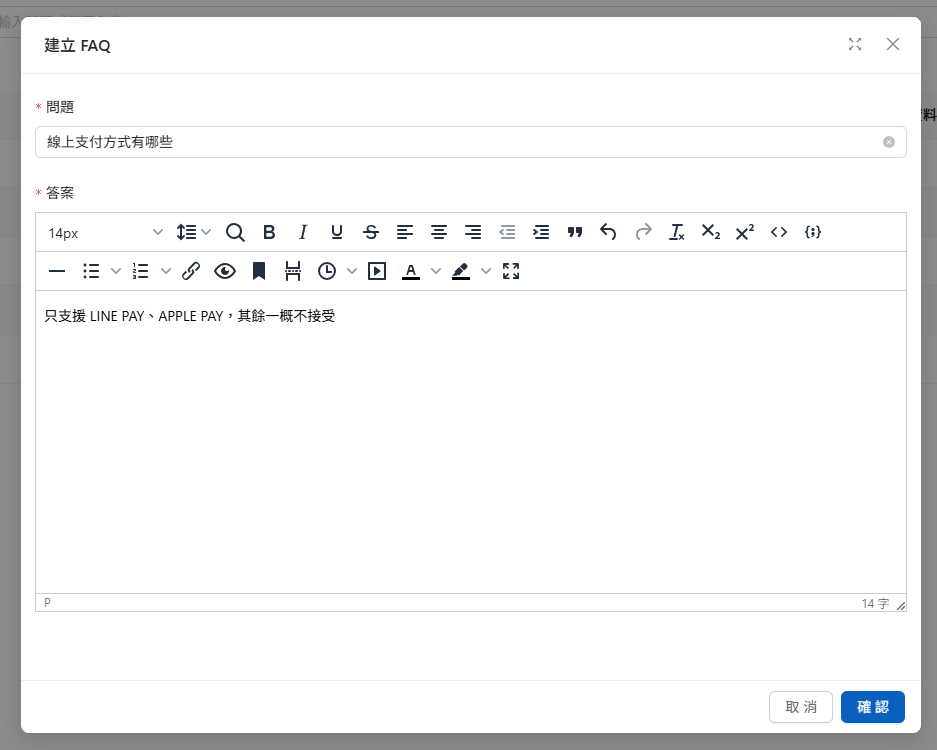
The FAQ editor supports multiple answer formats:
* Basic text formatting (bold, underline, italics, etc.)
* Equations
* Source code (HTML, XML)
* Embedded links (videos, websites)
* Videos provide reference links for users (the Agent cannot read video content yet)
Example answer formats
These formats let you clearly highlight key points in your answers and ensure the information is complete.
For example, for e-commerce payment methods, you can add the following question to explain online payment options:
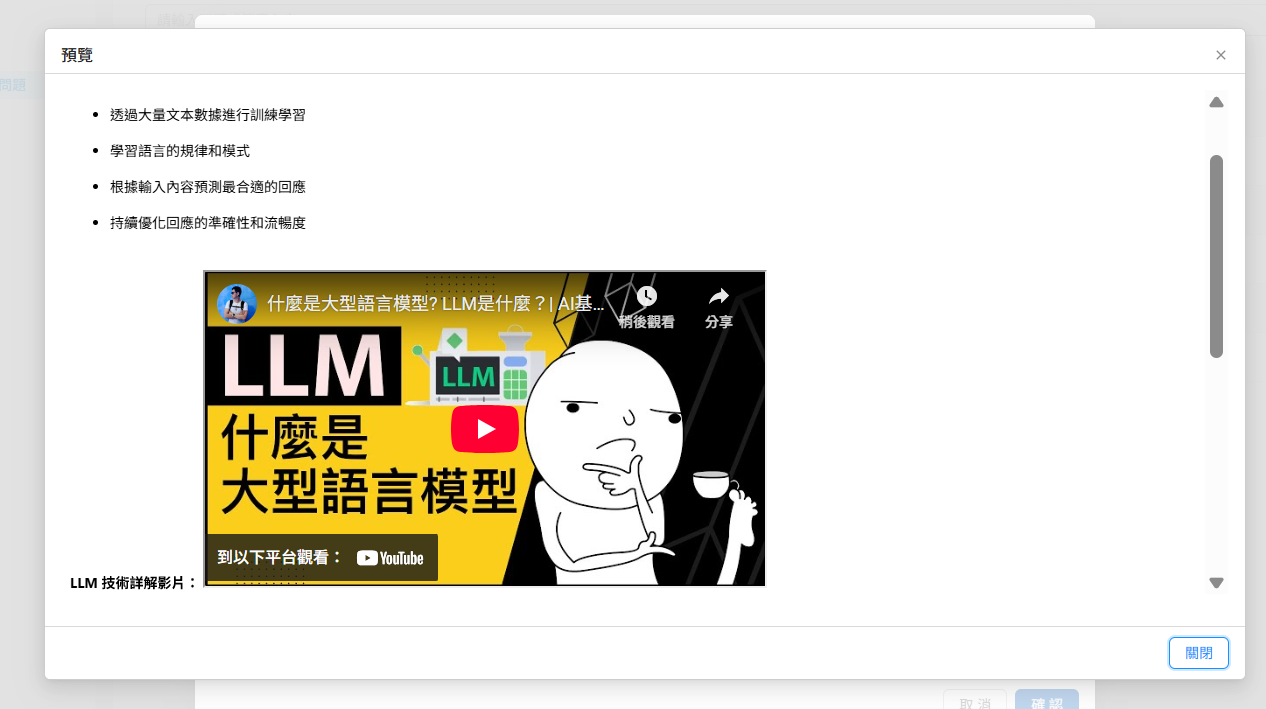
After creating the answer, click Preview to check its content:
After adding the content, click “Confirm” to finish creating the FAQ. The Agent can then refer to the answer you provided when responding:
When a customer asks about online payment methods, the LLM responds based on the FAQ content:
This limits the scope of the Agent's answers and helps prevent incorrect responses or content that does not comply with company policies.
{% hint style="info" %}
Users do not need to phrase their questions exactly as they appear in the FAQ: like knowledge base documents, FAQs use semantic search, so different wording may retrieve the same FAQ. In the payment example above, both “Can I pay by credit card?” and “What payment methods are available?” may retrieve this FAQ. Before going live, enter several common phrasings in [Search Testing](/maiagent-user-guide/en/build/knowledge-base/test-search-result.md) to confirm they all retrieve it.
{% endhint %}
## Bulk Import FAQs with Excel
If you have many questions and answers, you can import them all at once with Excel. Each row creates one FAQ, which appears in the list and can be edited individually, just like an FAQ created manually.
{% stepper %}
{% step %}
### Download the Template
On the knowledge base's “FAQ” tab, click “Bulk Import FAQs” in the upper right, then click “Download FAQ Template” on the “Upload” tab. The first row of the downloaded Excel file is an example, followed by the existing FAQs in this knowledge base.
{% endstep %}
{% step %}
### Fill In Questions and Answers
Enter questions in the `question` column and answers in the `answer` column. Do not change the column names. Before uploading, delete the example row and any existing FAQs you do not want to import again.
{% endstep %}
{% step %}
### Upload and Import
Drag the file into the upload area or click to upload (supports `.xlsx` and `.xls`), then click “Upload and Update”. The import runs in the background, so you can close the window. When it finishes, a notification tells you how many FAQs were imported.
{% endstep %}
{% step %}
### View Import Results
Go to the “Import History” tab to view each import's status, progress, number of FAQs created, and errors. Rows with blank questions or answers are not imported and are listed in the errors as “Row N”.
{% endstep %}
{% endstepper %}
{% hint style="warning" %}
* Importing only **adds** FAQs; it does not update or compare existing questions and answers. Uploading the downloaded file without changes creates duplicates of the existing FAQs.
* The example row is not skipped automatically. If you forget to delete it, it is imported as an FAQ. Delete it after importing.
* Only one import can run at a time in the same knowledge base. While an import is running, “Upload and Update” cannot be clicked.
{% endhint %}
## Other Use Cases
### Product Usage Questions and Answers
For example, for **using the MaiAgent platform**, suppose you need to help new users get started with the MaiAgent system. You can add the following question and answer to the FAQ section:
**Question:** What should I do if I don't know how to use MaiAgent?
{% hint style="info" %}
If the answer is long, click Preview to check the full content
{% endhint %}
Answer preview
Based on the answer you provide, the Agent explains MaiAgent's available resources and getting-started steps, and shares the links in your answer for users to refer to:
***
### Introducing Concepts
For example, for an **introduction to LLM technology**, suppose you run a technology education platform and need to explain large language models (LLMs) to the general public. You can add the following question and answer to the FAQ section:
**Question:** How do LLMs work?
{% hint style="info" %}
You can enter video links in the answer
{% endhint %}
Click Insert/Edit Media
Example of entering a link
Media insertion preview
The Agent responds based on the answer you configured and provides the video reference link for users to visit:
***
## FAQ Maintenance Tips
**Keeping Content Up to Date**
* **Update event information**: Remove or update relevant content as soon as promotions or limited-time offers end
* **Keep policies in sync**: When company policies change (such as return conditions or terms of service), update the FAQ content accordingly
* **Maintain product information**: Promptly reflect new products, specification changes, discontinued products, and other updates in the relevant questions and answers
**Data-Driven Optimization**
* **Improve answer quality**: Optimize answers to frequently asked questions with more detailed and useful information
* **Gap analysis**: Use customer feedback and customer service records to identify common questions that the FAQ does not cover
**Quality Control**
* **Check content accuracy**: Regularly verify links, contact information, and technical data in the FAQ
* **Maintain a consistent tone**: Ensure all FAQ content matches the brand's tone and communication style
* **Synchronize language versions**: If multiple languages are needed, keep all language versions updated in sync
{% hint style="info" %}
Check FAQ hit counts to identify the question categories users ask about most often, and update them regularly.
For an explanation of hit counts, see: [Search Testing](/maiagent-user-guide/en/build/knowledge-base/test-search-result.md)
{% endhint %}
These maintenance practices help the Agent consistently provide accurate, timely responses that meet users' needs, improving the overall customer service experience.
---
# Agent Instructions
This documentation is published with GitBook. GitBook is the documentation platform designed so that both humans and AI agents can read, navigate, and reason over technical content effectively. Learn more at gitbook.com.
## Querying This Documentation
If you need additional information that is not directly available in this page, you can query the documentation by asking a question.
Perform an HTTP GET request on the following URL with the `ask` and `goal` query parameters:
```
GET https://docs.maiagent.ai/maiagent-user-guide/en/build/knowledge-base/faq.md?ask=&goal=
```
`ask` is the immediate question: it should be specific, self-contained, and written in natural language.
`goal` is what the user is ultimately trying to achieve, the reason they need the answer. Sharing it helps GitBook give you a better, more relevant answer. A goal is most helpful when it describes the outcome the user wants rather than restating the question. For example, with `ask=how do I create an API token`, a goal like `automate deployments from our CI pipeline` lets GitBook tailor the answer to that use case.
The response will contain a direct answer to the question and relevant excerpts and sources from the documentation.
Use this mechanism when the answer is not explicitly present in the current page, you need clarification or additional context, or you want to retrieve related documentation sections.
.png?alt=media)
.png?alt=media)
.png?alt=media)
.png?alt=media)
.png?alt=media)
.png?alt=media)
.png?alt=media)
.png?alt=media)
%20(1).png?alt=media)
.png?alt=media)
.png?alt=media)
.png?alt=media)
.png?alt=media)