> For the complete documentation index, see [llms.txt](https://docs.maiagent.ai/llms.txt). Markdown versions of documentation pages are available by appending `.md` to page URLs; this page is available as [Markdown](https://docs.maiagent.ai/maiagent-user-guide/en/build/database.md).
# Database
What databases (Text to SQL) are, how Agents query structured data using natural language, supported database types, differences from knowledge bases, security, and setup steps.
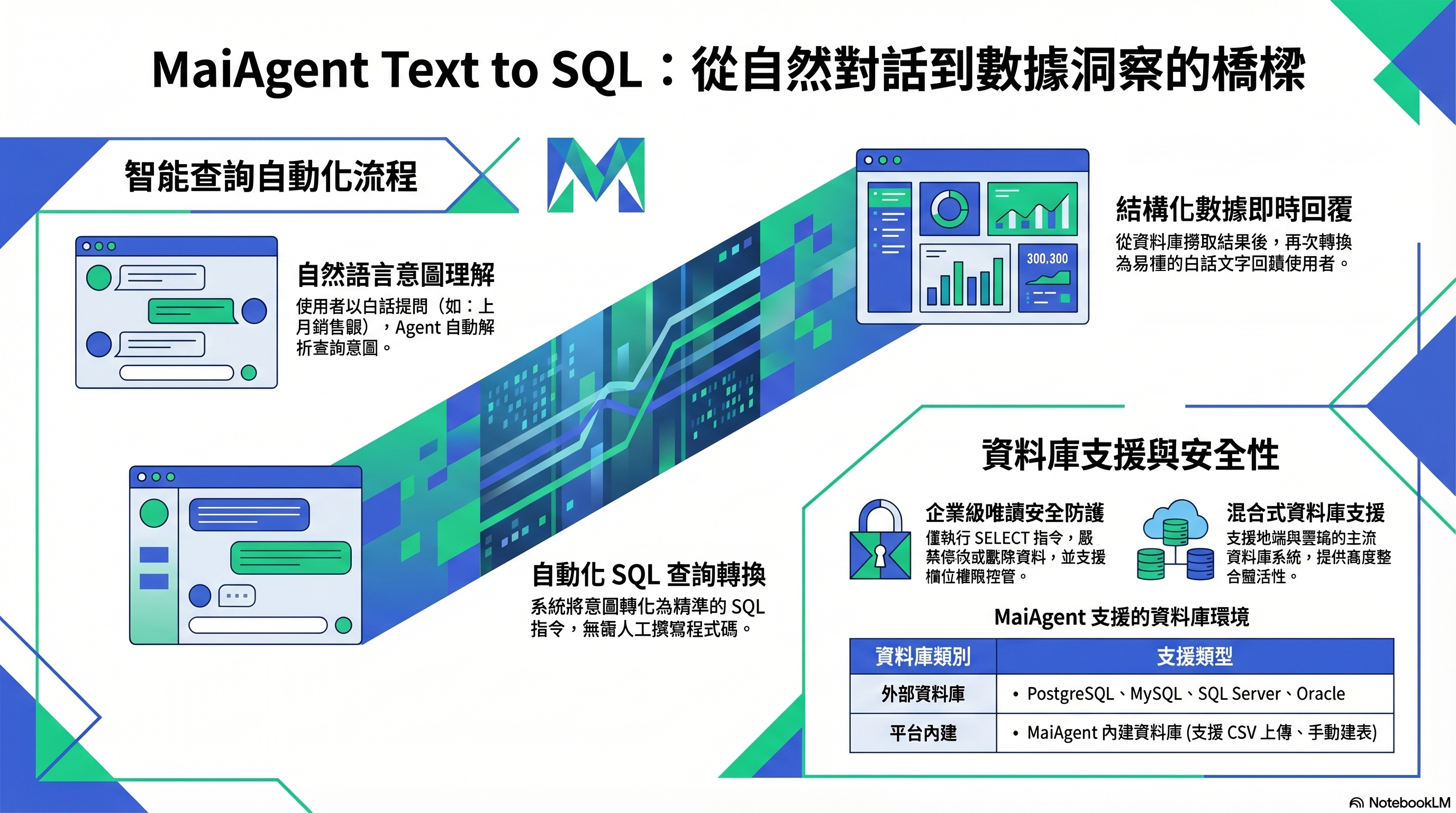
Text to SQL: Natural language → SQL query → Plain-language response
## What is this?
Databases let Agents query structured data using natural language. When a user asks, “How many laptops did we sell last month?”, the Agent automatically converts the question into a SQL query, retrieves the answer from the database, and responds in plain language.
The technical name for this feature is **Text to SQL**.
## When do you need it?
Use it when your scenario involves:
* **Data queries**: Order status, inventory levels, sales revenue
* **Statistical analysis**: “How much did sales grow this quarter compared with last quarter?”
* **Real-time status**: “How many tickets are currently pending?”
The answers to these questions are stored in structured tables rather than documents, so you need a database rather than a knowledge base.
## Which databases are supported?
| Type | Description |
| ------------------------------ | ------------------------------------------------------------------------------------------------------ |
| **MaiAgent built-in database** | A database included with the platform; upload Excel, CSV, or JSON files to automatically create tables |
| **External database** | Connect to your PostgreSQL, MySQL, SQL Server, Oracle, or SynxDB database |
## Is it secure?
Agents only execute **read-only queries** (SELECT) and do not modify or delete your data. For external databases, use Specify tables to restrict which tables the Agent can query. The permissions of the database account you provide determine which tables and columns are actually accessible. We recommend using a read-only account. For sensitive columns, use a view that includes only the necessary columns.
> **Advanced note**: Text to SQL accuracy depends on how clearly your tables are structured. Add Chinese descriptions to tables and columns to help the Agent understand what each column means.
## What do I need to do?
1. **Create a database** — Upload a spreadsheet to create a MaiAgent database, or enter the connection string for an external database, then turn on Enable database
2. **Configure queryable tables** — For external databases, use Specify tables to narrow the scope
3. **Add column descriptions** — Add descriptions to tables and columns to improve query accuracy
4. **Link the database to an Agent** — The Agent must use Agent mode; select the database in Database settings
5. **Test queries** — Ask questions in natural language in a conversation to confirm that the Agent queries the data correctly
## Further reading
* [Text to SQL feature](/maiagent-user-guide/en/build/database/text2sql.md)
* [Create and configure a database](/maiagent-user-guide/en/build/database/create-database.md)
* [Text to SQL with a MaiAgent database](/maiagent-user-guide/en/build/database/text-to-sql-maiagent.md)
* [Text to SQL with Supabase](/maiagent-user-guide/en/build/database/text-to-sql-supabase.md)
---
# Agent Instructions
This documentation is published with GitBook. GitBook is the documentation platform designed so that both humans and AI agents can read, navigate, and reason over technical content effectively. Learn more at gitbook.com.
## Querying This Documentation
If you need additional information that is not directly available in this page, you can query the documentation by asking a question.
Perform an HTTP GET request on the following URL with the `ask` and `goal` query parameters:
```
GET https://docs.maiagent.ai/maiagent-user-guide/en/build/database.md?ask=&goal=
```
`ask` is the immediate question: it should be specific, self-contained, and written in natural language.
`goal` is what the user is ultimately trying to achieve, the reason they need the answer. Sharing it helps GitBook give you a better, more relevant answer. A goal is most helpful when it describes the outcome the user wants rather than restating the question. For example, with `ask=how do I create an API token`, a goal like `automate deployments from our CI pipeline` lets GitBook tailor the answer to that use case.
The response will contain a direct answer to the question and relevant excerpts and sources from the documentation.
Use this mechanism when the answer is not explicitly present in the current page, you need clarification or additional context, or you want to retrieve related documentation sections.