> For the complete documentation index, see [llms.txt](https://docs.maiagent.ai/llms.txt). Markdown versions of documentation pages are available by appending `.md` to page URLs; this page is available as [Markdown](https://docs.maiagent.ai/maiagent-user-guide/en/build/agent/schedule.md).
# Agent Scheduling
What agent scheduling is:let an Agent automatically run tasks at scheduled times (scheduled tasks and proactive notifications), with Cron, interval, and one-time schedules, execution modes, and result
## What Is It?
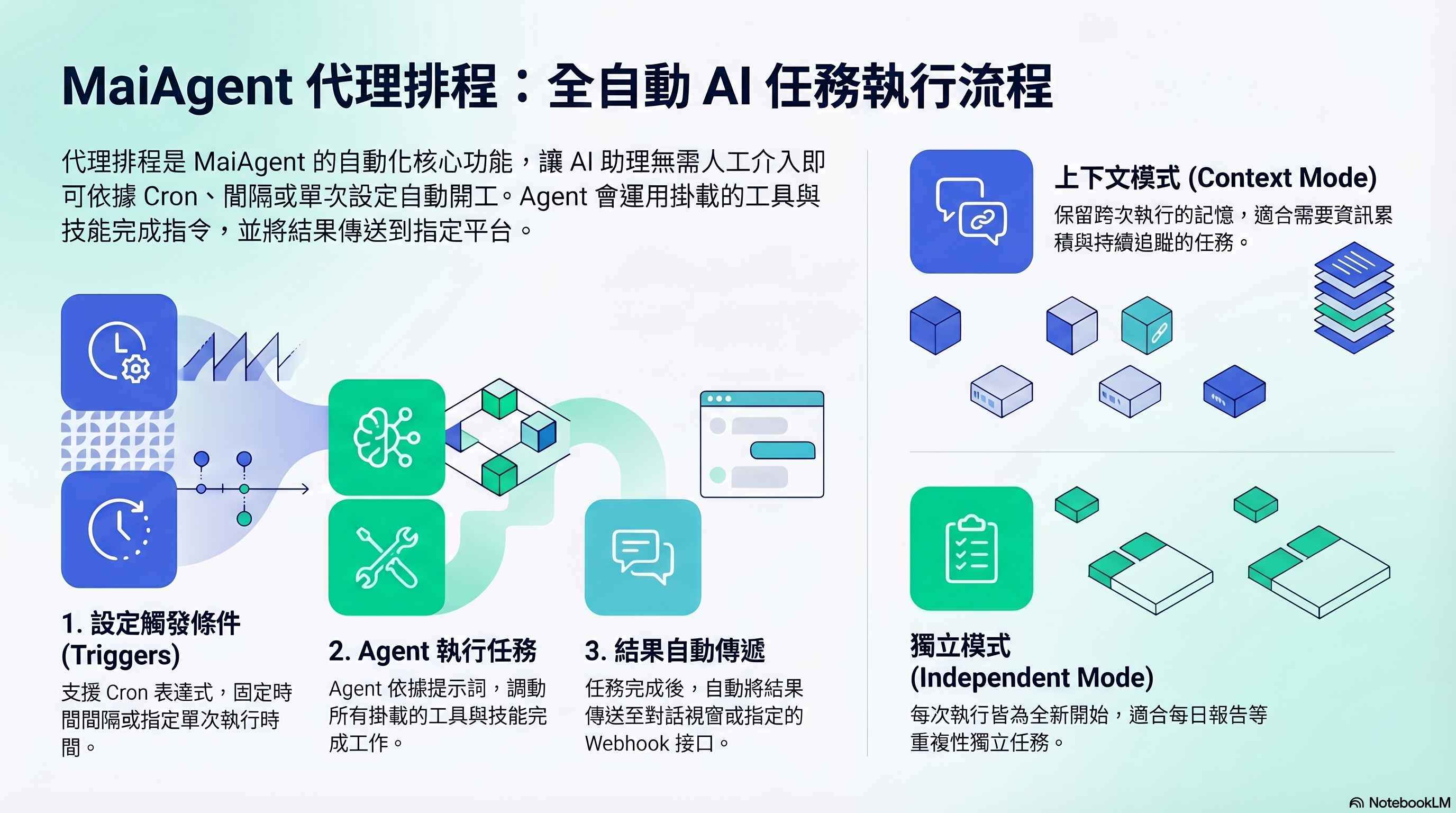
Agent scheduling lets an Agent automatically run tasks at configured times without waiting for someone to ask a question. Give it a prompt and set a schedule, and the Agent will run at the scheduled times and send the results to your chosen destination.
It is like setting an alarm for the Agent—when the time comes, it starts working automatically.
## When Do You Need It?
* **Recurring reports**: Summarize the previous day's customer service activity every morning at 9 AM
* **Monitoring checks**: Check system status every hour and send a notification if anything is wrong
* **Data processing**: Compile the previous week's sales data every Monday
* **One-time tasks**: Perform a specific action once at a scheduled time
## Schedule Types
| Type | Description | Example |
| ---------------------- | ----------------------------------------- | ------------------------------------------- |
| **Cron** | Set precise times using a Cron expression | `0 9 * * 1-5` (9 AM, Monday through Friday) |
| **Interval** | Run at a fixed interval | Every 30 minutes, every 2 hours |
| **One-time execution** | Run once at a specified time | 2026-04-15 14:00 |
## Execution Modes
| Mode | Description | Suitable Scenarios |
| -------------------- | ------------------------------------------------------------------------- | -------------------------------------------------------------------- |
| **Context mode** | Retains memory across runs so each run can continue from the previous one | Tasks that need to accumulate information (such as ongoing tracking) |
| **Independent mode** | Starts from scratch each time without memory of previous runs | Independent recurring tasks (such as daily reports) |
## Result Delivery
After execution, results can be sent to:
* **Conversation**: Send to a conversation on the specified conversation platform
* **Webhook**: POST to your external URL (to integrate with Slack, LINE, and other services)
> **Advanced details**: Agent scheduling only supports Agents whose response mode is set to Agent mode. During a scheduled run, the Agent uses your configured prompt as its instructions and uses all its attached tools and skills to complete the task.
A scheduled run executes a “conversation,” rather than batch processing files: the Agent can do the same things you can ask it to do in a conversation. The platform does not have built-in file conversion features such as “PDF to images.” To process files on a schedule, attach the required capability to the Agent—[Code Interpreter](/maiagent-user-guide/en/build/agent/code-interpreter.md) can use code in a sandbox to process files from the knowledge base or a conversation and produce new files. For a fixed integration with an external system, use an [API tool](/maiagent-user-guide/en/build/tools/setup_api_tool.md) or an MCP tool instead. Results are sent through a conversation or Webhook and are not automatically written back to the knowledge base.
## What Do I Need to Do?
1. **Choose an Agent** — Select an existing Agent (it must use Agent mode)
2. **Write a prompt** — Describe what the Agent should do on each run
3. **Set the schedule** — Choose the schedule type and time
4. **Configure delivery** — Decide where to send the results
5. **Enable** — Turn on the schedule to start automatic execution
## Next Steps
For complete instructions, see [How to Set Up Agent Scheduling](/maiagent-user-guide/en/build/agent/schedule/schedule-setup.md).
---
# Agent Instructions
This documentation is published with GitBook. GitBook is the documentation platform designed so that both humans and AI agents can read, navigate, and reason over technical content effectively. Learn more at gitbook.com.
## Querying This Documentation
If you need additional information that is not directly available in this page, you can query the documentation by asking a question.
Perform an HTTP GET request on the following URL with the `ask` and `goal` query parameters:
```
GET https://docs.maiagent.ai/maiagent-user-guide/en/build/agent/schedule.md?ask=&goal=
```
`ask` is the immediate question: it should be specific, self-contained, and written in natural language.
`goal` is what the user is ultimately trying to achieve, the reason they need the answer. Sharing it helps GitBook give you a better, more relevant answer. A goal is most helpful when it describes the outcome the user wants rather than restating the question. For example, with `ask=how do I create an API token`, a goal like `automate deployments from our CI pipeline` lets GitBook tailor the answer to that use case.
The response will contain a direct answer to the question and relevant excerpts and sources from the documentation.
Use this mechanism when the answer is not explicitly present in the current page, you need clarification or additional context, or you want to retrieve related documentation sections.