> For the complete documentation index, see [llms.txt](https://docs.maiagent.ai/llms.txt). Markdown versions of documentation pages are available by appending `.md` to page URLs; this page is available as [Markdown](https://docs.maiagent.ai/maiagent-user-guide/en/build/agent/multi-language-support.md).
# Multilingual Support
Multilingual support: 13 Web Chat interface languages, knowledge base content processing in all languages, response language settings, and cross-language Q\&A use cases.
MaiAgent provides language support at multiple levels: **Web Chat supports interfaces in 13 languages**, **the knowledge base supports content processing in all languages**, and **the admin console provides Chinese and English interfaces**. Your Agent can engage in natural, fluent conversations with users worldwide, overcome language barriers, and expand your business reach.
## **🌍 Supported Languages**
MaiAgent Web Chat currently supports the following 13 languages:
#### **Chinese Languages**
* **Traditional Chinese** (Traditional Chinese) - zh-TW
* **Simplified Chinese** (Simplified Chinese) - zh-CN
#### **International Languages**
* **English** (English) - en
#### **Southeast Asian Languages**
* **Thai** (Thai) - th
* **Malay** (Malay) - ms
* **Vietnamese** (Vietnamese) - vi
* **Indonesian** (Indonesian) - id
* **Filipino** (Filipino) - fil
* **Burmese** (Burmese) - my
* **Khmer** (Khmer) - km
* **Lao** (Lao) - lo
#### **East Asian Languages**
* **Japanese** (Japanese) - ja
* **Korean** (Korean) - ko
**Ongoing updates**: We continue to add support for more languages based on user needs. If you need support for a specific language, contact our technical team.
***
## **⚙️ Language Settings**
#### **1. Configure via JavaScript**
{% hint style="info" %}
See the [Technical Manual—Web Chat Embedding and SDK (`locale` setting)](https://docs.maiagent.ai/tech/serve/web-chat-sdk#config-basic)
{% endhint %}
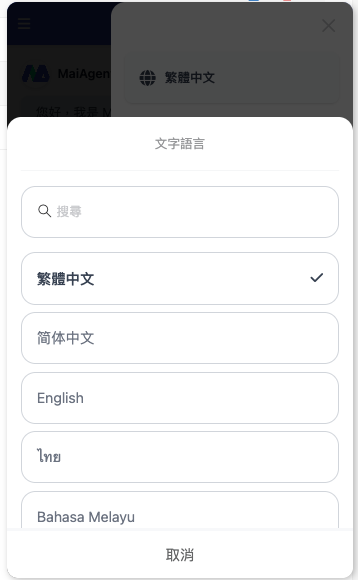
#### **2. Web Chat Settings**
**Setup steps:**
1. Click `⋮` in the upper-right corner of the window
2. Click Traditional Chinese
3. Select the language you want to use
***
## **🎯 Multilingual Features**
#### **1. Intelligent Language Detection and Responses**
* **Automatic detection (Chinese and English)**: Automatically detects Chinese and English and responds in the corresponding language.
* **Multilingual settings**: Supports multiple languages. Switch and select the display language in settings; once selected, conversations will receive responses in that language.
* **High accuracy**: Based on advanced NLP technology, language detection achieves 98% accuracy.
#### **2. Natural Language Understanding**
* **Semantic understanding**: Goes beyond translation to understand meaning in different languages
* **Cultural adaptation**: Considers how people express themselves in different cultural contexts
* **Slang recognition**: Understands common slang and colloquial expressions
#### **3. Localized Responses**
* **Word choice**: Uses wording and expressions that match local conventions
* **Format adjustments**: Adapts date, number, and currency formats to different languages
***
## **📚** Knowledge Base and Interface Languages
#### **1. Interface Language Support Levels**
**MaiAgent Admin Console**
* Supports 3 interface languages: Traditional Chinese, Simplified Chinese, and English
* Designed for system administration and configuration
**Web Chat Interface**
* Provides interface text in all 13 languages
* Includes speech recognition and voice response features
* Covers: Chinese (Traditional and Simplified), English, Thai, Japanese, Korean, Malay, Vietnamese, Indonesian, Filipino, Burmese, Khmer, and Lao
#### **2. Knowledge Base Content Processing**
**Document Support in All Languages**
* The knowledge base can parse and process document content in any language
* No restrictions on document language; supports language formats from around the world
* Intelligent retrieval accurately searches multilingual knowledge bases
**Upload steps:**
1\. Open **Knowledge Base Management**
2\. Select **Add Document**
3\. Upload a document in any language (no language restrictions)
4\. The system automatically detects the document language and creates a multilingual index
#### **3. Cross-Language Q\&A**
#### Key Features
* **Multilingual questions**: Ask questions freely in 13 languages
* **Retrieval across all languages**: Searches the entire multilingual knowledge base for relevant content
* **Intelligent translation**: Automatically translates retrieved results into the user's preferred language
* **Accurate responses**: Ensures complete and accurate answers
#### Workflow
1. **Receive the question** - The user asks a question in any supported language (Thai, Japanese, Korean, etc.)
2. **Intelligent retrieval** - The system searches across languages for the most relevant content
3. **Content integration** - The LLM analyzes and combines multilingual information
4. **Language conversion** - Translates it into the user's selected display language
5. **Output the answer** - Provides a complete response
***
## **🚀 Use Cases**
#### **1. Expansion into Southeast Asian Markets**
* **Regional coverage**: Supports 8 major Southeast Asian languages, reaching more than 600 million people
* **Localized service**: Understands cultural differences and business practices in each country
* **Cross-border e-commerce**: Provides customers in different countries with a shopping experience in their native language
#### **2. International Customer Service Centers**
* **Global support**: Meets customer service needs across major Asian markets
* **24-hour service**: Provides multilingual customer support across time zones
* **Cultural sensitivity**: Understands communication styles and polite expressions in different cultures
#### **3. Internal Use at Multinational Enterprises**
* **Employee support**: Provides internal Q\&A services for employees of different nationalities
* **Knowledge sharing**: Overcomes language barriers to facilitate knowledge exchange
* **Training assistance**: Offers multilingual training content and Q\&A
#### **4. Tourism and Hospitality**
* **Visitor services**: Provides immediate assistance to travelers from different countries
* **Attraction information**: Offers multilingual attraction information and guided tour services
* **Room and ticket reservations**: Supports multilingual bookings and inquiries
---
# Agent Instructions
This documentation is published with GitBook. GitBook is the documentation platform designed so that both humans and AI agents can read, navigate, and reason over technical content effectively. Learn more at gitbook.com.
## Querying This Documentation
If you need additional information that is not directly available in this page, you can query the documentation by asking a question.
Perform an HTTP GET request on the following URL with the `ask` and `goal` query parameters:
```
GET https://docs.maiagent.ai/maiagent-user-guide/en/build/agent/multi-language-support.md?ask=&goal=
```
`ask` is the immediate question: it should be specific, self-contained, and written in natural language.
`goal` is what the user is ultimately trying to achieve, the reason they need the answer. Sharing it helps GitBook give you a better, more relevant answer. A goal is most helpful when it describes the outcome the user wants rather than restating the question. For example, with `ask=how do I create an API token`, a goal like `automate deployments from our CI pipeline` lets GitBook tailor the answer to that use case.
The response will contain a direct answer to the question and relevant excerpts and sources from the documentation.
Use this mechanism when the answer is not explicitly present in the current page, you need clarification or additional context, or you want to retrieve related documentation sections.
%20(1).png?alt=media)
%20(1)%20(1)%20(1).png?alt=media)
%20(1).png?alt=media)